Home Assistant vs Gladys Assistant
An honest comparison between two open-source home assistants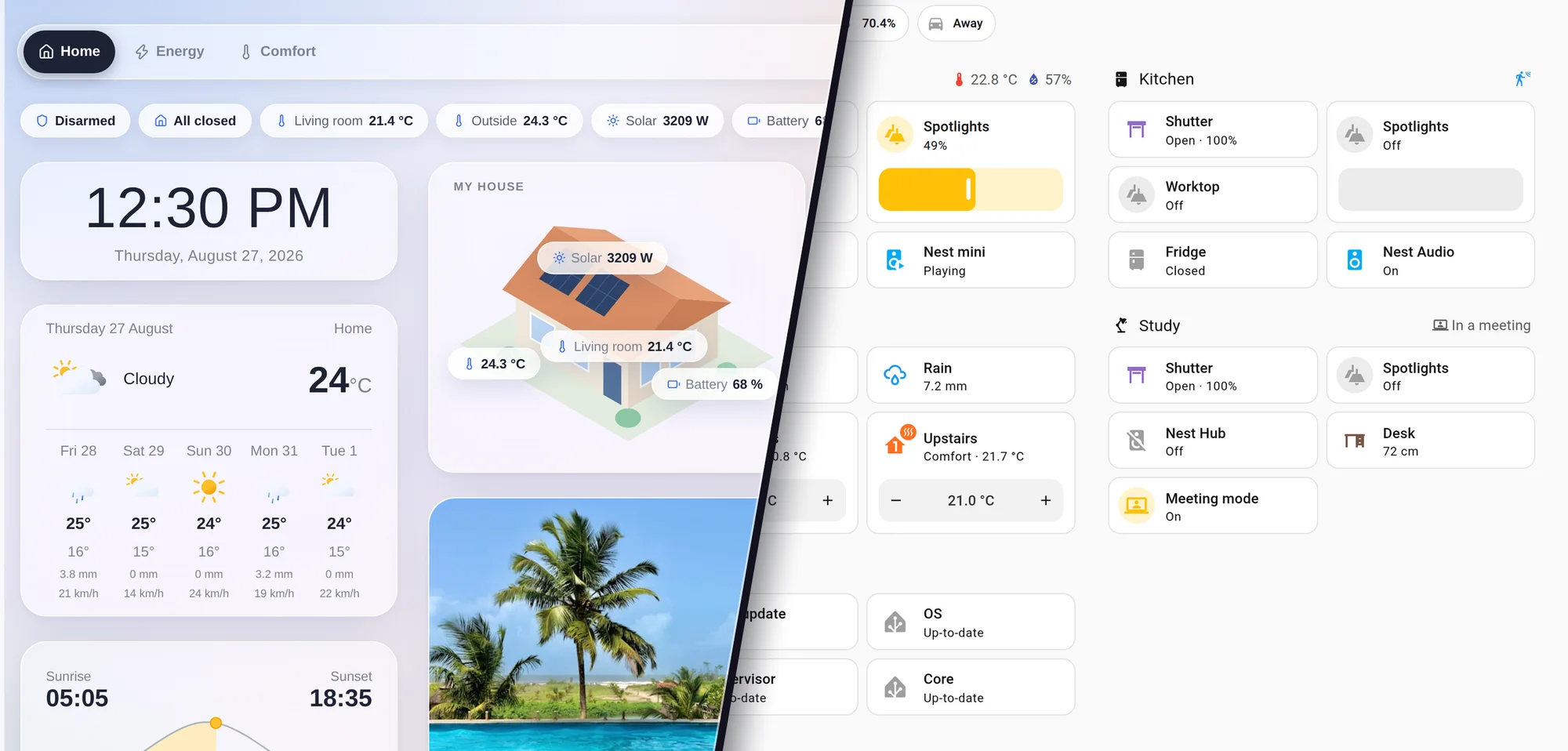
Still hesitating between Home Assistant and Gladys Assistant? This comparison will save you hours.
Full transparency: I'm Pierre-Gilles, the creator of Gladys Assistant, so I'm obviously biased. But I'll be fair about both projects. Here's how they really compare, and why I believe Gladys is the better fit for most people who want a smart home that simply works.
Both projects started in 2013, right after the first Raspberry Pi came out. They look similar at first glance, but they're built on very different philosophies, and that difference is exactly what should guide your choice.
The short version
Choose Gladys Assistant if…
- You want something simple, fast to set up, and that just works.
- You prefer a clean interface where everything happens with clicks, with no configuration files and no YAML.
- You value stability: updates are fully automatic and atomic.
- You want a responsive project where your feedback actually shapes the product.
- You want to be able to add any device: anyone can publish an external integration, and you install it in one click.
Choose Home Assistant if…
- You own very niche devices nobody has built a Gladys integration for yet.
- You're a power user who loves to tinker and customize to the extreme.
- You're comfortable editing YAML and going under the hood.
- You want the largest possible catalog of integrations, even if quality varies.
Quick comparison
| Gladys Assistant | Home Assistant | |
|---|---|---|
| Created | 2013 | 2013 |
| Backend | Node.js (JavaScript) | Python |
| Frontend | Preact | Lit + Web Components |
| Installation | One Docker command, rich docs and videos | Home Assistant OS, the HA Green box, or Docker |
| Setup difficulty | Beginner-friendly, guided step by step | Steeper learning curve |
| Configuration files | None: everything is in the interface | YAML needed for some parts |
| Integrations | Native ones built around open standards (Zigbee, Matter, MQTT), plus community external integrations installed in one click | Huge catalog, community-built, quality varies |
| Supported devices | Thousands via Zigbee, Matter and MQTT, plus the external integrations catalog | The widest catalog available |
| Adding a missing integration | Anyone can publish one: clone the template, push to GitHub, no pull request and no review | Write a custom component in Python, or install a community one via HACS |
| Automations | One simple "Scenes" tab, visual editor, Node-RED | Automations / Scenes / Scripts / Blueprints, visual editor, YAML, Node-RED |
| Native alarm mode | Yes | Not native |
| Native presence | Yes | Via integrations |
| Updates | Fully automatic and atomic | Frequent, can occasionally break things |
| Support | Direct answers from the maker, active community | Large community, community-driven support |
| Pricing | Free & open-source + optional Gladys Plus subscription | Free & open-source + optional Nabu Casa Cloud subscription |
| Philosophy | User-first, product-grade simplicity | Developer-first, ultimate flexibility |
Installation
Gladys is genuinely simple to install. It runs with a single Docker command (a `docker run` line or a `docker-compose` file you copy, paste and launch), and the documentation walks you through every step with screenshots and installation videos.
And because Gladys is just a container, you stay free to use your mini-PC, NAS or Raspberry Pi for other things too.
Home Assistant offers Home Assistant OS, which is polished, and the Home Assistant Green box arrives ready to use.
It's straightforward if you buy their box. Without it, though, it's not always obvious which installation method is the simplest, since they tend to push Home Assistant OS over the plain Docker route.
The verdictBoth are beginner-friendly if you buy their hardware. But Gladys is especially easy to install yourself, thanks to a one-line Docker setup, rich documentation and step-by-step videos.
Interface & ease of use
Since version 5, Gladys ships a brand new interface called Horizon: frosted glass surfaces over a living gradient, real depth, and every control redrawn one by one. It was designed mobile-first, so controls grow to thumb size on a phone and shrink back on a desktop, and the dashboard switcher sits at the bottom of the screen, where your hand actually is.
The whole philosophy is to think about the user before the technical implementation: you never have to dig into logs or edit a file on disk. Everything happens with the mouse, or with your thumb.
You can build as many dashboards as you want, one per room or by theme (energy, security, and so on), with no configuration files because there simply aren't any.
Gladys deliberately keeps things focused: you arrange the widgets you actually need instead of wading through endless options. And since it's open-source, anything missing can be added by the community.
Home Assistant has a modern Material Design interface that's clean and highly customizable. The dashboard is fully editable with tons of cards and options.
But you'll often see, on the forums, that some parts still require editing YAML files, which can be intimidating for a beginner.
The verdictThis is where Gladys is clearly ahead, and since version 5 it is not close. Home Assistant hands you a box of cards and lets you assemble your own dashboard; Gladys hands you one that already looks finished, on your phone as much as on your laptop, with nothing to configure. If you are going to open an app several times a day for years, that difference matters more than any feature list.
Integrations & compatibility
Gladys' native integrations focus on what matters: open standards like Zigbee, Matter and MQTT, each one carefully built and tested end to end, designed like a polished consumer product rather than by developers for developers.
Through Zigbee and Matter alone, that already means thousands of compatible devices. The bet is that open standards, Matter especially, will dominate, so Gladys invests heavily where the market is heading, not in closed, cloud-only ecosystems that lock you in.
And for everything else, there are external integrations. This is the biggest change in the project's history: anyone can now write and publish a Gladys integration on GitHub, without a pull request, a review, or my approval. They appear in the catalog inside every Gladys instance, next to the native ones, and the community published more of them in a few days than we had built in the core in six years.
For you as a user, nothing changes: you browse the catalog in Gladys, you click Install, and Gladys pulls the integration, starts it and generates its whole interface (device list, discovery, configuration form). Then you start, stop, update it or read its logs from the same place. No command line, no YAML, no technical skills required.
Freedom on one side, Gladys' rigor on the other: each external integration runs in an isolated sandbox (limited RAM and CPU, read-only filesystem, isolated network). If one crashes, it crashes alone, and it can never take your instance down with it. That's exactly what makes it safe to open the door to everyone.
And if the integration you need doesn't exist yet, you no longer have to wait for anyone: you clone the official template, adapt it to your device, publish it, and it lands in the catalog of every Gladys instance within the hour.
Home Assistant has a massive catalog with thousands of community integrations, so even niche devices are often supported out of the box.
The flip side is variable quality: some integrations are excellent, others less so, and it's up to you to find the right one and test that it works. Custom components installed through HACS also run inside Home Assistant itself, so a badly behaved one can affect the whole instance.
The verdictThe usual objection is the integration count, and that argument is running out of road: the community catalog went from 20 to 67 integrations in a little over two weeks, written by people who had never opened the Gladys codebase before, and it is still accelerating. Home Assistant has the larger catalog today, and if you own very niche hardware there's a good chance it's already covered. But Gladys is no longer limited to what I have time to build, and between Matter on one side and a catalog anyone can extend on the other, we are closing that gap on purpose, and fast.
Automations & scenes
Everything lives in a single "Scenes" tab. A scene can be a manual sequence of actions you trigger from your dashboard, or a full automation with triggers, conditions and actions.
The visual editor is intuitive: you start with a trigger (optional), then chain as many conditions and actions as you want, and you can mix them freely, with a condition leading to actions, then more conditions. It's surprisingly powerful while staying easy to read.
And if you ever need to go further, you can offload complex logic to Node-RED and connect it to Gladys over MQTT or HTTP.
Home Assistant has a visual editor too, plus shareable YAML blueprints and a Node-RED integration to go further.
It splits things into four tabs (Automations, Scenes, Scripts and Blueprints), which can feel like four versions of the same thing when you're starting out and adds to the learning curve.
The verdictGladys keeps everything in one simple, powerful place, while Home Assistant spreads it across four tabs. For most people, Gladys' single Scenes tab is faster to learn and just as capable for everyday automations.
Community & support
Gladys is a project that genuinely listens. There's an active community on the forum, and a roadmap shaped by real user feedback rather than by what's easiest to build.
Best of all, you get direct support from the founder. If you have a question, even a deep one about the code, you can email me, post on the forum, or reach out on social media, and you'll get a personal answer. That kind of access is rare.
Home Assistant has a huge global community and a massive forum, so you'll usually find someone who has already solved your problem.
With that scale, though, support is community-driven rather than personal, and most of the developer communication happens in English.
The verdictHome Assistant wins on sheer size. But Gladys offers something rarer: a responsive project where the maker listens and answers you personally.
Pricing & business model
Gladys is 100% free and open-source at its core, forever. There's an optional Gladys Plus subscription for remote access, encrypted automated backups, voice assistants (Google Home, Alexa), AI and Enedis energy data.
The business model is really the subscription, with no investors, no ads and no data resale.
Home Assistant is also 100% free and open-source at its core, with an optional Nabu Casa Cloud subscription (remote access, voice) and a growing line of hardware like the HA Green box.
The verdictBoth have a transparent, very similar model: a free open-source core plus an optional subscription. Either way, you're funding an independent project rather than a data-hungry tech giant.
Why not both?
Here's the part most comparisons miss: you don't have to choose. You can run Gladys Assistant and Home Assistant on the same setup at the same time.
With Zigbee2MQTT, a single Zigbee instance can talk to both Gladys and Home Assistant, so the same device shows up in both interfaces. The same goes for Matter: a device paired to a hub (like an Apple TV) can be controlled from both. You can have several controllers at once.
Both also expose rich APIs, so they can talk to each other over MQTT or HTTP, with one acting as a backend and the other as your interface.
So if you love the Gladys interface but need a niche Home Assistant integration, run them side by side, or turn it into a Gladys external integration yourself and share it with everyone. There's really no excuse: everything is possible.
Frequently asked questions
Is Gladys Assistant a fork of Home Assistant?
No. Gladys is an independent project, created in 2013, the same year as Home Assistant, but with a completely different stack: Node.js and Preact for Gladys, versus Python and Lit for Home Assistant.
Which is easier for beginners, Gladys or Home Assistant?
Gladys is the easier choice for beginners: there are no configuration files and no YAML, everything is configured by clicking in the interface, and the documentation guides you with videos. Home Assistant is more powerful but has a steeper learning curve.
Will Gladys work with my devices?
Very likely. Gladys supports thousands of devices through open standards like Zigbee, Matter and MQTT, plus dedicated integrations for popular brands. Anything else is usually covered by an external integration, a community integration you install in one click from the catalog inside Gladys. And if nobody has built the one you need yet, you can create it yourself from the official template.
What if there is no Gladys integration for my device?
Since version 4.84, anyone can create one. You clone the official template, adapt it to your device, publish it on a public GitHub repository, and it is listed within the hour in the catalog of every Gladys instance. There is no pull request, no review and no approval to wait for. Each external integration runs in an isolated sandbox, so it can never destabilize your Gladys.
Do external integrations make Gladys as complicated as Home Assistant?
No. Installing one is a single click from the catalog inside Gladys: no command line, no YAML, no configuration file. Gladys generates the whole interface for the integration, and you start, stop, update it or read its logs from the same screen as any native integration.
Can I run Gladys and Home Assistant at the same time?
Yes. With Zigbee2MQTT or Matter multi-admin, the same devices can appear in both. You can also connect the two over MQTT or HTTP, since both expose rich APIs.
Is Gladys free like Home Assistant?
Yes. Both are 100% free and open-source at their core. Each offers an optional paid subscription: Gladys Plus for Gladys, and Nabu Casa Cloud for Home Assistant.
Should I choose Gladys or Home Assistant?
If you want a simple, stable smart home that just works, with no YAML and no configuration files, Gladys is the better fit for most people. Choose Home Assistant if you're a power user who wants the largest possible catalog of integrations and loves to tinker.
Ready to try Gladys Assistant?
Gladys is free, open-source, and installs in a single Docker command. Privacy-first, self-hosted, no cloud required.