Integración domótica SNCF, gratuita y de código abierto
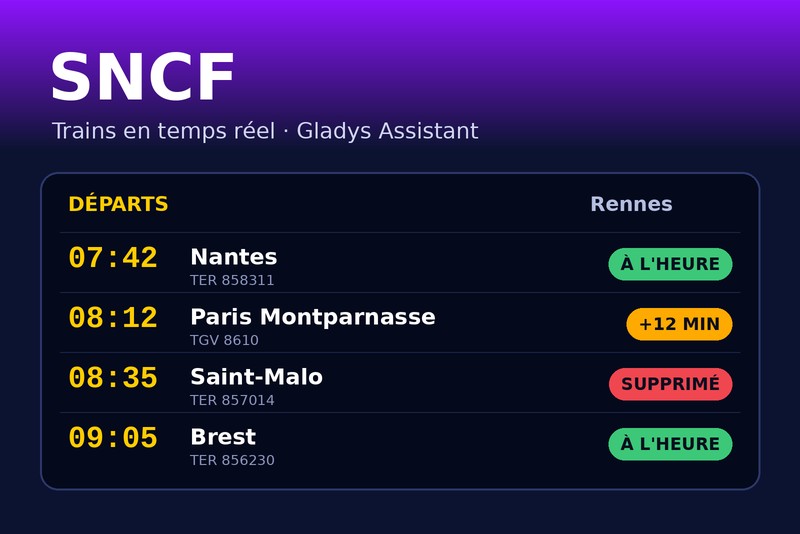
Tus trenes SNCF en tiempo real: retrasos, cancelaciones, escenas, widgets.
Publicado por William-De71
- Dispositivos
- Versión 1.3.0
- Requiere Gladys >=5.3.0
- ★ 0
Esta integración sigue tus trenes SNCF en tiempo real en Gladys: las próximas salidas de tus trayectos (casa → trabajo, la vuelta…), sus retrasos, las cancelaciones y su motivo. Los convierte en dispositivos, en disparadores de escena («mi tren está cancelado», «mi tren sale dentro de 15 minutos») y en widgets del panel.
Los datos proceden de la API oficial de SNCF: tiempo real para TGV INOUI, OUIGO, Intercités, TER, Lyria y Eurostar. Los trenes Transilien solo aparecen con su horario teórico (sin retrasos ni cancelaciones).
Integración comunitaria, sin relación con SNCF ni respaldada por ella.
Configuración
1. Obtener una clave de API (gratuita)
- Abre la página Token développeur de SNCF.
- Indica tu nombre, apellidos y correo electrónico, y acepta las condiciones de uso.
- La clave (un identificador de 36 caracteres, del tipo
0f1e2d3c-4b5a-…) llega por correo electrónico.
La clave gratuita permite 5 000 peticiones al día. La integración las cuenta ella misma y reduce el ritmo antes del límite: si se supera, SNCF bloquea la clave durante horas.
2. Rellenar la integración
| Campo | Función |
|---|---|
| Clave de API | obligatoria |
| Trayecto 1, 2, 3 | estación de salida y estación de llegada (solo se siguen los trenes directos) |
| Franja horaria | opcional, por ejemplo 07:00-09:30: los trenes que salen en esa franja |
| Días de viaje | opcionales, por ejemplo de lunes a viernes (vacío: todos los días) |
| Trenes seguidos | cuántos próximos trenes por trayecto (4 por defecto) |
| Umbral de retraso | a partir de cuántos minutos un tren cuenta como «retrasado» (5 por defecto) |
| Actualización | cada 3 minutos en torno a la franja, cada 30 minutos el resto del tiempo (por defecto) |
| Idioma | de los nombres de dispositivos y textos de escena (automático: el idioma de tu panel) |
Para una estación, puedes escribir:
- su nombre: «Rennes», «Lyon Part Dieu», «Paris Montparnasse» — se toma el primer resultado de la búsqueda de SNCF;
- su código UIC: «87471003»;
- su identificador: «stop_area:SNCF:87471003».
Si el nombre no da la estación correcta, usa el botón Buscar una estación: muestra las estaciones que coinciden con su identificador, para copiarlo en el campo del trayecto.
Guarda y haz clic en Probar la conexión: para cada trayecto, indica cuántos trenes ha encontrado y la hora del próximo.
La franja horaria
Con una franja horaria, la integración sigue los trenes de la próxima franja: los del día mientras no haya terminado, y después los del siguiente día de viaje. Por la noche, el widget ya muestra los trenes de la mañana siguiente, y una cancelación anunciada la víspera dispara tu escena la víspera.
Además, solo consulta la API a menudo en torno a la franja (desde una hora antes hasta su final), lo que ahorra cuota: unas 250 peticiones al día para un trayecto con una franja de 2 h 30, frente a 800 sin franja.
3. Añadir los dispositivos
En la pestaña Descubrir, cada trayecto aparece como un dispositivo «SNCF – salida → llegada». Añádelo y colócalo en una habitación. Los widgets y las escenas también funcionan sin el dispositivo, pero la elección del trayecto en sus ajustes pasa por la lista de dispositivos.
| Funcionalidad | Valor |
|---|---|
| Próximo tren | texto, por ejemplo «07:42 · TER 858311 · +5 min» o «… · cancelado» |
| Retraso del próximo tren | en minutos, el del próximo tren que circula (0 si va en hora) |
| Trenes con incidencias | cuántos trenes seguidos van retrasados (desde el umbral) o están cancelados |
Ejemplos de escenas sobre estos valores: «si el retraso del próximo tren supera los 10 minutos, encender la lámpara del pasillo en naranja», «si hay trenes con incidencias, anunciarlo por el altavoz».
En la pantalla Dispositivos, la insignia de cada trayecto indica cloud mientras la API de SNCF responde, inaccesible cuando su última lectura ha fallado, y se pone naranja cuando las lecturas están en pausa por la cuota diaria.
Escenas
Disparadores
| Disparador | Cuándo | Filtros |
|---|---|---|
| SNCF: tren con retraso | un tren seguido se retrasa (desde el umbral), y de nuevo al superar los 15 y los 30 minutos | trayecto, nivel de retraso |
| SNCF: tren cancelado | un tren seguido se cancela, o ya no para en una estación del trayecto | trayecto |
| SNCF: salida inminente | un tren seguido sale dentro de 5, 10, 15, 20, 30, 45 o 60 minutos | trayecto, minutos |
La salida inminente se cuenta sobre la hora de salida en tiempo real: si tu tren de las 7:42 lleva 5 minutos de retraso, «sale en 15 minutos» llega a las 7:32, no a las 7:27. Práctico para un «sal ahora».
Cada disparador proporciona variables: trayecto, número y tipo del tren, dirección, fecha, horas prevista y estimada, retraso, motivo y un resumen listo para enviar, por ejemplo:
Rennes → Nantes: el TER 858311 de las 07:42 lleva 18 min de retraso, sale a las 08:00. Motivo: Panne de signalisation.
Cada evento se dispara una sola vez por tren, incluso tras reiniciar la integración. El motivo lo da SNCF y queda en francés.
Acción
SNCF: próximos trenes da el próximo tren de un trayecto (horas, retraso, estado, motivo, minutos hasta la salida, número de trenes con incidencias) y una frase que resume los siguientes:
Rennes → Nantes: el TER 858311 de las 07:42 lleva 5 min de retraso, sale a las 07:47. Después: 08:12 en hora, 08:42 cancelado.
Ejemplo: cada mañana laborable a las 7, «SNCF: próximos trenes» y luego enviar el resumen por Telegram.
Widgets
| Widget | Contenido |
|---|---|
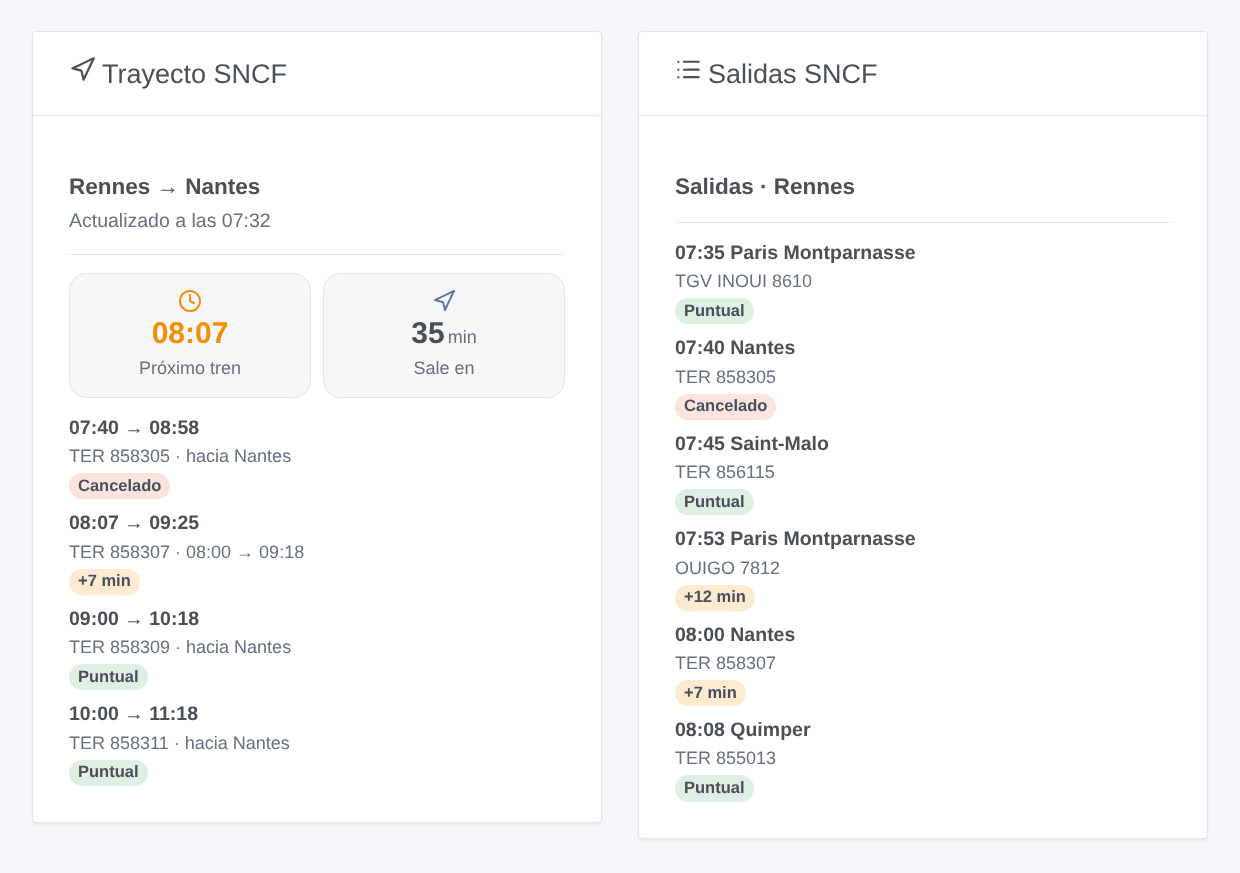
| Trayecto SNCF | la hora de la próxima salida y el tiempo que falta, y después cada tren con una insignia puntual / +N min / cancelado; toca un tren con incidencias para leer el motivo |
| Salidas SNCF | el panel de salidas de una estación, todas las direcciones: una estación escrita en los ajustes del widget, o la estación de salida de un trayecto |
Límites
- Solo se siguen los trenes directos (sin transbordo).
- Transilien: solo horario teórico, sin retrasos ni cancelaciones (un límite de la API de SNCF).
- La vía no la proporciona la API oficial.
- Un tren cancelado desaparece de los datos en tiempo real de SNCF: la integración lo encuentra comparando con el horario teórico y luego lo confirma en el panel de salidas de la estación. Si no puede confirmarlo, el tren sigue mostrándose como previsto en lugar de anunciarse cancelado por error.
Solución de problemas
| Mensaje | Qué hacer |
|---|---|
| «La clave de API de SNCF es rechazada» | comprueba la clave copiada del correo (sin espacios) |
| «Estación no encontrada: …» | usa el botón Buscar una estación y copia el identificador propuesto |
| «Cuota diaria de la API de SNCF alcanzada» | SNCF ha bloqueado la clave hasta la hora indicada: menos trayectos sin franja horaria o intervalos más largos |
| «Ningún tren encontrado en el periodo seguido» | ningún tren directo en la franja horaria: comprueba las estaciones y la franja, o vacíala |
| Nombres de dispositivos o resúmenes en inglés | ajusta Idioma de los textos en los ajustes, o abre una vez un widget de SNCF |
Parámetros de configuración
Estos son los parámetros que SNCF te pide en su pantalla de configuración en Gladys.
| Parámetro | Tipo | Obligatorio | Descripción |
|---|---|---|---|
| Clave de API de SNCF | section | No | Los trenes proceden de la API oficial de SNCF: TER, TGV INOUI, OUIGO, Intercités, Lyria, Eurostar… en tiempo real (Transilien: solo horarios teóricos, sin retrasos). La clave es gratuita: rellena el formulario de la página para desarrolladores de SNCF y la clave llega por correo electrónico. Permite 5 000 peticiones al día; la integración las cuenta y reduce el ritmo antes del límite. |
| Clave de API | secret | Sí | La clave recibida por correo electrónico (un UUID, 36 caracteres). |
| Trayecto 1 | section | No | Un nombre de estación («Rennes», «Lyon Part Dieu»), su código UIC («87471003») o el identificador que da el botón «Buscar una estación» («stop_area:SNCF:87471003»). Solo se siguen los trenes directos. La franja horaria y los días son opcionales: con ellos se siguen los trenes de la próxima franja, y la API solo se consulta a menudo alrededor de ella (ahorra la cuota diaria). |
| Estación de salida | string | No | |
| Estación de llegada | string | No | |
| Franja horaria | string | No | Salidas entre estas horas, por ejemplo 07:00-09:30. Vacío: los próximos trenes, todo el día. |
| Días de viaje | multi_select | No | Vacío: todos los días. |
| Trayecto 2 (opcional) | section | No | Los mismos campos que el trayecto 1, por ejemplo para la vuelta. Déjalo vacío si no lo usas. |
| Estación de salida | string | No | |
| Estación de llegada | string | No | |
| Franja horaria | string | No | Salidas entre estas horas, por ejemplo 07:00-09:30. Vacío: los próximos trenes, todo el día. |
| Días de viaje | multi_select | No | Vacío: todos los días. |
| Trayecto 3 (opcional) | section | No | Los mismos campos que el trayecto 1, por ejemplo para la vuelta. Déjalo vacío si no lo usas. |
| Estación de salida | string | No | |
| Estación de llegada | string | No | |
| Franja horaria | string | No | Salidas entre estas horas, por ejemplo 07:00-09:30. Vacío: los próximos trenes, todo el día. |
| Días de viaje | multi_select | No | Vacío: todos los días. |
| Ajustes | section | No | Con franja horaria, un trayecto cuesta unas 250 peticiones al día con los valores por defecto; sin ella, unas 800. Tres trayectos y un panel de salidas abierto se quedan por debajo de las 5 000 diarias. |
| Trenes seguidos por trayecto | number | No | Los próximos trenes de cada trayecto, entre 1 y 8. |
| Umbral de retraso (min) | number | No | A partir de cuántos minutos un tren cuenta como retrasado (escenas, trenes con incidencias, colores). |
| Actualización en torno a la franja (min) | number | No | Desde una hora antes de la franja horaria hasta su final (todo el día sin franja), entre 2 y 30 minutos. |
| Actualización el resto del tiempo (min) | number | No | Fuera de la franja (y de noche), entre 10 y 180 minutos. |
| Idioma de los textos | select | No | Nombres de los dispositivos, resúmenes y salidas de las escenas. Automático: el idioma de tu panel, en cuanto se haya mostrado un widget de SNCF. |
Cómo instalar SNCF en Gladys
- En Gladys, abre Integraciones: SNCF aparece en el catálogo junto a las integraciones nativas, con una insignia de comunidad.
- Haz clic en Instalar. Gladys descarga la imagen Docker (
ghcr.io/william-de71/gladys-sncf:1.3.0), la ejecuta en un entorno aislado del núcleo y genera la interfaz de la integración (dispositivos, descubrimiento y configuración). - Abre la pantalla de Configuración de la integración, rellena los parámetros y guarda.
- También puedes instalarla directamente desde la URL de su repositorio: https://github.com/William-De71/gladys-sncf.
SNCF requiere Gladys >=5.3.0. El catálogo de Gladys se actualiza cada hora, así que una nueva versión está disponible como máximo una hora después de publicarse.
¿Todavía no usas Gladys? Es gratuito y de código abierto: sigue la guía de instalación para empezar.
Sobre las integraciones externas
SNCF es una integración externa: una integración comunitaria empaquetada como contenedor Docker y publicada en GitHub. Gladys la instala con un clic y la ejecuta en un entorno aislado del núcleo. La publica y mantiene William-De71, no el equipo principal de Gladys.
- Explorar todas las integraciones, nativas y de la comunidad
- Crear y publicar tu propia integración externa
- Código fuente en GitHub — fuente de esta documentación