Integración domótica National Weather Service, gratuita y de código abierto
Previsiones y alertas oficiales de EE. UU. del National Weather Service.
Publicado por William-De71
- Dispositivos
- Versión 1.2.0
- Requiere Gladys >=5.3.0
- ★ 0
Esta integración aporta a Gladys las previsiones y las alertas oficiales del National Weather Service (NWS), el servicio meteorológico de los Estados Unidos. Alimenta el widget meteorológico del panel, el asistente y las escenas activadas por una alerta, y añade tres widgets.
Integración comunitaria, sin relación con el National Weather Service ni con la NOAA, que no la respaldan.
Lista para usar
No se necesita ninguna configuración: la API del NWS es gratuita y no necesita clave. Instale la integración y funciona de inmediato.
El NWS solo cubre los Estados Unidos y sus territorios (Alaska, Hawái, Puerto Rico, Guam…). Para una casa situada en otro lugar, Gladys usa automáticamente otro proveedor de meteorología.
Defina la ubicación de cada casa en sus ajustes: la vigilancia de alertas, las acciones de escena y los widgets la necesitan.
Lo que aporta la integración
- Condiciones actuales medidas en la estación meteorológica más cercana (temperatura, sensación térmica, humedad, punto de rocío, presión, viento, rachas, visibilidad). Si ninguna estación ha transmitido recientemente, se usa la previsión de la hora en curso.
- Previsión por horas para 24 horas: temperatura, sensación térmica, humedad, nubosidad, viento y rachas, cantidad y probabilidad de lluvia.
- Previsión diaria para 6 a 7 días: máxima del día, mínima de la noche siguiente, cielo, probabilidad de lluvia, cantidad, viento y rachas.
- Salida y puesta del sol, calculadas localmente.
- Alertas oficiales (vigilancias, avisos, advertencias) con su texto completo y las instrucciones.
El NWS no publica índice UV.
El NWS redacta sus textos solo en inglés: los nombres de las alertas, los textos de los meteorólogos y los boletines quedan en inglés; todo lo demás sigue el idioma de Gladys (inglés, francés, alemán o español).
Niveles de alerta
| Nivel | Significado |
|---|---|
| Warning | el fenómeno está ocurriendo o es inminente: actúe ahora |
| Watch | las condiciones son favorables: esté preparado |
| Advisory | un peligro menos grave que puede causar molestias |
| Statement | información o seguimiento |
Escenas activadas por una alerta
Gladys ya ofrece los activadores genéricos «Alerta meteorológica activada» y «Alerta meteorológica finalizada». Gladys comprueba las alertas cada 30 minutos; esta integración las vigila además cada minuto y avisa a Gladys en cuanto una cambia, de modo que su escena se activa en segundos.
La integración añade sus propios activadores, más finos, bajo National Weather Service en el editor de escenas:
| Activador | Se activa cuando… | Filtros |
|---|---|---|
| Alerta NWS emitida | una nueva vigilancia, aviso o advertencia cubre la casa | casa, tipo de alerta, nivel, gravedad |
| Fin de una alerta NWS | una alerta ha expirado o se ha cancelado | casa, tipo de alerta, nivel |
Tipos: tornado, huracán / tormenta tropical, tormenta severa, inundación, tormenta invernal, frío, calor, viento, riesgo de incendio, niebla, calidad del aire, mar, otro.
Por ejemplo, para ser avisado de un tornado: activador Alerta NWS emitida, tipo Tornado, nivel Warning, y luego una acción de envío de mensaje con las variables Resumen e Instrucciones.
Conviene saber:
- El campo Casa debe contener el nombre de la casa exactamente como en Gladys, con mayúsculas. Vacío = todas las casas.
- El NWS nunca modifica una alerta: emite una nueva que sustituye a la anterior. La integración sigue estas actualizaciones: una alerta prolongada o corregida no vuelve a activar su escena.
- Una alerta que cambia de nivel (por ejemplo, una Hurricane Watch sustituida por una Hurricane Warning) cuenta como una alerta nueva: Fin de una alerta NWS para la antigua, Alerta NWS emitida para la nueva.
- Las alertas ya en vigor cuando arranca la integración no activan nada: solo las nuevas.
- Una alerta termina en cuanto pasa su hora de fin, o cuando falta en dos comprobaciones seguidas y durante al menos 5 minutos. Si reaparece después, vuelve a activar Alerta NWS emitida: a cada fin le sigue un nuevo inicio, nunca un segundo fin.
Acciones de escena
| Acción | Devuelve |
|---|---|
| Obtener las alertas NWS | número de alertas, warnings, watches y advisories, lista de eventos, la más grave (tipo, nivel, instrucciones, fin), un resumen |
| Obtener la previsión NWS de un día | de hoy a dentro de 6 días: máxima, mínima, cielo, probabilidad de lluvia, viento, el texto del meteorólogo (día y noche), un resumen |
| Obtener las condiciones actuales NWS | temperatura, sensación térmica, humedad, punto de rocío, presión, viento, rachas, visibilidad, cielo, estación, un resumen |
Cada acción tiene una salida Resumen, una frase lista para enviar en un mensaje.
Widgets del panel
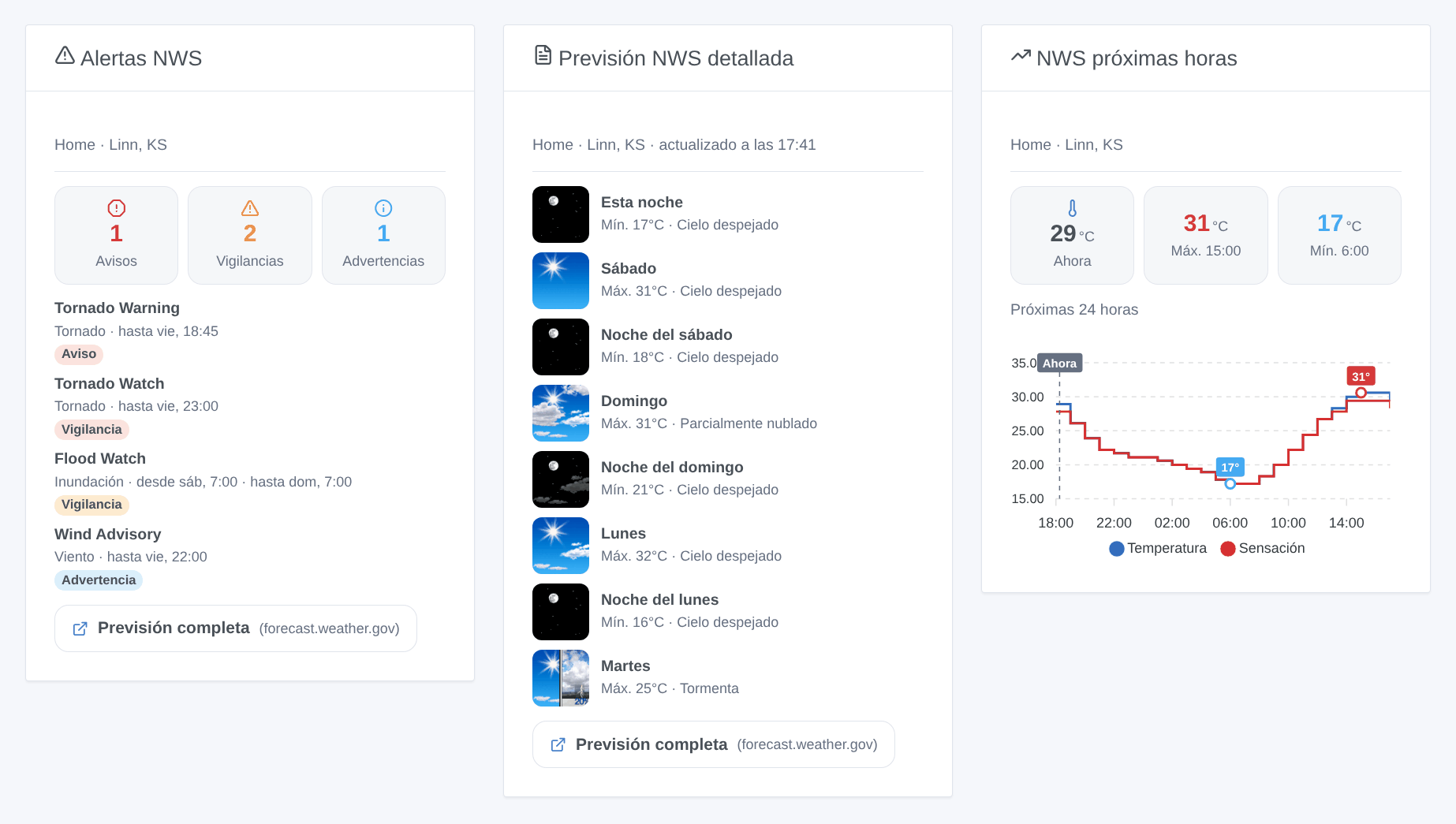
| Widget | Contenido |
|---|---|
| Alertas NWS | contadores de warnings / watches / advisories y luego cada alerta; toque una para ver su texto completo e instrucciones. Actualizado en cuanto una alerta cambia. |
| Previsión NWS detallada | el texto del meteorólogo, periodo a periodo (Esta noche, Sábado, Noche del sábado…), con los iconos del NWS |
| NWS próximas horas | 12, 24 o 48 horas en curva: temperatura y sensación térmica, probabilidad de lluvia, o viento y rachas |
Cada widget tiene un ajuste Casa (vacío = primera casa con ubicación), escrito exactamente como en Gladys.
Configuración (opcional)
| Ajuste | Defecto | Función |
|---|---|---|
| Correo de contacto | — | el NWS pide a cada aplicación que se identifique; su correo le permite contactarle antes de bloquear un tráfico que considere abusivo |
| Duración de la caché (s) | 600 | tiempo de reutilización de una previsión (el NWS las actualiza aproximadamente una vez por hora) |
| Intervalo de comprobación de alertas (s) | 60 | frecuencia de comprobación de las alertas de sus casas, de 30 a 900 segundos |
Solución de problemas
| Síntoma | Qué hacer |
|---|---|
| «Ninguna casa de Gladys tiene ubicación» | defina la ubicación de una casa en Parámetros → Casas |
| «Fuera de la cobertura del National Weather Service» | la casa no está en los Estados Unidos: Gladys usa otro proveedor de meteorología para ella |
| Una escena filtrada por casa nunca se activa | el campo Casa debe contener el nombre exacto, con mayúsculas |
| Tras un reinicio, una alerta no activó nada | las alertas ya en vigor al arrancar la integración se ignoran a propósito |
| Textos de las escenas en el idioma equivocado | siguen la última petición de Gladys: muestre una vez uno de los widgets |
Para informar de un problema, indique la versión de Gladys y de la integración, la ciudad de la casa y los logs de la integración (DEBUG=gladys-integration-sdk para el detalle), en GitHub o en el hilo del foro.
Parámetros de configuración
Estos son los parámetros que National Weather Service te pide en su pantalla de configuración en Gladys.
| Parámetro | Tipo | Obligatorio | Descripción |
|---|---|---|---|
| Listo para usar | section | No | Las previsiones y las alertas funcionan sin configuración: la API del National Weather Service es gratuita y no necesita clave. Solo cubre los Estados Unidos y sus territorios — una casa situada en otro lugar recibe su meteorología de otro proveedor. |
| Correo de contacto (opcional) | string | No | Se añade a la identificación que el NWS exige a cada aplicación, para que pueda contactarle antes de bloquear un tráfico que considere abusivo. Nunca se comparte con nadie más. |
| Duración de la caché (s) | number | No | En segundos, entre 0 y 3600. Tiempo durante el cual se reutiliza una previsión antes de volver a consultar el NWS. El NWS actualiza sus previsiones aproximadamente una vez por hora: el valor por defecto de 600 (10 min) no resta actualidad. Ponga 0 para consultar siempre la API. Las alertas no se ven afectadas: se comprueban a su propio ritmo. |
| Intervalo de comprobación de alertas (s) | number | No | En segundos, entre 30 y 900. Frecuencia de comprobación de las alertas oficiales de sus casas, para los activadores de escena y el widget de alertas. Una Tornado Warning dura unos 30 minutos: el valor por defecto de 60 s activa sus escenas menos de un minuto después de su emisión. |
Cómo instalar National Weather Service en Gladys
- En Gladys, abre Integraciones: National Weather Service aparece en el catálogo junto a las integraciones nativas, con una insignia de comunidad.
- Haz clic en Instalar. Gladys descarga la imagen Docker (
ghcr.io/william-de71/gladys-national-weather-service:1.2.0), la ejecuta en un entorno aislado del núcleo y genera la interfaz de la integración (dispositivos, descubrimiento y configuración). - Abre la pantalla de Configuración de la integración, rellena los parámetros y guarda.
- También puedes instalarla directamente desde la URL de su repositorio: https://github.com/William-De71/gladys-national-weather-service.
National Weather Service requiere Gladys >=5.3.0. El catálogo de Gladys se actualiza cada hora, así que una nueva versión está disponible como máximo una hora después de publicarse.
¿Todavía no usas Gladys? Es gratuito y de código abierto: sigue la guía de instalación para empezar.
Sobre las integraciones externas
National Weather Service es una integración externa: una integración comunitaria empaquetada como contenedor Docker y publicada en GitHub. Gladys la instala con un clic y la ejecuta en un entorno aislado del núcleo. La publica y mantiene William-De71, no el equipo principal de Gladys.
- Explorar todas las integraciones, nativas y de la comunidad
- Crear y publicar tu propia integración externa
- Código fuente en GitHub — fuente de esta documentación