Integración domótica Last.fm, gratuita y de código abierto

Lo que escuchas en Last.fm: scrobbles, escenas musicales y widgets.
Publicado por William-De71
- Dispositivos
- Versión 1.2.0
- Requiere Gladys >=5.3.0
- ★ 0
Esta integración lleva tus escuchas de Last.fm a Gladys: lo que estás escuchando ahora mismo, tus scrobbles, escenas que reaccionan a la música y tres widgets para el panel.
Last.fm registra («scrobblea») cada canción reproducida en Spotify, Deezer, Apple Music, YouTube Music, Tidal, Plex, Sonos y muchos otros reproductores. Da igual el reproductor: si tus escuchas llegan a tu perfil de Last.fm, Gladys las ve.
Integración de la comunidad, sin relación con Last.fm.
Configuración
1. Crear una clave de API (gratuita)
- Inicia sesión en Last.fm y abre Crear una cuenta de API.
- Escribe un nombre de aplicación (por ejemplo «Gladys») y una descripción. La URL de callback puede quedar vacía.
- Last.fm muestra una clave de API (32 caracteres) y un secreto compartido. Puedes volver a consultarlos en cualquier momento en Mis cuentas de API.
2. Rellenar la integración
| Campo | Para qué sirve |
|---|---|
| Clave de API | obligatoria |
| Secreto compartido | solo para vincular una cuenta (marcar canciones como favoritas desde Gladys) |
| Perfiles a seguir | nombres de usuario de Last.fm separados por comas (10 como máximo): el tuyo, el de un familiar… |
| Intervalo de lectura | 30 segundos por defecto (de 15 a 300): es el tiempo de reacción de las escenas |
| Idioma de los textos | nombres de los dispositivos y resúmenes de las escenas; Automático sigue tu panel en cuanto se muestra un widget de Last.fm |
Guarda. El botón Probar la conexión comprueba la clave y lee cada perfil.
Un perfil que oculta sus escuchas recientes (ajustes de privacidad de Last.fm) no se puede seguir: Last.fm se niega a compartirlas.
3. Añadir los dispositivos
En la pestaña Descubrir, cada perfil seguido aparece como un dispositivo «Last.fm – nombre». Añádelo y asígnale una habitación. Los widgets y las escenas también funcionan sin dispositivo, pero el perfil se elige en sus ajustes a través de la lista de dispositivos.
4. Vincular tu cuenta (opcional)
Solo para marcar o desmarcar canciones como favoritas desde Gladys (botón del widget, acciones de escena):
- rellena el secreto compartido y guarda;
- haz clic en Conectar: se abre una página de Last.fm;
- haz clic en Sí, permitir el acceso. Gladys lo detecta en pocos segundos: la configuración muestra «cuenta nombre vinculada».
No hace falta nada más: ninguna URL de redirección que declarar. La página es válida durante 15 minutos; pasado ese tiempo, vuelve a hacer clic en Conectar.
Para desvincular: botón Desvincular la cuenta y, si quieres, revoca el acceso en tus ajustes de Last.fm (sección Aplicaciones).
El dispositivo de un perfil
| Funcionalidad | Valor |
|---|---|
| Escuchando | 1 mientras suena una canción, 0 en caso contrario |
| Canción actual o última | «Artista – Canción»; conserva la última canción cuando termina la escucha |
| Scrobbles de hoy | desde medianoche, en la zona horaria de Gladys |
| Scrobbles en total | desde la creación de la cuenta |
| Título, Artista, Álbum, Portada | la canción que suena ahora (funcionalidades de música de Gladys 5.3), vacías cuando no suena nada |
Título, artista, álbum y portada aparecen en la tarjeta «Dispositivos de la habitación». No hay duración ni posición (Last.fm no las da), y la caja de música del panel no ofrece el perfil: no es un reproductor que se pueda controlar. Un dispositivo añadido antes de estas funcionalidades las obtiene con el botón Actualizar de la pestaña Descubrir.
El historial se conserva: la tarjeta «Gráfico» del panel muestra por ejemplo tu semana de escuchas, y las escenas habituales sobre el valor de un dispositivo funcionan («más de 100 scrobbles hoy»…).
Escenas: disparadores
En el editor de escenas, en Last.fm:
| Disparador | Se activa cuando… | Filtros |
|---|---|---|
| Last.fm: nueva canción | un perfil empieza a escuchar una canción | perfil, artista |
| Last.fm: inicio de escucha | un perfil empieza a escuchar tras una pausa | perfil |
| Last.fm: fin de escucha | no suena nada desde hace dos comprobaciones seguidas | perfil |
| Last.fm: canción favorita | un perfil marca una canción como favorita (en Last.fm o en un reproductor conectado) | perfil, artista |
Datos que reciben las acciones de la escena: nombre de usuario, artista, canción, álbum, favorita, enlace de Last.fm y un resumen listo para enviar; para el fin de escucha, además, la duración de la sesión (minutos) y el número de canciones reproducidas.
Ejemplos:
- Inicio de escucha → atenuar el salón y encender el amplificador;
- Fin de escucha → apagar el amplificador;
- Nueva canción, artista «Daft Punk» → luces en modo disco.
Conviene saber:
- El filtro Artista compara el nombre exactamente como lo escribe Last.fm, mayúsculas incluidas («Daft Punk», no «daft punk»).
- Last.fm no envía nada por sí mismo: la integración lee los perfiles cada 30 segundos por defecto. Una escena reacciona, por tanto, con entre unos segundos y medio minuto de retraso.
- Al arrancar la integración, una escucha ya en curso no activa «Inicio de escucha»; solo cuenta la canción siguiente.
- La misma canción reproducida dos veces seguidas cuenta una sola vez (Last.fm no permite distinguir las dos escuchas).
Escenas: acciones
| Acción | Resultado |
|---|---|
| Last.fm: qué está sonando | escuchando (sí/no), artista, canción, álbum, favorita, enlace, hora de escucha, resumen |
| Last.fm: estadísticas de escucha | scrobbles de hoy y en total, artista / álbum / canción favoritos en un periodo, resumen |
| Last.fm: marcar como favorita | añade una canción a las favoritas de la cuenta vinculada |
| Last.fm: quitar de favoritas | la quita |
Para marcar o quitar una favorita: deja artista y canción vacíos para apuntar a la canción que suena ahora (o la última reproducida) en la cuenta vinculada, o rellénalos (se aceptan variables de escena). Ambas acciones requieren una cuenta vinculada.
Widgets del panel
| Widget | Contenido |
|---|---|
| Last.fm sonando ahora | portada, canción, artista y álbum, scrobbles de hoy y en total, estado, botón Me encanta (cuenta vinculada), enlace |
| Last.fm escuchas recientes | las últimas canciones con su portada; la canción en curso y las favoritas están señaladas |
| Last.fm tops | top de artistas, álbumes (en cuadrícula de portadas) o canciones en 7 días, 1, 3, 6 o 12 meses, o desde siempre |
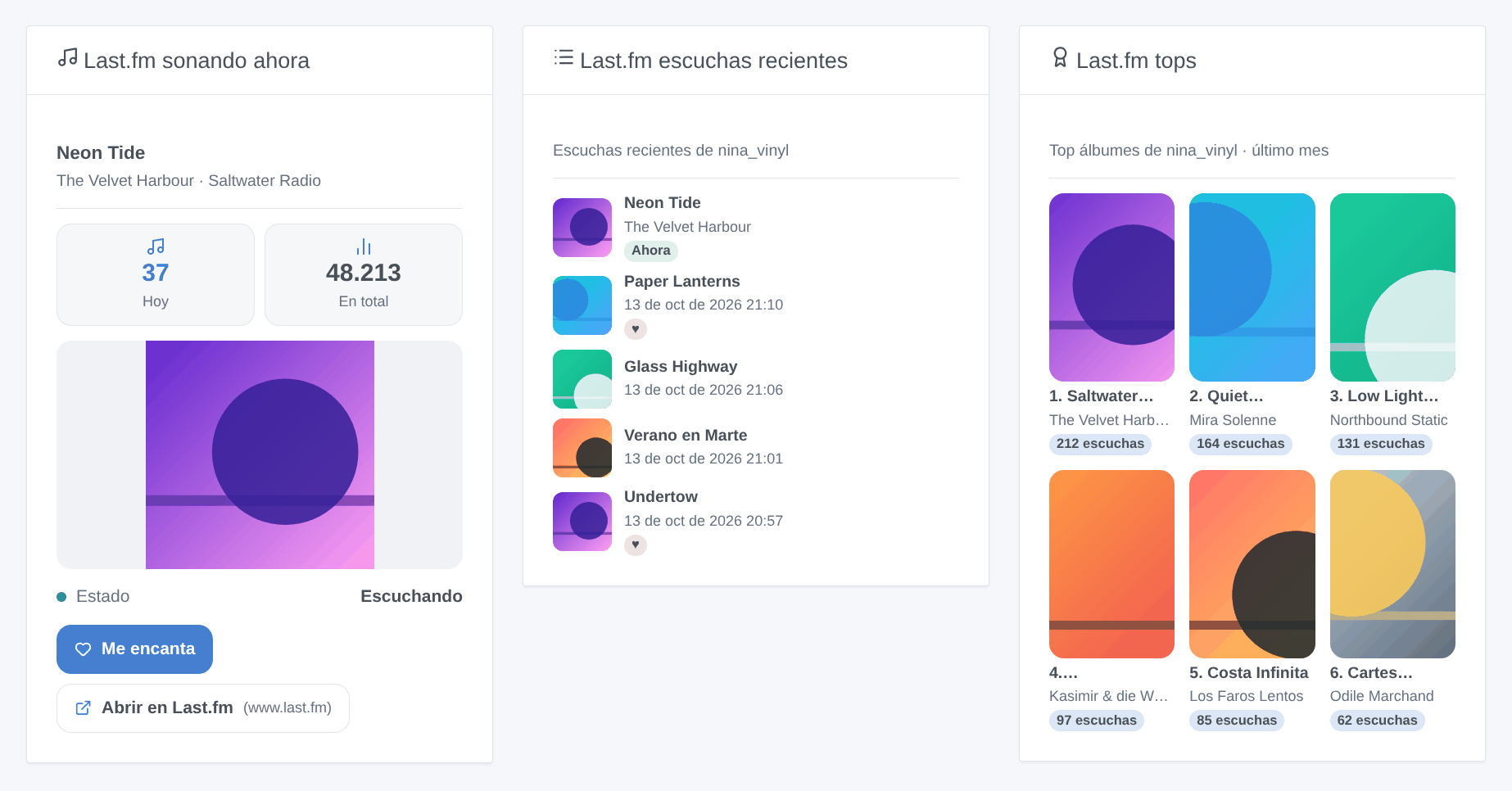
Cada widget se configura con un perfil (vacío = el primer perfil seguido). El widget «sonando ahora» se actualiza en cuanto empieza una canción nueva.
Last.fm ya no ofrece fotos de artistas desde 2019: el top de artistas se muestra sin imágenes.
Solución de problemas
| Síntoma | Causa probable |
|---|---|
| «Last.fm rechaza la clave de API» | clave mal copiada, o secreto compartido erróneo al vincular |
| Un perfil no aparece en Descubrir | el nombre de usuario no existe (consulta los registros de la integración) |
| «oculta sus escuchas recientes» | el perfil activó la opción de privacidad correspondiente en Last.fm |
| No pasa nada al escuchar | el reproductor no hace scrobble: comprueba que la canción aparece en tu perfil de Last.fm |
| El botón Conectar falla | falta el secreto compartido: rellénalo y guarda antes de hacer clic |
Parámetros de configuración
Estos son los parámetros que Last.fm te pide en su pantalla de configuración en Gladys.
| Parámetro | Tipo | Obligatorio | Descripción |
|---|---|---|---|
| Clave de API de Last.fm | section | No | Last.fm registra lo que escuchas en Spotify, Deezer, Apple Music, YouTube Music, Plex y muchos más. Para leer tus escuchas se necesita una clave de API gratuita: crea una cuenta de API en Last.fm (cualquier nombre de aplicación; la URL de callback puede quedar vacía) y copia aquí su clave de API y su secreto compartido. |
| Clave de API | secret | Sí | 32 caracteres. |
| Secreto compartido | secret | No | Solo necesario para vincular una cuenta (marcar canciones como favoritas). |
| Perfiles a seguir | string | Sí | Nombres de usuario de Last.fm, separados por comas (10 como máximo). Cada uno se convierte en un dispositivo en la pestaña Descubrir. |
| Intervalo de lectura (s) | number | No | Cada cuánto se leen los perfiles, entre 15 y 300 segundos. Last.fm no envía nada por sí mismo: es el retardo de las escenas. |
| Idioma de los textos | select | No | Nombres de los dispositivos, resúmenes y salidas de las escenas. Automático: el idioma de tu panel, en cuanto se haya mostrado un widget de Last.fm. |
| Vincular tu cuenta (opcional) | section | No | Solo necesario para marcar o desmarcar canciones como favoritas desde Gladys (botón del widget, acciones de escena). Rellena primero el secreto compartido y guarda, luego haz clic en Conectar y autoriza el acceso en la página de Last.fm que se abre. Gladys detecta la autorización en pocos segundos. |
| Cuenta de Last.fm | account_link | No |
Cómo instalar Last.fm en Gladys
- En Gladys, abre Integraciones: Last.fm aparece en el catálogo junto a las integraciones nativas, con una insignia de comunidad.
- Haz clic en Instalar. Gladys descarga la imagen Docker (
ghcr.io/william-de71/gladys-lastfm:1.2.0), la ejecuta en un entorno aislado del núcleo y genera la interfaz de la integración (dispositivos, descubrimiento y configuración). - Abre la pantalla de Configuración de la integración, rellena los parámetros y guarda.
- También puedes instalarla directamente desde la URL de su repositorio: https://github.com/William-De71/gladys-lastfm.
Last.fm requiere Gladys >=5.3.0. El catálogo de Gladys se actualiza cada hora, así que una nueva versión está disponible como máximo una hora después de publicarse.
¿Todavía no usas Gladys? Es gratuito y de código abierto: sigue la guía de instalación para empezar.
Sobre las integraciones externas
Last.fm es una integración externa: una integración comunitaria empaquetada como contenedor Docker y publicada en GitHub. Gladys la instala con un clic y la ejecuta en un entorno aislado del núcleo. La publica y mantiene William-De71, no el equipo principal de Gladys.
- Explorar todas las integraciones, nativas y de la comunidad
- Crear y publicar tu propia integración externa
- Código fuente en GitHub — fuente de esta documentación