Integración domótica Île-de-France Mobilités, gratuita y de código abierto
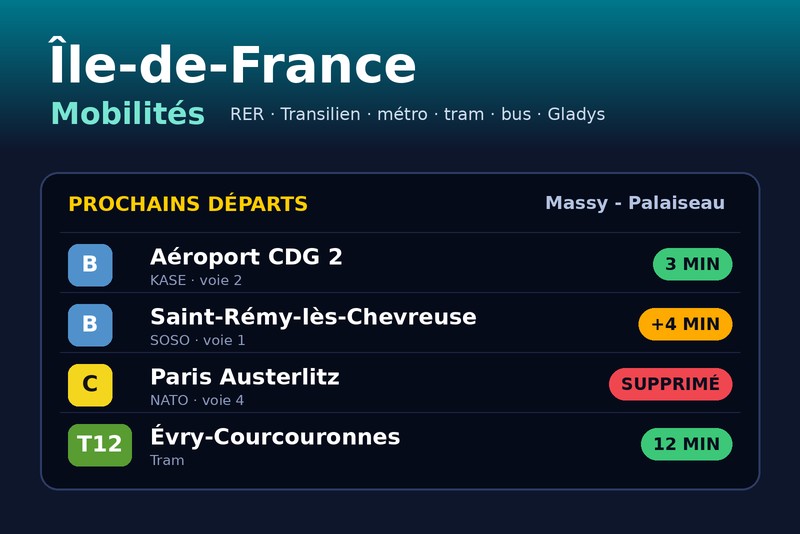
RER, Transilien, metro, tranvía, autobús: salidas y tráfico en tiempo real.
Publicado por William-De71
- Dispositivos
- Versión 1.3.0
- Requiere Gladys >=5.3.0
- ★ 0
Esta integración sigue el transporte público de la región de París en tiempo real en Gladys: las próximas salidas en tus paradas — RER, Transilien, metro, tranvía, autobús — con sus retrasos y cancelaciones, y el tráfico de tus líneas (incidencias, obras). Los convierte en dispositivos, disparadores de escena («mi RER está cancelado», «mi metro sale en 5 minutos», «la línea 13 tiene incidencias») y widgets del panel.
Los datos proceden de PRIM, la plataforma de datos abiertos de Île-de-France Mobilités, y de sus datos de referencia abiertos (líneas y paradas).
Integración comunitaria, sin relación con Île-de-France Mobilités, SNCF ni RATP.
Configuración
1. Obtener una clave de API (gratis)
- Crea una cuenta en prim.iledefrance-mobilites.fr.
- En el menú de tu cuenta, abre Mes jetons d'authentification (mis tokens de autenticación), pestaña API, y haz clic en Générer mon jeton.
- Copia el token enseguida: solo se muestra una vez (generar uno nuevo invalida el anterior).
Una cuenta nueva permite 1 000 peticiones al día por API: suficiente para una o dos paradas con franja horaria. Para más, pide gratis una cuota mayor en la página Ma consommation API (hasta 1 000 000 al día para las salidas) y después introduce la nueva cuota en el ajuste Cuota diaria de salidas.
2. Las paradas seguidas (hasta 3)
| Campo | Función |
|---|---|
| Parada | el nombre de la parada («Massy - Palaiseau», «Châtelet») o su número dado por Buscar una parada |
| Línea | opcional pero recomendada: «RER B», «Transilien P», «Métro 13», «T3a», «Bus 91», «C01743» |
| Dirección | opcional: palabras del destino («Robinson», «Saint-Rémy | Massy» para dos direcciones) |
| Franja horaria | opcional, por ejemplo 07:00-09:30 |
| Días de viaje | opcionales, por ejemplo de lunes a viernes (vacío: todos los días) |
Para una línea sin modo, una letra es una línea de tren («B» = RER B, «P» = Transilien P) y un número una línea de metro antes que de autobús («13» = metro 13). Para un autobús, escribe «Bus 91»; si varias redes tienen una línea con ese número, usa el identificador dado por Buscar una línea («C01122»).
Con una línea, el nombre de la parada se busca entre las paradas de esa línea: es lo más fiable. Sin línea, la integración toma la parada cuyo nombre coincide exactamente, con prioridad para las estaciones de tren, y muestra todas sus líneas. Si no es la parada correcta, usa Buscar una parada y copia su número.
La franja horaria
Las próximas salidas solo se conocen con dos horas de antelación. Con una franja horaria, la parada solo se lee desde una hora antes de la franja hasta su final, y nada el resto del tiempo. Ahorra mucha cuota: una parada con una franja de 2 horas entre semana cuesta unas 65 peticiones al día, frente a unas 600 de una parada leída todo el día.
Si las paradas configuradas necesitaran más que la cuota, la integración espacia las lecturas por sí sola (el botón Probar la conexión muestra el intervalo realmente usado).
3. El tráfico
En Líneas seguidas, escribe hasta 6 líneas separadas por comas: RER B, Transilien P, Métro 13. Toda la red se lee con una sola petición cada 5 minutos (ajustable), unas 290 peticiones al día sea cual sea el número de líneas.
Una línea está:
- interrumpida cuando hay una incidencia que bloquea (sin trenes en toda la línea o en parte);
- con incidencias cuando hay una incidencia que no detiene el tráfico (ralentizaciones, paradas sin servicio…);
- normal en otro caso. Los simples mensajes informativos (un ascensor averiado…) no cuentan.
Guarda y haz clic en Probar la conexión: muestra, para cada parada, las salidas encontradas y la próxima, el estado de cada línea y la cuota consumida.
4. Añadir los dispositivos
En la pestaña Descubrir, cada parada aparece como «IDFM – parada (línea → dirección)» y cada línea seguida como «IDFM – Tráfico línea». Añádelos y colócalos en una habitación.
| Dispositivo | Función | Valor |
|---|---|---|
| Parada | Próxima salida | texto, por ejemplo «07:42 · RER B KASE → Aéroport CDG 2 · +5 min» |
| Parada | Sale en | minutos, en tiempo real |
| Parada | Retraso | minutos (trenes con horario; siempre 0 en el metro, que no tiene) |
| Parada | Salidas con incidencias | cuántas salidas seguidas van con retraso (desde el umbral) o están canceladas |
| Línea | Tráfico | texto: «Tráfico normal», «Con incidencias: …», «Interrumpido: …» |
| Línea | Incidencias en curso | las incidencias vigentes (sin contar los mensajes informativos) |
Los nombres de los dispositivos y los resúmenes de escena siguen el ajuste Idioma de los textos: inglés, francés, alemán, español o automático (el idioma de tu panel, en cuanto se haya mostrado un widget de IDFM).
En la pantalla Dispositivos, la insignia de cada parada y de cada línea indica cloud mientras la API de PRIM responde, inaccesible cuando su última lectura falló, y se vuelve naranja cuando las lecturas están en pausa por la cuota diaria.
Escenas
Disparadores
| Disparador | Cuándo |
|---|---|
| IDFM: tren con retraso | un tren seguido se retrasa (desde el umbral), y de nuevo a los 15 y 30 min |
| IDFM: salida cancelada | una salida seguida se cancela |
| IDFM: salida inminente | una salida seguida sale dentro de 2, 5, 10, 15, 20 o 30 minutos, contado sobre la hora real |
| IDFM: línea con incidencias | una nueva incidencia afecta a una línea seguida (filtros: gravedad, incidencia/obras) |
| IDFM: tráfico normalizado | una línea seguida que tenía incidencias vuelve a circular con normalidad |
Cada evento incluye una variable Resumen, una frase lista para enviar: «Massy - Palaiseau: el RER B KASE → Aéroport CDG 2 sale dentro de 15 min, a las 07:42 (4 min de retraso).» o «RER B: Interrumpido. Trafic interrompu entre Massy et Paris.».
Un evento solo se dispara una vez por salida o incidencia, incluso tras un reinicio.
Acciones
- IDFM: próximas salidas: la próxima salida de una parada (línea, destino, hora, retraso, vía…) y un resumen, por ejemplo para «anunciar mi próximo RER cuando salgo de la ducha».
- IDFM: tráfico de una línea: el estado de una línea, su incidencia principal y un resumen.
Widgets
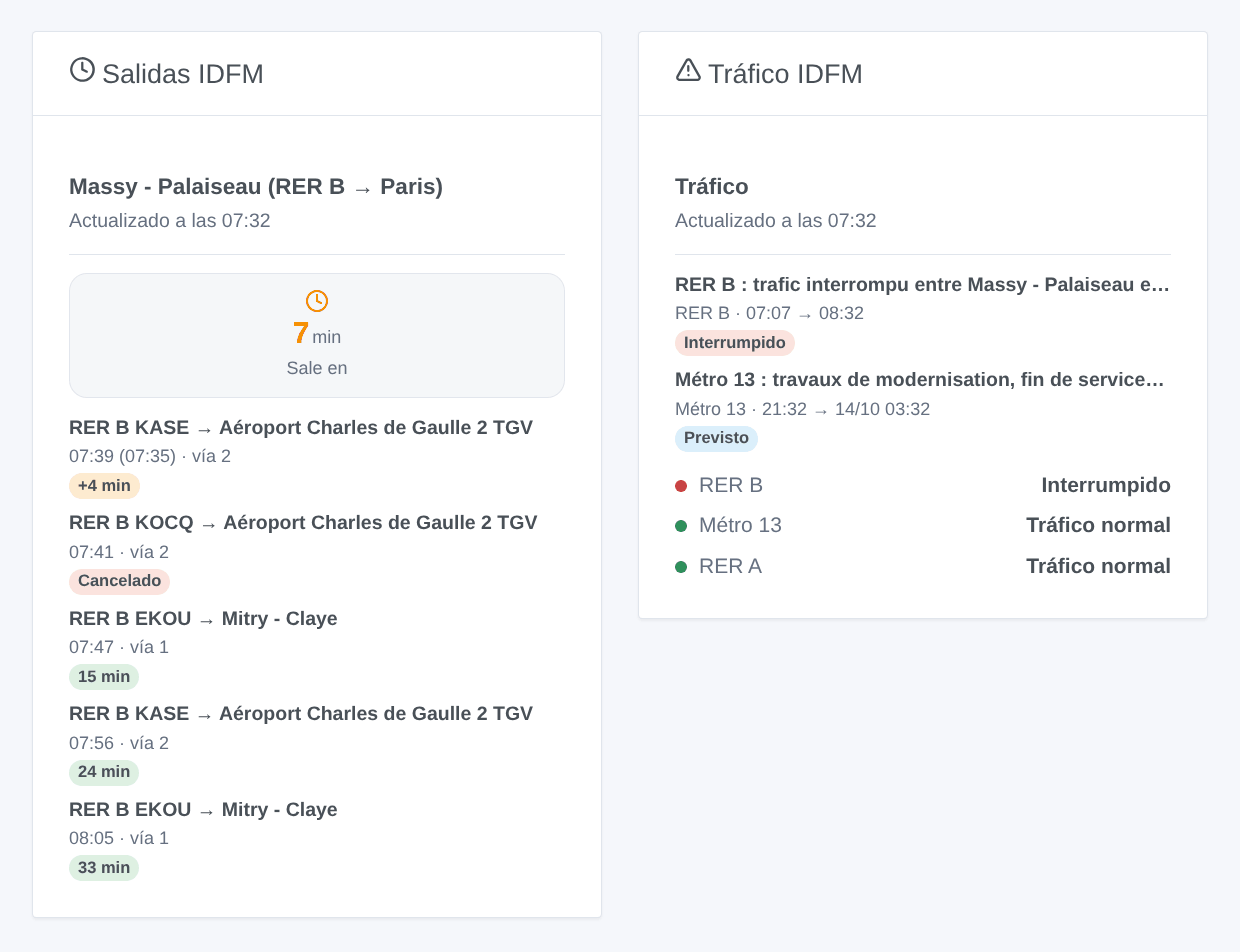
- Salidas IDFM: las próximas salidas de una parada, como en las pantallas de las estaciones, con «N min», «+N min», «Cancelado» o «En andén». Elige una parada seguida, o escribe otra parada (y su línea) directamente en el widget — entonces consume cuota en cada actualización.
- Tráfico IDFM: el estado de cada línea seguida (o de las escritas en el widget), y después las incidencias en curso y las previstas en las próximas 24 horas; toca una para leer el mensaje completo.
Preguntas frecuentes
¿Sin retraso para el metro? El metro y la mayoría de autobuses no tienen horario en los datos en tiempo real: solo se conoce la espera. El retraso y el disparador «tren con retraso» son para RER, Transilien y líneas con horario.
El widget muestra «Salidas de 07:00-09:30 visibles a partir de las 06:00». Es normal: fuera de la franja horaria, la parada no se lee.
¿Nombres de dispositivos o resúmenes en inglés? Ajusta Idioma de los textos en los ajustes, o abre una vez un widget de IDFM.
«La clave de API de PRIM es rechazada». El token se copió mal o se ha regenerado después: genera uno nuevo y pégalo.
«Cuota diaria alcanzada». Añade una franja horaria a tus paradas, ralentiza la actualización, o pide a PRIM una cuota mayor (gratis) e introdúcela en los ajustes.
Parámetros de configuración
Estos son los parámetros que Île-de-France Mobilités te pide en su pantalla de configuración en Gladys.
| Parámetro | Tipo | Obligatorio | Descripción |
|---|---|---|---|
| Clave de API de PRIM | section | No | Los datos proceden de PRIM, la plataforma de datos abiertos de Île-de-France Mobilités: salidas en tiempo real de RER, Transilien, metro, tranvía y autobús, y las incidencias del tráfico. La clave es gratuita: crea una cuenta y genera un token en «Mes jetons d’authentification». Una cuenta nueva permite 1 000 peticiones al día por API; la integración las cuenta y espacia sus lecturas para no superarlas. |
| Clave de API | secret | Sí | El token generado en PRIM (solo se muestra una vez). |
| Parada 1 | section | No | La parada donde tomas el tren, metro, tranvía o autobús, y su línea: las salidas se leen en tiempo real. Un nombre de parada («Massy - Palaiseau») o su número, dado por el botón «Buscar una parada». Con una línea, el nombre se busca entre sus paradas. La dirección solo conserva las salidas cuyo destino contiene estas palabras («Robinson», «Saint-Rémy | Massy»). La franja horaria ahorra cuota: la parada solo se lee desde una hora antes hasta su final. |
| Parada | string | No | |
| Línea | string | No | RER B, Transilien P, Métro 13, T3a, Bus 91… Vacío: todas las líneas de la parada. |
| Dirección | string | No | Palabras del destino. Vacío: todas las direcciones. |
| Franja horaria | string | No | Salidas entre estas horas, por ejemplo 07:00-09:30. Vacío: todo el día. |
| Días de viaje | multi_select | No | Vacío: todos los días. |
| Parada 2 (opcional) | section | No | Los mismos campos que la parada 1, por ejemplo para la vuelta. Déjalo vacío si no lo usas. |
| Parada | string | No | |
| Línea | string | No | RER B, Transilien P, Métro 13, T3a, Bus 91… Vacío: todas las líneas de la parada. |
| Dirección | string | No | Palabras del destino. Vacío: todas las direcciones. |
| Franja horaria | string | No | Salidas entre estas horas, por ejemplo 07:00-09:30. Vacío: todo el día. |
| Días de viaje | multi_select | No | Vacío: todos los días. |
| Parada 3 (opcional) | section | No | Los mismos campos que la parada 1, por ejemplo para la vuelta. Déjalo vacío si no lo usas. |
| Parada | string | No | |
| Línea | string | No | RER B, Transilien P, Métro 13, T3a, Bus 91… Vacío: todas las líneas de la parada. |
| Dirección | string | No | Palabras del destino. Vacío: todas las direcciones. |
| Franja horaria | string | No | Salidas entre estas horas, por ejemplo 07:00-09:30. Vacío: todo el día. |
| Días de viaje | multi_select | No | Vacío: todos los días. |
| Tráfico | section | No | Las líneas cuyo tráfico sigues: un dispositivo por línea (normal, con incidencias, interrumpida), escenas cuando una incidencia empieza o termina, y un widget. Toda la red se lee con una sola petición cada pocos minutos. |
| Líneas seguidas | string | No | Hasta 6, separadas por comas. |
| Ajustes | section | No | Con los valores por defecto, una parada leída todo el día cuesta unas 600 peticiones al día, y una parada con una franja de 2 horas entre semana unas 65. Si las paradas necesitaran más que la cuota diaria, la integración las lee con menos frecuencia por sí sola. |
| Salidas seguidas por parada | number | No | Las próximas salidas de cada parada, entre 1 y 8. |
| Umbral de retraso (min) | number | No | A partir de cuántos minutos un tren cuenta como retrasado (escenas, salidas con incidencias, colores). |
| Actualización de las salidas (min) | number | No | Dentro de la franja horaria (todo el día si no hay), entre 1 y 30 minutos. |
| Actualización del tráfico (min) | number | No | Entre 2 y 60 minutos. |
| Cuota diaria de salidas | number | No | La cuota diaria de la API «Prochains passages (requête unitaire)» de tu cuenta: 1 000 en una cuenta nueva. Auméntala aquí después de pedir más a PRIM (gratis). |
| Idioma de los textos | select | No | Nombres de los dispositivos, resúmenes y salidas de las escenas. Automático: el idioma de tu panel, en cuanto se haya mostrado un widget de IDFM. |
Cómo instalar Île-de-France Mobilités en Gladys
- En Gladys, abre Integraciones: Île-de-France Mobilités aparece en el catálogo junto a las integraciones nativas, con una insignia de comunidad.
- Haz clic en Instalar. Gladys descarga la imagen Docker (
ghcr.io/william-de71/gladys-idfm:1.3.0), la ejecuta en un entorno aislado del núcleo y genera la interfaz de la integración (dispositivos, descubrimiento y configuración). - Abre la pantalla de Configuración de la integración, rellena los parámetros y guarda.
- También puedes instalarla directamente desde la URL de su repositorio: https://github.com/William-De71/gladys-idfm.
Île-de-France Mobilités requiere Gladys >=5.3.0. El catálogo de Gladys se actualiza cada hora, así que una nueva versión está disponible como máximo una hora después de publicarse.
¿Todavía no usas Gladys? Es gratuito y de código abierto: sigue la guía de instalación para empezar.
Sobre las integraciones externas
Île-de-France Mobilités es una integración externa: una integración comunitaria empaquetada como contenedor Docker y publicada en GitHub. Gladys la instala con un clic y la ejecuta en un entorno aislado del núcleo. La publica y mantiene William-De71, no el equipo principal de Gladys.
- Explorar todas las integraciones, nativas y de la comunidad
- Crear y publicar tu propia integración externa
- Código fuente en GitHub — fuente de esta documentación