Integración domótica Free Mobile SMS, gratuita y de código abierto
Envíe notificaciones SMS a su propio número de teléfono a través de la API SMS de Free Mobile.
Publicado por William-De71
- Mensajería
- Versión 1.4.0
- Requiere Gladys >=5.3.0
- ★ 0
Esta integración envía notificaciones por SMS a su propio número de teléfono, usando la API SMS gratuita de Free Mobile. Es un canal de solo envío: Gladys puede enviarle un SMS (notificación de una escena, alerta…), pero no hay ningún canal de recepción — no puede responder al SMS para controlar Gladys.
Requisitos
- Una suscripción a Free Mobile (la oferta móvil de Free, no la Freebox).
- La opción «Notifications par SMS» (notificaciones por SMS) activada en su cuenta.
- Gladys Assistant 5.3.0 o posterior. En Gladys 4.86 a 5.2, una versión ya instalada sigue enviando los SMS pero no recibe más actualizaciones (su aviso «Actualización disponible» no se puede aplicar): actualice primero Gladys.
Activar la opción y obtener sus credenciales
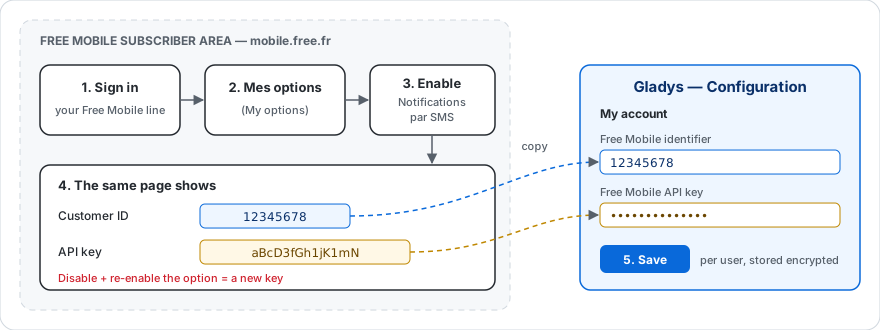
- Inicie sesión en su área de cliente de Free Mobile en https://mobile.free.fr.
- Abra el menú «Mes options» (Mis opciones).
- Busque la línea «Notifications par SMS» y actívela.
- En esa misma página, Free Mobile muestra dos datos que necesitará:
- su identificador («Customer ID», un login de 8 cifras);
- una clave de API (generada para usted; puede regenerarla si es necesario).
Tenga a mano ambos valores: son los que introducirá en Gladys.
Importante: si desactiva y vuelve a activar la opción «Notifications par SMS», se genera una nueva clave de API. Recuerde entonces actualizarla en la configuración de Gladys.
Configurar la integración en Gladys
- En Gladys, abra la página de Configuración de la integración Free Mobile SMS.
- En el bloque «Mi cuenta», rellene:
- Identificador de Free Mobile → su login de 8 cifras;
- Clave de API de Free Mobile → la clave obtenida en el paso anterior (se guarda cifrada y no se vuelve a mostrar nunca).
- Guarde. Eso es todo.
Cada usuario de Gladys introduce sus propias credenciales en su bloque «Mi cuenta». Los SMS se envían siempre al número de la cuenta de Free Mobile correspondiente.
Uso
Una vez configurada, la integración recibe los mensajes salientes que Gladys le dirige (por ejemplo la acción «Enviar mensaje» de una escena, o una alerta) y los reenvía por SMS a su teléfono. No hace falta nada más.
De forma predeterminada, un mensaje de escena se envía a todos los servicios de mensajería que haya configurado. Para enviarlo solo por SMS, elija Free Mobile SMS en la lista «Enviar mediante» de la acción.
Escenas: cuando un SMS no se envía
El activador «SMS no enviado» inicia una escena cuando Free Mobile rechaza o no recibe un SMS: clave de API errónea, opción desactivada, demasiados SMS, Free Mobile fuera de servicio… Úselo para recibir un aviso por otro canal (Telegram, una notificación, una luz que se pone roja).
- Se activa con el primer fallo de una línea de Free Mobile y solo de nuevo después de que un SMS de esa línea haya pasado. Por eso, una escena que le avisa por este mismo canal no puede entrar en bucle.
- El filtro Causas limita la escena a algunas causas; déjelo vacío para reaccionar a todas.
- Las acciones de la escena pueden usar estas variables:
| Variable | Contenido |
|---|---|
{{triggerEvent.data.reason}} | código de la causa: access_denied, rate_limited, server_error, timeout, unreachable, invalid_message o unexpected |
{{triggerEvent.data.status}} | código HTTP devuelto por Free Mobile (403, 402…), vacío sin respuesta |
{{triggerEvent.data.error}} | mensaje de error en inglés, como en los registros |
{{triggerEvent.data.account}} | identificador enmascarado de la línea, por ejemplo 12****78 |
timeout significa que Free Mobile no respondió a tiempo: el SMS aún puede llegar.
Ejemplo: activador «SMS no enviado» con la causa «Acceso denegado» y después una acción «Enviar mensaje» mediante Telegram: Free Mobile rechazó un SMS ({{triggerEvent.data.error}}): compruebe la clave de API.
Limitaciones
- Envío solo a su propio número: la API de Free Mobile no permite enviar a un número cualquiera.
- Sin recepción: no puede responder al SMS para hablar con Gladys.
- Solo SMS de texto: los archivos adjuntos (imágenes) no se reenvían.
- Mensajes largos: Free Mobile acepta hasta 999 caracteres por SMS. Un mensaje más largo se envía en varios SMS, numerados «(1/2)», «(2/2)»…
- Límite de envío: Free Mobile rechaza los mensajes demasiado seguidos. La integración envía los mensajes de un mismo usuario uno tras otro y, cuando Free Mobile pide ir más despacio, lo vuelve a intentar dos veces (tras 2 y luego 5 segundos) antes de abandonar.
Solución de problemas
- No recibo ningún SMS: compruebe que la opción «Notifications par SMS» está activada y que el identificador y la clave de API son correctos.
- Error de acceso denegado: el identificador o la clave probablemente son incorrectos, o la opción se ha desactivado. Regenere la clave desde su área de cliente y actualícela en Gladys.
- Error «demasiados SMS enviados»: se enviaron varios mensajes en pocos segundos y Free Mobile siguió rechazándolos tras los reintentos. Espacie las acciones «Enviar mensaje» de sus escenas (basta con una breve espera entre dos).
Cómo instalar Free Mobile SMS en Gladys
- En Gladys, abre Integraciones: Free Mobile SMS aparece en el catálogo junto a las integraciones nativas, con una insignia de comunidad.
- Haz clic en Instalar. Gladys descarga la imagen Docker (
ghcr.io/william-de71/gladys-free-mobile:1.4.0), la ejecuta en un entorno aislado del núcleo y genera la interfaz de la integración (dispositivos, descubrimiento y configuración). - Abre la pantalla de Configuración de la integración, rellena los parámetros y guarda.
- También puedes instalarla directamente desde la URL de su repositorio: https://github.com/William-De71/gladys-free-mobile.
Free Mobile SMS requiere Gladys >=5.3.0. El catálogo de Gladys se actualiza cada hora, así que una nueva versión está disponible como máximo una hora después de publicarse.
¿Todavía no usas Gladys? Es gratuito y de código abierto: sigue la guía de instalación para empezar.
Sobre las integraciones externas
Free Mobile SMS es una integración externa: una integración comunitaria empaquetada como contenedor Docker y publicada en GitHub. Gladys la instala con un clic y la ejecuta en un entorno aislado del núcleo. La publica y mantiene William-De71, no el equipo principal de Gladys.
- Explorar todas las integraciones, nativas y de la comunidad
- Crear y publicar tu propia integración externa
- Código fuente en GitHub — fuente de esta documentación