YouTube smart home integration, free and open source
Follow public YouTube channels: new videos, lives, subscribers, scenes and widgets.
Published by William-De71
- Devices
- Version 0.1.0
- Requires Gladys >=5.1.0
- ★ 0
Overview
This integration follows public YouTube channels in Gladys. Each channel becomes a device with its subscribers, its total views, its number of videos and the title and date of its latest video. New videos are detected through the public RSS feeds of the channels, every 15 minutes and without any quota; the statistics and the details of the videos (duration, live) come from the official YouTube Data API v3 with your own Google Cloud API key.
It adds scene triggers (a video or a Short is published, a live starts, a subscriber milestone is reached, the key is refused, the quota is spent), scene actions (the latest video of a channel, the statistics of a channel) and three dashboard widgets.
Not affiliated with, endorsed by nor sponsored by Google or YouTube. YouTube is a trademark of Google LLC.
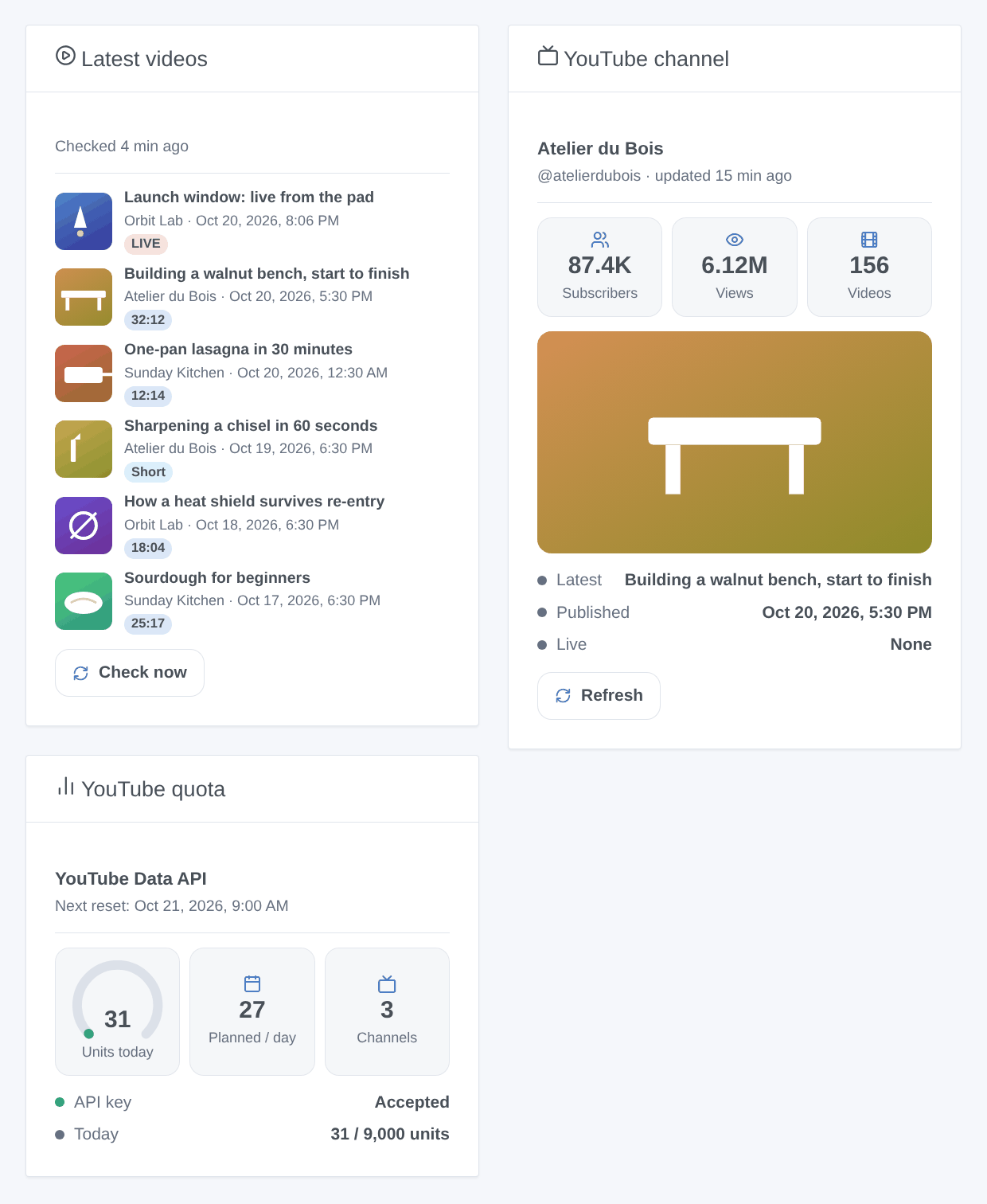
The image above is a generated illustration with made-up channels, not a screenshot.
Prerequisites
- Gladys Assistant 5.1.0 or later.
- A Google account and a Google Cloud API key with YouTube Data API v3 enabled:
- Open the Google Cloud console and create a project (for example "Gladys YouTube").
- In APIs & Services → Library, search for YouTube Data API v3 and press Enable.
- In APIs & Services → Credentials, press Create credentials → API key.
- Edit the key: under API restrictions, choose "Restrict key" and tick only YouTube Data API v3; leave Application restrictions on "None" (Gladys calls from your home, not from a website).
- No billing account is needed: the API is free within its daily quota of 10,000 units per project, reset at midnight Pacific Time. Every call of the integration costs 1 unit; for 10 channels, about 30 units a day.
Configuration
| Field | Meaning |
|---|---|
| Google Cloud API key | Required. Never shown in the logs, sent only to Google in a header. |
| New videos: check every (minutes) | 5 to 240, 15 by default. Reads the RSS feed of each channel: free. YouTube refreshes its feeds about every 15 minutes. |
| Statistics: read every (minutes) | 15 to 1,440, 60 by default. Subscribers, views and videos of every channel: 1 unit per 50 channels. |
| Daily budget (units) | 9,000 by default. Once spent, the statistics wait for midnight Pacific Time; the RSS feeds still detect the new videos (without their duration). |
| Language of the texts | Feature names, dates, scene summaries and messages. Automatic: the language of your dashboard. |
Configuration buttons:
- Add a channel: type its @handle (
@GoogleDevelopers), its URL (youtube.com/@…,/channel/UC…,/user/…), its id (UC…) or the URL of one of its videos. 1 unit (2 for a video URL), plus 1 for the details of its latest videos. Up to 50 channels. - Remove a channel: by its number (
#2), its name, its @handle or its id. Its device stays in Gladys until you delete it. - List the channels: every channel with its number, its subscribers, its latest video, its last check and its last error, and the units of the day.
- Test the API key: reads the official YouTube channel (1 unit) and says what to fix if Google refuses the key.
Usage
Channels
Add the channels with Add a channel. The latest uploads of a new channel are read at once and kept as the past: they are never announced as new. Legacy custom URLs (/c/Name) have no API: the name is tried as a handle; if it fails, use the @handle shown on the channel page.
Devices
Open the Discover tab of the integration and add the channels you want. Each device has:
- Subscribers, total views, videos (counters). YouTube rounds the public subscriber count down to three significant figures (1,234,567 shows 1,230,000); a channel can hide it, the feature then stays empty.
- Latest video: the title of the latest upload (a Short or a finished live included, a scheduled live excluded) and its publication date, in the timezone of Gladys.
Dashboard widgets
- Latest videos: the latest uploads of your channels (8 at most), newest first and a running live on top, with thumbnail, channel, date and a badge (LIVE, Scheduled, Short or the duration). A tap opens the details and the link to the video. Settings: the channels (empty: all), Shorts shown or not. "Check now" reads the RSS feeds at once (free).
- YouTube channel: one channel, with the thumbnail of its latest video, its subscribers, views and videos, the latest video, its date, the live state and a "Refresh" button (1 unit for the statistics).
- YouTube quota: the units spent today, the next reset, the units planned a day by your channels, the state of the key.
The buttons never check a channel checked less than a minute ago, and never fire a scene: the new videos they find are announced at the next round of the clock.
Scenes
Triggers:
- A channel publishes a video: a new video or Short, published less than 48 hours ago (lives excluded). Filters: channel, kind (video or Short). Variables:
channel_name,title,url,video_id,kind,short,duration_seconds,duration,published_at,thumbnail,summary. - A channel goes live: a live or a premiere starts; a scheduled live is checked every 5 minutes from 30 minutes before its start. Variables:
channel_name,title,url,video_id,started_at,scheduled_at,thumbnail,summary. - A channel reaches a subscriber milestone: 100, 200, 500, 1,000, 2,000, 5,000, 10,000… Each milestone fires once; the first reading of a channel is its baseline. Variables:
channel_name,milestone,subscribers,summary. - Google refuses the API key: once, until a request works again. Variables:
reason,summary. - The daily quota is spent: the budget of the integration (
budget) or a refusal of Google (google); once a day. Variables:source,used,budget,summary.
Actions:
- Get the latest video of a channel: checks its RSS feed now (free). Outputs:
title,url,video_id,short,duration_seconds,published_at,live,summary. - Get the statistics of a channel: the last reading, no request. Outputs:
subscribers(-1 when hidden),views,videos,summary.
Examples:
- When a channel publishes a video, kind "Video" → send a message:
{{triggerEvent.data.summary}}. - When a channel goes live → turn the living room lights to cinema mode.
- Every evening at 19:00 → get the latest video of a channel → say its title with the text-to-speech of Gladys.
Transport
Cloud: the integration reads www.googleapis.com (Data API, with your key), www.youtube.com (RSS feeds, Shorts check) and i.ytimg.com (thumbnails). Only the ids of the public channels and videos you follow are sent. The channels are stored in the Gladys configuration; /data keeps the last readings and the unit counter.
Troubleshooting
- "Google refuses the API key (API_KEY_INVALID)": copy the key again from the Cloud console.
- "SERVICE_DISABLED" or "accessNotConfigured": YouTube Data API v3 is not enabled in the project of the key.
- "API_KEY_SERVICE_BLOCKED": the API restrictions of the key do not include YouTube Data API v3.
- "API_KEY_HTTP_REFERRER_BLOCKED" or "API_KEY_IP_ADDRESS_BLOCKED": set the application restrictions of the key to "None".
- Quota spent: wait for midnight Pacific Time; check in the Cloud console (APIs & Services → YouTube Data API v3 → Quotas) that no other application uses the same project, or lower the frequency of the statistics.
- "RSS feed 404" in "List the channels": YouTube's feeds are sometimes down for a few hours; the integration then reads the uploads playlist (1 unit per channel) while less than 80 % of the budget is spent. A channel that stays in error for days may have been deleted.
- A new video was not announced: the feeds of YouTube are refreshed about every 15 minutes, so a video is seen 15 to 30 minutes after its publication; a video published while the integration was stopped for more than 48 hours is not announced; a premiere fires "goes live", not "publishes a video".
- Report a problem on GitHub with the versions of Gladys and of the integration, the text of "List the channels" and the logs of the integration (Settings → Supervision). Never paste your API key.
Configuration settings
These are the settings YouTube asks for in its configuration screen in Gladys.
| Setting | Type | Required | Description |
|---|---|---|---|
| YouTube | section | No | How it works: 1. In the Google Cloud console, create a project, enable “YouTube Data API v3” and create an API key (restrict it to that API). Paste it below. 2. Add each channel with “Add a channel”: its @handle, its URL or its id. 3. Open the Discover tab and add the channel: it becomes a device with its subscribers, views, videos and latest video. 4. Add the widgets to a dashboard and use the scenes (new video, live started). New videos are detected through the public RSS feeds (no quota); the statistics and video details use the free daily quota of the API (10,000 units, about 30 a day for 10 channels). Not affiliated with Google or YouTube. |
| Google Cloud API key | secret | Yes | A key of a Google Cloud project with “YouTube Data API v3” enabled. Restrict it to that API; no billing account is needed. |
| New videos: check every (minutes) | number | No | How often the RSS feed of each channel is read (5 to 240). Free: no quota. YouTube refreshes its feeds about every 15 minutes. |
| Statistics: read every (minutes) | number | No | Subscribers, views and videos of every channel (15 to 1,440): 1 unit per 50 channels at each reading. |
| Daily budget (units) | number | No | Units a day the integration may spend; Google gives 10,000 a day per Cloud project for free, reset at midnight Pacific Time. Once spent, the RSS feeds still detect new videos. |
| Language of the texts | select | No | Feature names, dates, scene summaries and messages of the buttons. Automatic: the language of your dashboard once a widget has been shown, guessed from the timezone of Gladys before that. |
How to install YouTube in Gladys
- In Gladys, open Integrations: YouTube appears in the catalog, next to the native integrations, with a community badge.
- Click Install. Gladys pulls the Docker image (
ghcr.io/william-de71/gladys-youtube:0.1.0), starts it in a sandbox isolated from the core, and generates the integration's interface (devices, discovery and configuration). - Open the Configuration screen of the integration, fill in the settings, and save.
- You can also install it directly from its repository URL: https://github.com/William-De71/gladys-youtube.
YouTube requires Gladys >=5.1.0. The catalog inside Gladys refreshes every hour, so a new version becomes available at most one hour after its release.
Not running Gladys yet? It is free and open source: follow the installation guide to get started.
About external integrations
YouTube is an external integration: a community integration packaged as a Docker container and published on GitHub, that Gladys installs in one click and runs in a sandbox isolated from its core. It is published and maintained by William-De71, not by the Gladys core team.
- Browse all integrations, native and community
- Build and publish your own external integration
- Source code on GitHub — source of this documentation