Wrestling Events smart home integration, free and open source
Wrestling shows of WWE, AEW, NJPW, TNA, AAA…: calendars, reminders and widgets.
Published by William-De71
- Devices
- Version 0.1.0
- Requires Gladys >=5.2.0
- ★ 1
Overview
This integration brings the program of professional wrestling into Gladys: the shows of WWE, AEW, NJPW, TNA, AAA, ROH, CMLL, Stardom, AJPW, DDT, Dragon Gate, GCW, RevPro and MLP, picked in a list. Each followed promotion becomes a calendar for every user who enables the integration, with the time, the venue and the card of each show. Scenes can react before the bell, when a show is announced or when matches are added to a card, and two dashboard widgets show what is coming.
The program comes from TheSportsDB, an open sports database kept up to date by its community. No account is needed: the integration uses the free key of TheSportsDB, or your premium key if you have one.
Requirements
- Gladys Assistant 5.2.0 or later (calendar integrations).
- Internet access.
- Optional: a premium key of TheSportsDB, for 60 or 90 days ahead and a faster reading.
Configuration
| Field | Description |
|---|---|
| Promotions | The promotions to follow, one calendar each. WWE, AEW, NJPW, TNA and AAA by default. |
| Kinds of shows | Weekly TV shows (RAW, SmackDown, Dynamite…), tour shows ("Day 1"…) and major events (PLE, specials). |
| Program ahead | 2 weeks or 30 days (default); 60 or 90 days need a premium key. |
| Premium API key (optional) | Leave it empty to use the free key. |
| Language of the scene texts | The language of the sentence of the "next show" scene action. Automatic: the language of the dashboard. |
Save, then, in My calendars on the same page, press Enable for me. Each user who wants the calendars enables the integration for themselves.
With the free key, the integration asks for one day of one promotion at a time, once every 7 seconds, to stay within what TheSportsDB allows: the first reading of 30 days for 5 promotions takes about 20 minutes. The status of the integration shows the progress. Following fewer promotions, or 2 weeks only, makes it faster.
Usage
Calendars
Each followed promotion is a calendar named "Wrestling – WWE" (in French "Catch – WWE"), in the color of the promotion, with:
- one event per show, from the time of the bell to an estimated end (2 hours for a TV show, 3 for a tour show, 4 for a major event) when the time is known, or an all-day event when TheSportsDB does not know the time yet;
- the venue, city and country as the place, the card (one match per line) and the kind of show as the description, and a link to the page of the show on TheSportsDB;
- the shows from 7 days ago to the horizon you chose. A cancelled show disappears, a moved one follows.
A new calendar is private. In My calendars, turn Share with the household on to use it in the scenes of the household (and with the native trigger "Calendar event is coming"), or turn Synchronize this calendar off to skip it. A promotion removed from the configuration deletes its calendar.
Dashboard widgets
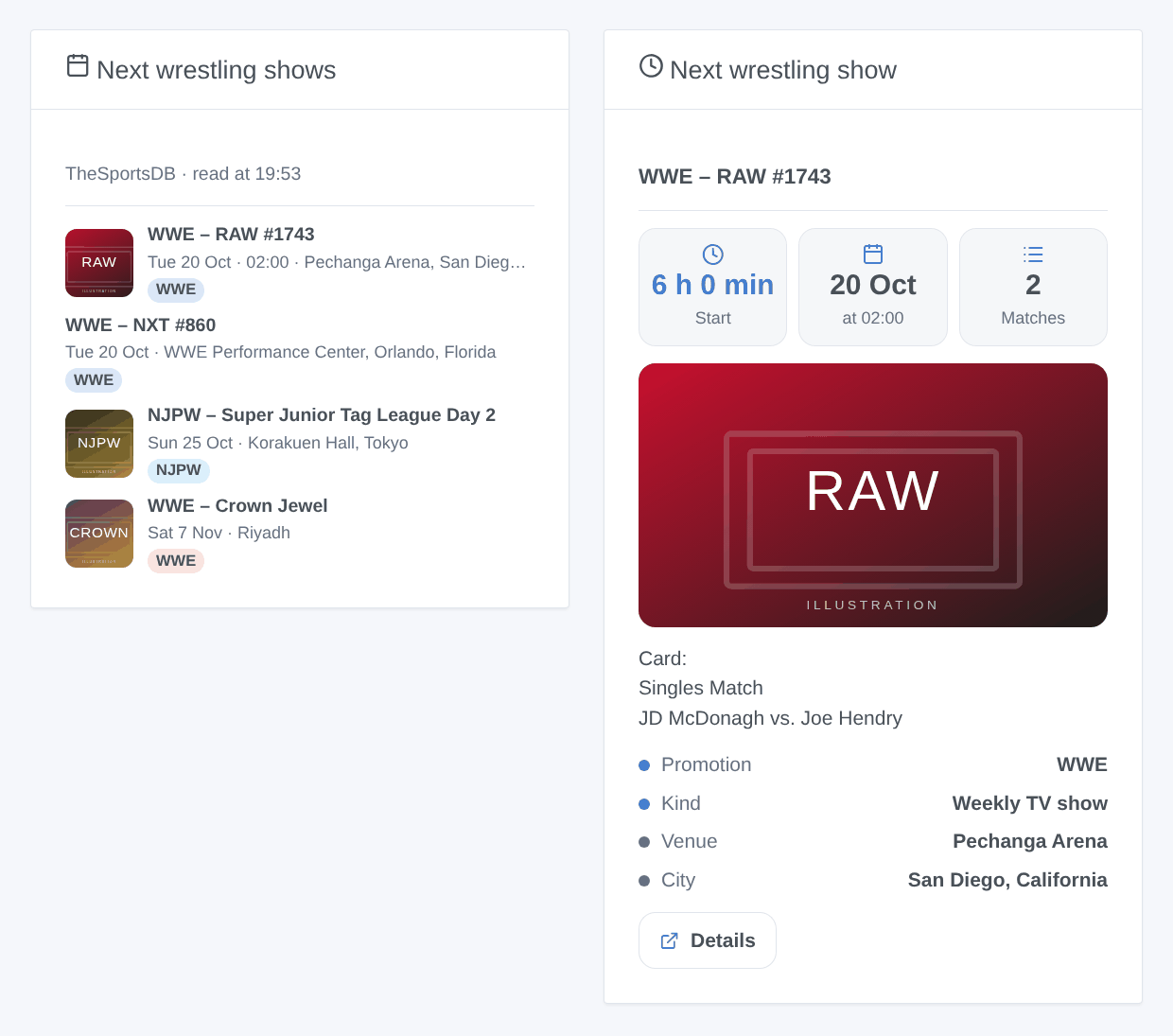
- Next wrestling shows: the next 3, 5 or 8 shows with their date, time, venue, a badge per promotion (blue: TV show, light blue: tour show, red: major event) and the poster. Tap a show to read its card.
- Next wrestling show: the countdown to the next show, its time, the number of matches announced, the poster, the venue and the card.
Both can be limited to some promotions or kinds of shows in their settings.
Scenes
Triggers (filters: promotions and kinds of shows):
- Wrestling: a show starts: at the bell, or 15, 30, 60 or 120 minutes before (choose it in "When"). Only for shows whose time is known.
- Wrestling: new show announced: a show is added to the program of a followed promotion.
- Wrestling: matches added to a card: new matches appear on the card of a show to come;
new_matcheslists them.
The variables of the shows: title ("WWE – Crown Jewel"), name, promotion, promotion_name, kind (weekly, tour, special), date, time, venue, city, country, place, card, url.
Action: Wrestling: next show gives the next show of some promotions or kinds: title, date, time, place, minutes until the start, card, link, and a ready-made sentence text.
Examples:
- When a WWE or AEW major event starts in 15 minutes → switch the TV on and dim the living room.
- When a new NJPW show is announced → send
{{triggerEvent.data.title}}, {{triggerEvent.data.date}} in {{triggerEvent.data.city}}. - Every Monday at 9 am → Wrestling: next show, then send its
texton Telegram.
Transport
Cloud only. Only the chosen promotions and the days asked go to TheSportsDB, over the internet; the posters of the widgets are downloaded from TheSportsDB when a dashboard shows them. Nothing about you or your home leaves your network.
Troubleshooting
- The calendars stay empty: check that you pressed Enable for me in My calendars, and wait for the first reading (the status of the integration shows its progress).
- "TheSportsDB asked to slow down": the free key is shared by everybody; the integration waits 15 minutes and goes on by itself.
- "TheSportsDB refuses the API key": check the premium key, or empty the field to use the free key.
- A show has no time: TheSportsDB often adds the time a few days before; the all-day event becomes a timed one by itself. The "a show starts" trigger only fires once the time is known.
- A show is missing: TheSportsDB is kept up to date by its community, and the free key answers at most 3 shows per promotion and day (CMLL can have more). A premium key reads whole seasons.
- A show has the wrong kind: the kind is guessed from its name (a number "#1743" means a TV show, "Day 3" a tour show). Report it with the name of the show.
- No scene runs: the triggers of the integration need no sharing, but "a show starts" needs the time of the show and "new show announced" a day already read once. The native trigger "Calendar event is coming" only sees calendars shared with the household.
For a bug report, give the Gladys and integration versions, the promotions followed, free or premium key, and the lines of the Logs tab of the integration; in developer mode, DEBUG=gladys-integration-sdk adds the SDK logs.
Configuration settings
These are the settings Wrestling Events asks for in its configuration screen in Gladys.
| Setting | Type | Required | Description |
|---|---|---|---|
| TheSportsDB | section | No | The program comes from TheSportsDB, an open sports database kept up to date by its community. Choose the promotions and the kinds of shows to follow, then enable the integration in “My calendars” below: each user gets one calendar per promotion. Nothing about you leaves your network: the integration only asks TheSportsDB for the shows of the chosen promotions. |
| Promotions | multi_select | Yes | One calendar per promotion. With the free key, each promotion costs one request per day of the program: five are a good start. |
| Kinds of shows | multi_select | Yes | Guessed from the name of the show. The calendars, the widgets and the scenes only see these. |
| Program ahead | select | No | How far ahead the program is read. The free key stops at 30 days; 60 and 90 days need a premium key. |
| Free or premium key | section | No | Without a key, the integration uses the free key of TheSportsDB, shared by everybody: one request every 7 seconds, at most 3 shows per promotion and day. The first reading of 30 days for 5 promotions takes about 20 minutes. A premium key (a paid subscription of TheSportsDB) reads a whole season in one request and allows 90 days. |
| Premium API key (optional) | secret | No | Leave empty to use the free key. |
| Language of the scene texts | select | No | For the sentence of the “next show” scene action. Automatic: the language of the dashboard. |
How to install Wrestling Events in Gladys
- In Gladys, open Integrations: Wrestling Events appears in the catalog, next to the native integrations, with a community badge.
- Click Install. Gladys pulls the Docker image (
ghcr.io/william-de71/gladys-wrestling-events:0.1.0), starts it in a sandbox isolated from the core, and generates the integration's interface (devices, discovery and configuration). - Open the Configuration screen of the integration, fill in the settings, and save.
- You can also install it directly from its repository URL: https://github.com/William-De71/gladys-wrestling-events.
Wrestling Events requires Gladys >=5.2.0. The catalog inside Gladys refreshes every hour, so a new version becomes available at most one hour after its release.
Not running Gladys yet? It is free and open source: follow the installation guide to get started.
About external integrations
Wrestling Events is an external integration: a community integration packaged as a Docker container and published on GitHub, that Gladys installs in one click and runs in a sandbox isolated from its core. It is published and maintained by William-De71, not by the Gladys core team.
- Browse all integrations, native and community
- Build and publish your own external integration
- Source code on GitHub — source of this documentation