Whois smart home integration, free and open source
Expiration of your domain names (RDAP, whois): days left, registrar, scenes.
Published by William-De71
- Devices
- Version 0.1.0
- Requires Gladys >=5.1.0
- ★ 0
Overview
This integration follows the expiration of your domain names in Gladys: the days left before each domain expires, its expiration date, its registrar and its state. Each domain is checked once a day with its registry, through RDAP (the successor of whois) or, for the extensions without RDAP, through whois. A forgotten domain stops your website and your emails the day it expires: scenes warn you weeks before.
This community integration is not affiliated with any registry or registrar.
Requirements
- Gladys Assistant 5.1.0 or newer.
- Internet access from Gladys. No account, no key.
Configuration
| Field | Role |
|---|---|
| Domain names | Up to ten, separated by commas. A web address is accepted: https://www.example.fr/ is example.fr. |
| Language of the texts | Language of the feature names, text states and scene summaries. Automatic by default. |
The Check a domain button asks the registry of any domain right away, without following it. Check now checks every domain again (done on its own once a day, at night). The connection status lists the domains without an answer and the entries that are not domain names.
Usage
Devices
Open the Discover tab and add the devices, one per domain. Each one has: the days before expiration (negative once expired), the expiration date, the registrar and the state: Active, Expires soon (30 days or less), Expired, Redemption period (expired, can still be restored at a cost) or Pending deletion.
Dashboard widget
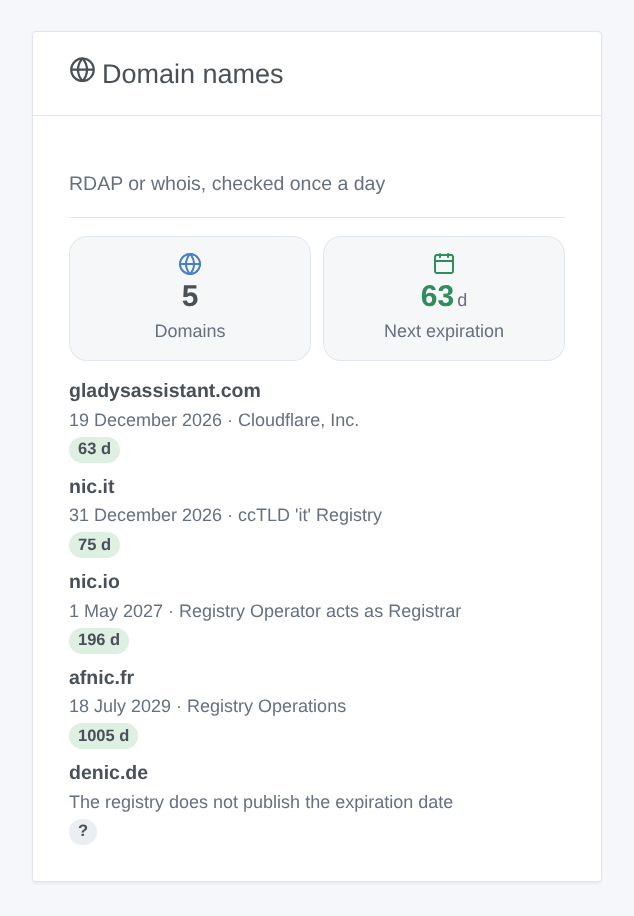
Domain names: how many domains are followed, the days before the next expiration, then each domain, the closest expiration first, with its date, its registrar and the days left as a colored badge (orange at 30 days, red at 7).
Scenes
- Domain: expires soon: the domain expires in 90, 60, 30, 14, 7, 3 or 1 day or less, or on the day. Each threshold fires once per expiration date. When several are reached at once (a domain added 5 days before its expiration), only the most urgent one is sent.
- Domain: renewed: the expiration date moved forward; the thresholds start again from the new date.
- Action Domain: read the expiration: days left, date, registrar, state and a summary ready for a message.
Examples: 30 days before the expiration, send "example.fr expires in 30 days (19 December 2026)." on Telegram; on the renewal, thank the treasurer of the association.
Transport
The integration asks the registries over the internet ("cloud" badge): only the domain name is in the requests, nothing about you leaves your network. One request per domain and per day.
Extensions
RDAP covers .com, .net, .org, .fr, .uk, .nl, .dev, .app and most extensions; whois covers others such as .io and .it. Some registries publish no expiration date at all (.de, .eu, .be, .ch): the domain is then listed with this reason and no device is offered.
Troubleshooting
- "Not a domain name": check the spelling; an IP address or a name without extension is refused.
- "Not registered": the registry does not know the domain (typo, or domain deleted).
- "The registry limits the requests": some whois servers refuse frequent requests. The integration tries again on its own later and keeps the last answer.
- Bug report: click Diagnostic, then copy the "Diagnostic:" lines of the Logs tab, with the versions of Gladys and of the integration (Gladys does not pass
DEBUGto the container).
Configuration settings
These are the settings Whois asks for in its configuration screen in Gladys.
| Setting | Type | Required | Description |
|---|---|---|---|
| Domains | section | No | Each domain is checked once a day with its registry: RDAP, or whois for the extensions without RDAP. No account, no key. Up to ten domains; each one becomes a device on the Discovery screen. |
| Domain names | string | No | Separated by commas. A web address is accepted: https://www.example.fr/ is read as example.fr. |
| Language of the texts | select | No | Feature names, text states and scene summaries. Automatic: the language of your dashboard, once the widget has been displayed (French before that). |
How to install Whois in Gladys
- In Gladys, open Integrations: Whois appears in the catalog, next to the native integrations, with a community badge.
- Click Install. Gladys pulls the Docker image (
ghcr.io/william-de71/gladys-whois:0.1.0), starts it in a sandbox isolated from the core, and generates the integration's interface (devices, discovery and configuration). - Open the Configuration screen of the integration, fill in the settings, and save.
- You can also install it directly from its repository URL: https://github.com/William-De71/gladys-whois.
Whois requires Gladys >=5.1.0. The catalog inside Gladys refreshes every hour, so a new version becomes available at most one hour after its release.
Not running Gladys yet? It is free and open source: follow the installation guide to get started.
About external integrations
Whois is an external integration: a community integration packaged as a Docker container and published on GitHub, that Gladys installs in one click and runs in a sandbox isolated from its core. It is published and maintained by William-De71, not by the Gladys core team.
- Browse all integrations, native and community
- Build and publish your own external integration
- Source code on GitHub — source of this documentation