Victron VRM smart home integration, free and open source
Victron Energy installations via VRM: battery, solar, grid, alarms and forecasts.
Published by William-De71
- Devices
- Version 0.1.0
- Requires Gladys >=5.1.0
- ★ 0
Overview
This integration brings the Victron Energy installations of your VRM account (vrm.victronenergy.com) into Gladys, through the official VRM API and a personal access token. It only reads: it never changes a setting of your installation. It is not affiliated with Victron Energy.
- One device per installation: battery level, battery charge and discharge power, battery voltage, solar power and solar production of the day, grid power (import +, export −), AC loads and consumption of the day, generator power.
- Four dashboard widgets: energy flow now, today (with an hourly chart), the VRM forecast, the VRM alarms.
- Scene triggers: VRM alarm raised or cleared, battery low or full, grid lost or restored, installation offline or back online, access refused.
- Scene actions: the energies of today, the solar and consumption forecast of today and tomorrow.
Transport: cloud. The access token goes to VRM (vrmapi.victronenergy.com) and the data of your installations come from the Victron cloud, which receives them from the GX device (Cerbo GX, Venus GX, Ekrano…) of each installation.
Prerequisites
- Gladys Assistant 5.1.0 or later.
- A Victron installation with a GX device that sends its data to VRM (it shows on vrm.victronenergy.com).
- A VRM access token: on VRM, open Preferences → Integrations → Access tokens (direct link), create a token and copy it. A token opens the whole account (keep it secret); the integration only reads with it.
- For the forecasts: solar panels, the location of the installation in VRM and about 30 days of history (a VRM rule).
How fresh the data are: VRM receives the data of an installation at the log interval of its GX device (Settings → VRM online portal → Log interval; often 15 minutes, 1 minute at best). Reading VRM more often than that brings nothing new.
Configuration
| Field | Meaning |
|---|---|
| Access token | The token created in VRM (a secret, never shown again nor written to the logs) |
| Reading of the installations | Every 1, 2, 5 (default), 10 or 15 minutes: one request reads every installation of the account |
| Level of the "battery low" trigger | 10 to 50 % (20 % by default) |
| Installation offline after | 30 min, 1 h (default), 2 h or 4 h without new data in VRM |
| Language of the texts | Feature names, scene texts and errors; automatic follows the language of the last widget |
Buttons:
- Test the connection checks the token and lists the installations of the account, with the time of their last data.
- Diagnostic writes the state of the integration to its logs, without the token.
Usage
Devices
Open Discover and add your installations. An installation device has:
- Battery level (%), Battery charge power and Battery discharge power (W, both positive: VRM gives the voltage and the current, the power is their product), Battery voltage (V);
- Solar production (W) and Solar production today (kWh), when the installation has solar;
- Grid power (W, positive when importing, negative when exporting), when it has a grid or shore power input;
- AC loads (W) and Consumption today (kWh);
- Generator power (W), when VRM says it has a generator.
None of these features is counted as the consumption of your house: a Linky or another meter keeps feeding the energy dashboard alone, without double counting. When VRM receives nothing from an installation for the delay of the configuration, its values are no longer published (they keep their last value and time in Gladys).
Dashboard widgets
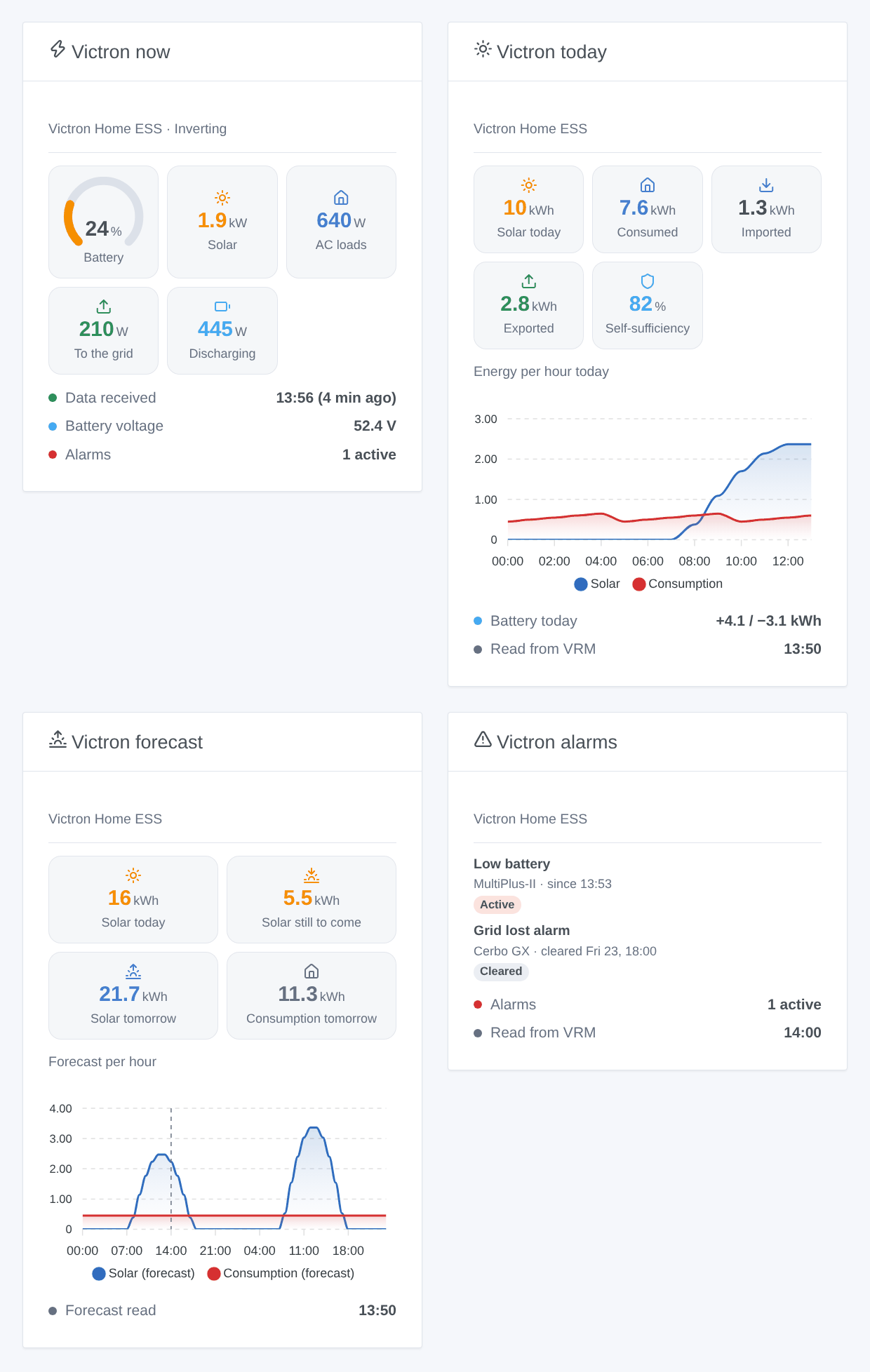
- Victron now: battery level, solar, AC loads, grid (to or from), battery (charging or discharging), generator when it runs; the state of the system, the battery voltage, the active alarms and when VRM last received data.
- Victron today: solar, consumption, grid import and export of the day, self-sufficiency, an hourly chart of the solar yield and the consumption, the battery charged and discharged.
- Victron forecast: the solar yield expected today, what is still to come, tomorrow, the consumption expected tomorrow, and their hourly chart.
- Victron alarms: the VRM alarm log, active alarms first, then the last cleared ones.
Choose the installation in the settings of the widget (empty: the first one).
Scenes
Triggers (once per change, never at the first reading):
- Victron VRM: alarm raised / alarm cleared: an entry of the VRM alarm log (low battery, grid lost, overload, high temperature, inverter error…). Variables: the alarm text, the Victron device, the start and end times, the duration.
- Victron VRM: battery low: the battery reaches the level of the configuration (again once 5 points above). Battery full: 100 % (again once under 95 %).
- Victron VRM: grid lost / grid restored: the grid alarm of the system (mains or shore power).
- Victron VRM: installation offline / back online: no new data in VRM for the delay of the configuration.
- Victron VRM: access refused: VRM refuses the token (revoked, expired or wrong).
Actions:
- Victron VRM: energies of today: solar, consumption, import, export, battery charged and discharged, generator, self-sufficiency, battery level and a sentence, from the last readings (no request).
- Victron VRM: solar forecast: solar today, still to come today, tomorrow, consumption today and tomorrow (kWh), and a sentence.
Examples:
- When Victron VRM: grid lost → send a notification "Power cut, battery at {{triggerEvent.data.battery_level}} %" and turn off the heaters on the inverter.
- Every evening at 21:00 → Victron VRM: solar forecast; if solar tomorrow is under 5 kWh → turn on the water heater during off-peak hours tonight.
- When Victron VRM: alarm raised → send a notification with {{triggerEvent.data.description}}.
Troubleshooting
- "VRM refuses the access token": the token was deleted or mistyped. Create a new one in VRM and paste it again (with or without the
Tokenprefix). - No installation: the token belongs to an account that sees no installation; check on vrm.victronenergy.com with the same account.
- Values that move every 15 minutes only: VRM itself receives the data at the log interval of the GX device; lower it on the GX device (1 minute) if you need more.
- "No forecast": VRM needs solar panels, the location of the installation and about 30 days of history.
- No alarm log: some accounts (shared installations, low access level) may be refused the log; the widget says so and it is asked again once a day.
- "VRM asked to slow down": VRM answered 429; the integration waits for the time VRM gives (Retry-After), then goes on by itself.
- Press Diagnostic and look at the logs of the integration (no token in them). For a bug, open an issue on GitHub with the versions of Gladys and of the integration, and the logs with
DEBUG=gladys-integration-sdk.
Configuration settings
These are the settings Victron VRM asks for in its configuration screen in Gladys.
| Setting | Type | Required | Description |
|---|---|---|---|
| VRM access token | section | No | Sign in to vrm.victronenergy.com, open Preferences → Integrations → Access tokens, create a token and paste it below. A token opens the whole account (keep it secret); this integration only reads. The data travel through the Victron cloud. This integration is not affiliated with Victron Energy. |
| Access token | secret | Yes | |
| Readings and triggers | section | No | VRM receives the data of an installation at the logging interval of its GX device (Settings → VRM online portal → Log interval, often 15 minutes): reading more often than that brings nothing new. |
| Reading of the installations | select | No | How often the latest values of every installation are read (one request for all). |
| Level of the “battery low” trigger | select | No | |
| Installation offline after | select | No | Without new data in VRM for this long, the installation is offline (trigger, widgets) and its values are no longer published. |
| Language of the texts | select | No | Feature names, scene texts and errors. Automatic: the language of the last widget shown. |
How to install Victron VRM in Gladys
- In Gladys, open Integrations: Victron VRM appears in the catalog, next to the native integrations, with a community badge.
- Click Install. Gladys pulls the Docker image (
ghcr.io/william-de71/gladys-victron-vrm:0.1.0), starts it in a sandbox isolated from the core, and generates the integration's interface (devices, discovery and configuration). - Open the Configuration screen of the integration, fill in the settings, and save.
- You can also install it directly from its repository URL: https://github.com/William-De71/gladys-victron-vrm.
Victron VRM requires Gladys >=5.1.0. The catalog inside Gladys refreshes every hour, so a new version becomes available at most one hour after its release.
Not running Gladys yet? It is free and open source: follow the installation guide to get started.
About external integrations
Victron VRM is an external integration: a community integration packaged as a Docker container and published on GitHub, that Gladys installs in one click and runs in a sandbox isolated from its core. It is published and maintained by William-De71, not by the Gladys core team.
- Browse all integrations, native and community
- Build and publish your own external integration
- Source code on GitHub — source of this documentation