TGV MAX smart home integration, free and open source

MAX JEUNE and MAX SENIOR seats on your SNCF routes, and an alert when seats open.
Published by William-De71
- Devices
- Version 0.1.0
- Requires Gladys >=5.3.0
- ★ 0
Overview
This integration follows the MAX JEUNE (16-27) and MAX SENIOR (60+) seats of SNCF, the unlimited subscriptions on TGV INOUI and Intercités with reservation. You declare your routes — "Paris → Lyon, Fridays from 17:00", "Lyon → Paris, Sundays" — and each one becomes a device: the trains with MAX seats open over the next 30 days, within 7 days, the days with seats and the next open train. A scene trigger tells you each morning when MAX seats open on a route, and three widgets show the trains, a 30-day calendar and all your routes.
The data come from the official open data of SNCF Voyageurs (dataset "Disponibilité à 30 jours de places MAX JEUNE et MAX SENIOR ouvertes à la réservation"), under the ODbL licence: no account, no key. SNCF rebuilds it once a day, early in the morning: the integration checks every 30 minutes whether it changed, then reads the trains of your routes. The seats it shows are the ones of the morning: seats can go during the day, and others can come back. Always book on SNCF Connect, where the seats are live.
It is a cloud integration: it contacts ressources.data.sncf.com. Nothing else leaves your network.
Prerequisites
- Gladys Assistant 5.3.0 or later.
- A MAX JEUNE or MAX SENIOR subscription, to book the seats on SNCF Connect. Nothing else: the open data of SNCF need neither an account nor a key.
Configuration
| Field / button | What it does |
|---|---|
| Add a route | Departure and arrival station, the days, the dates (they replace the days), the departure hours, and "also follow the return trip" (two routes at once). |
| Edit a route | Changes the days, the dates or the hours of a route (its number in List the routes, or its stations): the device stays. |
| Remove a route | Stops following a route. Delete its device in Gladys too if you no longer need it. |
| List the routes | Every followed route, numbered, with its trains with MAX seats. |
| Find a station | The stations of MAX holding some words: "marseille" gives Marseille St Charles and Marseille Blancarde. |
| Test the connection | The date of the data, the number of stations, and the requests left today. |
| Language of the texts | Device names, the next train and scene summaries. Automatic: the language of the dashboard (French until a widget is shown). |
Stations. Type a city or a station as SNCF names it. "Paris", "Lyon" and "Lille" cover every station of the city: Paris → Lyon follows every train from any Paris station to Part-Dieu or Perrache. A station alone: "Lyon St Exupery", "Aix en Provence TGV", "Marne la Vallee". When a name could be several stations ("Marseille", "Avignon", "Valence"), the integration lists them: type the one you want. Foreign stations work in French or in their language ("Barcelone", "Genève", "Bâle").
Days and hours. Every day, Monday to Friday, weekends, Friday to Sunday, or one day of the week; or up to ten dates (06/11, 08/11/2026, +3), which replace the days. The hours are the departure ones: "from 17" and "before 21" keep the trains leaving from 17:00 to 20:59. When adding the route, the integration checks that MAX trains run between the two stations.
The routes are kept in the Gladys configuration, so they follow its backups. Up to 20 routes.
Usage
Devices
In the Discover tab, create the TGV MAX <from> → <to> devices. Each one has four features:
- Trains with MAX seats: the trains of the route with MAX seats open, over the next 30 days;
- Trains with MAX seats within 7 days;
- Days with MAX seats: the dates with one open train at least;
- Next train with MAX seats: "Sat 31 Oct · 07:00 → 08:56 · train 6603", or "None".
A train that left today is no longer counted, even though the data of the morning still lists it.
Dashboard widgets
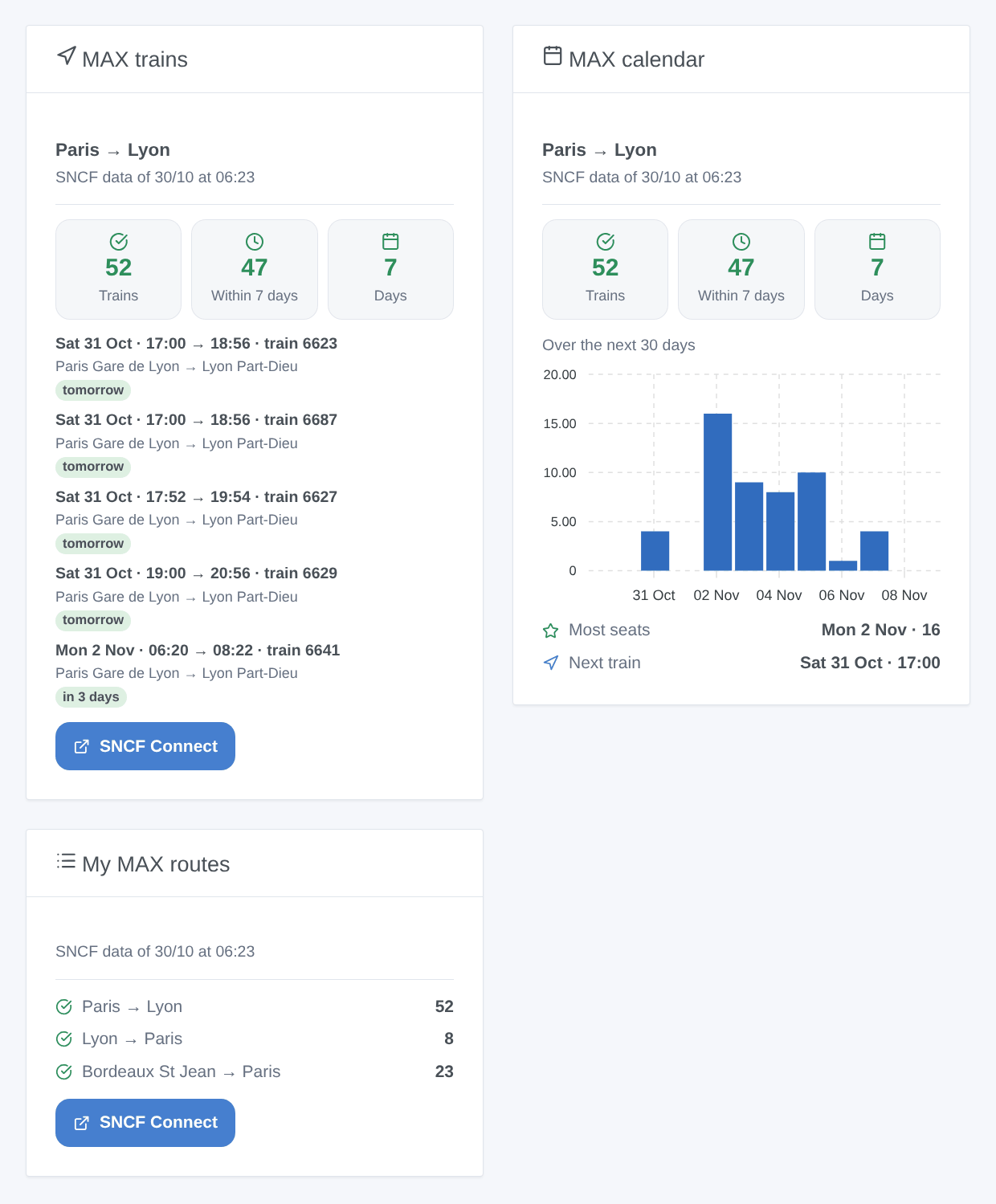
- MAX trains: three tiles (open trains, within 7 days, days), then the next open trains with their stations ("Paris Gare de Lyon → Lyon Part-Dieu") and how many days until them, the time of the data and a button to SNCF Connect. The setting Trains shown sets the length of the list.
- MAX calendar: the open trains of each day of the route over 30 days, in bars, the day with the most seats and the next train.
- My MAX routes: every followed route in one card, with its number of open trains, or "None".
Scenes
Triggers (the first reading of a route is only a reference):
- TGV MAX: new MAX seats: MAX seats opened on trains of a followed route that had none the day before, or on a new day of the dataset (it adds one every morning, 30 days ahead). One event per route and per morning, even when ten trains open:
{{triggerEvent.data.summary}}lists them,countgives their number,first_date_text,first_departure,first_trainanddays_untildescribe the first one. - TGV MAX: no more MAX seats: a followed route had open trains and has none left.
Actions:
- TGV MAX: search MAX seats: the trains with MAX seats between two stations on a date (today, tomorrow, 06/11, +3; within 30 days), within some hours. Outputs:
found,count, the first train, asummary. No route needs to be followed. - TGV MAX: read a followed route: its open trains, its days with seats, the next train and a
summary.
Examples:
- When new MAX seats open on Paris → Lyon (Fridays from 17:00) → send the summary to your phone.
- When a route has no more MAX seats → light the desk lamp in red.
- Every Thursday at 8:00 → search MAX seats from Lyon to Paris for tomorrow; if
foundis true, have the summary spoken by the kitchen speaker.
Transport
Cloud only: the data come from the internet. Only the stations of your routes are sent to the portal of SNCF.
Troubleshooting
- "No station of MAX is called …": use Find a station, and type the start of the city name. MAX only covers TGV INOUI and Intercités with reservation: TER and OUIGO stations are not listed.
- "No MAX train runs from … to …": no MAX train links these two stations over the next 30 days. Try the city ("Paris") rather than a station, or the other station of the city.
- The seats shown are gone on SNCF Connect: the data date from the morning; seats go fast. The widgets show the time of the data.
- Nothing fires on the first day: the first reading of a route is a reference; the trigger fires from the next morning, when seats open.
- "Daily quota reached": too many requests today from your internet address (other software may share it); the readings resume after midnight (UTC).
- "The SNCF open data portal does not answer": the integration tries again every 30 minutes; the last trains stay on the widgets.
- To report a problem: copy the answers of Test the connection and List the routes into an issue on GitHub or a reply on the forum, with the versions of Gladys and of the integration.
Configuration settings
These are the settings TGV MAX asks for in its configuration screen in Gladys.
| Setting | Type | Required | Description |
|---|---|---|---|
| SNCF open data | section | No | MAX JEUNE (16-27) and MAX SENIOR (60+) are the unlimited subscriptions of SNCF on TGV INOUI and Intercités with reservation. This integration reads the official open data of SNCF Voyageurs: the trains with MAX seats open, 30 days ahead, rebuilt every morning. No account, no key. 1. Press "Add a route" (Paris → Lyon, Fridays from 17:00…). 2. Add its device in the Discovery tab. 3. Use the "New MAX seats" scene trigger to be told, and the widgets on the dashboard. The data dates from the morning: book on SNCF Connect, where seats are live. |
| Language of the texts | select | No | Device names, the next train and scene summaries. Automatic: the language of the dashboard. |
How to install TGV MAX in Gladys
- In Gladys, open Integrations: TGV MAX appears in the catalog, next to the native integrations, with a community badge.
- Click Install. Gladys pulls the Docker image (
ghcr.io/william-de71/gladys-tgv-max:0.1.0), starts it in a sandbox isolated from the core, and generates the integration's interface (devices, discovery and configuration). - Open the Configuration screen of the integration, fill in the settings, and save.
- You can also install it directly from its repository URL: https://github.com/William-De71/gladys-tgv-max.
TGV MAX requires Gladys >=5.3.0. The catalog inside Gladys refreshes every hour, so a new version becomes available at most one hour after its release.
Not running Gladys yet? It is free and open source: follow the installation guide to get started.
About external integrations
TGV MAX is an external integration: a community integration packaged as a Docker container and published on GitHub, that Gladys installs in one click and runs in a sandbox isolated from its core. It is published and maintained by William-De71, not by the Gladys core team.
- Browse all integrations, native and community
- Build and publish your own external integration
- Source code on GitHub — source of this documentation