STAR Rennes smart home integration, free and open source
Rennes buses and metro (STAR): real-time passages, line traffic, metro lifts.
Published by William-De71
- Devices
- Version 0.1.0
- Requires Gladys >=5.3.0
- ★ 0
Overview
This integration brings STAR, the bus and metro network of Rennes Métropole, into Gladys: the next passages in real time at the stops of your choice (three in the form, up to 20 more with a button), filtered by line and direction, with the delay of the next bus; the traffic of up to six lines, bus or metro (normal, minor, major or blocking disruption, metro down, with the alerts of STAR); and the state of the metro: its two lines, closed stations, and the lifts and escalators out of service. Each stop and each line becomes a device you can show on a dashboard and use in scenes.
The data come from the official open data portal of STAR (Keolis Rennes, for Rennes Métropole), under the ODbL licence: no account, no key. The stops are read every minute by default (every 10 minutes while a stop announces nothing, at night), the traffic and the metro every 5 minutes. The lines and stops of the network are kept in the integration and read again once a day and once a week.
It is a cloud integration: it contacts data.explore.star.fr. Nothing else leaves your network.
Prerequisites
- Gladys Assistant 5.3.0 or later.
- Nothing else: the open data of STAR need neither an account nor a key.
Configuration
| Field | What to enter |
|---|---|
| Stop 1, 2, 3 | The name of the stop ("République", "Gares") for every side of the street and the metro station, or an id ("1242") for one side or platform. |
| Line | Only this line: "C1", "11", "a" or "b" for the metro. Empty: every line of the stop. |
| Direction | Only the destinations holding these words: "Chantepie", "Poterie | Gaîté". Empty: both directions. |
| Followed lines | The lines whose traffic you follow, up to six: "a, b, C1, 11". |
| Reading of the stops | Every 30 seconds, minute, 2 minutes or 5 minutes. |
| Language of the texts | Device names, scene summaries and outputs. The names of stops and the alerts of STAR stay in French. |
The Find a stop button gives the exact names of the stops holding a few words, with the id of each side of the street and of each metro platform, and the lines and destinations announced there ("1242 → 11 La Poterie, C1 Chantepie"): copy the id of the side you board. Test the connection reads the network, every stop and line at once, and the number of calls left today.
More stops than the three of the form (home, work…): Add a stop takes the same three fields — stop, line, direction — and follows up to 20 more stops. List the stops shows every followed stop, numbered; Remove a stop takes that number (or the name). The added stops are kept in the Gladys configuration, so they follow its backups.
Without a key, the portal allows a number of calls per day and per internet address (20,000 when this integration was written). With many stops, the integration reads them less often to stay well below it, and says so in its status.
Usage
Devices
In the Discover tab, create the devices you want:
- STAR <stop>: the next passage as text ("C1 → Chantepie · 6 min (+1 min late)"), the wait of the next passage and of the following one, and the delay of the next bus on its timetable (minutes);
- STAR line <line> or STAR metro <line>: the traffic as text ("Major disruption: Travaux") and the number of major or blocking disruptions under way.
When a bus is not located yet, STAR gives its timetable: the integration says so ("timetable"). At night, without any passage, the waits keep their last value.
Dashboard widgets
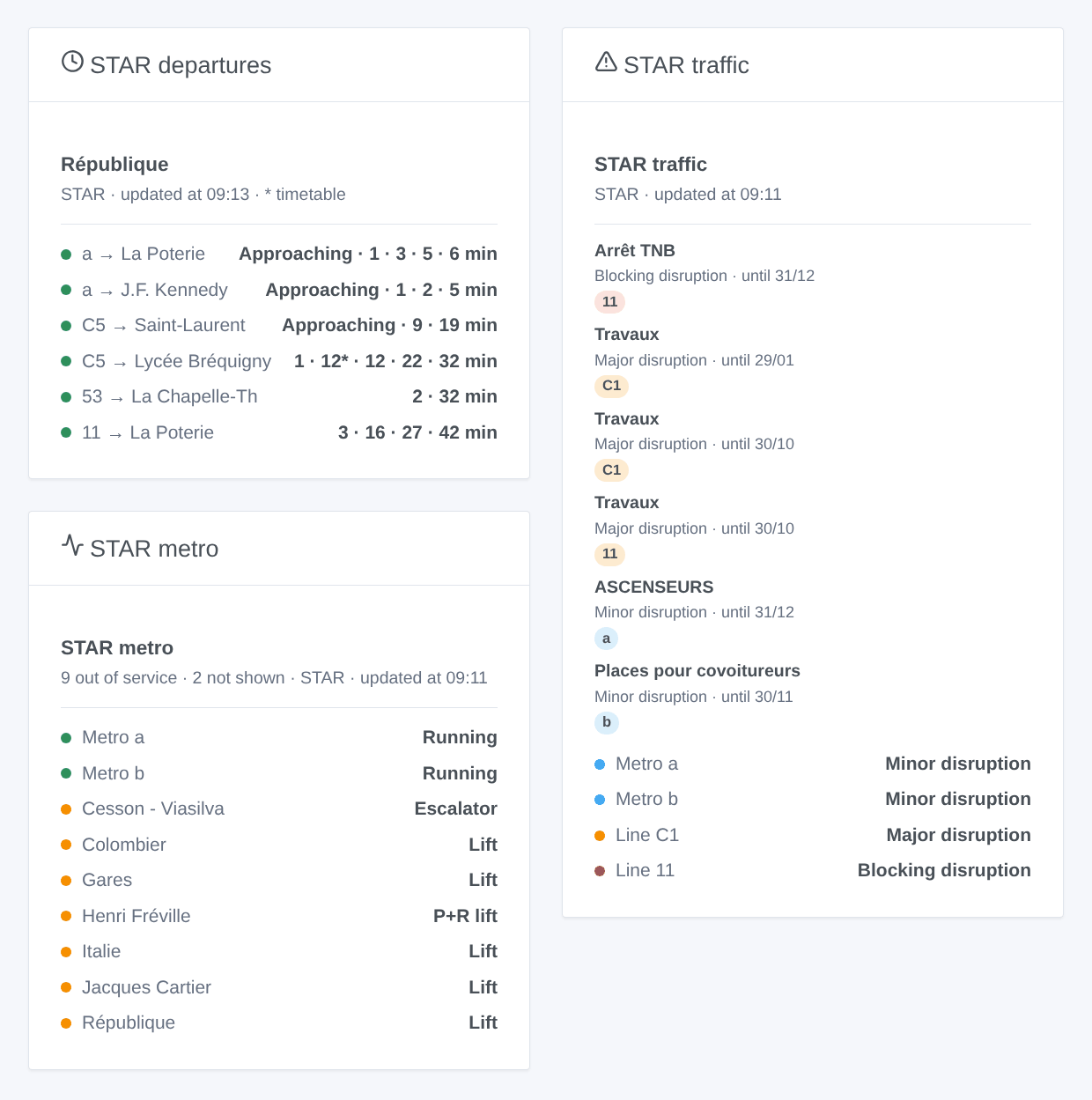
- STAR departures: the next passages of a stop, compact: one row per line and destination with its next passages on one line ("1 · 9 · 27 min", "10:32"), the timetable times in grey. The setting Routes shown sets the number of rows. Choose a followed stop, or type any stop (and a line) in the settings of the widget. With Several stops, one widget shows several stop devices: the devices of one stop are merged under its name; for different stops, each row starts with its stop.
- STAR traffic: the state of each line, then the alerts of STAR with their dates; tap a card for the full text and the link to star.fr. The followed lines, or the ones typed in the settings.
- STAR metro: lines a and b (running, or down with the restart expected), the closed stations, then the lifts and escalators out of service, station by station. The setting Equipment shown keeps only the lifts, for instance.
Scenes
Triggers, fired once per change (the first reading is only a reference):
- STAR: bus or metro soon: a passage at a followed stop leaves in 2, 3, 5, 10, 15 or 20 minutes.
- STAR: line disrupted: a followed line gets a major or blocking alert under way, or its metro goes down.
- STAR: line back to normal: it runs normally again.
- STAR: new traffic alert: STAR publishes an alert about a followed line (planned or under way).
- STAR: metro lift out of service and STAR: metro lift back in service: a lift or an escalator of a metro station (or of its park-and-ride), to filter by station and kind. No line needs to be followed.
Each one gives a ready-made sentence, {{triggerEvent.data.summary}}, and its values (line, destination, time, delay, title, station…). The actions STAR: next passages and STAR: traffic of a line return the same kind of values, to put in a message or test in a condition.
Examples:
- When the C1 towards Chantepie leaves République in 5 minutes → light the hall lamp in green.
- When the lift of your metro station goes out of service → send the summary to your phone before leaving.
- Every weekday at 7:30 → read the next passages of your stop and have them spoken by the speaker of the kitchen.
Transport
Cloud only: the data come from the internet. Only the stops and lines you follow are asked to the portal of STAR.
Troubleshooting
- "Unknown to STAR": use Find a stop, then copy the exact name or an id; for a line, its name as on the buses ("C1", "11"), "a" or "b" for the metro.
- No passage at night: the network sleeps; the stop is read every 10 minutes until the first passage is announced.
- "Daily quota reached": too many calls today from your internet address (other software may share it); the readings resume after midnight (UTC). Follow fewer stops, or read them less often.
- "The STAR open data portal does not answer": the integration tries again at each reading; the last passages stay on the widgets.
- To report a problem: press Diagnostic, then copy the lines starting with "STAR diagnostic" from the Logs tab into an issue on GitHub or a reply on the forum, with the versions of Gladys and of the integration.
Configuration settings
These are the settings STAR Rennes asks for in its configuration screen in Gladys.
| Setting | Type | Required | Description |
|---|---|---|---|
| STAR open data | section | No | The passages, the traffic and the state of the metro come from the official open data portal of STAR, the bus and metro network of Rennes Métropole (Keolis Rennes). No account and no key: fill in your stops and lines below, then press "Test the connection". |
| Stop 1 | section | No | The stop where you take the bus or the metro: its passages are read in real time. Type its name ("République") for every side of the street and the metro station, or an id ("1242") for one side only: the "Find a stop" button gives them. The line keeps only its passages ("C1", "11", "a" or "b" for the metro). The direction keeps only the destinations holding these words ("Chantepie", "Poterie | Gaîté"). |
| Stop | string | No | |
| Line | string | No | Empty for every line. |
| Direction | string | No | Words of the destination. Empty for both directions. |
| Stop 2 | section | No | |
| Stop | string | No | |
| Line | string | No | Empty for every line. |
| Direction | string | No | Words of the destination. Empty for both directions. |
| Stop 3 | section | No | More stops (a home, a workplace…): the "Add a stop" button, under the form, follows up to 20 more, "List the stops" shows them all, numbered, and "Remove a stop" stops following one. |
| Stop | string | No | |
| Line | string | No | Empty for every line. |
| Direction | string | No | Words of the destination. Empty for both directions. |
| Traffic of the lines | section | No | The lines whose traffic you follow, bus or metro: a device per line, with its state (normal, minor, major or blocking disruption, metro down) and the alerts of STAR, read every 5 minutes. |
| Followed lines | string | No | Up to 6, separated by commas. |
| Options | section | No | |
| Reading of the stops | select | No | How often the passages of the stops are read. A stop announcing nothing (at night) is read every 10 minutes. With many stops, the interval is stretched to stay within the daily quota of the portal. |
| Language of the texts | select | No | Device names, scene summaries and outputs. Automatic: the language of your dashboard, once a STAR widget has been displayed. Names of stops and traffic alerts stay in French. |
How to install STAR Rennes in Gladys
- In Gladys, open Integrations: STAR Rennes appears in the catalog, next to the native integrations, with a community badge.
- Click Install. Gladys pulls the Docker image (
ghcr.io/william-de71/gladys-star-rennes:0.1.0), starts it in a sandbox isolated from the core, and generates the integration's interface (devices, discovery and configuration). - Open the Configuration screen of the integration, fill in the settings, and save.
- You can also install it directly from its repository URL: https://github.com/William-De71/gladys-star-rennes.
STAR Rennes requires Gladys >=5.3.0. The catalog inside Gladys refreshes every hour, so a new version becomes available at most one hour after its release.
Not running Gladys yet? It is free and open source: follow the installation guide to get started.
About external integrations
STAR Rennes is an external integration: a community integration packaged as a Docker container and published on GitHub, that Gladys installs in one click and runs in a sandbox isolated from its core. It is published and maintained by William-De71, not by the Gladys core team.
- Browse all integrations, native and community
- Build and publish your own external integration
- Source code on GitHub — source of this documentation