Shodan smart home integration, free and open source
What the Internet sees of your home, by Shodan: open ports, vulnerabilities, alerts.
Published by William-De71
- Devices
- Version 0.1.0
- Requires Gladys >=5.3.0
- ★ 0
Overview
This integration shows in Gladys what the Internet sees of your home, as Shodan knows it. Shodan scans the whole Internet and records the open ports, the software answering on them and the known vulnerabilities (CVE) of that software. The integration only asks Shodan what it knows about the addresses you watch: it never scans anything from Gladys, and only the addresses are sent to Shodan. It only reads. It is not affiliated with Shodan.
- One device per watched address: the public address of the home, and up to 10 other public addresses or host names.
- Three dashboard widgets: the Internet exposure of every address, the worst first; one address with its services and vulnerabilities; the Shodan account and its credits.
- Scene triggers: port opened, port closed, vulnerability found, vulnerability gone, tag added, public IP changed, API key refused.
- Scene actions: the values of an address, look up any address, ask Shodan to scan an address.
Two sources:
- Without an API key: Shodan InternetDB, free for non-commercial use, without an account, refreshed once a week by Shodan. It gives the open ports, the CVE ids, the host names, the Shodan tags and the CPE — no product or version, no CVSS score, no date of the last scan.
- With the API key of a Shodan account (optional, account.shodan.io): the host lookup of the Shodan API adds the software and version of each service, the CVSS score and description of each CVE, the date Shodan last saw the address and the organisation or ISP; plus the plan and credits (account widget) and the on-demand scan (paid plans only).
Transport: cloud. The data come from internetdb.shodan.io and api.shodan.io. The integration keeps in /data/shodan.json (mode 0600) its readings, what the triggers know, the credits and the scans asked — never the API key.
Prerequisites
- Gladys Assistant 5.3.0 or later: older instances cannot install the integration.
- Internet access.
- Optional: a Shodan account and its API key. Shodan InternetDB is free for non-commercial use only.
- Watch only addresses you own.
How fresh the data are: a timer checks every minute what is due. The public address is asked to Shodan every 15 minutes; each address is read every 6 hours, or at once when its IP changed; a failed reading is tried again after 30 minutes; the credits are read every 6 hours. Requests are sent 1.1 s apart (Shodan asks for one request per second at most); a 429 or a server error pauses that service only (InternetDB or the API). InternetDB changes about once a week, so most readings bring nothing new: that is expected.
Configuration
| Field | Meaning |
|---|---|
| Watch the public address of the home | On by default: the address your box uses, asked to Shodan every 15 minutes; a change of address is followed |
| Other addresses | Public IP addresses or host names (a dynamic DNS name, a server), separated by commas, 10 at most; host names are resolved by the DNS of the container at each reading (IPv4 first); private, local (.local, .lan) or invalid entries are ignored and listed in the connection status |
| API key | Optional, a secret (never shown again, never written to the logs nor to /data) |
| Language of the texts | Feature names, scene texts and errors; automatic follows the language of the last widget shown (en/fr/de/es) |
Buttons:
- Test the connection asks for the public address, reads every address and checks the key now, and answers for instance "Shodan answers. Public address: 203.0.113.7. 1 address(es) read with Shodan API. Plan: dev, 87 scan credit(s)."
- Diagnostic writes what the integration knows to its logs, never the key.
When Shodan refuses the key (HTTP 401), InternetDB answers meanwhile, the trigger "API key refused" fires once and the key is tried again every 6 hours. When the plan of the key refuses host lookups (HTTP 403), InternetDB is used for 24 hours.
Usage
Devices
After the configuration, open Discover: "Shodan: public IP" is offered for the public address — one device that stays the same when the address changes — and "Shodan <address>" for each address you typed. Add the ones you want.
| Feature | Category / type | Content |
|---|---|---|
| Open ports | counter-sensor / integer | Number of open ports Shodan saw |
| Vulnerabilities | counter-sensor / integer | Number of CVE Shodan matched to the software it saw |
| IP address | text / text | The address read |
| Exposed ports | text / text | "22/tcp, 443/tcp" with a key, "22, 443" without |
All features are read only and keep their history. The vulnerabilities are matched by Shodan from the versions of the software it saw: they are not verified on the machine. Use the features in scene conditions, for instance "Vulnerabilities > 0".
Dashboard widgets
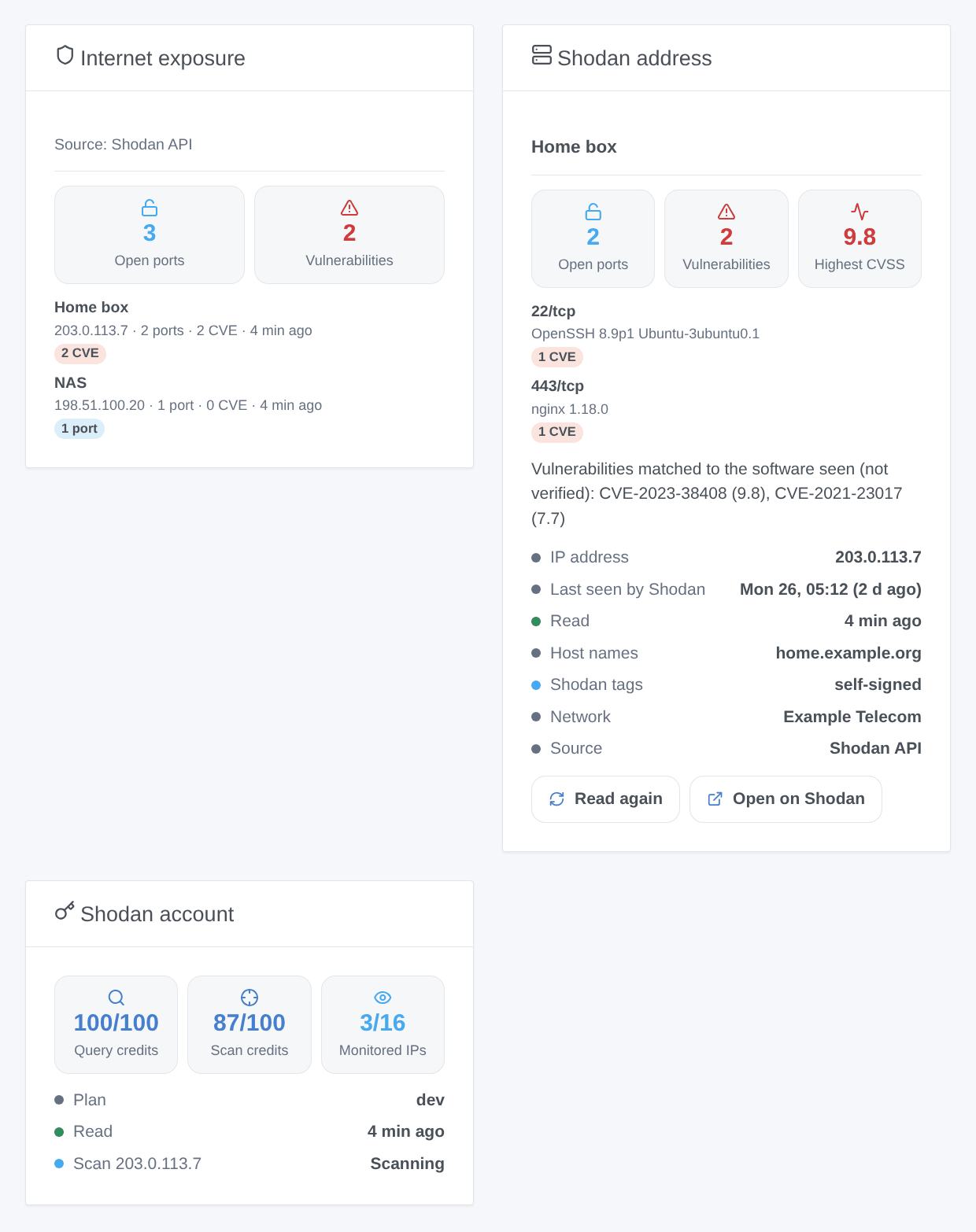
- Internet exposure: tiles with the total open ports and vulnerabilities, then one card per address, the worst first (alarm tags compromised, malware or doublepulsar, then CVE, then errors, then open ports). Each card shows the ports, the CVE, the tags and a link to the page of the address on shodan.io; a caption tells the source.
- Shodan address: one address (choose its device in the settings of the widget; empty = the public address): tiles ports, vulnerabilities and highest CVSS (with a key), one card per port or service with its product, version and CVE (scores and descriptions), a text listing the CVE, status rows (IP, last seen by Shodan, read, host names, tags, network, source), a Read again button (once a minute at most) and an Open on Shodan button.
- Shodan account: query credits, scan credits and monitored IPs against their limits, the plan and the last scans. Without a key, it says a key is needed.
Scenes
Triggers (once per change, never at the first reading, never because of a scene action; at most 10 events of a kind per address and per reading):
- Shodan: port opened (filters: address, port number): variables target, target_name, ip, ports, port, and transport and product with a key.
- Shodan: port closed (same filters): variables target, target_name, ip, ports, port.
- Shodan: vulnerability found (filter: address): variables target, target_name, ip, ports, cve, cvss and summary with a key, url (the NVD page of the CVE).
- Shodan: vulnerability gone: variables target, target_name, ip, ports, cve, url.
- Shodan: tag added (filters: address, tags: compromised, malware, honeypot, doublepulsar, eol-product, eol-os, self-signed, starttls, database, devops, iot, ics, medical, videogame, vpn, proxy, tor, cdn, cloud, scanner): variable tag.
- Shodan: public IP changed (checked every 15 minutes): variables previous_ip, ip.
- Shodan: API key refused: variables reason (
refused) and message; once per refusal. A plan that refuses host lookups (HTTP 403) does not fire it.
A new address, or a change of source (key added or removed), starts a new baseline without any event: what Shodan knows about a freshly assigned address may describe its previous holder.
Actions:
- Shodan: values of an address (no request; field: an address device, empty = the public address or the first one): target_name, ip, port_count, ports, vuln_count, vulns, max_cvss, tags, hostnames, source (
internetdborapi), last_scan (ISO 8601, with a key), read_at and summary, for instance "Shodan: public IP (203.0.113.7): 2 open ports (22/tcp, 443/tcp), 2 vulnerabilities (CVSS 9.8). Shodan tags: self-signed." - Shodan: look up an address (field: any public IP or host name; one request now): ip, found, port_count, ports, vuln_count, vulns, max_cvss, tags, hostnames, source, summary.
- Shodan: scan an address (needs an API key and the scan credits of a paid plan, 1 credit per address; field: an address device): scan_id, ip, credits_left. The scan is followed every 2 minutes until it is done, then the address is read again.
Examples:
- When Shodan: port opened on the public IP → send "Port {{triggerEvent.data.port}} is open on {{triggerEvent.data.ip}}".
- When Shodan: vulnerability found → send "{{triggerEvent.data.cve}}: {{triggerEvent.data.url}}".
- Every Monday at 8:00 → Shodan: values of an address → send its
summary. - When Shodan: public IP changed → send "New public address: {{triggerEvent.data.ip}}".
Troubleshooting
- "The public address is not known yet":
api.shodan.iocould not be reached to ask for the public address; check the Internet access of Gladys. - A host name "does not resolve to a public address": the DNS of the container gives no address, or a private one; check the name.
- "Shodan refuses the API key": check the key on account.shodan.io. InternetDB answers meanwhile; the key is tried again every 6 hours, or at once with Test the connection.
- HTTP 403 (plan): the free or oss plan may not allow host lookups or scans. InternetDB is used for host lookups; a scan needs scan credits.
- The data look old: InternetDB is refreshed about once a week; with a key, the Shodan address widget shows when Shodan last saw the address.
- After a change of public address, the data may describe the previous holder of the address until Shodan scans it again.
- Nothing appears: Shodan only sees what is reachable from the Internet. Behind a CGNAT or without port forwarding, there may be nothing to see, which is good news.
- For an issue, give the versions of Gladys and of the integration, the message of Test the connection and the lines written by Diagnostic in the logs of the integration (
DEBUG=gladys-integration-sdkadds the SDK logs). Never paste your API key.
Configuration settings
These are the settings Shodan asks for in its configuration screen in Gladys.
| Setting | Type | Required | Description |
|---|---|---|---|
| What the Internet sees | section | No | Shodan scans the whole Internet and lists the open ports and the software it finds. The integration asks Shodan what it knows of your public address: nothing is scanned from Gladys, and only the addresses go to Shodan. Without a key it uses InternetDB, free for non-commercial use and refreshed once a week. Not affiliated with Shodan. |
| Watch the public address of the home | boolean | No | The address your Internet box uses, asked to Shodan every 15 minutes: it follows a change of address. |
| Other addresses | string | No | Public IP addresses or host names (a dynamic DNS name, a server), separated by commas, 10 at most. Watch only addresses that are yours. |
| Shodan API key (optional) | section | No | With the key of a Shodan account (account.shodan.io), the integration reads the Shodan API instead: the software and version of each service, the CVSS scores, the date of the last scan, the credits, and the on-demand scan (paid plans). Without a key everything else works. |
| API key | secret | No | |
| Language of the texts | select | No | Feature names, scene texts and errors. Automatic: the language of the last widget shown. |
How to install Shodan in Gladys
- In Gladys, open Integrations: Shodan appears in the catalog, next to the native integrations, with a community badge.
- Click Install. Gladys pulls the Docker image (
ghcr.io/william-de71/gladys-shodan:0.1.0), starts it in a sandbox isolated from the core, and generates the integration's interface (devices, discovery and configuration). - Open the Configuration screen of the integration, fill in the settings, and save.
- You can also install it directly from its repository URL: https://github.com/William-De71/gladys-shodan.
Shodan requires Gladys >=5.3.0. The catalog inside Gladys refreshes every hour, so a new version becomes available at most one hour after its release.
Not running Gladys yet? It is free and open source: follow the installation guide to get started.
About external integrations
Shodan is an external integration: a community integration packaged as a Docker container and published on GitHub, that Gladys installs in one click and runs in a sandbox isolated from its core. It is published and maintained by William-De71, not by the Gladys core team.
- Browse all integrations, native and community
- Build and publish your own external integration
- Source code on GitHub — source of this documentation