SensorPush Cloud smart home integration, free and open source
SensorPush sensors via the official cloud API: temperature, humidity, pressure, alerts.
Published by William-De71
- Devices
- Version 0.1.0
- Requires Gladys >=5.3.0
- ★ 0
Overview
This integration brings the sensors and gateways of your SensorPush account into Gladys: the temperature, humidity, dew point, barometric pressure and vapour pressure deficit (VPD) of your SensorPush sensors (HT1, HT.w, HTP.xw), relayed to the cloud by a SensorPush gateway (G1 WiFi Gateway), through the official SensorPush Gateway Cloud API with the e-mail address and the password of your account. It only reads. It is not affiliated with SensorPush.
- One device per sensor: temperature, humidity, dew point, barometric pressure (HTP.xw only) and VPD, as each model gives them.
- One device per gateway: whether it checks in with the SensorPush cloud, its software version.
- Two dashboard widgets: every sensor at a glance, the alerts first; one sensor with a 24-hour chart.
- Scene triggers: outside the alert range, back in the alert range (the ranges you set in the SensorPush app), sensor silent, sensor back, gateway disconnected, gateway reconnected, access refused.
- Scene actions: the values of a sensor, the history of a sensor (minimum, maximum, average over 1 to 72 hours).
Transport: cloud. The e-mail address and the password go to SensorPush (api.sensorpush.com) to sign in; the samples of your sensors come from the SensorPush cloud, which receives them from your gateway.
Prerequisites
- Gladys Assistant 5.3.0 or later.
- A SensorPush account with at least one sensor and a SensorPush gateway: without a gateway, the samples stay in the phone and never reach the cloud.
- The API access of the account must be activated: log in once to the Gateway Cloud Dashboard with the same e-mail address and password, and accept the terms of the API. Until then SensorPush refuses the sign-in.
- The password must have at least 8 characters (a rule of SensorPush).
How fresh the data are: a gateway relays the sensors about once a minute, and SensorPush accepts one request a minute at most. The integration never asks more: the last samples every minute by default, the lists of the sensors and of the gateways every 15 minutes, each in place of a sample reading.
Configuration
| Field | Meaning |
|---|---|
| E-mail address | The e-mail of your SensorPush account |
| Password | Its password (a secret: never shown again, never written to the logs nor to /data) |
| Reading of the samples | Every 1 (default), 2, 5 or 10 minutes: one request for every sensor |
| Sensor silent after | 15, 30 (default), 60, 120 or 360 minutes without a new sample |
| Units of the scenes | Metric (°C, hPa, default) or US (°F, inHg) for the values and texts of the scenes; widgets follow each user |
| Language of the texts | Feature names, gateway state, scene texts and errors; automatic follows the last widget |
Buttons:
- Test the connection signs in to SensorPush and lists the sensors (it can wait up to a minute, the pace of SensorPush).
- Diagnostic writes the state of the integration to its logs, without the password nor the token.
The access token stays in memory: after a restart the integration signs in again.
Usage
Devices
After the configuration, open Discover: each sensor is offered once a first sample was read, named as in the SensorPush app, and each gateway as "SensorPush gateway <name>". Add the ones you want.
| Feature | Category / type | Unit |
|---|---|---|
| Temperature | temperature-sensor / decimal | °C |
| Humidity | humidity-sensor / decimal | % |
| Dew point | temperature-sensor / probe | °C |
| Barometric pressure (HTP.xw) | pressure-sensor / decimal | hPa |
| Vapour pressure deficit (VPD) | pressure-sensor / decimal | kPa |
| Gateway connection, its version | text / text | — |
SensorPush gives °F and inHg: the integration converts them, and Gladys shows them in the units of each user. The dew point is a "probe" temperature so that it does not count in the average temperature of the room. Older sensors have no dew point nor VPD, and only the HTP.xw has a barometer: a feature appears with its first value. The battery voltage and the signal have no fitting category in Gladys: the sensor widget and the scene action show them.
Dashboard widgets
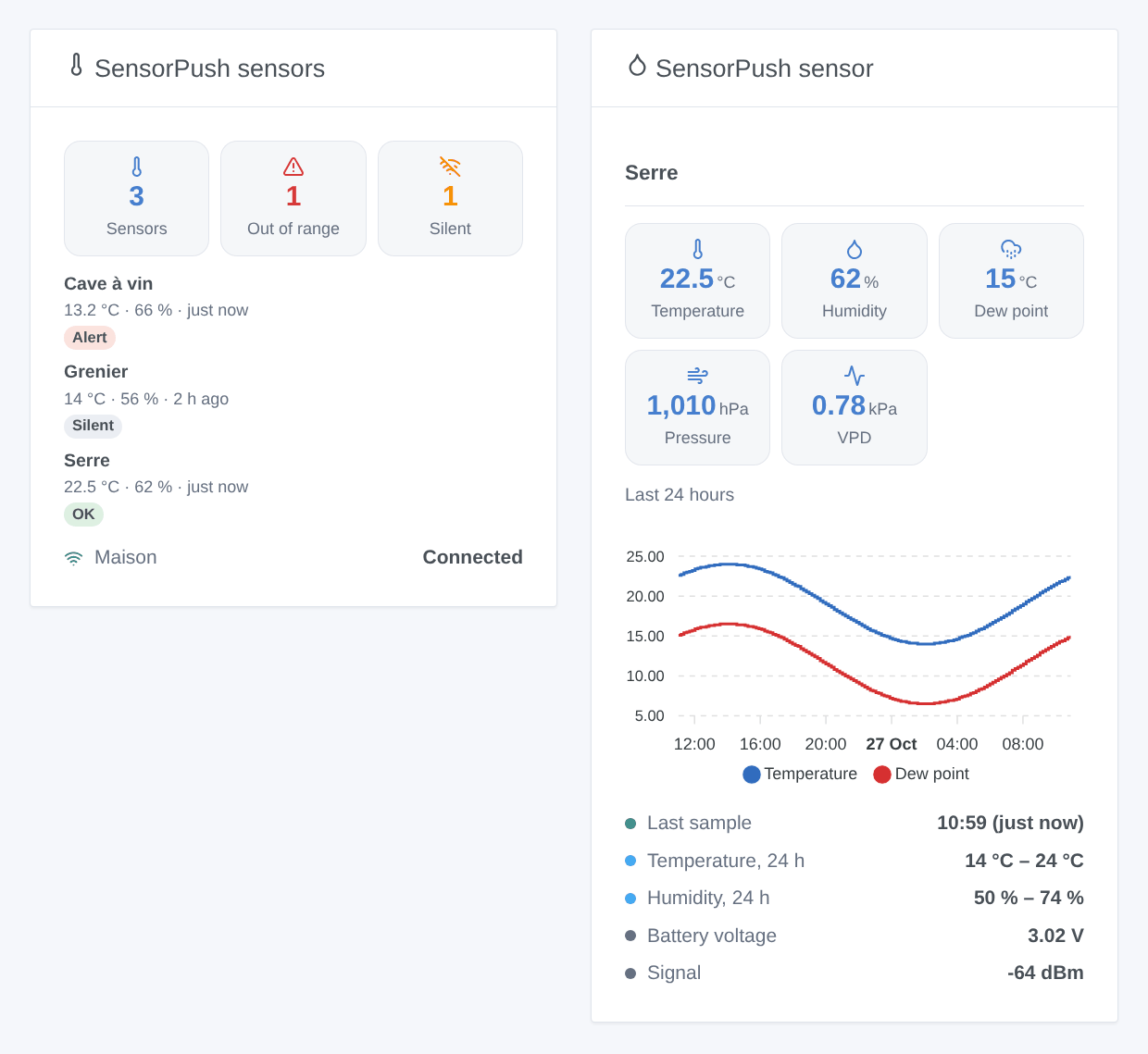
- SensorPush sensors: how many sensors, how many are outside their alert range, how many are silent; one card per sensor (the alerts first) with its temperature, humidity and the age of its last sample; the gateways and whether they check in.
- SensorPush sensor: one sensor (choose it in the settings of the widget; the first one by default): its measures, the temperature and dew point of the last 24 hours, the lowest and highest of the day, its alert ranges, battery voltage and signal. The chart comes from the samples the integration keeps, without any extra request.
Scenes
Triggers (once per change, never at the first reading, never because of a scene action), filtered by sensor or gateway:
- Outside the alert range: the temperature or the humidity leaves the alert range set in the SensorPush app (filters: measures, side). An alert switched off in the app watches nothing.
- Back in the alert range: it comes back inside, with how long it was outside.
- Sensor silent / Sensor back: no new sample for the delay of the configuration, then samples again.
- Gateway disconnected / Gateway reconnected: no check-in with the SensorPush cloud for 30 minutes, then a check-in again.
- Access refused: SensorPush refuses the e-mail address, the password or the access token.
Actions:
- Values of a sensor: temperature, humidity, dew point, pressure, VPD, battery voltage, signal, minutes since the last sample and a sentence, from the last reading (no request).
- History of a sensor: the minimum, maximum and average temperature and humidity of the last 1 to 72 hours, and a sentence. It sends one request in the next free minute: the scene may wait up to a minute.
Examples:
- When SensorPush: outside the alert range on the wine cellar → send "{{triggerEvent.data.sensor_name}}: {{triggerEvent.data.measure_label}} {{triggerEvent.data.value}} {{triggerEvent.data.unit}}".
- Every day at 8:00 → SensorPush: history of a sensor (greenhouse, 24 h) → send its summary.
- When SensorPush: gateway disconnected → send "The SensorPush gateway {{triggerEvent.data.gateway_name}} is offline".
Troubleshooting
- "SensorPush refused the sign-in": check the e-mail address and the password in the SensorPush app; a new account must first log in once to dashboard.sensorpush.com and accept the API terms.
- "at least 8 characters": SensorPush refuses shorter passwords: change it in the SensorPush app.
- No device offered: a sensor is offered once a first sample was read, about two minutes after the configuration. Inactive sensors are not offered.
- Values that do not change, sensor silent: the samples need the gateway; check that it is plugged in and online (its device, or the overview widget).
- The history action is slow: SensorPush accepts one request a minute; the action waits for the next free minute.
- For an issue, give the versions of Gladys and of the integration, the message of Test the connection and the "SensorPush diagnostic" lines written by Diagnostic in the logs of the integration. Never paste your password.
Configuration settings
These are the settings SensorPush Cloud asks for in its configuration screen in Gladys.
| Setting | Type | Required | Description |
|---|---|---|---|
| SensorPush account | section | No | Enter the e-mail address and the password of your SensorPush account. The integration signs in to the official Gateway Cloud API (api.sensorpush.com) and only reads: the samples travel through the SensorPush cloud, relayed by a SensorPush gateway (G1 WiFi Gateway). A new account must first log in once to the Gateway Cloud Dashboard and accept the API terms. Not affiliated with SensorPush. |
| E-mail address | string | Yes | |
| Password | secret | Yes | |
| Readings and triggers | section | No | SensorPush accepts one request a minute at most: the integration never asks more. A gateway relays the sensors about once a minute. The list of the sensors and the gateways is read again every 15 minutes, in place of a sample reading. |
| Reading of the samples | select | No | How often the last sample of every sensor is read (one request for all). |
| Sensor silent after | select | No | Time without a new sample before a sensor is silent and the “sensor silent” trigger fires. |
| Units of the scenes | select | No | Units of the values and texts of the scene actions and triggers. The widgets follow the units of each user. |
| Language of the texts | select | No | Feature names, gateway state, scene texts and errors. Automatic: the language of the last widget shown. |
How to install SensorPush Cloud in Gladys
- In Gladys, open Integrations: SensorPush Cloud appears in the catalog, next to the native integrations, with a community badge.
- Click Install. Gladys pulls the Docker image (
ghcr.io/william-de71/gladys-sensorpush-cloud:0.1.0), starts it in a sandbox isolated from the core, and generates the integration's interface (devices, discovery and configuration). - Open the Configuration screen of the integration, fill in the settings, and save.
- You can also install it directly from its repository URL: https://github.com/William-De71/gladys-sensorpush-cloud.
SensorPush Cloud requires Gladys >=5.3.0. The catalog inside Gladys refreshes every hour, so a new version becomes available at most one hour after its release.
Not running Gladys yet? It is free and open source: follow the installation guide to get started.
About external integrations
SensorPush Cloud is an external integration: a community integration packaged as a Docker container and published on GitHub, that Gladys installs in one click and runs in a sandbox isolated from its core. It is published and maintained by William-De71, not by the Gladys core team.
- Browse all integrations, native and community
- Build and publish your own external integration
- Source code on GitHub — source of this documentation