Refoss smart home integration, free and open source
Refoss smart plugs, relays, shutters and energy monitors, on the local network.
Published by William-De71
- Devices
- Version 0.1.0
- Requires Gladys >=5.1.0
- ★ 0
Overview
This integration brings your Refoss devices into Gladys, on your local network, without the Refoss cloud: the P11S smart plug, the R10, R11 and R21 relays and shutter modules, and the EM01P, EM06, EM06P, EM16 and EM16P energy monitors with their current clamps.
Every outlet, shutter and clamp becomes a Gladys device you can control, put in a room, use in scenes and add to the energy monitoring of Gladys: the integration turns the counters of the devices, which restart every month, into energy indexes that only go up.
Not affiliated with Refoss.
Requirements
- Gladys Assistant 5.1.0 or later.
- Your Refoss devices set up in the Refoss app and connected to the same network as Gladys.
- For the first models (R10, EM06, EM16): a fixed IP address, set as a DHCP reservation in your router.
- If you protected your devices with a password in the Refoss app: that password.
Configuration
Devices
The current models (P11S, R11, R21, EM01P, EM06P, EM16P) are found by themselves: accept the network discovery when you install the integration, then press Search the devices.
The first models (R10, EM06, EM16) cannot be found by Gladys: type their IP addresses in Addresses of the older models, separated by commas. You can also type the address of a current model that sits on another subnet.
Device password: only if you set one in the Refoss app (the same for all your devices). Leave it empty otherwise.
Refresh and language
Measurement refresh: how often power, voltage, current and energy are sent to Gladys (10, 30 or 60 seconds); on / off and shutters are always sent at once. Search again: how often the network is searched for new devices. Language of the device names: the language of the feature names and of the scene error messages.
Usage
Devices
Open the Discover tab of the integration and add the devices you want. There is one Gladys device per channel:
- an outlet or a relay: on / off, and power, voltage, current and an energy index when the device measures them;
- a shutter (R11 or R21 in cover mode): open, stop, close, and the position once the motor is calibrated in the Refoss app;
- a current clamp of an energy monitor: power (below zero when the line sends energy back, a solar line for example), voltage, current, energy consumed and energy returned.
The names come from the Refoss app; a clamp without a name is called after its box and its position (A1, B1…).
Energy monitoring
The Energy consumed feature of an outlet or a clamp is an index in kWh that only goes up: add the device to the energy monitoring of Gladys to see its daily consumption and its cost. The Energy returned feature of a clamp follows what it sent back. The index starts the day you add the device.
Widgets
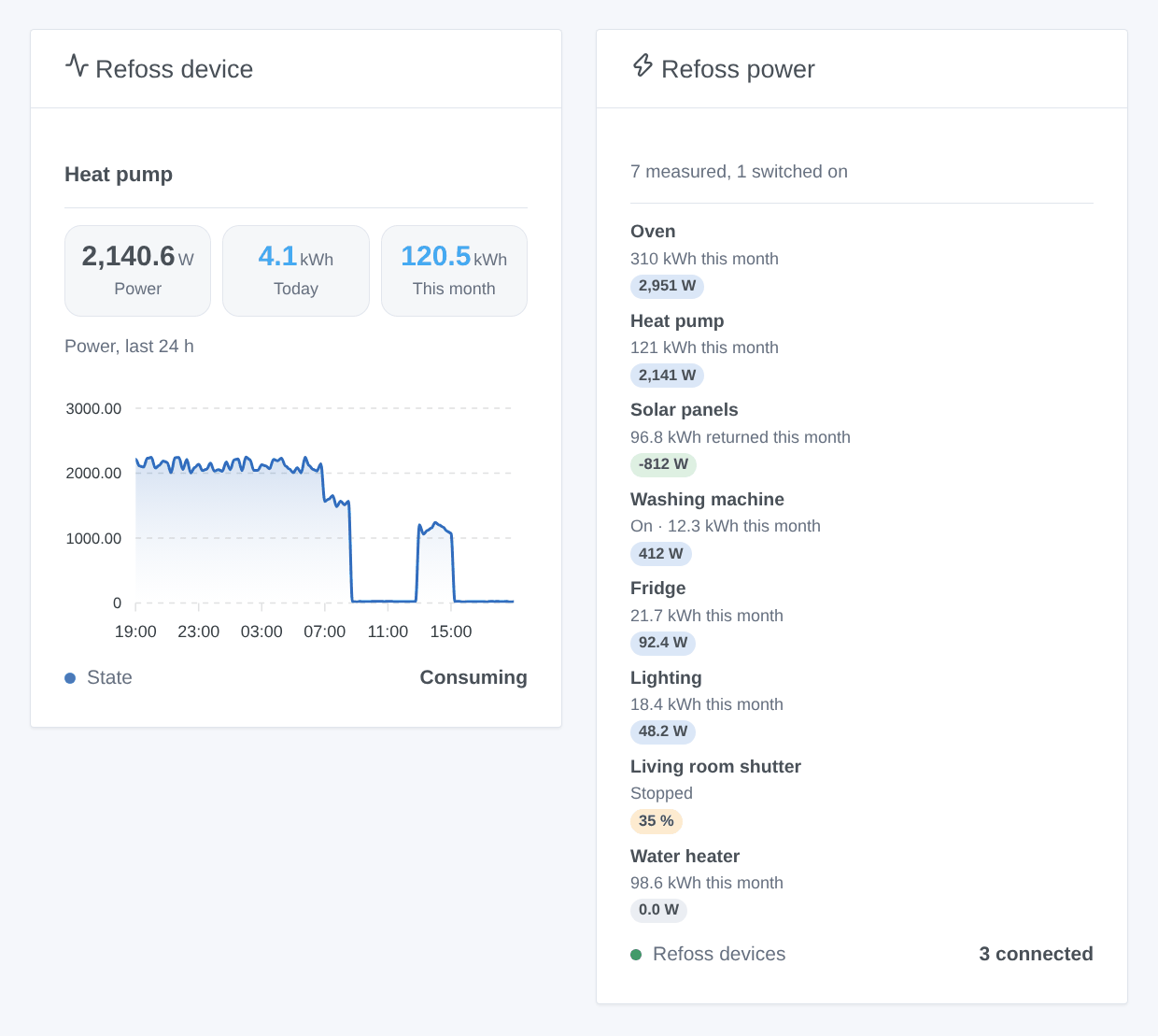
- Refoss power: every outlet, clamp and shutter at a glance, the hungriest first, with its energy of the month, and the devices that do not answer.
- Refoss device: one outlet, clamp or shutter with its live power, today, this month, its power curve of the last 24 hours and its buttons.
Scenes
Triggers: A button on a Refoss device is pressed (single, double, triple or long press on the input of an R11, R21 or P11S), A Refoss protection trips (overpower, overvoltage, overcurrent, undervoltage, overheating), A Refoss device is lost, A Refoss device is back.
Actions: Turn a Refoss outlet on for a while (off after the duration, even after a restart), Read the energy of a Refoss device (power, today, this week, this month, returned, index).
Examples:
- A double press on the hallway button → turn every light off.
- A protection trips on the oven outlet → send a notification.
- Every evening → read the energy of the heat pump and send it in a message.
Troubleshooting
- A device is not found: check that the Refoss app reaches it on the same Wi-Fi as Gladys and that your network lets mDNS through, or type its address. An R10, EM06 or EM16 always needs its address.
- "protected by a password": type the password of the Refoss app in the configuration.
- A clamp counts consumption as returned energy: turn the clamp around (the arrow on it shows the direction).
- "Gladys refused the network search": reinstall the integration and accept its network discovery.
- The Search the devices button lists what the integration sees; the Logs tab of the integration tells more.
Report a problem on GitHub with your Gladys version, the integration version, the model of the device and the logs.
Configuration settings
These are the settings Refoss asks for in its configuration screen in Gladys.
| Setting | Type | Required | Description |
|---|---|---|---|
| Your Refoss devices | section | No | Refoss makes Wi-Fi plugs (P11S), relays and shutter modules (R10, R11, R21) and energy monitors with current clamps (EM01P, EM06, EM06P, EM16, EM16P). Gladys talks to them directly on the local network, without the Refoss cloud: set them up in the Refoss app first, then the current models are found by themselves and every outlet, shutter and clamp appears in the Discover tab. Nothing leaves your network. Not affiliated with Refoss. |
| Addresses of the older models | string | No | The IP addresses of your R10, EM06 and EM16, separated by commas: these first models cannot be found by Gladys. Give them a fixed address in your router. Also useful for a current model on another subnet. |
| Device password | secret | No | Only if you protected your devices with a password in the Refoss app (the same for all of them). Leave empty otherwise. |
| Measurement refresh | select | No | How often power, voltage, current and energy are sent to Gladys (and how often the older models are read). On / off and shutters are always sent at once. |
| Search again | select | No | How often the network is searched again (a new device, a device that changed its address). |
| Language of the device names | select | No | Gladys does not tell integrations the language of its users: choose the one of the feature names and of the scene error messages. |
How to install Refoss in Gladys
- In Gladys, open Integrations: Refoss appears in the catalog, next to the native integrations, with a community badge.
- Click Install. Gladys pulls the Docker image (
ghcr.io/william-de71/gladys-refoss:0.1.0), starts it in a sandbox isolated from the core, and generates the integration's interface (devices, discovery and configuration). - Open the Configuration screen of the integration, fill in the settings, and save.
- You can also install it directly from its repository URL: https://github.com/William-De71/gladys-refoss.
Refoss requires Gladys >=5.1.0. The catalog inside Gladys refreshes every hour, so a new version becomes available at most one hour after its release.
Not running Gladys yet? It is free and open source: follow the installation guide to get started.
About external integrations
Refoss is an external integration: a community integration packaged as a Docker container and published on GitHub, that Gladys installs in one click and runs in a sandbox isolated from its core. It is published and maintained by William-De71, not by the Gladys core team.
- Browse all integrations, native and community
- Build and publish your own external integration
- Source code on GitHub — source of this documentation