Radio France smart home integration, free and open source
Shows, tracks and schedules of the Radio France stations, via the Open API (unofficial).
Published by William-De71
- Devices
- Version 0.1.0
- Requires Gladys >=5.1.0
- ★ 0
Overview
This integration shows in Gladys what is on air on the Radio France stations: France Inter, franceinfo, France Culture, France Musique, FIP, Mouv’, the ICI local stations (formerly France Bleu) and the web radios. For each station you follow you get the show, the segment inside it (the news, a column) and the track, and your scenes can react when a new show, segment or track starts.
The data comes from the official Open API of Radio France, with your own API key. The integration is unofficial and not affiliated with Radio France. It never plays a stream: the Open API may not be used for live listening.
Terms of use
Using the Open API means accepting its terms: a personal key, private and non-commercial use, the data shown as it is and never stored, and the credit “données fournies par l’Open API Radio France” (data provided by the Radio France Open API), which every widget of the integration shows. The integration keeps the data in memory only, an hour at most; /data only holds its request counter and your follow switches. No Radio France logo is used.
Prerequisites
- Gladys Assistant 5.1.0 or later.
- A free Open API key, personal: each Gladys user requests their own.
- Internet access from Gladys (the requests go to
openapi.radiofrance.fr).
Get your Open API key
- Create an account on developers.radiofrance.fr.
- In My account, click Request an API key.
- Give the name of your project (for example “Gladys at home”) and its purpose (for example “show what is on air on my home automation dashboard”).
- Radio France checks each request by hand and sends the key by e-mail, often within the day.
- Paste the key in the configuration of the integration, save, then press Test the API key.
Configuration
| Field | Default | What it does |
|---|---|---|
| Open API key | — | Your key. Sent to Radio France in a header of each request, never shown again nor written in the logs. |
| Language of the texts | French | Feature names, status messages and the sentences of the scene actions. Titles of Radio France are never translated. |
| Daily budget (requests) | 900 | Requests the integration allows itself per day, out of the 1,000 of the key (100 to 1,000). Lower it if the key is used elsewhere. |
| Minimum interval (seconds) | 90 | Never two readings closer than this (60 to 600). The budget may space them more. |
Test the API key reads the list of stations (one request), updates the Discover tab and shows the requests used today.
Usage
Devices
Open the Discover tab of the integration and add the stations you want. The list comes from the API, with the names Radio France gives them.
| Feature | Notes |
|---|---|
| Show | The show on air (its name). A dash when there is none: FIP and its web radios play music without shows most of the time. |
| Segment | The segment inside the show: the news, a column, an interview. A dash between two segments. |
| Track | “Artist – Title” of the track on air, on the music stations. A dash otherwise. |
| Follow | On by default. Only the stations you follow are asked. Turn it off for the stations you do not listen to, or let a scene turn it on when you listen. |
Quota and readings
A key allows 1,000 requests a day; past that, Radio France blocks it until the next day. The integration counts every request it sends and asks up to 10 stations in one request. It waits for the end of the show, segment or track on air before asking again (never sooner than the minimum interval, at least every 15 minutes), and spreads the requests over the rest of the day when the budget runs low. When nothing is followed, it sends no request at all. The counter is assumed to reset at midnight, Paris time (Radio France does not say).
The scene actions, the Refresh button and the “Upcoming shows” widget use the same budget. When it is used up, they say so and wait for midnight.
Dashboard widgets
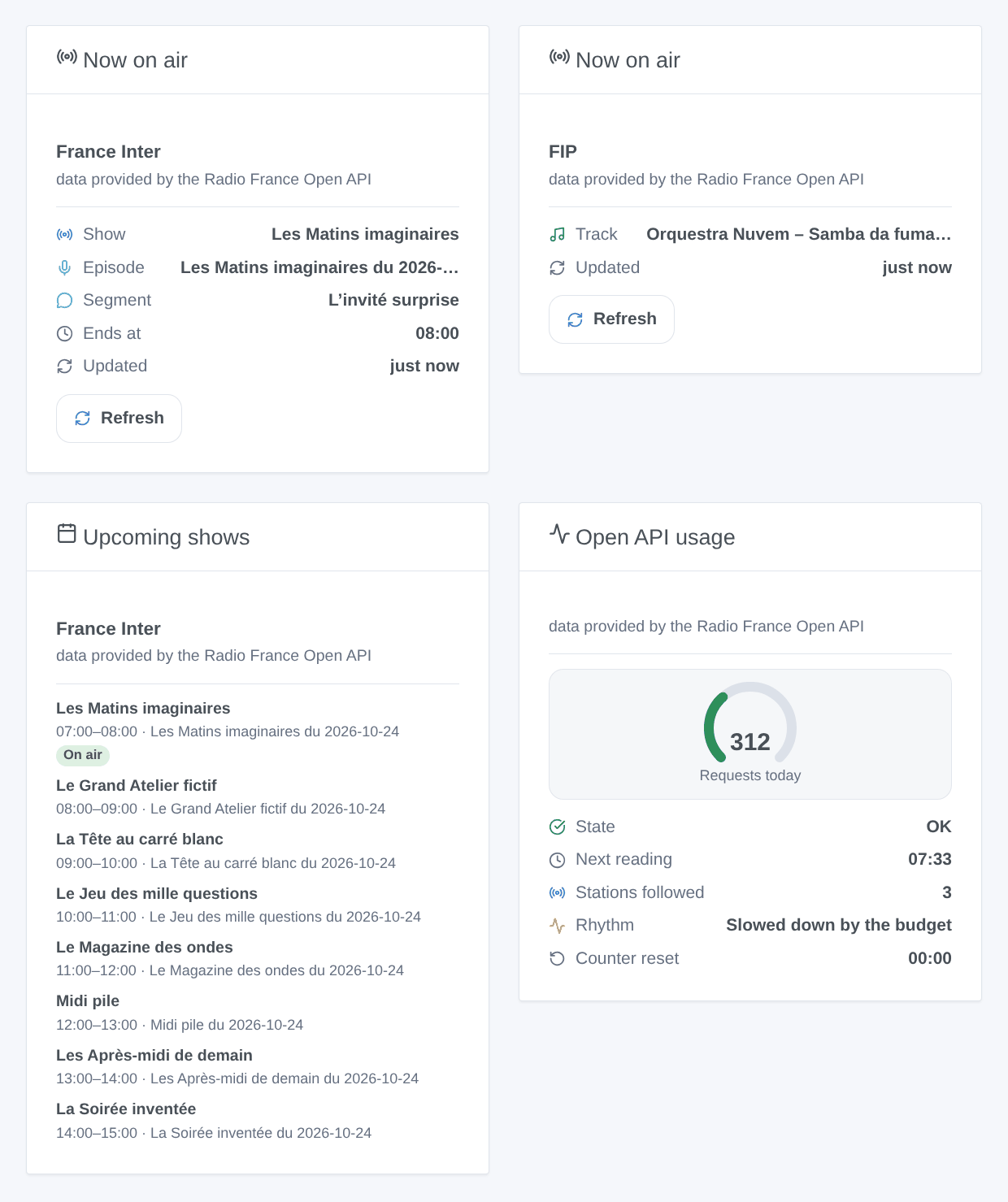
- Now on air: the show, the episode, the segment, the track, the end of the show and the time of the last reading, with a Refresh button (one request, at most once a minute).
- Upcoming shows: the next shows of a station, from its program grid (read at most every 15 minutes). FIP and its web radios do not publish their schedule in advance.
- Open API usage: the requests of the day against the budget, the state (OK, quota pause, key refused…), the next reading, the stations followed.
Choose the station in the settings of a widget (the first station followed by default). The image above is a generated illustration with made-up programs, not a screenshot.
Scenes
Triggers, for the stations you follow (seen by the regular readings, so up to a few minutes after the start; never at the first reading after a restart):
- Radio France: new track — title, artist, album, year, record label.
- Radio France: show started — show, episode title, summary, web page, end time.
- Radio France: segment started — the same variables, for the news, a column, an interview.
Actions:
- Radio France: what is on air — show, segment, track, artist, album and end of the show, for a notification or a spoken message.
- Radio France: upcoming shows — the next shows within 12 hours, with a sentence to read out (“Coming up on France Inter: …”).
Examples: when the 7 o’clock news starts on France Inter, turn the kitchen radio up; when a new track starts on FIP, show it on the TV; every evening at 7 pm, have Gladys read the shows of the evening on France Culture.
Troubleshooting
- “Radio France refuses the API key”: check the key (no space before or after it). A new key may need a few minutes before it works. The integration tries again after 5 minutes, then less and less often (up to an hour).
- “Daily quota reached” or “Daily budget used”: everything waits for midnight (Paris time). Follow fewer stations, raise the minimum interval, or check that the key is not used by another program.
- “The Open API does not answer”: the service or your internet access is down; the integration tries again a little later. A “server error” may also mean that the quota of the key is used elsewhere.
- A station never updates: check that its Follow switch is on and look at the “Open API usage” widget. A station Radio France removed from its list is no longer asked.
- FIP has no show: that is normal, FIP and its web radios mostly play music without shows.
- For an issue, give the versions of Gladys and of the integration, the message of Test the API key (it never shows the key), and the logs with
DEBUG=gladys-integration-sdk.
Configuration settings
These are the settings Radio France asks for in its configuration screen in Gladys.
| Setting | Type | Required | Description |
|---|---|---|---|
| Before you start | section | No | What is on air on the Radio France stations (France Inter, franceinfo, France Culture, France Musique, FIP, Mouv’, the ICI local stations and the web radios): the show, the segment and the track, from the official Open API of Radio France. This integration is unofficial and not affiliated with Radio France. It never plays a stream: the Open API may not be used for live listening. Each user needs a personal API key, free, for private, non-commercial use. |
| Get your API key | section | No | 1. Create an account on developers.radiofrance.fr. 2. In “My account”, click “Request an API key”. 3. Give the name of your project (for example “Gladys at home”) and its purpose (show what is on air on my home dashboard). 4. Radio France validates the request by hand and sends the key by e-mail, often the same day. 5. Paste it below and save, then use “Test the API key”. The key is personal: do not share it. |
| Open API key | secret | Yes | Sent to Radio France in a header of each request, never shown again nor written in the logs. |
| Language of the texts | select | No | Language of the feature names, of the status messages and of the texts the scene actions return (Gladys does not tell the integration the language of the user). Titles of Radio France stay as they are. |
| Daily quota | section | No | Radio France allows 1,000 requests a day per key and blocks the key past it. The integration counts its requests and spreads them over the day: one request reads up to 10 stations, the next one is sent when a show or a track ends. Only the stations whose “Follow” switch is on are asked. Scene actions, the Refresh button and the schedule widget use the same budget. The counter is assumed to reset at midnight, Paris time. |
| Daily budget (requests) | number | No | Requests the integration allows itself per day, out of the 1,000 of the key. Lower it if you use the same key elsewhere. |
| Minimum interval (seconds) | number | No | Never two readings closer than this. The budget may space them more. |
| Terms of use | section | No | By using your key you accept the terms of use of the Open API: private, non-commercial use, data shown as it is, never stored (the integration only keeps it in memory, a few minutes) and with the credit “données fournies par l’Open API Radio France”, which every widget shows. No stream is played and no Radio France logo is used. |
How to install Radio France in Gladys
- In Gladys, open Integrations: Radio France appears in the catalog, next to the native integrations, with a community badge.
- Click Install. Gladys pulls the Docker image (
ghcr.io/william-de71/gladys-radio-france:0.1.0), starts it in a sandbox isolated from the core, and generates the integration's interface (devices, discovery and configuration). - Open the Configuration screen of the integration, fill in the settings, and save.
- You can also install it directly from its repository URL: https://github.com/William-De71/gladys-radio-france.
Radio France requires Gladys >=5.1.0. The catalog inside Gladys refreshes every hour, so a new version becomes available at most one hour after its release.
Not running Gladys yet? It is free and open source: follow the installation guide to get started.
About external integrations
Radio France is an external integration: a community integration packaged as a Docker container and published on GitHub, that Gladys installs in one click and runs in a sandbox isolated from its core. It is published and maintained by William-De71, not by the Gladys core team.
- Browse all integrations, native and community
- Build and publish your own external integration
- Source code on GitHub — source of this documentation