PVOutput smart home integration, free and open source
PVOutput solar systems: production, consumption, and statuses sent from your scenes.
Published by William-De71
- Devices
- Version 0.1.1
- Requires Gladys >=5.1.0
- ★ 0
Overview
This integration brings the solar systems of your PVOutput account into Gladys, and lets your scenes send data to PVOutput. PVOutput.org is a free service where owners of solar systems share and compare their production; this integration uses its official API with your own key, and is not affiliated with PVOutput.
- One device per system (up to five): power produced, energy produced today, lifetime production, and — when the system publishes them — power and energy consumed today, temperature and voltage.
- Two dashboard widgets: the system today (with the curve of the day) and its last 30 days.
- Scene triggers: system silent by day, system back, summary of the day after sunset, record day, key refused.
- Scene actions: send a live status, send the output of a day, read the day of a system.
Transport: cloud. Your API key, your System Ids and the values your scenes send go to pvoutput.org; nothing else leaves Gladys.
Prerequisites
- Gladys Assistant 5.1.0 or later.
- A PVOutput account (free) with API access enabled.
- The API key: on pvoutput.org, open Settings, set API Access to Enabled, click New Key, then Save. A read only key is enough to read your systems; sending statuses or outputs from scenes needs the standard key.
- The System Id of each system: at the bottom of the Settings page, under Registered Systems.
The quota: PVOutput allows 60 requests an hour per key (300 in donation mode), every system and every app using the key together. The integration stays within it on its own, keeps 15 requests an hour (60 in donation mode) for your scenes, and pauses until the next hour when PVOutput says the quota is used up. Each status a scene sends is one request: a scene every 5 minutes uses 12 requests an hour.
Configuration
| Field | Meaning |
|---|---|
| API key | The key of Settings → API Access (a secret, never shown again nor written to the logs) |
| System Id(s) | One System Id, or several separated by commas (five at most), of the same account |
| Donation mode | Tick it if your account is in donation mode (300 requests an hour) |
| Language of the texts | Feature names, scene texts and errors; automatic follows the language of the last widget |
Then press Test the connection: it shows, for each system, its name, its size, its status interval, its timezone, and the requests left this hour. Diagnostic writes the state of the integration to its logs, without the key.
Usage
Devices
Open Discover and add your systems. Each device has:
- Solar production (W): the last status, 0 at night; a system late by day keeps its last value;
- Production today (kWh) and Lifetime production (kWh, an index for the history: it never feeds the consumption nor the cost of Gladys);
- when the system publishes them: Consumption (W), Consumption today (kWh), Temperature (°C, out of the room average), Voltage (V).
A feature appears the first time PVOutput gives a value for it, and never disappears. The readings follow the status interval of each system (5 to 15 minutes) by day and every 30 minutes at night, and stretch when you follow several systems.
Dashboard widgets
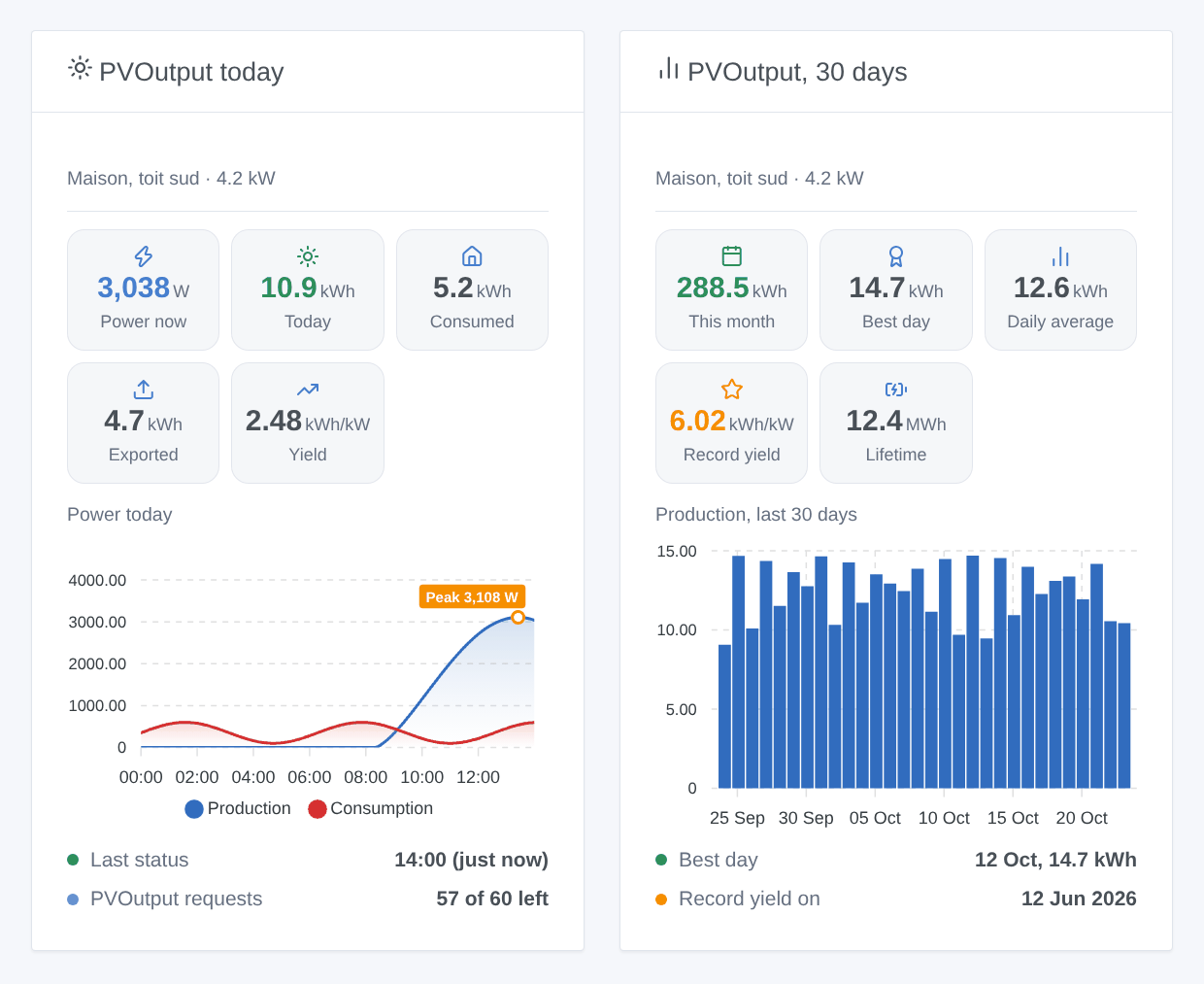
- PVOutput today: power now, energy of the day, consumption or export, yield (kWh/kW), the curve of the day with its peak, when the last status came (or silent, or night) and the requests left this hour. The curve is read only while the widget is shown.
- PVOutput, 30 days: the last 30 days in bars, the total of the month, the best day, the average, the record yield and its date, the lifetime production.
Choose the system in the settings of the widget (empty: the first one).
Scenes
Triggers:
- PVOutput: system silent: no new status for 3 status intervals (30 minutes at least) while the sun is up at the system. Never at night: inverters publish nothing then. PVOutput: system back: it publishes again.
- PVOutput: summary of the day: once a day, about an hour after sunset at the system, with the production, export, consumption, peak, yield and a sentence (
summary). - PVOutput: record day: the yield of the day is the record of the life of the system.
- PVOutput: key refused: PVOutput refuses the key.
Actions:
- PVOutput: send a status: the values are text fields that take the variables
{{…}}of the previous actions (for example "get the last value of a device"). Energies in kWh (or Wh, chosen in the action or written after the value), powers in W. "Cumulative values" tells that an energy is a lifetime index; "Net data" sends the export and import powers of a meter. Date and time: now, in the timezone of the system. - PVOutput: send the output of a day: today or yesterday; production, export, consumption, peak and off-peak import in kWh (or written in Wh,
6210 Wh), temperaturesmin / max, condition, comment. - PVOutput: read the day of a system: production, export, consumption, peak, yield, power now, last status and a sentence, without any request.
Examples:
- Every 5 minutes → get the last value of the power of the inverter and of its production index → PVOutput: send a status with the power
{{…}}, the energy{{…}}and "Production is an index". - Every evening at 23:30 → get the Linky values of the day → PVOutput: send the output of a day with the export and the import.
- When PVOutput: system silent → send a notification "The inverter is silent since {{triggerEvent.data.last_status_time}}".
- When PVOutput: summary of the day → send the message "Today: {{triggerEvent.data.production_kwh}} kWh".
Troubleshooting
- "PVOutput refuses the API key": check the key in Settings → API Access, and that API Access is Enabled. A new key replaces the old one.
- "PVOutput does not know the System Id": the System Id is a number under Registered Systems, for a system of the account of the key.
- "The key is a read only key": reading works, sending needs the standard key.
- "Readings paused until…": the requests of the hour are used up, often because another app uses the same key. They resume at the next hour; your scenes keep a reserve.
- "Moon Powered" when sending: PVOutput thinks it is night at the system: check the timezone of the system on PVOutput.
- An energy "too high": the value is probably in Wh while the action expects kWh (or a lifetime index without "Cumulative values").
- No curve in the widget: it comes with the next reading once the widget is shown (a few minutes).
- Report a problem on GitHub with the versions of Gladys and of the integration, the message of Test the connection and the lines written by Diagnostic. Never paste your key.
Configuration settings
These are the settings PVOutput asks for in its configuration screen in Gladys.
| Setting | Type | Required | Description |
|---|---|---|---|
| PVOutput API key | section | No | PVOutput.org is a free service to share and compare the output of solar systems. On pvoutput.org, open Settings, set API Access to Enabled, click New Key, then Save: the key is shown there. A read only key is enough to read your systems; sending statuses or daily outputs from your scenes needs the standard key. The data travel to pvoutput.org (cloud). This integration is not affiliated with PVOutput. |
| API key | secret | Yes | |
| System Id(s) | string | Yes | The System Id of each system, under Registered Systems at the bottom of the Settings page. Several systems of the same account: separate them with commas (five at most). |
| Requests and quota | section | No | PVOutput allows 60 requests an hour per key (300 in donation mode), for every system and every app using the key together. The integration spaces its readings to stay within it and keeps a quarter of the hour for your scenes: a scene that sends a status every 5 minutes uses 12 requests an hour. |
| Donation mode | boolean | No | The account is in donation mode: 300 requests an hour instead of 60. PVOutput tells the real quota in its answers: a wrong choice only slows the readings down. |
| Language of the texts | select | No | Feature names, scene texts and errors. Automatic: the language of the last widget shown. |
How to install PVOutput in Gladys
- In Gladys, open Integrations: PVOutput appears in the catalog, next to the native integrations, with a community badge.
- Click Install. Gladys pulls the Docker image (
ghcr.io/william-de71/gladys-pvoutput:0.1.1), starts it in a sandbox isolated from the core, and generates the integration's interface (devices, discovery and configuration). - Open the Configuration screen of the integration, fill in the settings, and save.
- You can also install it directly from its repository URL: https://github.com/William-De71/gladys-pvoutput.
PVOutput requires Gladys >=5.1.0. The catalog inside Gladys refreshes every hour, so a new version becomes available at most one hour after its release.
Not running Gladys yet? It is free and open source: follow the installation guide to get started.
About external integrations
PVOutput is an external integration: a community integration packaged as a Docker container and published on GitHub, that Gladys installs in one click and runs in a sandbox isolated from its core. It is published and maintained by William-De71, not by the Gladys core team.
- Browse all integrations, native and community
- Build and publish your own external integration
- Source code on GitHub — source of this documentation