Pool Lab smart home integration, free and open source
PoolLab and PrimeLab water tests from LabCom: pH, chlorine, ideal ranges, alerts.
Published by William-De71
- Devices
- Version 0.1.0
- Requires Gladys >=5.3.0
- ★ 0
Overview
This integration brings the water tests of your Water-i.d. PoolLab 1.0 / 2.0 or PrimeLab photometer into Gladys: pH, chlorine, cyanuric acid, alkalinity, hardness and the other parameters you measure, with the ideal range you set for each one in LabCom. It reads the LabCom cloud through its official GraphQL API with a personal API token. It only reads, and it is not affiliated with Water-i.d.
- One device per LabCom "sampling point" (a pool, a spa): one feature per parameter measured, with the value of its last test, and the water balance (what is out of its ideal range).
- Two dashboard widgets: the last test of a pool, colored by ideal range; the history of one parameter with its ideal range.
- Scene triggers: new measurement, parameter out of its ideal range, back in range, water test overdue, token refused.
- Scene actions: refresh now, last value of a parameter.
The measurements stay manual: you test the water with the photometer, the PoolLab app synchronizes the result with LabCom, and Gladys reads it from there. Gladys never takes a measurement itself.
Transport: cloud. The API token goes to LabCom (backend.labcom.cloud); the measurements come from the LabCom cloud.
Prerequisites
- Gladys Assistant 5.3.0 or later.
- A PoolLab 1.0, PoolLab 2.0 or PrimeLab, and a LabCom account where the app synchronizes its measurements (check them on labcom.cloud).
- A personal API token: sign in to labcom.cloud, open Settings (labcom.cloud/pages/user-setting), create an API token and copy it. Keep it secret: anyone holding it can read your measurements.
- Optional, but useful: the ideal range of each parameter in LabCom (low and high values). Without one, a parameter is shown "without ideal range" and never fires the range triggers.
Configuration
| Field | Meaning |
|---|---|
| LabCom API token | The token created on labcom.cloud (a secret: never shown again, never written to the logs; only a fingerprint in /data) |
| Reading of LabCom | Every 5, 10, 15 (default), 30 or 60 minutes: how long after a synchronization Gladys sees a new test |
| Test reminder after | 3, 7 (default), 14 or 30 days without a new measurement before the "water test overdue" trigger; or never |
| Language of the texts | Feature names, water balance, scene texts and errors; automatic follows the last widget |
Buttons:
- Test the connection reads LabCom with the token and lists the pools (and how many have measurements).
- Diagnostic writes the state of the integration to its logs, without the token.
The first reading takes every measurement of the account; then each reading asks for the measurements of the last week only, and the last 400 days are read again every 6 hours (a measurement edited or deleted in LabCom is followed). The integration keeps up to 300 measurements of 400 days per parameter in /data.
Usage
Devices
After the configuration, open Discover: each pool or spa with at least one measurement is offered as a device named after its reference in LabCom. Add the ones you want. A parameter measured later adds a feature: Discover then offers to update the device.
| Parameter | Category / type | Unit |
|---|---|---|
| pH | ph-sensor / decimal | pH |
| Free, total, combined chlorine, bromine, active oxygen, hydrogen peroxide, chlorine dioxide, ozone, PHMB, cyanuric acid, alkalinity, hardness, salt… | level-sensor / decimal | ppm (mg/l), or none |
| Water temperature | temperature-sensor / decimal | °C (°F if LabCom says so) |
| Redox (ORP) | orp-sensor / decimal | mV |
| Water balance | text / text | — |
Gladys has no category for chlorine or alkalinity: they use the plain numeric sensor level-sensor / decimal (like the Flipr integration). A value beyond the measuring range of the photometer (OVERRANGE, UNDERRANGE) has no number: the feature keeps its last value, the water balance and the widgets say it.
Dashboard widgets
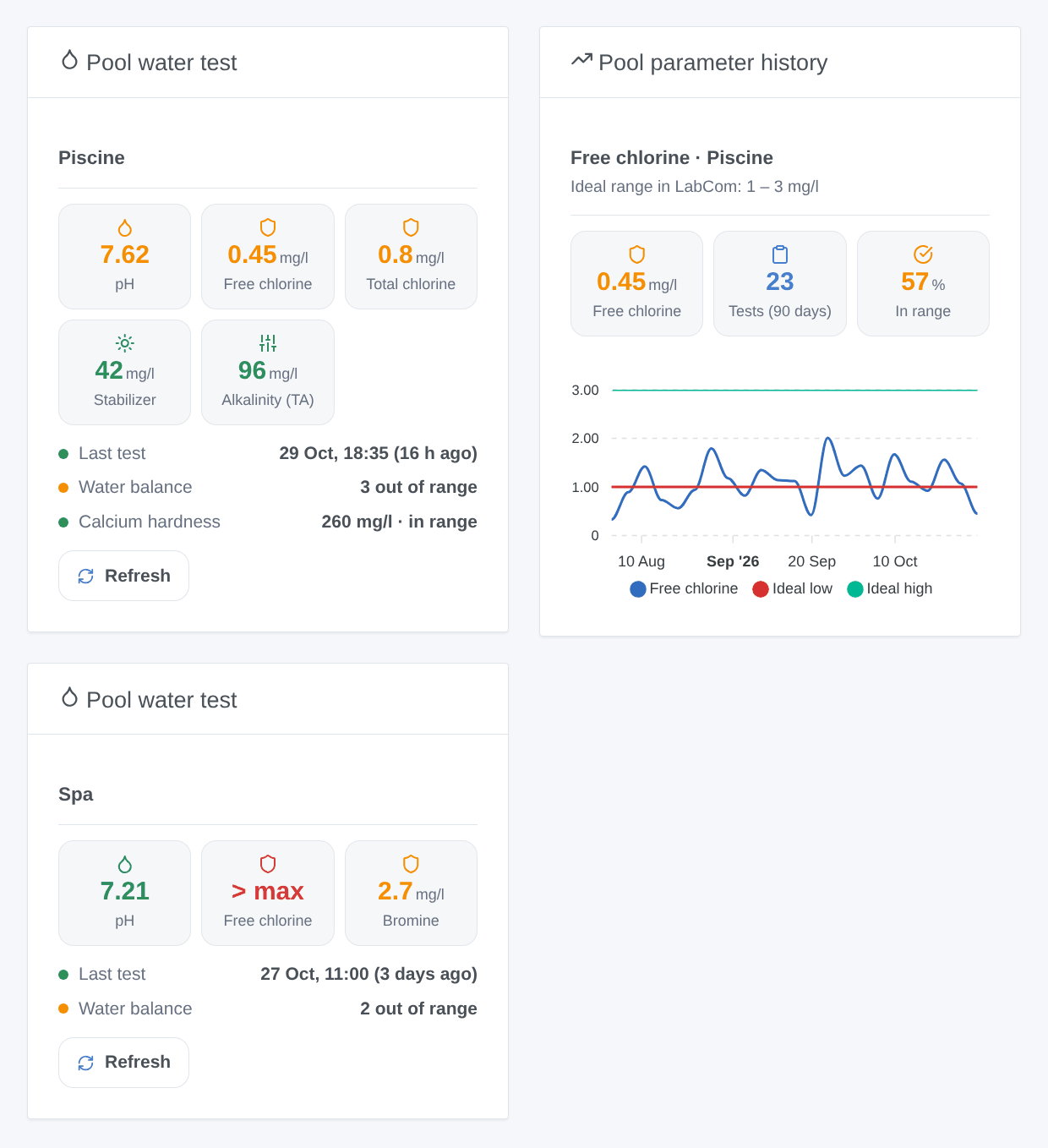
- Pool water test: one pool (choose it in the settings of the widget; the first one by default): the first five parameters as tiles, green in range, orange out of range, red beyond the measuring range, grey without a range; when the last test was taken, the water balance and the other parameters. The Refresh button reads LabCom now (once a minute at most).
- Pool parameter history: one parameter of a pool over 30, 90 or 365 days, at the real time of each test (not the time Gladys received it), with the ideal low and high as two lines, the number of tests and the share in range.
Scenes
Triggers (once per change, never at the first reading, never because of a scene action), filtered by pool and parameter:
- New measurement: a parameter has a newer test in LabCom (one event per parameter tested).
- Parameter out of range: a parameter goes too low or too high for its ideal range (filter: direction).
- Back in range: a parameter that was out of range is back in it.
- Water test overdue: no measurement on a pool for the delay of the configuration, once, between 9:00 and 21:00.
- Token refused: LabCom refuses the API token.
Actions:
- Refresh now: reads LabCom (once a minute at most); returns the number of pools, of parameters out of range and the time of the last test.
- Last value of a parameter: value, unit, status, ideal range, date and a sentence, from the last reading.
Examples:
- When Pool Lab: parameter out of range (free chlorine, too low) → send "Free chlorine {{triggerEvent.data.value_text}} mg/l, ideal from {{triggerEvent.data.ideal_low}}: add chlorine".
- When Pool Lab: water test overdue → send "No pool test for {{triggerEvent.data.days_since}} days".
- Every Saturday at 10:00 → Pool Lab: last value of a parameter (pH) → send its summary.
Troubleshooting
- "LabCom refuses the API token": the token was deleted or mistyped; create a new one on labcom.cloud (Settings) and paste it in the configuration.
- No device offered: only pools with at least one measurement are offered; press Test the connection and check on labcom.cloud that the app synchronized.
- A test that does not show up: the app must synchronize it with LabCom first; then it appears at the next reading (15 minutes by default) or with Refresh.
- "No ideal range": set the ideal low and high of the parameter in LabCom.
- For an issue, give the versions of Gladys and of the integration, the message of Test the connection and the "Pool Lab diagnostic" lines written by Diagnostic in the logs of the integration. Never paste your token.
Known limitations
- Never tested with a real LabCom account: the integration follows the published GraphQL schema and the two open-source clients (Home Assistant, ioBroker). The exact spelling of the ideal range status is unknown: it is read in any form and computed from the ideal range when missing.
- Shared sampling points (shared by another LabCom user) and water treatment products are not read.
- The kind of a parameter (pH, free chlorine…) comes from its LabCom id or name: an unknown parameter keeps its LabCom name and the plain numeric category.
Configuration settings
These are the settings Pool Lab asks for in its configuration screen in Gladys.
| Setting | Type | Required | Description |
|---|---|---|---|
| LabCom account | section | No | Your PoolLab or PrimeLab sends its measurements to the LabCom cloud when the app synchronizes. Create a personal API token on labcom.cloud (Settings, API token) and paste it below: the integration only reads your measurements (one device per pool or spa) through the official LabCom API. Gladys never takes a measurement itself. Not affiliated with Water-i.d. |
| LabCom API token | secret | Yes | |
| Readings and triggers | section | No | The measurements reach LabCom only when the PoolLab app synchronizes: reading more often only shortens the delay after a synchronization. Each reading asks for the last week of measurements; the last 400 days are read again every 6 hours. |
| Reading of LabCom | select | No | How often the integration reads LabCom (one request). |
| Test reminder after | select | No | Days without a new measurement before the “water test overdue” trigger fires (in the day, between 9:00 and 21:00). |
| Language of the texts | select | No | Feature names, water balance, scene texts and errors. Automatic: the language of the last widget shown. |
How to install Pool Lab in Gladys
- In Gladys, open Integrations: Pool Lab appears in the catalog, next to the native integrations, with a community badge.
- Click Install. Gladys pulls the Docker image (
ghcr.io/william-de71/gladys-pool-lab:0.1.0), starts it in a sandbox isolated from the core, and generates the integration's interface (devices, discovery and configuration). - Open the Configuration screen of the integration, fill in the settings, and save.
- You can also install it directly from its repository URL: https://github.com/William-De71/gladys-pool-lab.
Pool Lab requires Gladys >=5.3.0. The catalog inside Gladys refreshes every hour, so a new version becomes available at most one hour after its release.
Not running Gladys yet? It is free and open source: follow the installation guide to get started.
About external integrations
Pool Lab is an external integration: a community integration packaged as a Docker container and published on GitHub, that Gladys installs in one click and runs in a sandbox isolated from its core. It is published and maintained by William-De71, not by the Gladys core team.
- Browse all integrations, native and community
- Build and publish your own external integration
- Source code on GitHub — source of this documentation