Peugeot / Citroën / DS / Opel smart home integration, free and open source
Peugeot, Citroën, DS, Opel and Vauxhall cars: battery, range, charging, fuel, locks.
Published by guim31
- Devices
- Version 1.0.1
- Requires Gladys >=5.1.0
- ★ 0
Follow your Peugeot, Citroën, DS, Opel and Vauxhall cars in Gladys: battery, range, charging, fuel, mileage, locks. The integration signs in to your MyPeugeot, MyCitroën, MyDS, MyOpel or MyVauxhall account, like the app, and reads the state your cars last sent to the Stellantis cloud.
This integration is not affiliated with Stellantis or its brands. It was developed without a car or an account, from the work of the Home Assistant community: feedback welcome, on the forum or in the GitHub issues.
What it does
- One Gladys device per car of the account: electric, plug-in hybrid or combustion.
- Its values are read from the Stellantis cloud every 15 minutes (you can choose 10 to 60). A read never wakes the car: it returns what the car last sent (when it was switched off, while it charges, now and then while parked).
- Nothing is controlled from Gladys yet: preconditioning, charging and locks are shown, not commanded (see Limits).
- The GPS position is off by default; you turn it on in the configuration.
Requirements
- A car of the Stellantis group (Peugeot, Citroën, DS, Opel, Vauxhall) with connected services, already added to the brand's app (MyPeugeot, MyCitroën, MyDS, MyOpel, MyVauxhall) and showing its state there.
- The e-mail address and password of that app's account.
- No paid subscription: the integration only reads the car's state, which the free app and the basic connected services allow (a new electric car includes the Connect One pack for several years). The paid offers (e-Remote Control, Remote Control, Connect Plus) are only needed for remote commands, which this version does not send.
- A computer with Chrome, Edge, Firefox or Safari for the sign-in (once, then again only if the session ends): the code is read in the browser's developer tools.
- Gladys 5.1 or later, with access to the Internet.
Fiat, Jeep, Alfa Romeo and the other brands of the group use other apps and another cloud: they are not covered.
Configuration
Open Integrations, find Peugeot / Citroën / DS / Opel and open its Configuration tab.
1. App and country
| Setting | What to choose |
|---|---|
| App of the car | The app you use: MyPeugeot, MyCitroën, MyDS, MyOpel or MyVauxhall. |
| Country of the account | The country chosen in the app. Vauxhall exists in the United Kingdom only. |
| Device names language | Language of the feature names of new devices (French by default). |
| Refresh | How often the cloud is read: 10, 15 (default), 30 or 60 minutes. |
| GPS position | Off by default. On: the last position the car sent is shown, with a map button. |
Save before signing in: the sign-in page depends on the app and the country.
Sign in
The brands' sign-in page is made for their mobile app: at the end, it hands a code to the app
through an address only the app opens (mymap://… for MyPeugeot, mymacsdk://… for MyCitroën,
mymdssdk://… for MyDS, mymopsdk://… for MyOpel, mymvxsdk://… for MyVauxhall). On a computer
the browser cannot open it and seems to do nothing, but the address, with the code, appears in its
developer tools. You copy it into Gladys.
- Click Connect (field “Account of the app”): the brand's sign-in page opens in a new tab.
- In that tab, open the developer tools before signing in:
F12, orCtrl+Shift+I(Cmd+Option+Ion a Mac). Choose the Console tab. - Sign in with the e-mail address and password of the app, and accept if the page asks for it.
- The page seems to do nothing: that is expected. Copy the line of the console that contains
code=(see below, browser by browser). - Within two minutes (the code expires quickly and works only once), paste it in the action Finish the sign-in at the bottom of the configuration page, and click it.
- The action answers “Connected: N vehicle(s)”. Open the Discovery tab and add your cars.
Gladys never sees your password: it is typed on the brand's page. The code is traded for a session that renews itself; it is kept in the integration's storage.
Chrome and Edge
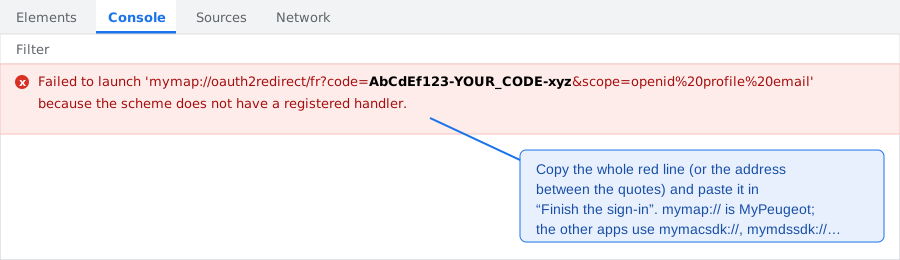
In the Console tab, a red line appears after the sign-in:
Failed to launch 'mymap://oauth2redirect/fr?code=…&scope=…' because the scheme does not have a registered handler.
Copy the whole line, or only the address between the quotes.
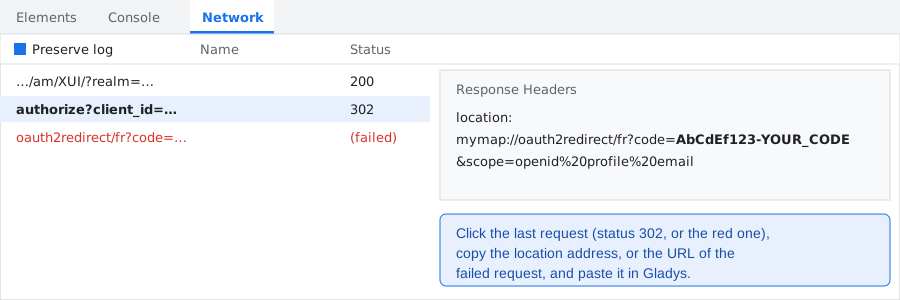
No line? Open the Network tab, tick Preserve log, sign in again from step 1, then click the
last request (status 302, or the red one named oauth2redirect…) and copy the address of its
location header, or its URL.
Firefox
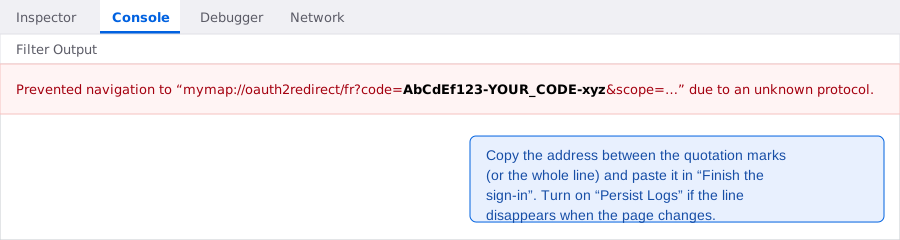
In the Console, Firefox writes:
Prevented navigation to “mymap://oauth2redirect/fr?code=…” due to an unknown protocol.
Copy the address between the quotation marks, or the whole line. If the console is emptied when the
page changes, turn on Persist Logs in its settings (gear icon) and sign in again.
Safari
Turn on the developer tools first: Safari → Settings → Advanced → Show features for web
developers. Then, in the sign-in tab, Develop → Show Web Inspector, Network tab, and tick
Preserve Log. After the sign-in, click the last request and copy the mymap://… address of its
Location header. Safari sometimes also shows the address in an error message of the page.
What to paste
Any of these works: the whole console line, the address mymap://oauth2redirect/fr?code=…, or the
code alone (what follows code=, up to &). The integration takes the code out of it.
If the action answers “Code refused”: the code was used already, expired, or comes from another app or country than the ones saved. Click Connect again and paste the new code quickly.
The other actions: Test the connection lists the cars of the account (no car is woken); Sign out deletes the stored session (the devices stay in Gladys, without new values).
Devices
Each car is a device named after its model and the end of its VIN, e.g. Peugeot e-208 (…0208):
the full VIN never appears in Gladys or in the logs. A car gets the features its motorization and
its answers allow:
| Feature | Cars | Value |
|---|---|---|
| Battery level | electric, plug-in hybrid | % |
| Electric range | electric, plug-in hybrid | km |
| Charging state | electric, plug-in hybrid | charging, vehicle connected (charge complete), suspended by the vehicle (waiting), suspended by the charger (failure), idle (unplugged) |
| Plugged in | electric, plug-in hybrid | yes / no |
| Charging | electric, plug-in hybrid | yes / no |
| Charging speed | when the car sends it | km of range gained per hour (what the app shows; the cloud gives no power in kW) |
| Charging time remaining | when the car sends it | minutes (0 when not charging) |
| Fuel level | combustion, plug-in hybrid | % |
| Fuel range | combustion, plug-in hybrid | km |
| Total range | plug-in hybrid | km, electric plus fuel |
| Mileage | when the car sends it | km |
| Locked | when the car sends it | locked / unlocked (one door unlocked counts as unlocked) |
| Door or boot open | when the car sends it | yes / no |
| Preconditioning | when the car sends it | on / off |
| Outside temperature | when the car sends it | °C |
| GPS position | when turned on | latitude, longitude text |
Every feature is read-only. A value that does not change is sent again twice a day, so Gladys keeps showing it as recent. A value the car stops sending keeps its last state.
Widget
My car (Stellantis) shows one car: battery (or fuel) and range tiles, then a list with the charge (with its speed and the expected end time while charging), the doors, the preconditioning and the time of the last update. Its Refresh button reads the cloud again (it does not wake the car); a Map button appears when the GPS position is on. Choose the car in the widget's settings.
Scene trigger
Charge finished fires when a car reports a complete charge after a charge in progress. A charge stopped, failed or ended by unplugging does not fire it. Its variables: the battery level (%) and the electric range (km). Leave the vehicle filter empty for every car.
Plugged in, unplugged, low battery: use the device's own values in a scene (“device value” trigger, e.g. Battery level below 20 with “only when the threshold is crossed”), no dedicated trigger is needed.
Scene action
Read a Stellantis car now reads the state the car last sent to the cloud, at once, and gives the next actions its battery level, fuel level, total range, plugged in, charging and locked values. It does not wake the car.
Scene examples
- Charge reminder: every evening at 21:00, Read a Stellantis car now, then if the battery level is below 30 % and the car is not plugged in, send “Plug the car in” to the family.
- Charge complete: trigger Charge finished, send “The car is charged: {{triggerEvent.data.battery_level}} %, {{triggerEvent.data.range_km}} km”.
- Car left unlocked: trigger Locked becomes “unlocked”, wait 10 minutes, then if it is still unlocked, send a notification.
Refresh and quotas
The integration reads the cloud on its own timer (one call per car per read, plus a renewal of the session about once an hour), never through the Gladys poll. Stellantis publishes no quota for this API; the Home Assistant integration reads every minute without known trouble. If the cloud answers “too many requests”, reads pause for 30 minutes. A cloud outage is retried after 1, 2, 5, 10 then every 15 minutes.
Troubleshooting
- “Not signed in”: the sign-in was not finished. Follow Sign in.
- “Code refused”: the code is valid once, about two minutes, for the app and country saved. Click Connect again, then paste quickly.
- “No code found”: paste the line or the address that contains
code=. - “The app of this brand does not exist in this country”: choose the country of your account (Vauxhall: United Kingdom).
- “The Stellantis session has ended”: the session was refused when it renewed itself (password changed, account reset, long stop of Gladys). Sign in again; the devices and their history stay.
- No line in the console: the developer tools were opened after the sign-in. Open them first, or use the Network tab with “Preserve log”, and sign in again.
- A car shows no value, or old values: the app shows the same: the car sends its state when it is switched off, while it charges and now and then; a car unused for days sends less (its 12 V battery is protected). A car in privacy mode shares nothing: the widget says it.
- Logs: the integration writes only its lifecycle at info level. Set
LOG_LEVEL=debugto see every read. Tokens, codes, VINs and positions are never written.
Limits
- No remote command yet: preconditioning, starting or stopping a charge, the charge limit, locking, unlocking and waking the car up go through a separate Stellantis service (MQTT) that needs an enrolment by SMS code and the PIN of the app. The only open implementations of that enrolment are licensed under the GPL; this integration, under Apache 2.0, does not copy them. They may come in a later version.
- Reads only the cloud's state: no “wake up and refresh”. The values are as recent as the car's last message.
- Sign-in by copying a code: Stellantis gives no API access to private persons, the integration signs in as the brand's app; if Stellantis changes the app's sign-in, the integration may stop working until it is updated.
- Charging speed in km/h: the cloud gives no power in kW.
- Developed and tested without a car or an account, against answers built from the Home Assistant integration: please report what you see.
Credits
- andreadegiovine/homeassistant-stellantis-vehicles (MIT): the sign-in of each app, the identifiers of the apps per country, the API calls and the meaning of the fields.
- flobz/psa_car_controller (GPL-3.0): read to understand the API and its remote commands; nothing of it is copied here.
Configuration settings
These are the settings Peugeot / Citroën / DS / Opel asks for in its configuration screen in Gladys.
| Setting | Type | Required | Description |
|---|---|---|---|
| Before you start | section | No | This integration signs in to your MyPeugeot, MyCitroën, MyDS, MyOpel or MyVauxhall account, like the app, and reads the state your cars last sent to the Stellantis cloud: it never wakes them. Remote commands (preconditioning, charge, locks) are not supported yet. Developed without a car: feedback welcome. Not affiliated with Stellantis or its brands. |
| App of the car | select | Yes | The app you use for your car: the account and the sign-in page depend on it. |
| Country of the account | select | Yes | The country chosen in the app: it decides the app's identifiers. Vauxhall: United Kingdom only. |
| Sign in | section | No | On a computer: 1. Choose the app and the country above, then save. 2. Click Connect: the brand's sign-in page opens in a new tab. In that tab, open the developer tools (F12, or Cmd+Option+I on a Mac) on the Console tab. 3. Sign in with the e-mail address and password of the app. The page then seems to do nothing: that is expected. 4. In the console, a red line mentions an address starting with mymap:// (mymacsdk://, mymdssdk://, mymopsdk:// or mymvxsdk:// for the other brands) and containing code=. Copy that address. 5. Within two minutes, paste it in the “Finish the sign-in” action at the bottom of this page. Gladys never sees your password. The guide shows where to find the address in each browser. |
| Account of the app | account_link | No | |
| Device names language | select | No | Language of the feature names given to new devices (Gladys keeps a name once the device is created). |
| Refresh | select | No | How often the cloud is read. It never wakes the car: it gets the state the car last sent. |
| GPS position | boolean | No | Off by default (privacy). On: the last position the car sent is shown in Gladys. |
How to install Peugeot / Citroën / DS / Opel in Gladys
- In Gladys, open Integrations: Peugeot / Citroën / DS / Opel appears in the catalog, next to the native integrations, with a community badge.
- Click Install. Gladys pulls the Docker image (
ghcr.io/guim31/gladys-stellantis:1.0.1), starts it in a sandbox isolated from the core, and generates the integration's interface (devices, discovery and configuration). - Open the Configuration screen of the integration, fill in the settings, and save.
- You can also install it directly from its repository URL: https://github.com/guim31/gladys-stellantis.
Peugeot / Citroën / DS / Opel requires Gladys >=5.1.0. The catalog inside Gladys refreshes every hour, so a new version becomes available at most one hour after its release.
Not running Gladys yet? It is free and open source: follow the installation guide to get started.
About external integrations
Peugeot / Citroën / DS / Opel is an external integration: a community integration packaged as a Docker container and published on GitHub, that Gladys installs in one click and runs in a sandbox isolated from its core. It is published and maintained by guim31, not by the Gladys core team.
- Browse all integrations, native and community
- Build and publish your own external integration
- Source code on GitHub — source of this documentation