Pellet Stock smart home integration, free and open source
Track your wood pellet stock: deliveries, consumption, autonomy, with a dashboard widget.
Published by William-De71
- Devices
- Version 1.4.0
- Requires Gladys >=5.2.0
- ★ 0
This integration tracks your wood pellet stock, in bags or in a bulk silo, one per house: deliveries, consumption, average daily consumption, remaining autonomy and heating cost. It adds dashboard widgets, a virtual device per stock for history and scenes, scene actions and scene triggers.
No hardware and no online account are needed: the integration keeps a ledger of bag movements and derives everything from it.
Getting started
- Open the integration's Configuration tab and check the bag weight (15 kg by default) and the number of bags per pallet (66 by default).
- Run the "Correct the stock" action and enter the number of bags you currently have.
- Add the "Pellet stock" widget to your dashboard (edit the dashboard → add a box → Pellet stock).
Day to day
- Tap "Remove bag(s)" in the widget each time you fill the stove. A short form opens, filled in with 1 bag: send it, or enter another count.
- Tap "Add bag(s)" for bags bought on their own (at a store, say). The form asks for the bags and the price per bag, filled in with the last known price; the price is optional.
- Tap "Pallet delivered" when a pallet is delivered. The form is filled in with the bags per pallet, the price of a pallet at the last price paid per bag and the bag weight of the configuration: correct them if needed, then send. The price is optional; enter 0 for a delivery without a price.
- On a Gladys version without these forms, the buttons remove or add 1 bag, and "Pallet delivered" adds the bags per pallet (a confirmation is asked).
- Wrong tap? "Undo" removes the last operation.
- To add several bags at once (half a pallet, a batch of 10 bags…), use the "Record a delivery" action of the configuration, where the price paid can be entered too.
You do not have to tap for every bag: counting the stock from time to time with "Correct the stock" is enough. The bags missing since the last count are counted as consumed.
What the widget shows
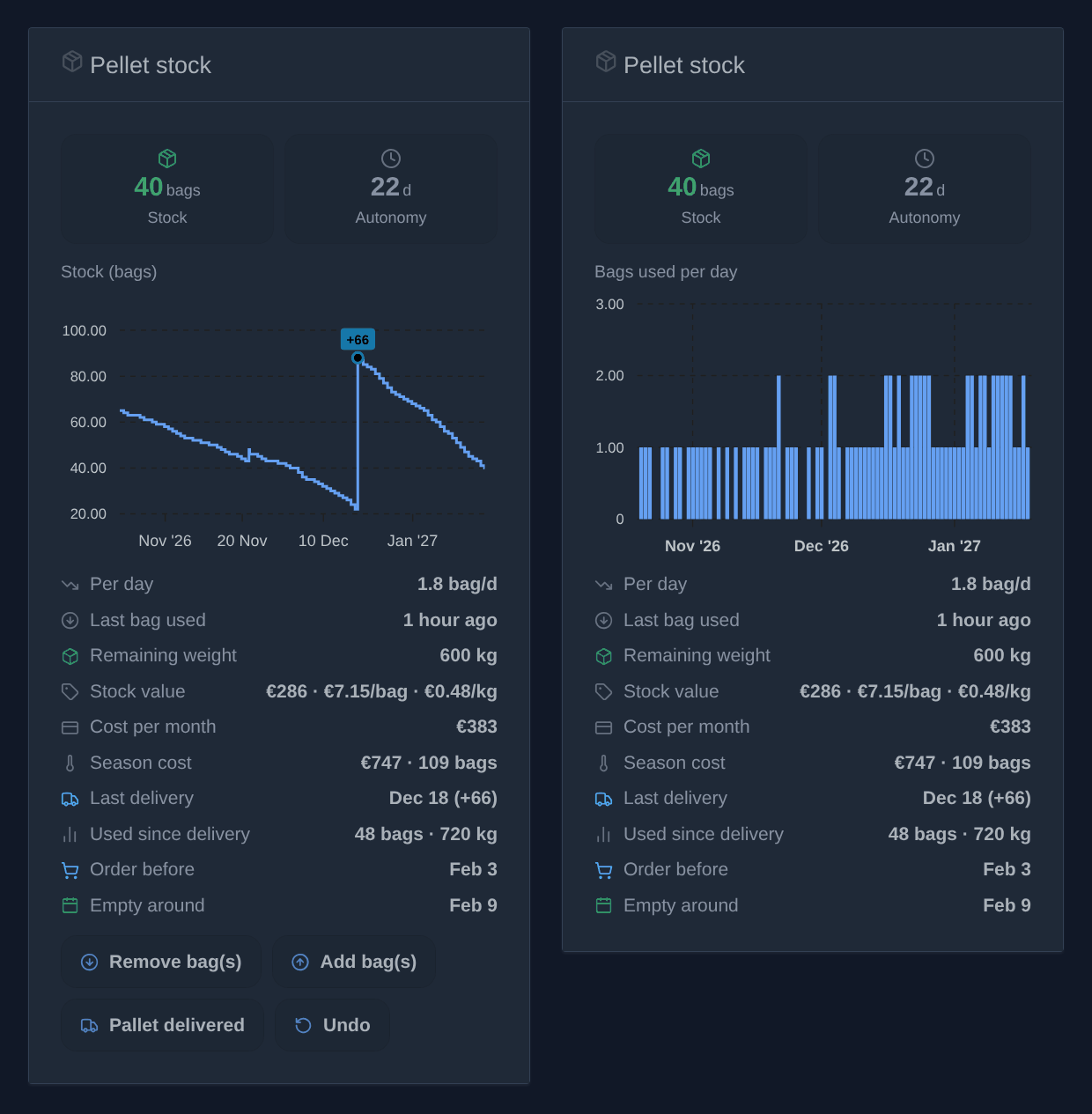
- Stock in bags: green, then orange under the low stock threshold (10 bags by default), red at zero. A "Time to order" reminder then appears.
- Autonomy in days.
- A chart, picked in the widget settings: the stock over time, with the deliveries marked, or the bags used per day as bars (per week over 1 year). Period: 1 month, 3 months, 1 year. To see both, put two widgets side by side. The bags found missing by a recount are counted on the day of the recount.
- The average consumption per day, the last bag used ("2 days ago"), the remaining weight, the last delivery and the use since (in bags and kg).
- The date to order by (when the stock will reach the low stock threshold) and the estimated date the stock runs out.
- Once a price is known: the stock value, with the price per bag and per kg, and the cost per month. The price paid for the last delivery counts, or else the pallet price of the configuration. The price per kg follows the weight of the bags of that delivery.
- The season cost: what the bags used since the heating season started cost (October by default, set in the widget settings), with their count.
Only deliveries ("Pallet delivered", the "Record a delivery" action) count as deliveries: bags added with "Add bag(s)", even several at once, are neither marked on the chart nor used for "Last delivery" and the use since. They do enter the stock and its cost.
In the widget settings, you can hide the buttons, for instance for a read-only wall display.
Heating cost
The oldest bags go first ("first in, first out"): each bag used costs the price it was bought at. If you bought 40 bags at €6 then 60 bags at €8, the first 40 bags used count €6 each, the next ones €8.
- A delivery entered without a price takes the last price per bag known.
- The stock entered at first with "Correct the stock" has no price: it takes the pallet price of the configuration or, without one, is told apart ("12 unpriced"). "Correct the stock" takes an optional price per bag for the bags counted above the recorded stock.
- The remaining weight and the use in kg follow the weight of the bags of each delivery.
For a given period, run the "Analyze the cost" action with a start and an end date (DD/MM/YYYY): "From 01/10/2026 to 01/06/2027: 100 bags, 1,500 kg, €712 (€0.47/kg)".
Pellet prices widget
The "Pellet prices" widget (edit the dashboard → add a box → Pellet prices) follows what the pellets cost over the years, for a stock of bags or a silo (in € per tonne). It changes nothing: it reads the prices entered with the deliveries.
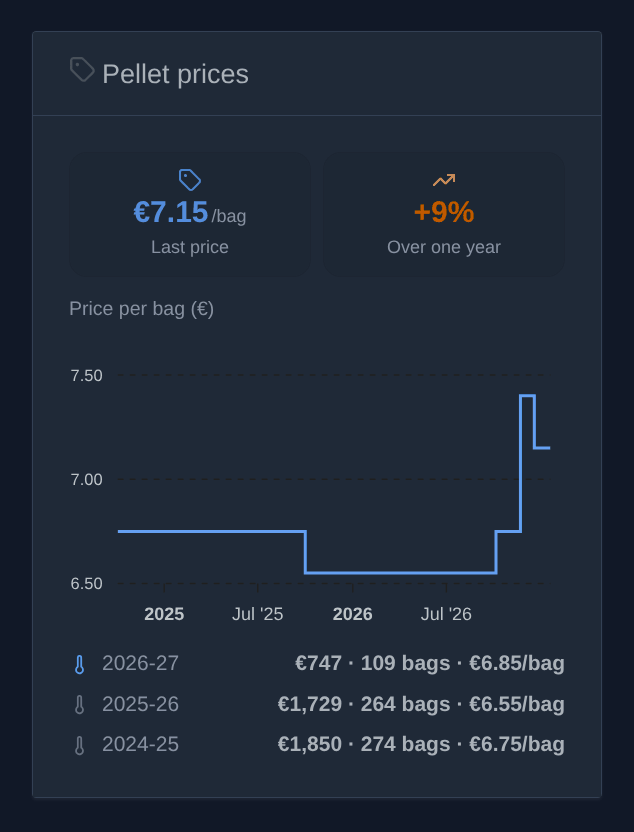
- Last price: the price per bag of the last delivery entered with a price.
- Over one year: how much it moved compared with the price paid one year before (orange when it went up, green when it went down).
- A chart of the price per bag, from one delivery to the next, over 1, 3 or 5 years (widget settings).
- One row per heating season, the current one in blue: what the bags used cost (first in, first out), how many, and the average price of a bag. Seasons start in October by default (widget settings). Bags without a known price are told apart.
How the autonomy is computed
The average consumption is computed over the last 14 days (3 to 90 days, set in the configuration). Shorter follows the weather faster; longer is steadier.
- With less than one day of history, the autonomy stays unknown (a dash is shown): a single bag used is not enough to extrapolate.
- With no consumption at all over the period (in summer, say), the autonomy is unknown too.
"Pellet stock" device (optional)
From the Discover tab, you can add the "Pellet stock" device. It exposes two values with history:
- Pellet stock (number of bags);
- Pellet autonomy (days).
It lets you show the history in a regular chart box and, above all, build scenes: for instance "when the stock drops below 10 bags, send me a message". An unknown autonomy is never sent as 0, so an "empty stock" scene never fires by mistake.
The widget works without this device.
Several houses
To follow the pellets of another house (a holiday home, a chalet…), run the "Add a stock" action in the configuration and pick the house in the list of the houses of Gladys. The stock takes the name of the house, one stock per house. Each stock has its own history and its own device:
- In the Discovery tab, add the "Pellet stock – Chalet" device (with the name of the house) and put it in a room of that house.
- Run "Correct the stock" with this stock selected, to enter its current bags.
- Add a "Pellet stock" widget and pick this stock in its settings. Its name shows in the chart title.
The configuration actions and the scene action have a Stock field: left empty, they apply to the main stock. A Zigbee button in the chalet can thus count down the chalet's stock only.
The settings of the configuration (bag weight, bags per pallet, threshold, window, pallet price) are the default settings of every stock. For a stock to have others (10 kg bags at the chalet, say), run "Set up a stock": fill in only the settings to change, the others keep their value. The answer lists the settings in use, the stock's own or the defaults. The "Back to the defaults" option drops the stock's own settings.
The main stock, and the stocks added with a name in an earlier version, can be attached to a house with "Attach a stock to a house": they take the name of the house, and keep their device and their history.
To read the names of the houses, the integration asks for access to the houses of Gladys (shown on install); it does not use their coordinates.
"Remove a stock" removes an added stock and its history; the main stock cannot be removed.
Silo (bulk pellets)
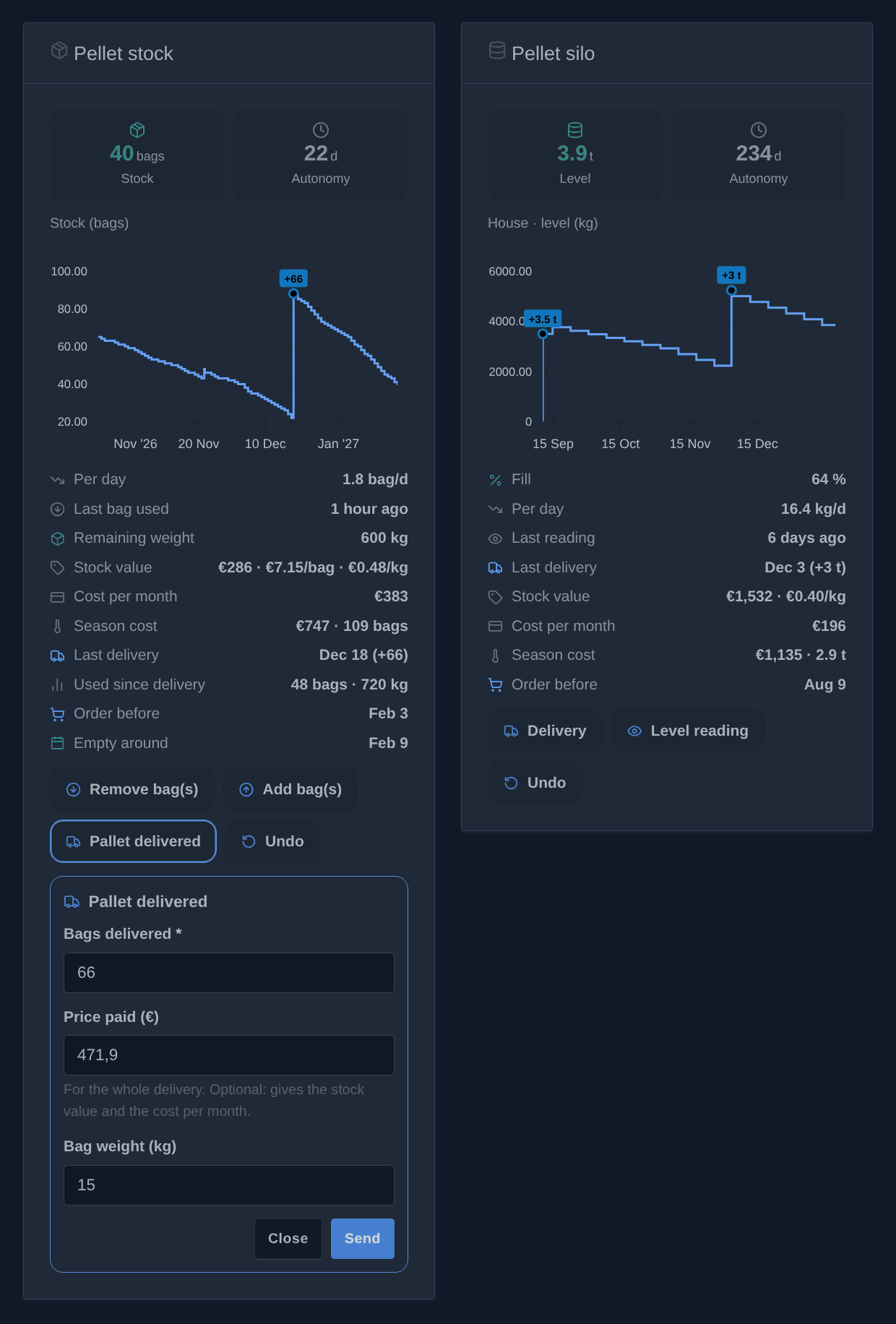
For a boiler fed from a silo, run "Add a stock" with the Silo (bulk) type and the house. A silo counts in kg and has its own widget, "Pellet silo", and its own device, "Pellet silo – House" (level in kg, fill in %, autonomy). A house may have a stock of bags and a silo.
- "Delivery": the kg delivered (filled in with the usual delivery) and the price paid.
- "Level reading": the level read on the silo, in kg or in % of its capacity (the "Level reading" setting). A level lower than the last one counts as consumption: the use per day, the autonomy, the order date and the season cost work as for the bags.
- "Undo" removes the last operation.
The widget shows the level (in tonnes from 1,000 kg), the autonomy, the level over time or the kg used per day, the fill, the last reading, the last delivery, the stock value and the price per kg, the cost per month and of the season, and the date to order by.
The defaults of the silos are in the "Silo" section of the configuration: capacity, low stock threshold (kg), usual delivery, price per tonne, reading in kg or in %. "Set up a stock" changes them for one silo. Without a stock picked, the silo widget and scene actions take the only silo.
Two scene actions, "Record a silo delivery" and "Read the silo level", can for instance feed the level from a sensor. The scene triggers count in bags and leave the silos out: for an alert, use the silo's device ("silo level below…").
Scenes
Actions
- "Use pellet bags" removes bags from the stock. Example: a Zigbee button next to the stove, triggering a scene that removes one bag at each press. The action fails when the recorded stock is too low: count your stock again.
- "Add pellet bags" adds bags (a delivery, bags bought on their own), with an optional price per bag and bag weight.
- "Correct the pellet stock" sets the stock to the number of bags counted.
- "Read the pellet stock" changes nothing: it gets the figures for the rest of the scene, for instance a weekly message. It also returns the type of the stock (
bagsorbulk), its unit (bagorkg) and the season cost: the cost (€), the bags (kg for a silo) and kg used since the season started (October by default, set in the action), and those without a known price.
Each action has a Stock field (empty: the main stock) and returns to the next actions the bags left, the autonomy (days), the bags per day, the days before ordering and the remaining weight (kg). A figure still unknown (the autonomy with no consumption yet, say) is left out rather than sent as 0.
Triggers
- "Pellet stock low": the stock falls to the low stock threshold of the configuration. It fires once, when crossing the threshold, not at every bag below it.
- "Pellet stock empty": the last bag was used.
- "Pellet pallet delivered": a delivery of several bags was recorded from the widget or the configuration.
Each trigger has a Stock field (empty: every stock) and gives the same figures as the actions, plus the bags delivered for the pallet. Example: "Pellet stock low → send me "{{triggerEvent.data.bags_left}} bags left, time to order"".
A delivery added by a scene does not fire "Pallet delivered", so that a scene can never restart itself in a loop. The low and empty stock triggers fire whatever the origin, a Zigbee button going through a scene included.
Languages
The integration speaks English, French, German and Spanish: the widgets and the messages follow the language of each Gladys user. Gladys tells an integration the language of its users only when they look at a widget: by default ("Language of the device names" set to "Language of the user"), the names of the devices offered on the Discovery tab follow the language of the last user who looked at a widget of the integration, English until then. The setting can also force a language. A device already added keeps its name; rename it from its settings if you wish.
Backup
The movement ledger (the last 2,000; beyond, the oldest ones are summed up, keeping the price of the bags still in stock) is stored in the Gladys database: it is part of the Gladys backups and survives an update of the integration. It is deleted if you uninstall the integration.
Configuration settings
These are the settings Pellet Stock asks for in its configuration screen in Gladys.
| Setting | Type | Required | Description |
|---|---|---|---|
| How it works | section | No | Start by entering your current stock with the "Correct the stock" action below. Then add the "Pellet stock" widget to your dashboard: tap "Remove bag(s)" each time you fill the stove, "Add bag(s)" for bags bought on their own, and "Pallet delivered" when a pallet arrives. Counting the stock from time to time with "Correct the stock" is enough too: the bags missing are counted as consumed. |
| Language of the device names | select | No | The names offered on the Discovery tab for the stock and silo devices. Gladys tells an integration the language of its users only when they look at a widget: "Language of the user" takes the one of the last user who did (English until then). Devices already added keep their name. |
| Default settings | section | No | Used by every stock, except the settings given to one stock with the "Set up a stock" action. |
| Bag weight (kg) | number | No | Used to display the remaining weight. Most bags weigh 15 kg. |
| Bags per pallet | number | No | Number of bags the "Pallet delivered" button adds. A pallet of 15 kg bags usually holds 66 or 72 bags. |
| Low stock threshold (bags) | number | No | At or below this number of bags, the widget shows the stock in orange and reminds you to order. |
| Consumption window (days) | number | No | The average daily consumption, hence the autonomy, is computed over this many past days. Shorter follows the weather faster, longer is steadier. |
| Pallet price (€) | number | No | Optional. Shows the value of the stock and the cost per month in the widget. The price of a bag is this price divided by the bags per pallet. Once a delivery is entered in the widget with its price, that price is used instead. |
| Silo (bulk pellets) | section | No | The defaults of the silos, added with "Add a stock" (type: silo) and followed with the "Pellet silo" widget. |
| Silo capacity (kg) | number | No | Optional. Gives the fill rate, and lets you read the level in %. |
| Low stock threshold (kg) | number | No | From this level, the silo widget turns orange and reminds you to order. |
| Usual delivery (kg) | number | No | Pre-fills the "Delivery" form of the silo widget. |
| Price per tonne (€) | number | No | Optional. The price paid for the last delivery wins over it. |
| Level reading | select | No | How the "Level reading" form asks for the level. In % needs the capacity. |
How to install Pellet Stock in Gladys
- In Gladys, open Integrations: Pellet Stock appears in the catalog, next to the native integrations, with a community badge.
- Click Install. Gladys pulls the Docker image (
ghcr.io/william-de71/gladys-pellet-stock:1.4.0), starts it in a sandbox isolated from the core, and generates the integration's interface (devices, discovery and configuration). - Open the Configuration screen of the integration, fill in the settings, and save.
- You can also install it directly from its repository URL: https://github.com/William-De71/gladys-pellet-stock.
Pellet Stock requires Gladys >=5.2.0. The catalog inside Gladys refreshes every hour, so a new version becomes available at most one hour after its release.
Not running Gladys yet? It is free and open source: follow the installation guide to get started.
About external integrations
Pellet Stock is an external integration: a community integration packaged as a Docker container and published on GitHub, that Gladys installs in one click and runs in a sandbox isolated from its core. It is published and maintained by William-De71, not by the Gladys core team.
- Browse all integrations, native and community
- Build and publish your own external integration
- Source code on GitHub — source of this documentation