Palazzetti smart home integration, free and open source

Control your Palazzetti pellet stove locally, through its Connection Box.
Published by William-De71
- Devices
- Version 1.1.0
- Requires Gladys >=5.3.0
- ★ 0
Control your Palazzetti pellet stove from Gladys, locally, through its Connection Box: switch on and off, setpoint, power level, fans, temperatures, alarms and pellet consumption. No Palazzetti account or cloud is needed.
Community integration, not affiliated with nor endorsed by Palazzetti Lelio S.p.A. "Palazzetti" and its logo are trademarks of their owner.
Requirements
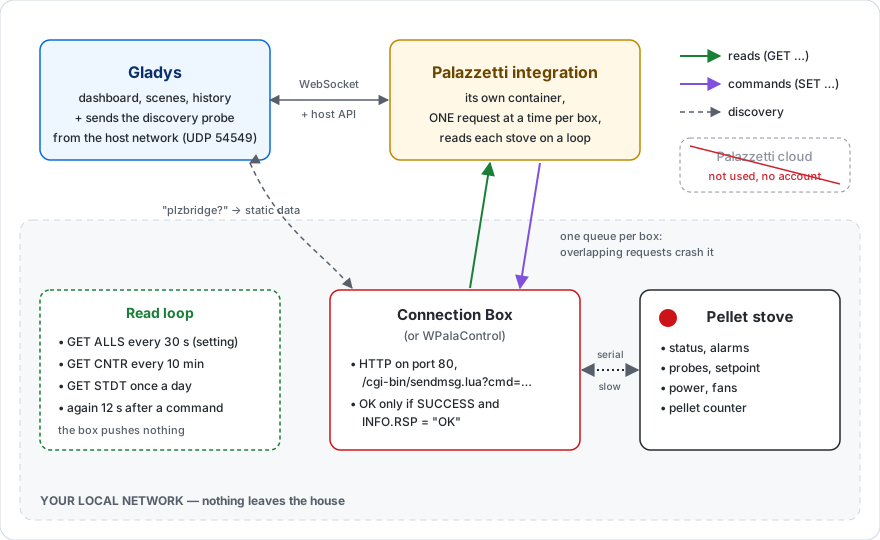
- A Palazzetti stove (or another brand using the same Fumis board) with a Connection Box on your network, over Wi-Fi or Ethernet. A WPalaControl module works too.
- The Connection Box must be reachable from the machine running Gladys (same local network).
- Recommended: give the Connection Box a fixed IP address in your router. The integration finds it again on its own when the address changes, but with a few minutes of delay.
Setup
1. Discover the stove
Go to Integrations → Palazzetti → Discover and run a scan. Gladys sends the Connection Box discovery request on your network (UDP, port 54549): every stove that answers shows up with its name (the one set in the Palazzetti app). Click Add.
2. If the stove is not found
The broadcast does not always cross the network (another VLAN, guest Wi-Fi, a router filtering it). In Configuration, enter the IP address of the Connection Box in Connection Box addresses (several addresses separated by commas), save, then run the scan again.
The IP address is shown in the Palazzetti app, in the device list of your router, or on the stove display depending on the model.
3. Refresh interval
The Connection Box never tells Gladys about a change: the integration reads each stove every 30 seconds by default (10 to 300). That is the longest delay of the scenes. A very low value needlessly loads the serial link between the box and the stove.
The Test the connection button looks for the boxes and shows the state of every stove.
The stove device
The features depend on what your model can do:
| Feature | Description |
|---|---|
| On / off | Switches the stove on or off (thermostat mode: Off / Heating) |
| Setpoint | Wanted temperature, in whole degrees, within the range of the stove |
| Heating | The stove is producing heat (ignition or combustion) |
| Room temperature | The probe the stove regulates on (the regulated water on a hydro stove) |
| Flue gas, water… temperatures | The other probes present |
| Status | In words: Burning, Eco mode, Cooling down… or the current alarm |
| Alarm | 1 while the stove is in alarm |
| Power level | 1 to 5 |
| Room fan, left / right fans | Off, speeds 1 to 5, High, Auto, as the model offers |
| Silent mode | Turns every fan off (models with several fans) |
| Weekly schedule | Enables or disables the weekly schedule of the stove |
| Pellets burnt (kg) | Cumulative counter |
| Pellet level / Hopper empty | Depending on the hopper sensor of the model |
| Ignitions, heating hours, hours since service | Counters of the stove, read every 10 minutes |
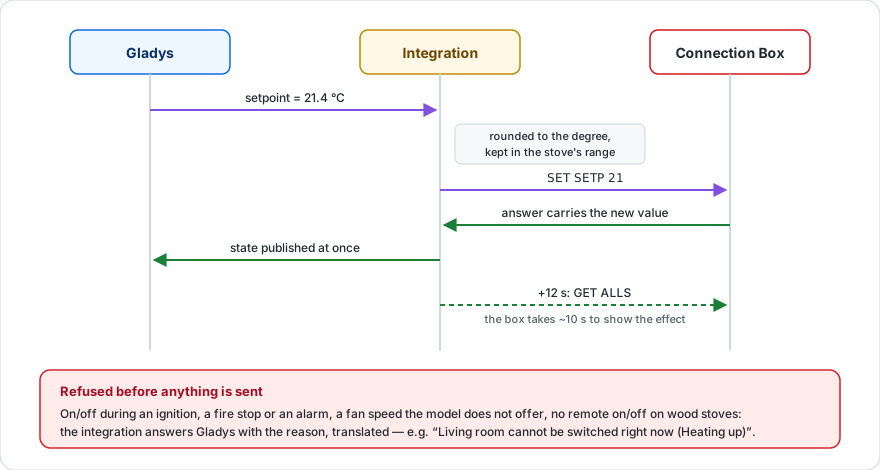
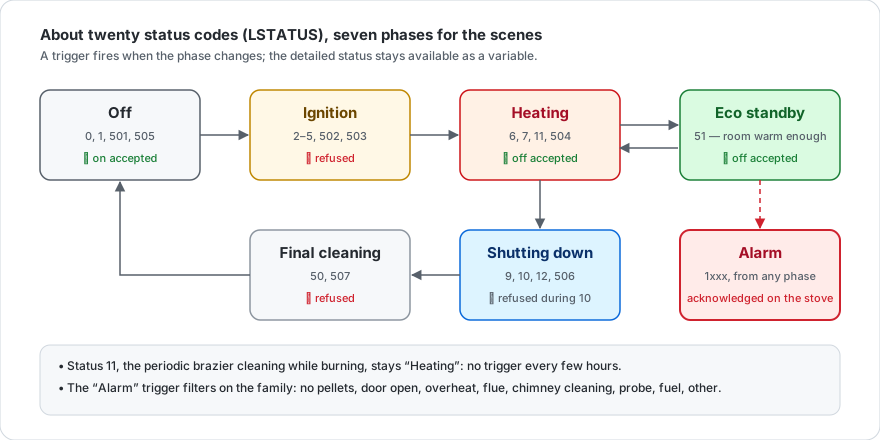
When can it be switched on or off? As in the Palazzetti app, the stove refuses the order during an ignition, a shutdown or an alarm. Gladys then shows the reason ("cannot be switched right now (Heating up)"). An alarm is cleared on the stove itself.
Display delay: the box takes about ten seconds to reflect a command; the integration reads the stove again 12 seconds after each order.
Scenes: triggers
Each trigger can be limited to one stove (leave empty for any).
| Trigger | When | Variables |
|---|---|---|
| Stove state changed | The stove enters a new state: Off, Igniting, Heating, Eco standby, Shutting down, Final cleaning, Alarm (filterable) | new and previous state, detailed status, temperature, setpoint, summary |
| Alarm | An alarm is raised, filterable by type: out of pellets, door open, overheating, draught, chimney cleaning, probe… | alarm label, type and code, summary |
| Alarm cleared | The stove is no longer in alarm | former alarm, new state, summary |
| Pellets running low | The hopper sensor reports a low level (equipped models) | level, summary |
| Stove unreachable | The Connection Box has not answered three reads in a row | summary |
| Stove reachable again | It answers again | state, temperature, summary |
The summary is a sentence ready to send, e.g. "Living room is in alarm: Out of pellets."
Examples:
- Alarm "Out of pellets" → send a message "{{summary}}".
- State changed to "Off" → close the shutters.
Scenes: actions
- Palazzetti: read the stove — returns the state, temperature, setpoint, power level, fan, flue gas temperature, pellets burnt and a summary, for the following actions (conditions, messages).
- Palazzetti: set the stove — in a single action: on/off (or unchanged), setpoint, power level and fan. Empty fields change nothing. The settings are sent before the ignition, so the stove starts with the right setpoint. A refused value (alarm, a speed the model does not offer) fails the action with the reason.
The features of the device also work in the standard "Control a device" action.
Dashboard widgets
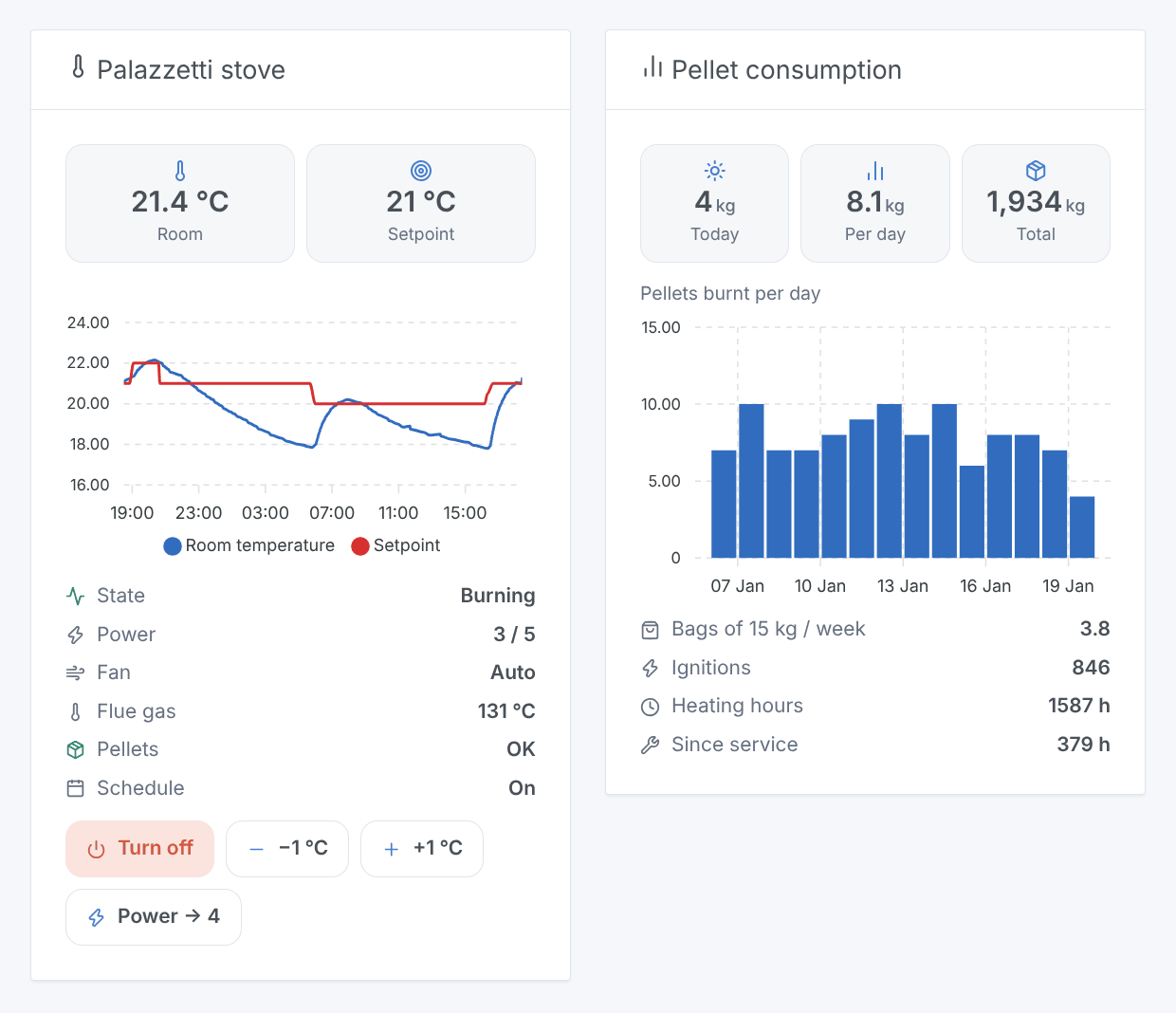
- Palazzetti stove — live room temperature and setpoint, the curve of the last 24 hours, the state (alarm in red), fan, pellets, and four buttons: Turn on/off (turning off asks for a confirmation), −1 °C, +1 °C and Power → next. Without the curve, the power level gets a tile.
- Pellet consumption — pellets burnt today, average per day, total, bars of the last days (7 to 60), 15 kg bags per week, ignitions, heating hours and hours since service. The daily history is computed by the integration from the counter of the stove: it shows after a first full day.
Configuration screen actions
- Test the connection: looks for the boxes and reads every stove.
- Set the stove clock: sets the clock of the stove (used by its weekly schedule) to the time of Gladys — handy after a power cut or a daylight saving change.
Troubleshooting
No stove found. Check that the Connection Box is on and on the same network as Gladys, then enter its IP address in the configuration. Try it from a browser: http://BOX_IP/cgi-bin/sendmsg.lua?cmd=GET+STAT must return JSON.
"The stove does not answer the box". The Connection Box answers but cannot reach the stove: check the cable between the box and the stove, and that the stove is powered.
A command is refused. The stove accepts no on/off during an ignition, a shutdown or an alarm; the fans only accept the speeds the model offers. The message shown gives the reason.
Temperatures stay empty. A probe at 0 is treated as absent: some models do not have every probe.
The daily consumption is empty. It fills up day after day; some stoves (boards of other brands) do not report their pellet counter.
The logs of the integration are in Integrations → Palazzetti → Logs.
Configuration settings
These are the settings Palazzetti asks for in its configuration screen in Gladys.
| Setting | Type | Required | Description |
|---|---|---|---|
| Getting started | section | No | Your stove needs a Palazzetti Connection Box (or a WPalaControl module) on your local network: the integration talks to it directly, without the Palazzetti cloud. Go to the Discover tab and run a scan: the boxes answering on your network appear there, ready to be added. If yours is not found (another VLAN, broadcast filtered), enter its IP address below. Give the box a fixed IP address in your router if you can. |
| Connection Box addresses | string | No | Only if the scan does not find your stove: IP addresses separated by commas. |
| Refresh interval (s) | number | No | How often each stove is read, between 10 and 300 seconds. The box pushes nothing: this is the delay of the scenes. |
How to install Palazzetti in Gladys
- In Gladys, open Integrations: Palazzetti appears in the catalog, next to the native integrations, with a community badge.
- Click Install. Gladys pulls the Docker image (
ghcr.io/william-de71/gladys-palazzetti:1.1.0), starts it in a sandbox isolated from the core, and generates the integration's interface (devices, discovery and configuration). - Open the Configuration screen of the integration, fill in the settings, and save.
- You can also install it directly from its repository URL: https://github.com/William-De71/gladys-palazzetti.
Palazzetti requires Gladys >=5.3.0. The catalog inside Gladys refreshes every hour, so a new version becomes available at most one hour after its release.
Not running Gladys yet? It is free and open source: follow the installation guide to get started.
About external integrations
Palazzetti is an external integration: a community integration packaged as a Docker container and published on GitHub, that Gladys installs in one click and runs in a sandbox isolated from its core. It is published and maintained by William-De71, not by the Gladys core team.
- Browse all integrations, native and community
- Build and publish your own external integration
- Source code on GitHub — source of this documentation