NOAA Space Weather smart home integration, free and open source
Space weather of the NOAA SWPC: Kp, storms, solar flares, aurora forecast and alerts.
Published by William-De71
- Devices
- Version 0.1.1
- Requires Gladys >=5.1.0
- ★ 0
Overview
This integration brings into Gladys the space weather of the NOAA Space Weather Prediction Center (SWPC): the Kp index of geomagnetic activity, the NOAA scales of geomagnetic storms (G), solar radiation storms (S) and radio blackouts (R), the solar wind, the solar flares, the messages of the SWPC and the OVATION aurora forecast for each of your houses. Your scenes can be told when a storm starts, when a strong flare happens, or when an aurora may be visible at home tonight.
Transport: cloud. The integration reads public files on services.swpc.noaa.gov; nothing of yours is sent (no account, no key, never the coordinates of your houses: the aurora grid is downloaded whole and read locally). Data: NOAA SWPC, public domain. This integration is not affiliated with the NOAA.
The scales in short. The Kp index goes from 0 (quiet) to 9 (extreme storm), per 3-hour period; Kp 5 is a storm G1, Kp 9 a storm G5. S1–S5 measure the protons coming from the Sun (satellites, polar flights), R1–R5 the X-rays of the flares (HF radio and GPS on the day side): R1 is an M1 flare, R3 an X1 flare.
Prerequisites
- Gladys 5.1.0 or later (widgets and scene triggers).
- For the aurora: a house with a location (Settings → Houses). The integration asks for the coordinates of the houses at installation.
- Latitude matters. Below about 55° of magnetic latitude, as in most of France, an aurora is rare: only strong storms (G3 or more, a few times per solar cycle) bring it that far south. In Scandinavia, Iceland, Canada or Alaska it is common.
Configuration
| Field | Use |
|---|---|
| Language of the texts | Device names, scene sentences and errors. Automatic: the language of the last widget shown. |
| Aurora threshold | 5 to 50 %: the OVATION probability from which an aurora is "possible" at a house in a dark sky (10 % by default). |
The Test the connection button reads the NOAA scales and the estimated Kp and lists the located houses. Diagnostic writes the state of the integration to its logs.
The integration reads each product at its own pace: the estimated Kp every minute, the solar wind, the magnetic field, the flares and the scales every 5 minutes, the messages every 10 minutes, the 3-hour Kp every 30 minutes, the forecast every hour, the radio flux every 3 hours. The OVATION grid (about 1 MB) is read every 20 minutes only while an Aurora device exists or an aurora widget is shown. Unchanged files are answered "not modified" by the server, a failure doubles the wait (an hour at most), and the last values are kept in the data folder of the integration.
Usage
Devices
On the Discovery screen: a Space weather (NOAA) device, and an Aurora device per located house. Create the ones you want.
| Device | Features |
|---|---|
| Space weather (NOAA) | Estimated Kp (last minutes), Kp index (3 h), geomagnetic storm (G 0–5), solar radiation storm (S 0–5), radio blackout (R 0–5), solar wind (km/s), magnetic field Bz and Bt (nT), radio flux 10.7 cm (sfu), X-ray class (a text, "B5.4") |
| Aurora – house | Aurora probability (%), dark sky (1 = the sun more than 6° below the horizon), Kp expected tonight |
Gladys has no unit for km/s, nT, sfu nor for the Kp: those features carry no unit, it is written in their name. The probability is the one of an aurora overhead, the highest of the nine 1° cells around the house; an aurora further north can still be seen low on the horizon.
Dashboard widgets
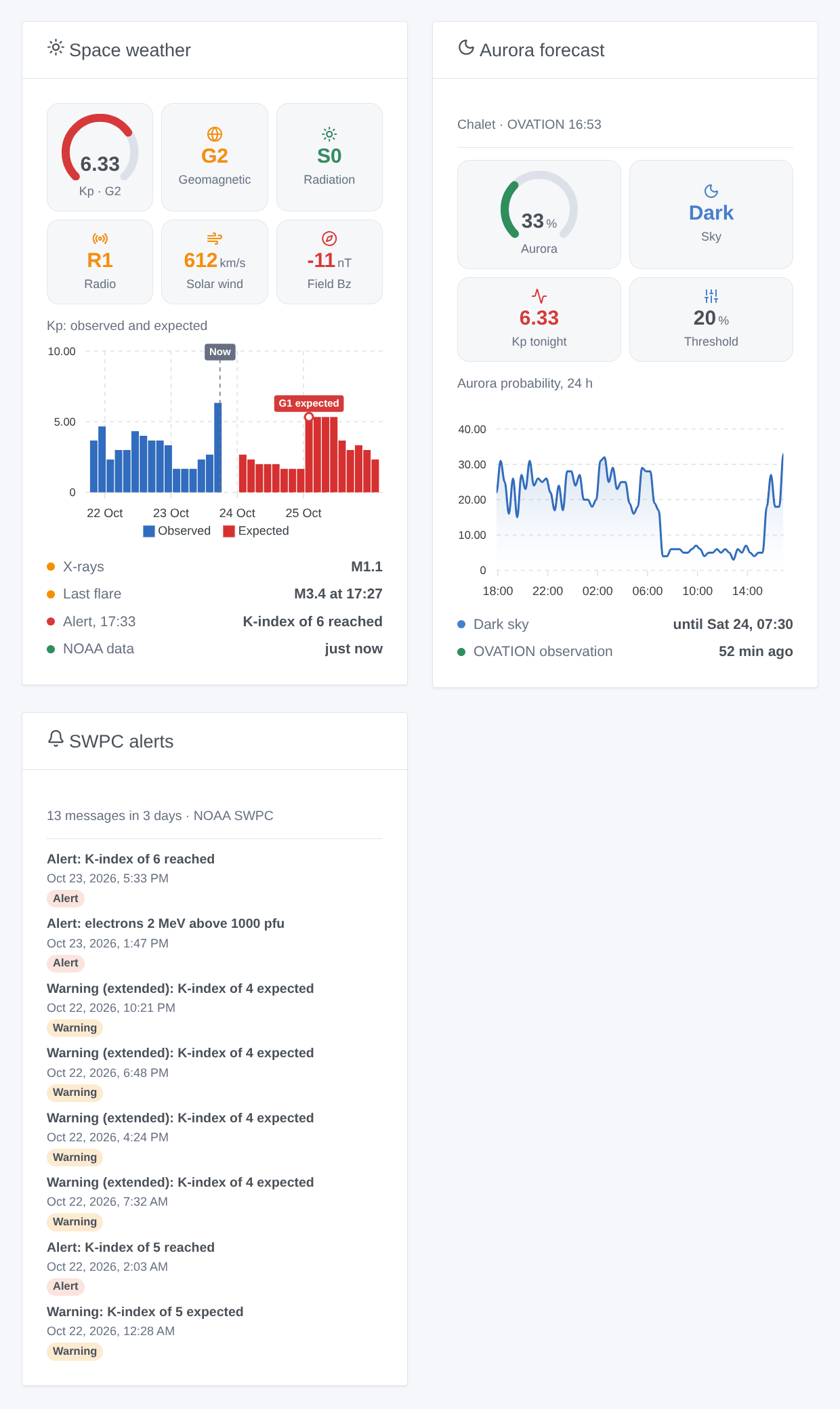
- Space weather: a Kp gauge, the G, S and R levels, the solar wind, Bz, the Kp observed over two days and expected over three, the X-rays, the last flare, the last SWPC message.
- Aurora forecast: choose an Aurora device (empty: the first located house): probability, dark or light sky, Kp expected tonight, threshold, the last 24 hours, the dark hours.
- SWPC alerts: the last messages with a short title in your language, the kind as a badge, the original English text when opened. Settings: kinds, period.
Scenes
Triggers (each fires once per event, never at startup):
- NOAA: geomagnetic storm: the G scale reaches a new level; filter by levels (for "G3 or more", tick G3, G4 and G5).
- NOAA: geomagnetic storm over: back to G0 for 3 hours.
- NOAA: solar radiation storm (S) and NOAA: radio blackout (R): a new level.
- NOAA: solar flare: a flare reaches class M or X (filter: X only); a flare that grows from M to X fires again.
- NOAA: aurora possible: at a house with an Aurora device, the probability reaches the threshold in a dark sky; NOAA: aurora over at dawn or when it falls back.
- NOAA: SWPC message: each new watch, warning, alert or summary, filtered by kind and topic.
- NOAA: storm in the forecast: a Kp of 5 or more expected within 3 days, once per episode.
Each trigger gives a ready-made sentence, {{triggerEvent.data.sentence}}, in the language of the configuration.
Actions: read the space weather, read the aurora forecast (a house), read the 3-day forecast, each with a summary sentence. They answer from the last readings, and read again only what is too old.
Examples:
- When geomagnetic storm with levels G3, G4, G5 → send the notification
{{triggerEvent.data.sentence}}. - When aurora possible at the Aurora device of the chalet → send "Aurora possible tonight: {{triggerEvent.data.probability}} %, look north".
- When solar flare with class X → send "X flare: HF radio and GPS may be disturbed ({{triggerEvent.data.class}})" to the radio amateur of the house.
Troubleshooting
- No Aurora device: the house has no location (Settings → Houses), then run a scan from the Discovery screen.
- The aurora widget waits: the OVATION grid is read within a minute of the first display; it shows within a few minutes.
- "The NOAA SWPC has not answered": the service or the internet connection is down; the integration tries again by itself, less and less often (an hour at most).
- A value stays empty: a product older than its freshness (an hour for the solar wind) is not shown as "now"; the SWPC sometimes stops a feed for a while.
- Logs: Settings → Supervision; add
DEBUG=gladys-integration-sdkin developer mode for the SDK logs. Issues: https://github.com/William-De71/gladys-noaa-space-weather/issues
Configuration settings
These are the settings NOAA Space Weather asks for in its configuration screen in Gladys.
| Setting | Type | Required | Description |
|---|---|---|---|
| Data of the NOAA SWPC | section | No | The Space Weather Prediction Center of the NOAA publishes its observations and forecasts for free, without an account or a key: nothing to fill in. The integration reads them from services.swpc.noaa.gov (cloud), at the pace of each product, and keeps a small cache in its data folder. The data are in the public domain; credit: NOAA SWPC. This integration is not affiliated with the NOAA. |
| Language of the texts | select | No | Device names, scene texts and errors. Automatic: the language of the last widget shown. |
| Aurora | section | No | Each house of Gladys with a location gets an Aurora device on the Discovery screen: create it for the houses you want. The forecast (OVATION, a file of about 1 MB) is only read while such a device exists or an aurora widget is shown. The probability is the one of an aurora overhead, the highest of the nine cells of 1° around the house, and "night" means the sun more than 6° below the horizon. Below about 55° of latitude, as in most of France, an aurora is rare: only strong storms (G3 or more) bring it there. |
| Aurora threshold | select | No | The probability from which an aurora is "possible" at a house, in a dark sky: the "Aurora possible" trigger and the colors of the widget. |
How to install NOAA Space Weather in Gladys
- In Gladys, open Integrations: NOAA Space Weather appears in the catalog, next to the native integrations, with a community badge.
- Click Install. Gladys pulls the Docker image (
ghcr.io/william-de71/gladys-noaa-space-weather:0.1.1), starts it in a sandbox isolated from the core, and generates the integration's interface (devices, discovery and configuration). - Open the Configuration screen of the integration, fill in the settings, and save.
- You can also install it directly from its repository URL: https://github.com/William-De71/gladys-noaa-space-weather.
NOAA Space Weather requires Gladys >=5.1.0. The catalog inside Gladys refreshes every hour, so a new version becomes available at most one hour after its release.
Not running Gladys yet? It is free and open source: follow the installation guide to get started.
About external integrations
NOAA Space Weather is an external integration: a community integration packaged as a Docker container and published on GitHub, that Gladys installs in one click and runs in a sandbox isolated from its core. It is published and maintained by William-De71, not by the Gladys core team.
- Browse all integrations, native and community
- Build and publish your own external integration
- Source code on GitHub — source of this documentation