National Weather Service smart home integration, free and open source
Official US forecasts and alerts from the National Weather Service.
Published by William-De71
- Devices
- Version 1.2.0
- Requires Gladys >=5.3.0
- ★ 0
This integration brings the forecasts and official alerts of the National Weather Service (NWS), the weather service of the United States, to Gladys. It feeds the dashboard weather widget, the assistant and the alert-driven scenes, and adds three widgets.
Community integration, not affiliated with or endorsed by the National Weather Service or NOAA.
Ready to use
No configuration is needed: the NWS API is free and keyless. Install the integration and it works right away.
The NWS covers the United States and its territories only (Alaska, Hawaii, Puerto Rico, Guam…). For a house elsewhere, Gladys automatically uses another weather provider.
Set the location of each house in its settings: the alert watch, the scene actions and the widgets need it.
What the integration provides
- Current conditions measured at the nearest weather station (temperature, feels-like, humidity, dew point, pressure, wind, gusts, visibility). When no station reported recently, the forecast of the running hour is used.
- Hourly forecast for 24 hours: temperature, feels-like, humidity, cloud cover, wind and gusts, rain amount and chance.
- Daily forecast for 6 to 7 days: high of the day, low of the following night, sky, chance of rain, amount, wind and gusts.
- Sunrise and sunset, computed locally.
- Official alerts (watches, warnings, advisories) with their full text and instructions.
The NWS publishes no UV index.
The NWS writes its texts in English only: alert names, forecasters' narratives and bulletins stay in English; everything else follows the language of Gladys (English, French, German or Spanish).
Alert levels
| Level | Meaning |
|---|---|
| Warning | the hazard is happening or imminent: take action now |
| Watch | conditions are favorable for it: be prepared |
| Advisory | a less serious hazard that may cause inconvenience |
| Statement | information or follow-up |
Alert-driven scenes
Gladys already offers the generic "Weather alert raised" and "Weather alert ended" triggers. Gladys checks the alerts every 30 minutes; this integration additionally watches them every minute and tells Gladys as soon as one changes, so your scene fires within seconds.
The integration adds its own, finer triggers under National Weather Service in the scene editor:
| Trigger | Fires when… | Filters |
|---|---|---|
| NWS alert issued | a new watch, warning or advisory covers the house | house, kind of alert, level, severity |
| NWS alert ended | an alert expired or was cancelled | house, kind of alert, level |
Kinds: tornado, hurricane / tropical storm, severe thunderstorm, flood, winter storm, cold, heat, wind, fire weather, fog, air quality, marine, other.
For instance, to be told about a tornado: trigger NWS alert issued, kind Tornado, level Warning, then a send-message action with the Summary and Instructions variables.
Good to know:
- The House field must hold the house name exactly as shown in Gladys, case included. Empty = every house.
- The NWS never edits an alert: it issues a new one replacing the previous. The integration follows these updates: an extended or amended alert does not fire your scene again.
- An alert that changes level (a Hurricane Watch replaced by a Hurricane Warning, for example) counts as a new alert: NWS alert ended for the old one, NWS alert issued for the new one.
- Alerts already in force when the integration starts fire nothing: only new ones do.
- An alert ends as soon as its end time has passed, or once it is missing from two checks in a row and for at least 5 minutes. If it comes back afterwards, it fires NWS alert issued again: every end is followed by a new start, never by a second end.
Scene actions
| Action | Returns |
|---|---|
| Get the NWS alerts | number of alerts, warnings, watches and advisories, list of events, the most serious one (kind, level, instructions, end), a summary |
| Get the NWS forecast of a day | today to 6 days ahead: high, low, sky, chance of rain, wind, the forecaster's text (day and night), a summary |
| Get the current NWS conditions | temperature, feels-like, humidity, dew point, pressure, wind, gusts, visibility, sky, station, a summary |
Every action has a Summary output, a sentence ready to send in a message.
Dashboard widgets
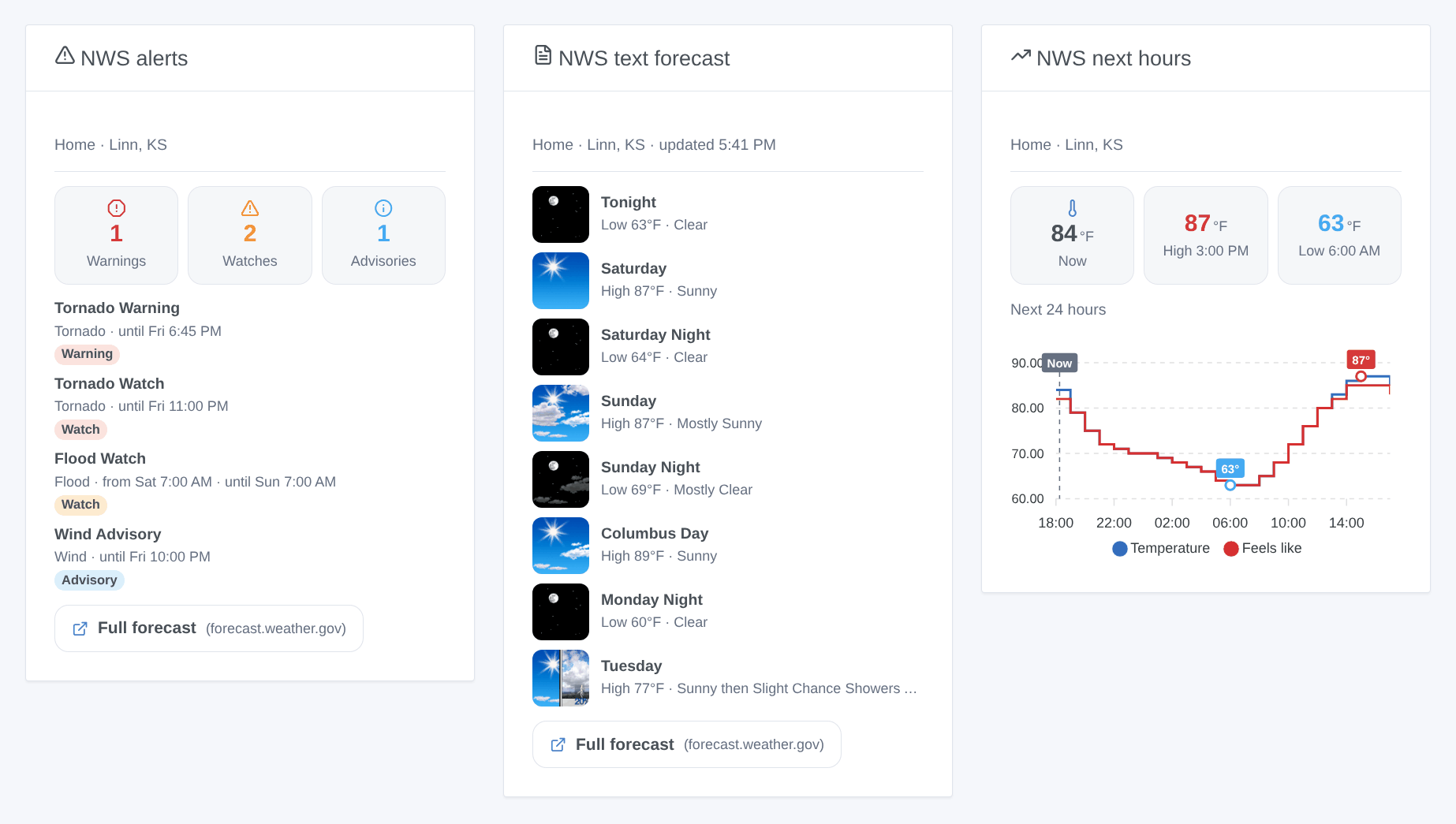
| Widget | Content |
|---|---|
| NWS alerts | warnings / watches / advisories counters, then each alert; tap one for its full text and instructions. Refreshed as soon as an alert changes. |
| NWS text forecast | the forecaster's narrative, period by period (Tonight, Saturday, Saturday Night…), with the NWS icons |
| NWS next hours | 12, 24 or 48 hours as a curve: temperature and feels-like, chance of rain, or wind and gusts |
Each widget has a House setting (empty = first located house), written exactly as in Gladys.
Configuration (optional)
| Setting | Default | Role |
|---|---|---|
| Contact email | — | the NWS asks every application to identify itself; your email lets it reach you before blocking traffic it finds abusive |
| Cache duration (s) | 600 | how long a forecast is reused (the NWS refreshes them about once an hour) |
| Alert check interval (s) | 60 | how often the alerts of your houses are checked, 30 to 900 seconds |
Troubleshooting
| Symptom | What to do |
|---|---|
| "No house of Gladys has a location" | set the location of a house in Settings → Houses |
| "Outside the National Weather Service coverage" | the house is not in the United States: Gladys uses another weather provider for it |
| A scene filtered on a house never fires | the House field must hold the house name exactly, case included |
| Nothing fired for an alert after a restart | alerts already in force when the integration starts are ignored on purpose |
| Scene texts in the wrong language | they follow the last request of Gladys: display one of the widgets once |
To report a problem, give the version of Gladys and of the integration, the city of the house and the logs of the integration (set DEBUG=gladys-integration-sdk for details), on GitHub or in the forum thread.
Configuration settings
These are the settings National Weather Service asks for in its configuration screen in Gladys.
| Setting | Type | Required | Description |
|---|---|---|---|
| Ready to use | section | No | Forecasts and alerts work with no configuration: the National Weather Service API is free and needs no key. It covers the United States and its territories only — a house elsewhere gets its weather from another provider. |
| Contact email (optional) | string | No | Added to the identification the NWS requires from every application, so it can reach you before blocking traffic it finds abusive. Never shared with anyone else. |
| Cache duration (s) | number | No | In seconds, between 0 and 3600. How long a forecast is reused before calling the NWS again. The NWS refreshes its forecasts about once an hour: the default of 600 (10 min) costs no freshness. Set to 0 to always call the API. Alerts are not affected: they are checked on their own schedule. |
| Alert check interval (s) | number | No | In seconds, between 30 and 900. How often the official alerts of your houses are checked, for the scene triggers and the alerts widget. A Tornado Warning lasts about 30 minutes: the default of 60 s fires your scenes within a minute of its issuance. |
How to install National Weather Service in Gladys
- In Gladys, open Integrations: National Weather Service appears in the catalog, next to the native integrations, with a community badge.
- Click Install. Gladys pulls the Docker image (
ghcr.io/william-de71/gladys-national-weather-service:1.2.0), starts it in a sandbox isolated from the core, and generates the integration's interface (devices, discovery and configuration). - Open the Configuration screen of the integration, fill in the settings, and save.
- You can also install it directly from its repository URL: https://github.com/William-De71/gladys-national-weather-service.
National Weather Service requires Gladys >=5.3.0. The catalog inside Gladys refreshes every hour, so a new version becomes available at most one hour after its release.
Not running Gladys yet? It is free and open source: follow the installation guide to get started.
About external integrations
National Weather Service is an external integration: a community integration packaged as a Docker container and published on GitHub, that Gladys installs in one click and runs in a sandbox isolated from its core. It is published and maintained by William-De71, not by the Gladys core team.
- Browse all integrations, native and community
- Build and publish your own external integration
- Source code on GitHub — source of this documentation