MTA New York smart home integration, free and open source
New York City subway (MTA): real-time departures and service status of the lines.
Published by William-De71
- Devices
- Version 0.1.0
- Requires Gladys >=5.3.0
- ★ 0
Overview
This integration brings the New York City subway of the MTA, and the Staten Island Railway, into Gladys. It gives the next trains, in real time, at the stations you choose (three in the form, up to 10 more with a button), filtered by line and direction, like the countdown clocks of the platforms. It also follows the service status of up to six lines (good service, notice, planned work, delays and changes, suspended), with the alerts of the MTA. Each station and each line becomes a device to show on a dashboard and to use in scenes.
The data come from the official open data of the MTA, without an account or a key: the real-time feeds of the subway (GTFS-RT), its service alerts and the official list of the stations (data.ny.gov). The trains of the followed stations are read in one request per group of lines (the A C E, the B D F M, the L…), every minute by default (every 10 minutes while no station announces a train in the next half hour). The alerts are read every 5 minutes, when a line is followed.
The MTA lists each train of the next hour or so with its stops to the terminus. A trip on which no train is put yet is shown, as on the clocks, but marked "(scheduled)": it may not run. The MTA gives no delay and marks no cancelled train: the integration does not invent them.
This is a cloud integration: it contacts api-endpoint.mta.info and data.ny.gov. Nothing else leaves your network. The data are obtained from the servers of the MTA and shown as they are: they may be inaccurate or incomplete, and what you see may not be real time (it is read every 30 seconds to 10 minutes). This community integration is not affiliated with, endorsed or licensed by the MTA.
Requirements
- Gladys Assistant 5.3.0 or later.
- Nothing else: the open data of the MTA need no account and no key.
Configuration
| Field | What to type |
|---|---|
| Station 1, 2, 3 | The name of the station as written in it ("Times Sq-42 St", "Bedford Av") or one of its stop ids ("R16"). |
| Line | Only this line: "A", "7", "Q", "S 42 St", "SIR". Empty: every line of the station. |
| Direction | One side ("Uptown", "Downtown", "Manhattan": the words on the platform) or words of the destination. Empty: both. |
| Followed lines | The lines whose service status you follow, six at most: "A, F, L, 7". |
| Reading of the real time | Every 30 seconds, minute, 2 minutes or 5 minutes. |
| Language of the texts | Names of the devices, summaries and outputs of the scenes. Station names and alerts stay in English. |
A station gathers every line of its complex: "Times Sq-42 St" gives the 1 2 3, the 7, the N Q R W, the shuttle and the A C E of 42 St-Port Authority. Some names serve several stations ("86 St" is on six lines): type the line too, or the name as Find a station writes it ("86 St (Q)"), or a stop id. Find a station gives the stations holding a few words, with their borough, their stop ids and their lines ("86 St (Q) · Manhattan [Q04] → Q"). Test the connection reads the list of the stations again and reads each station and each line right away.
A direction keeps one side of the station: "Uptown" / "Downtown", "N" / "S", or the words the MTA writes on the side ("Manhattan", "Queens", "Coney Island"). Other words keep the destinations holding them ("Far Rockaway | Lefferts").
More stations than the three of the form (home, work, school…): Add a station takes the same three fields — station, line, direction — and follows up to 10 more. List the stations shows every followed station, numbered; Remove a station takes that number (or the name). The added stations are kept in the configuration of Gladys, so they follow its backups.
Usage
Devices
In the Discover tab, create the devices you want:
- MTA <station>: the next train as text ("A → Far Rockaway-Mott Av · 3 min"), the wait of the next train and of the one after (minutes);
- MTA A train, MTA 42 St Shuttle…: the service status as text ("Delays and changes: Downtown F/M trains are running with delays…") and the number of alerts under way.
Service status
The MTA publishes alerts: a text, the lines concerned, their periods and a type. The state of a line comes from its heaviest alert under way: suspended, delays and changes (delays, reduced service, unplanned reroutes), planned work (the "Planned - …" alerts, every weekend on many lines), service notice; good service without an alert. An alert starting in the next three days is shown as coming.
Dashboard widgets
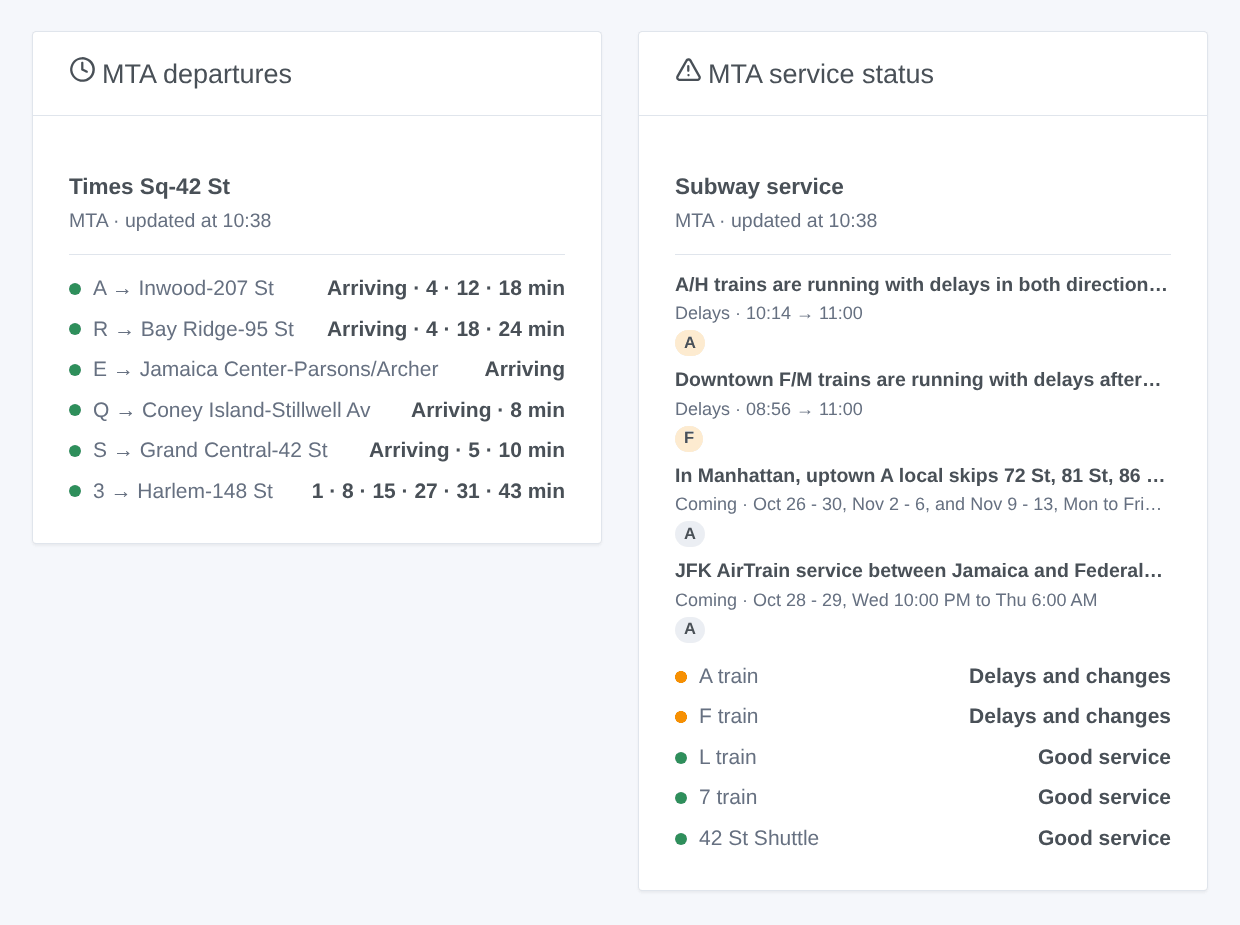
- MTA departures: the next trains of a station, compact. One row per line and destination, with its next trains in a row ("2 · 9 · 17 min"); grey when the next train is only scheduled. The Routes shown setting sets the number of rows. Choose a followed station, or type any station (and a line) in the widget settings. With Several stations, one widget shows several station devices: the devices of one station are merged under its name; for different stations, each opens with a row of its own.
- MTA service status: the state of each line, then the alerts under way and those of the next three days, with their hours. Tap a card for the full text. The followed lines, the ones typed in the settings, or the lines of your stations when you follow none.
Scenes
Triggers, once per change (the first reading is only a baseline):
- MTA: train soon: a train at a followed station leaves in 2, 3, 5, 10, 15 or 20 minutes.
- MTA: line disrupted: a followed line gets delays, changes or a suspension that were not planned. Planned work does not fire it.
- MTA: back to good service: no more unplanned trouble on the line.
- MTA: new service alert: the MTA publishes an alert about a followed line, under way or coming (filter: notice, planned work, delays and changes, suspension).
Each gives a ready-made sentence, {{triggerEvent.data.summary}}, and its values (line, destination, side, time, title, text, type, hours…). The actions MTA: next trains and MTA: status of a line return the same kind of values, to put in a message or to test in a condition.
Examples:
- When the L to 8 Av leaves Bedford Av in 5 minutes → turn the hall lamp green.
- When the A line is disrupted → send the summary to your phone before you leave.
- Every weekday at 7:30 → read the next trains of your station and have the kitchen speaker announce them.
Transport
Cloud only: the data come from the internet. The feeds of the lines of your stations at each reading, the alerts every 5 minutes, the list of the stations once a week.
Troubleshooting
- "Unknown or ambiguous": use Find a station, then copy the name as written ("86 St (Q)") or a stop id; for a line, its letter or number ("A", "7X"), "S 42 St", "Franklin shuttle", "Rockaway shuttle" or "SIR" (a bare "S" is one of three shuttles).
- "(scheduled)" after a train: no train is put on that trip yet; it may not run.
- No train in the direction typed: empty the direction to see every train, then copy the words of the side or of the destination.
- No train at all: some lines do not run at all hours (the B on weekends, the Z outside rush hours); the device then reads every 10 minutes.
- "The open data of the MTA do not answer": the integration tries again at each reading; a feed failing a short while gives its last reading meanwhile.
- To report a problem: press Diagnostic, then copy the lines starting with "MTA diagnostic" from the Logs tab into a GitHub issue or a reply on the forum, with the versions of Gladys and of the integration.
Configuration settings
These are the settings MTA New York asks for in its configuration screen in Gladys.
| Setting | Type | Required | Description |
|---|---|---|---|
| MTA open data | section | No | The departures and the service status come from the official open data of the MTA: the real-time feeds of the New York City subway and of the Staten Island Railway (GTFS-RT), and its service alerts. No account and no key: fill in your stations and lines below, then press "Test the connection". |
| Station 1 | section | No | The station where you take the subway: its next trains, from the real-time feeds of the MTA, like the countdown clocks. Type its name as written in the station ("Times Sq-42 St", "Bedford Av") or one of its stop ids ("R16"): the "Find a station" button gives them. A name shared by several stations ("86 St") needs its line. The line keeps only its trains ("A", "7", "Q"). The direction keeps one side ("Uptown", "Downtown", "Manhattan", the words written on the platform) or the destinations holding these words ("Far Rockaway | Lefferts"). |
| Station | string | No | |
| Line | string | No | Empty for every line. |
| Direction | string | No | Uptown, Downtown, or words of the destination. Empty for both directions. |
| Station 2 | section | No | |
| Station | string | No | |
| Line | string | No | Empty for every line. |
| Direction | string | No | Uptown, Downtown, or words of the destination. Empty for both directions. |
| Station 3 | section | No | More stations (a home, a workplace, a school…): the "Add a station" button, under the form, follows up to 10 more, "List the stations" shows them all, numbered, and "Remove a station" stops following one. The trains of every station come in one request per group of lines. |
| Station | string | No | |
| Line | string | No | Empty for every line. |
| Direction | string | No | Uptown, Downtown, or words of the destination. Empty for both directions. |
| Service status of the lines | section | No | The lines whose service status you follow: a device per line, with its state (good service, notice, planned work, delays and changes, suspended) worked out from the alerts of the MTA, and its alerts under way, read every 5 minutes. |
| Followed lines | string | No | Up to 6, separated by commas: "A", "7", "7X", "S 42 St", "SIR". |
| Options | section | No | |
| Reading of the real time | select | No | How often the trains of the followed stations are read: one request per group of lines (the A C E, the B D F M…). While no station announces a train in the next half hour, every 10 minutes. |
| Language of the texts | select | No | Names of the devices, summaries and outputs of the scenes. Automatic: the language of your dashboard, as soon as an MTA widget has been shown. Station names and alerts stay in English. |
How to install MTA New York in Gladys
- In Gladys, open Integrations: MTA New York appears in the catalog, next to the native integrations, with a community badge.
- Click Install. Gladys pulls the Docker image (
ghcr.io/william-de71/gladys-mta-new-york:0.1.0), starts it in a sandbox isolated from the core, and generates the integration's interface (devices, discovery and configuration). - Open the Configuration screen of the integration, fill in the settings, and save.
- You can also install it directly from its repository URL: https://github.com/William-De71/gladys-mta-new-york.
MTA New York requires Gladys >=5.3.0. The catalog inside Gladys refreshes every hour, so a new version becomes available at most one hour after its release.
Not running Gladys yet? It is free and open source: follow the installation guide to get started.
About external integrations
MTA New York is an external integration: a community integration packaged as a Docker container and published on GitHub, that Gladys installs in one click and runs in a sandbox isolated from its core. It is published and maintained by William-De71, not by the Gladys core team.
- Browse all integrations, native and community
- Build and publish your own external integration
- Source code on GitHub — source of this documentation