MotoGP smart home integration, free and open source
MotoGP, Moto2 and Moto3: session calendars, reminders, results and standings.
Published by William-De71
- Devices
- Version 0.1.0
- Requires Gladys >=5.3.0
- ★ 0
Overview
This integration brings the MotoGP World Championship into Gladys: the sessions of MotoGP, Moto2, Moto3 and the Bagger World Cup, the results and the championship standings. Each followed class becomes a calendar for every user who enables the integration. Scenes can react before a session starts, when results are out or when the championship leader changes, and four widgets show the next session, the schedule, the standings and the last results.
The data comes from motogp.com, the official website of the championship, which publishes it without an account or a key. This integration is unofficial: it is not affiliated with Dorna Sports, the FIM or motogp.com.
Requirements
- Gladys Assistant 5.3.0 or later (calendar integrations).
- Internet access. No account, no key.
Configuration
| Field | Description |
|---|---|
| Classes | MotoGP (default), Moto2, Moto3, Bagger World Cup. One calendar each. The Bagger World Cup has no results nor standings. |
| Sessions | Races, sprints, qualifying (default), practice, warm up, tests outside Grands Prix. |
| Favorite riders (optional) | Numbers or names, separated by commas ("93, Bezzecchi"). Highlighted in the widgets and given to the scenes. |
| Language of the scene texts | The language of the sentences of the scene triggers and actions. Automatic: the language of the dashboard. |
Save, then in My calendars on the same page, press Enable for me. Every user who wants the calendars enables the integration for themselves.
A number means the rider who wears it in every followed class; a name (or part of a name, accents ignored) is more precise.
Usage
Calendars
Each followed class is a calendar ("MotoGP", "Moto2"…), with:
- one event per session of the chosen kinds, at the time of Gladys: "MotoGP · Sprint – Portugal". Races have no end time in the official calendar: their end is estimated (45 minutes, 25 for the sprint);
- the circuit, city and country as the location, the official name of the Grand Prix and its round as the description;
- the sessions from 14 days back to the end of the season, and the next season as soon as motogp.com publishes it (from September). A moved session follows, a removed one disappears.
A new calendar is private. In My calendars, turn on Share with the household to use it in the scenes of the household (and with the built-in trigger "A calendar event is coming"), or turn off Synchronize this calendar to ignore it. A class removed from the configuration deletes its calendar.
Dashboard widgets
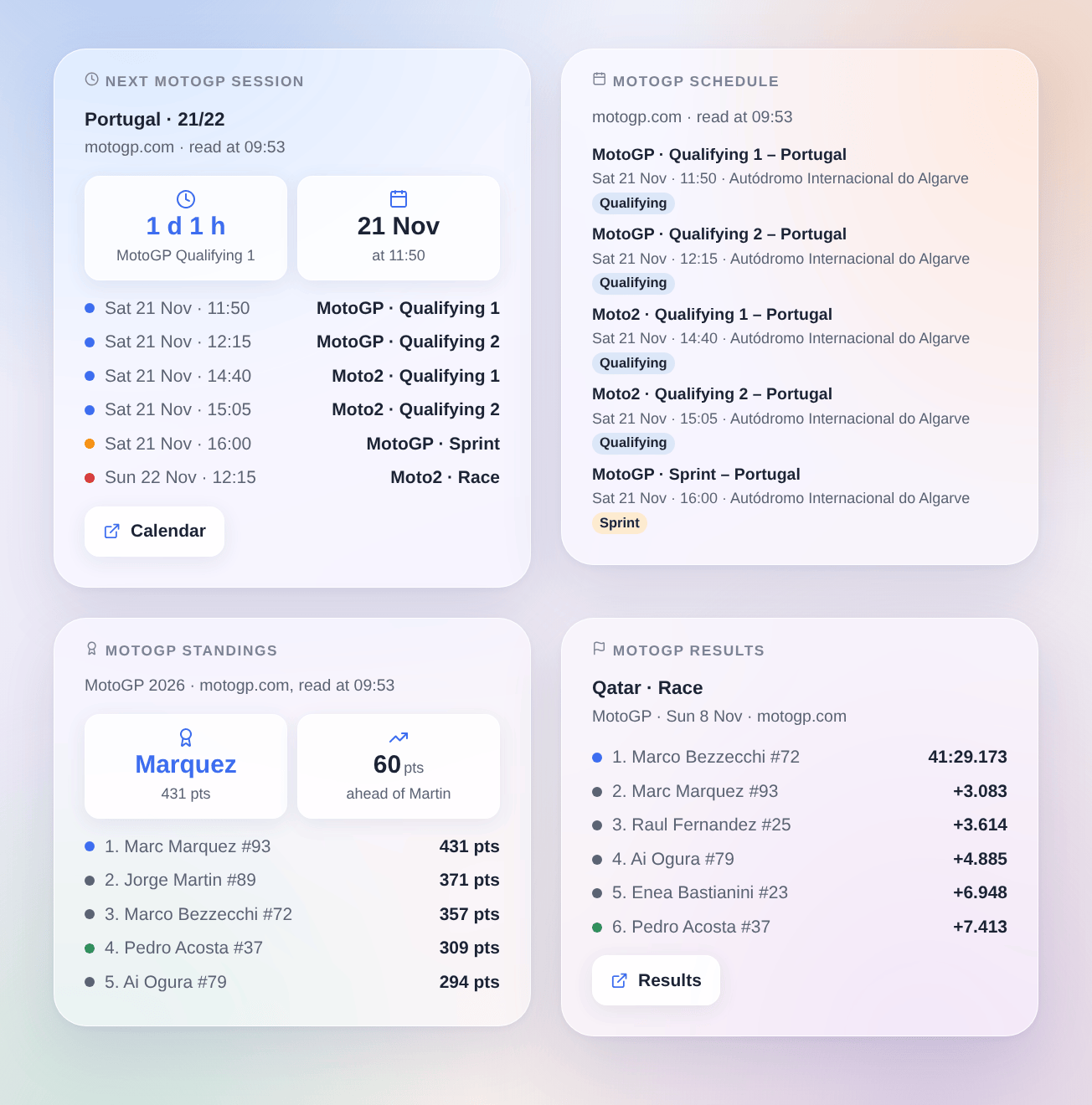
- Next MotoGP session: the countdown, the day and time, then the sessions left in the weekend (red dot: race, orange: sprint, blue: qualifying).
- MotoGP schedule: the next 3, 5 or 8 sessions with day, time and circuit.
- MotoGP standings: the leader, their lead over the second, then the top 5 or 10; your favorite riders are in green, and added below the top when outside it.
- MotoGP results: the last race, sprint or qualifying of a class, with the gaps; your favorites in green.
The first two can be limited to some classes or sessions in their settings; the other two show one class to choose.
Scenes
Triggers:
- MotoGP: a session starts: at the start, or 15, 30, 60 or 120 minutes before (choose in "When"). Filters: classes, sessions.
- MotoGP: results are out: the classification of a race, a sprint or the qualifying (the grid) is published, usually a few minutes after the finish. Filters: classes, sessions, and result of my favorite rider (wins, second or third, 4th to 10th, 11th or further, not classified, not in the classification).
- MotoGP: new championship leader: another rider leads the championship of a class.
Main variables: title ("MotoGP · Race – Qatar"), category, session (race, sprint, qualifying…), session_name, grand_prix, round, circuit, date, time; for the results winner_name, winner_team, second_name, third_name, podium, favorite_name, favorite_position (-1 when not classified), favorite_points, favorite_result and a ready-made sentence text; for the leader leader_name, leader_points, gap_to_second, previous_leader_name.
Actions:
- MotoGP: next session: title, class, session, Grand Prix, circuit, date, time, minutes until the start and a sentence
text. - MotoGP: championship standings: the top three and their gaps, the position, points and gap of your favorite rider, and a sentence
text. - MotoGP: last results: the winner, the podium, the result of your favorite and a sentence
text.
Examples:
- When the MotoGP race starts in 15 minutes → turn the TV on and dim the living room.
- When the race results are out and my favorite wins → turn the lights green and send
{{triggerEvent.data.text}}. - Every Monday at 8:00 → MotoGP: championship standings, then send its
texton Telegram.
Results and leader changes fire nothing on the very first reading (an install on Sunday evening does not announce the race of the afternoon).
Transport
Cloud only. The integration reads the public calendar, classifications and championship of motogp.com, over the internet: a few dozen requests a day, about one every 30 minutes during a race weekend. Nothing about you or your home leaves your network.
Troubleshooting
- The calendars stay empty: check that you pressed Enable for me in My calendars, and that the status of the integration does not say motogp.com cannot be reached.
- "motogp.com cannot be reached": the integration tries again by itself 15 minutes later; what was already read stays displayed.
- No results: motogp.com publishes the classification a few minutes after the finish; the integration asks for it every 5 minutes for 3 hours, then every hour. The Bagger World Cup has no results on motogp.com.
- My favorite is not recognized: write their last name as motogp.com writes it ("Marquez", "Viñales" or "Vinales"), or their number.
- Times change: during a race weekend, the calendar is read again every 30 minutes; moved sessions follow in the calendars and the reminders.
To report a bug, give the versions of Gladys and of the integration, the followed classes and the lines of the Logs tab of the integration; in developer mode, DEBUG=gladys-integration-sdk adds the SDK logs.
Configuration settings
These are the settings MotoGP asks for in its configuration screen in Gladys.
| Setting | Type | Required | Description |
|---|---|---|---|
| motogp.com | section | No | The calendar, the results and the standings come from motogp.com, the official website of the championship, without an account or a key. Choose the classes and the sessions to follow, then enable the integration in “My calendars” below: each user gets one calendar per class. Nothing about you leaves your network: the integration only reads the public calendar and results. |
| Classes | multi_select | Yes | One calendar per class. The Bagger World Cup has no results nor standings on motogp.com. |
| Sessions | multi_select | Yes | Put in the calendars, seen by the “a session starts” trigger and the schedule widgets. |
| Favorite riders (optional) | string | No | Numbers or names, separated by commas. Highlighted in the widgets, and in the scenes. |
| Language of the scene texts | select | No | For the sentences of the scene triggers and actions. Automatic: the language of the dashboard. |
How to install MotoGP in Gladys
- In Gladys, open Integrations: MotoGP appears in the catalog, next to the native integrations, with a community badge.
- Click Install. Gladys pulls the Docker image (
ghcr.io/william-de71/gladys-motogp:0.1.0), starts it in a sandbox isolated from the core, and generates the integration's interface (devices, discovery and configuration). - Open the Configuration screen of the integration, fill in the settings, and save.
- You can also install it directly from its repository URL: https://github.com/William-De71/gladys-motogp.
MotoGP requires Gladys >=5.3.0. The catalog inside Gladys refreshes every hour, so a new version becomes available at most one hour after its release.
Not running Gladys yet? It is free and open source: follow the installation guide to get started.
About external integrations
MotoGP is an external integration: a community integration packaged as a Docker container and published on GitHub, that Gladys installs in one click and runs in a sandbox isolated from its core. It is published and maintained by William-De71, not by the Gladys core team.
- Browse all integrations, native and community
- Build and publish your own external integration
- Source code on GitHub — source of this documentation