Minut smart home integration, free and open source
Minut sensors: noise, temperature, humidity, alarm and home events, via the Minut API.
Published by William-De71
- Devices
- Version 0.1.0
- Requires Gladys >=5.3.0
- ★ 0
Overview
Minut makes battery-powered home sensors used in holiday rentals, flats and houses: they watch the noise without recording any sound, the temperature, the humidity, the pressure, recognize the sound of a smoke or CO alarm, and act as a security alarm with motion detection. Each sensor reports to the Minut cloud about once an hour, and at once when something happens.
This integration brings them into Gladys through the official Minut API: one device per sensor and one per home, the alarm and the noise alerts controlled from Gladys, scene triggers on the events Minut reports, scene actions and three dashboard widgets.
Important: Minut opens its API only to accounts on its Enterprise plan; otherwise the Minut website offers to "book a demo". The integration was written from the official API reference and has never been tested with a real Minut account: please report what you see.
Prerequisites
- Gladys Assistant 5.3.0 or later (catalog keywords). Older instances cannot install the integration.
- Minut sensors set up in the Minut app, on an account with API access (Minut Enterprise plan).
- A Minut API client (below).
Create the API client
- Sign in to the Minut web app with the account of your homes.
- Open Settings, then Developer tools (web.minut.com/settings/api-clients), and create an API client. No redirect address is needed: the integration uses the
client_credentialsgrant, for your own data. - Copy its client id and client secret.
If the Developer tools page is missing, or if the client gets no organization, API access is not enabled on the account: contact Minut.
Configuration
| Field | What to enter |
|---|---|
| Client id | The id of your Minut API client. |
| Client secret | Its secret. Stored as a secret, never shown again nor logged. |
| Noise alerts pause (minutes) | How long turning the noise monitoring off pauses it (a Minut "snooze"), from 5 to 1,440 minutes. 60 by default. |
| Language of the texts | Device names and the texts given to scenes. Automatic: the language of the last widget shown. |
Two buttons complete the screen: Connect and search (checks the client, lists your homes and sensors and offers them in the Discover tab) and Diagnostic (the state of the integration in its logs, without the secret).
Usage
Devices
Open the Discover tab of the integration and create the devices:
- Minut home …, one per home: Alarm (a switch: on or off), Alarm status (on, off, turning on, grace period, alarm triggered), Noise monitoring (a switch: noise alerts watching, or paused for the length set in the configuration) and Noise disturbance (quiet, alert level 1 to 4, paused, off). The alarm appears when Minut gives its state, the noise monitoring when it is on in Minut.
- Minut …, one per sensor, named as in the Minut app: Temperature (°C), Humidity (%), Sound level (dB, A-weighted by Minut), Atmospheric pressure (hPa), Battery (%) and Removed from its plate (1 when the sensor is off its mounting plate; recent sensors only), each one once Minut gave its value.
A feature, once offered, never goes away; a value Minut did not give keeps its last one. There is no "online" feature: use the sensor offline or back trigger. Motion is not part of the home events of the API and is not available.
Minut sensors report about once an hour: the integration reads them when their next report is due (between 5 and 60 minutes), the homes every 5 minutes and the events every minute, always under the rate limit of the API (100 requests a minute at most, Minut allows 120).
Dashboard widgets
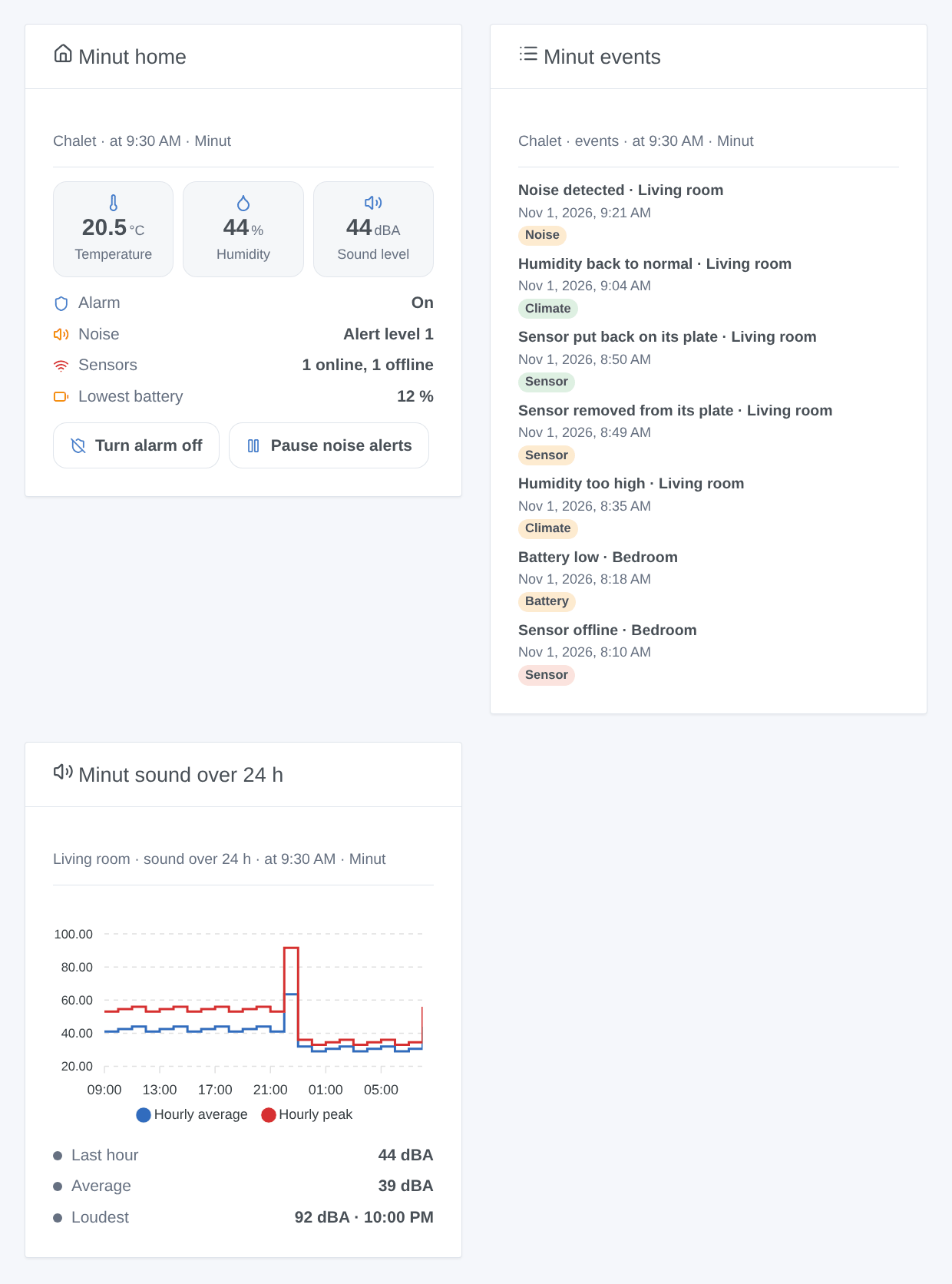
- Minut home: the alarm, the noise monitoring, the sensors online and offline, the lowest battery, then the average temperature and humidity and the loudest sound level; buttons to turn the alarm on or off (with a confirmation), to silence it while it rings, and to pause or resume the noise alerts.
- Minut events: the last 8 events of a home (noise, alarms, sensors, climate, battery), newest first.
- Minut sound over 24 h: the hourly average and peak of the sound level of a sensor, with the last hour, the average and the loudest hour.
The first two have a setting Minut home, the third a setting Sensor (the first one by default).
Scenes
Triggers (filters: home, sensor and state; variables: home_name, device_name, state, event_type, event_time, time, title, and the ids in Gladys):
- Minut: noise disturbance:
started(noise above the threshold of the noise monitoring) orended. Alsosound_level,sound_threshold,noise_count. - Minut: smoke or CO alarm heard: a sensor recognizes the sound of an alarm.
- Minut: security alarm:
triggered(after motion, once the grace period expired),silenced,mutedon a sensor. - Minut: alarm turned on or off:
onoroff, changed outside Gladys (Minut app, schedule). A command of Gladys never fires it. - Minut: sensor taken off its plate:
removed,mounted,moved(older sensors),casingopened. - Minut: sensor offline or back:
offline,online. - Minut: battery low:
low(about two weeks left),empty. - Minut: temperature alert:
high,low,normal,freezing— on the thresholds set in Minut. - Minut: humidity alert:
high,low,normal. - Minut: risk of mould:
detected,cleared. - Minut: sensor button pressed, Minut: smoking detected, Minut: crowd detected.
Events reach Gladys within a minute or two. Only the events after the first start count, each one once.
Actions:
- Minut: turn the alarm on or off (home, on / off).
- Minut: silence the alarm (home).
- Minut: pause or resume noise alerts (home, pause / resume, minutes).
- Minut: read the status of a home: alarm, noise, sensors online and offline, average temperature and humidity, loudest sound level, lowest battery, and a ready-made
summarysentence.
None of them fires a trigger. Examples:
- When a noise disturbance starts → send
Noise in {{triggerEvent.data.home_name}}: {{triggerEvent.data.sound_level}} dBAto the host; when it ends → a short confirmation. - When a smoke or CO alarm is heard → every light on, and a notification.
- When the house becomes empty → turn the Minut alarm on; when someone comes back → off.
Transport
Cloud ("transports": ["cloud"]): the integration contacts api.minut.com over HTTPS with an OAuth2 token of your client; Minut already holds what your sensors report. Webhooks are not used (they need a public HTTPS address): the integration reads the events instead. The last states, the features of each device and the events already fired are kept in the /data volume of the integration, so a restart fires nothing twice.
Troubleshooting
- Minut refused the client id or secret: copy them again from the Developer tools page, then save the configuration.
- Minut gives no organization for this client, or Minut refused access: API access is not enabled on the account (Enterprise plan); contact Minut.
- Minut asked to slow down: the integration pauses by itself, then starts again; nothing to do.
- The alarm cannot be turned on: motion detection is turned off: motion and presence are off for the organization in Minut.
- Noise monitoring is not turned on for this home: turn it on in the Minut app first.
- Values change only about once an hour: that is the pace of the sensors; events arrive at once.
- Still stuck: press Diagnostic, then open an issue on GitHub with the versions of Gladys and of the integration, your Minut plan, and the "Minut diagnostic" lines of the logs (add
DEBUG=gladys-integration-sdkin developer mode).
Minut is a trademark of its owner. This community integration is not affiliated with Minut.
Configuration settings
These are the settings Minut asks for in its configuration screen in Gladys.
| Setting | Type | Required | Description |
|---|---|---|---|
| Minut API client | section | No | The integration reads your Minut sensors through the official Minut API. Minut opens the API only on its Enterprise plan: without it, the client cannot be created or gets no data. In the Minut web app, open Settings, then Developer tools, and create an API client. Copy its client id and secret here. |
| Client id | string | Yes | |
| Client secret | secret | Yes | |
| Options | section | No | Sensors report to Minut about once an hour, or at once when something happens: values follow that pace, events reach Gladys within a minute or two. |
| Noise alerts pause (minutes) | number | No | How long turning the noise monitoring off pauses it (a Minut snooze). |
| Language of the texts | select | No | Names of the devices and texts of the scenes. Automatic: the language of the dashboard. |
How to install Minut in Gladys
- In Gladys, open Integrations: Minut appears in the catalog, next to the native integrations, with a community badge.
- Click Install. Gladys pulls the Docker image (
ghcr.io/william-de71/gladys-minut:0.1.0), starts it in a sandbox isolated from the core, and generates the integration's interface (devices, discovery and configuration). - Open the Configuration screen of the integration, fill in the settings, and save.
- You can also install it directly from its repository URL: https://github.com/William-De71/gladys-minut.
Minut requires Gladys >=5.3.0. The catalog inside Gladys refreshes every hour, so a new version becomes available at most one hour after its release.
Not running Gladys yet? It is free and open source: follow the installation guide to get started.
About external integrations
Minut is an external integration: a community integration packaged as a Docker container and published on GitHub, that Gladys installs in one click and runs in a sandbox isolated from its core. It is published and maintained by William-De71, not by the Gladys core team.
- Browse all integrations, native and community
- Build and publish your own external integration
- Source code on GitHub — source of this documentation