MeteoSwiss Pollen smart home integration, free and open source

Pollen measured every hour by MeteoSwiss: 15 Swiss stations, seven pollens, levels.
Published by William-De71
- Devices
- Version 0.1.0
- Requires Gladys >=5.3.0
- ★ 0
Overview
This integration brings into Gladys the pollen measured every hour by MeteoSwiss, the Swiss Federal Office of Meteorology and Climatology, at one to three stations of its national pollen monitoring network. For hazel, alder, ash, birch, beech, oak and grasses, you get the pollen count of the last hour (pollen per m³ of air) and a level from none to very high. Each station becomes a device to show on a dashboard and to use in scenes.
The 15 stations with real-time values: Basel, Bern, Buchs SG, Davos, Genève, La Chaux-de-Fonds, Lausanne, Locarno, Lugano, Luzern, Münsterlingen, Neuchâtel, Payerne, Sion and Zürich. These are measurements, not a forecast. MeteoSwiss does not publish ragweed, mugwort or plantain in real time, so they are not available.
The data are open government data of MeteoSwiss: no account and no key are needed. Source: MeteoSwiss. This community integration is not affiliated with MeteoSwiss.
It is a cloud integration: it reads the files of the station from data.geo.admin.ch every 20 minutes. It sends conditional requests, so an unchanged file costs almost nothing. It keeps the last 48 hours in /data, so a restart loses nothing.
Prerequisites
- Gladys Assistant 5.3.0 or later.
- Access to the internet from Gladys.
Configuration
| Field | What to choose |
|---|---|
| Station 1 | The pollen station nearest to your home, among the 15. Required. |
| Station 2, Station 3 | Other stations (a second home, the workplace). Optional. |
| Language of the texts | Device names, main pollen and scene summaries. Automatic: your dashboard. |
Save: the status at the top of the page shows each station, its level now and the time of the next reading. Read now reads again at once (not again within two minutes when the data are fresh). Diagnostic writes the state of the integration to the Logs tab.
Usage
Devices
In the Discover tab, create the “Pollen …” device of each station. It holds 16 features:
- the pollen level now, from 0 to 4: the highest of the seven pollens;
- for each pollen, the count of the last hour, in pollen per m³;
- for each pollen, its level, from the mean of the last 24 hours;
- the main pollen as text, for example “Birch: high (120/m³)”.
Levels follow the pollen load classes of MeteoSwiss: 0 none, 1 low, 2 moderate, 3 high, 4 very high. MeteoSwiss defines them for the mean of a day. The integration applies them to the mean of the last 24 hours, which needs at least 18 measured hours, so the level follows the measurements through the day.
| Pollen (pollen/m³) | Low | Moderate | High | Very high |
|---|---|---|---|---|
| Hazel, alder | 1–10 | 11–69 | 70–249 | ≥ 250 |
| Ash | 1–10 | 11–99 | 100–349 | ≥ 350 |
| Birch | 1–10 | 11–69 | 70–299 | ≥ 300 |
| Beech, oak | 1–49 | 50–129 | 130–399 | ≥ 400 |
| Grasses | 1–19 | 20–49 | 50–149 | ≥ 150 |
Gladys has no pollen unit: counts and levels show no unit. The times of MeteoSwiss are in UTC and mark the end of the hour measured.
Dashboard widgets
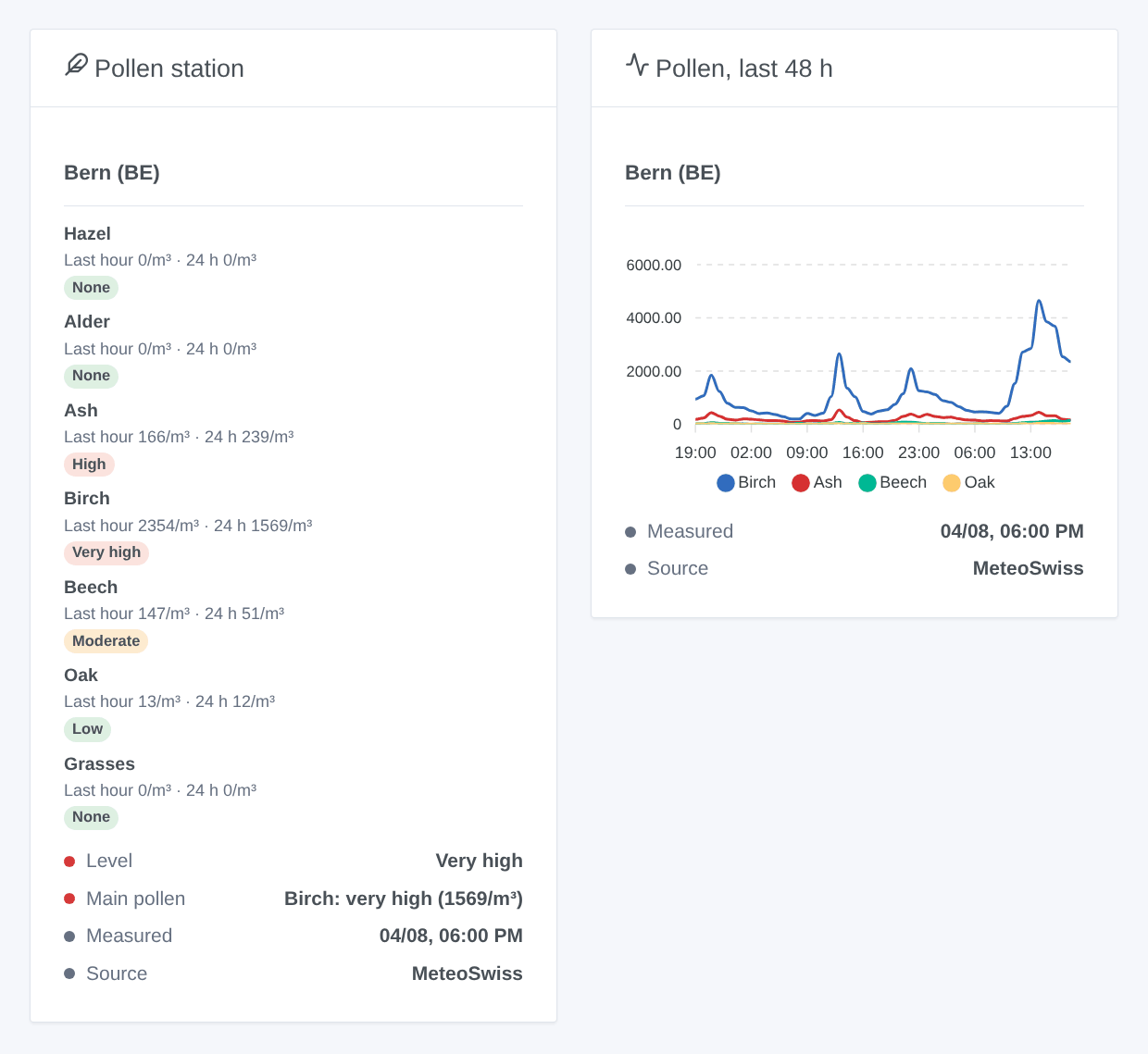
- Pollen station: the seven pollens, each with its level as a badge and its count over the last hour and 24 hours. Below them are the overall level, the main pollen, the time of the measurement and the source.
- Pollen, last 48 h: a chart of the hourly counts of the last 48 hours, for the four pollens with the highest peak. Outside the season, a text says that no pollen was measured.
Choose the station in the settings of the widget (empty: the first one).
Scenes
The MeteoSwiss: pollen alert trigger fires when a pollen reaches “Moderate” or more at a station, or rises again the same day. It fires at most once per level, station, pollen and day. The first reading of a station is a reference and fires nothing. You can filter by station, pollen and level (“High” and “Very high” for most allergic people). It gives a ready-made sentence, {{triggerEvent.data.summary}}, and its values: pollen, level, 24-hour mean, last hour and time of the measurement.
The MeteoSwiss: read the pollen action returns the level, the main pollen, a summary, and the count and level of each pollen at a station. Use them in a message or test them in a condition.
Examples:
- When birch is high in Bern → send
{{triggerEvent.data.summary}}and stop the ventilation of the bedrooms. - Every morning at 7:00 → read the pollen and send the summary with the weather.
- When grasses are very high → remind to close the windows before leaving.
Transport
Cloud only: the data come from data.geo.admin.ch, the open data platform of the Swiss federal government. Only the requests for the station files leave your network. Nothing about your home is sent.
Troubleshooting
- “without new measurement”: the station published nothing for six hours (maintenance, instrument failure). Its values are no longer updated until it comes back.
- The time of the measurement is one or two hours behind: the files can be cached for up to two hours by the server of the federal government. This is normal.
- All levels stay at 0: outside the pollen season (roughly October to January) this is normal.
- “MeteoSwiss cannot be reached” or “refuses the requests”: the integration tries again after 5, 10, 20 and 40 minutes, then at its usual pace.
- To report a problem: press Diagnostic, then copy the lines starting with “Pollen diagnostic” from the Logs tab into a GitHub issue or a reply on the forum. Include the versions of Gladys and of the integration.
Configuration settings
These are the settings MeteoSwiss Pollen asks for in its configuration screen in Gladys.
| Setting | Type | Required | Description |
|---|---|---|---|
| MeteoSwiss pollen stations | section | No | The data come from the national pollen monitoring network of MeteoSwiss: the pollen counted every hour in the air of 15 stations, for hazel, alder, ash, birch, beech, oak and grasses. They are open government data: no account and no key are needed. The integration reads them every 20 minutes. Source: MeteoSwiss. |
| Stations | section | No | Choose up to three stations, the nearest to your home first. Each station becomes a device in the Discover tab. |
| Station 1 | select | Yes | |
| Station 2 | select | No | Optional. |
| Station 3 | select | No | Optional. |
| Options | section | No | |
| Language of the texts | select | No | Language of the device names and of the scene texts. Automatic: the language of your dashboard. |
How to install MeteoSwiss Pollen in Gladys
- In Gladys, open Integrations: MeteoSwiss Pollen appears in the catalog, next to the native integrations, with a community badge.
- Click Install. Gladys pulls the Docker image (
ghcr.io/william-de71/gladys-meteoswiss-pollen:0.1.0), starts it in a sandbox isolated from the core, and generates the integration's interface (devices, discovery and configuration). - Open the Configuration screen of the integration, fill in the settings, and save.
- You can also install it directly from its repository URL: https://github.com/William-De71/gladys-meteoswiss-pollen.
MeteoSwiss Pollen requires Gladys >=5.3.0. The catalog inside Gladys refreshes every hour, so a new version becomes available at most one hour after its release.
Not running Gladys yet? It is free and open source: follow the installation guide to get started.
About external integrations
MeteoSwiss Pollen is an external integration: a community integration packaged as a Docker container and published on GitHub, that Gladys installs in one click and runs in a sandbox isolated from its core. It is published and maintained by William-De71, not by the Gladys core team.
- Browse all integrations, native and community
- Build and publish your own external integration
- Source code on GitHub — source of this documentation