Meteoblue smart home integration, free and open source
meteoblue weather forecasts: hourly, 7 days, rain and frost scenes, meteogram, widgets.
Published by William-De71
- Devices
- Version 0.1.0
- Requires Gladys >=5.2.0
- ★ 0
Overview
This integration makes the meteoblue Forecast API a weather provider of Gladys. Once installed, the weather card of the dashboard and the chat assistant ("what's the weather like tomorrow?") use it instead of the built-in OpenWeather service.
It provides:
- the weather of the present hour: temperature, feels like, humidity, pressure, wind, UV index, day or night, sunrise and sunset;
- the forecasts: 24 hours and the 7 days of meteoblue, with the predictability meteoblue gives each day (how far its models agree);
- three scene triggers: rain expected within 3 hours, frost expected within 12 hours, credits running out;
- three scene actions, four dashboard widgets, and the meteoblue meteogram (optional).
meteoblue (Basel, Switzerland) blends many weather models and corrects them with nearby stations, radar and satellite. Everything goes through meteoblue's servers (cloud only), with your own API key: the free Weather API trial gives 10 million credits for one year, for non-commercial use, and the integration spreads them over the year itself.
meteoblue publishes no official warning in this API: the weather-alert trigger of Gladys stays silent with this provider. The rain and frost triggers of the integration are forecasts, not official warnings.
This integration has not been tested with a real API key yet: it follows the meteoblue API reference to the letter. Please report any problem.
Requirements
- Gladys 5.2.0 or later.
- A house with a location (Settings → Houses): the forecast of every located house is watched for the scene triggers.
- A meteoblue account with the Weather API access (the free trial is enough), for non-commercial use.
Configuration
1. A meteoblue account and its free key
- Create a free account on meteoblue.com and log in.
- Click the account icon (top right) → Account overview → Weather API: the free trial starts at once, for one year, with 10 million credits. You confirm a non-commercial use.
- Copy the API key shown there. Keys that require signed requests (a shared secret) are not supported.
The steps are those of the meteoblue documentation. More credits can be bought later (200 € for 200 million at the time of writing, pricing).
2. Credits and refresh
meteoblue counts credits, not calls (Forecast API reference). What the integration spends:
| Call | Credits | With the 10 million free credits |
|---|---|---|
| Forecast refresh (hourly + 7 days, 1 call) | 8,000 | about 3 a day for one house, every 7 h or so |
| Meteogram picture (optional) | 16,000 | 24 h kept = 5.8 million a year, half the budget |
| "Test the API key" | 8,000 | on demand |
The integration counts what each answer cost (meteoblue says it in a header), keeps the count in /data, and spreads the credits left over the rest of the key year: the refresh interval is computed, never shorter than the "Refresh at most every" floor. A 2 % reserve stays for the test button. Every located house refreshes on its own, so two houses refresh half as often. The forecasts are kept in /data: a restart of Gladys costs nothing. Once the year's credits are spent, no call goes out until the next key year, and the last forecast is served as long as it covers the present hour (7 days).
3. In Gladys
- Integrations → Meteoblue → Configuration.
- Paste the API key. Enter the start of the key year if you know it (the day you enabled the Weather API), otherwise the first day of use is taken.
- Save, then click Test the API key: it reads the forecast of your first house now (8,000 credits) and shows the credits used and the refresh interval they allow.
| Field | Default | Purpose |
|---|---|---|
| API key | — | Your meteoblue key, stored as a secret |
| Credits per key year | 10,000,000 | Raise it after buying credits; never spent beyond |
| Start of the key year | empty | YYYY-MM-DD; empty = the first day the key was used |
| Refresh at most every (min) | 60 | 30 to 1,440: a floor, the credits usually decide |
| Show the meteogram | off | The 5-day meteogram picture, 16,000 credits each |
| Keep a meteogram for (h) | 24 | 3 to 168: a picture is fetched only when someone looks at it |
Usage
Weather card and assistant
Nothing to do: the weather card of the dashboard uses this provider. With several weather providers installed, pin one in the settings of the card. With the meteogram switched on, the card offers it as a provider image. meteoblue covers the whole world; the forecast of a house is cut into days in the time zone of Gladys.
Widgets
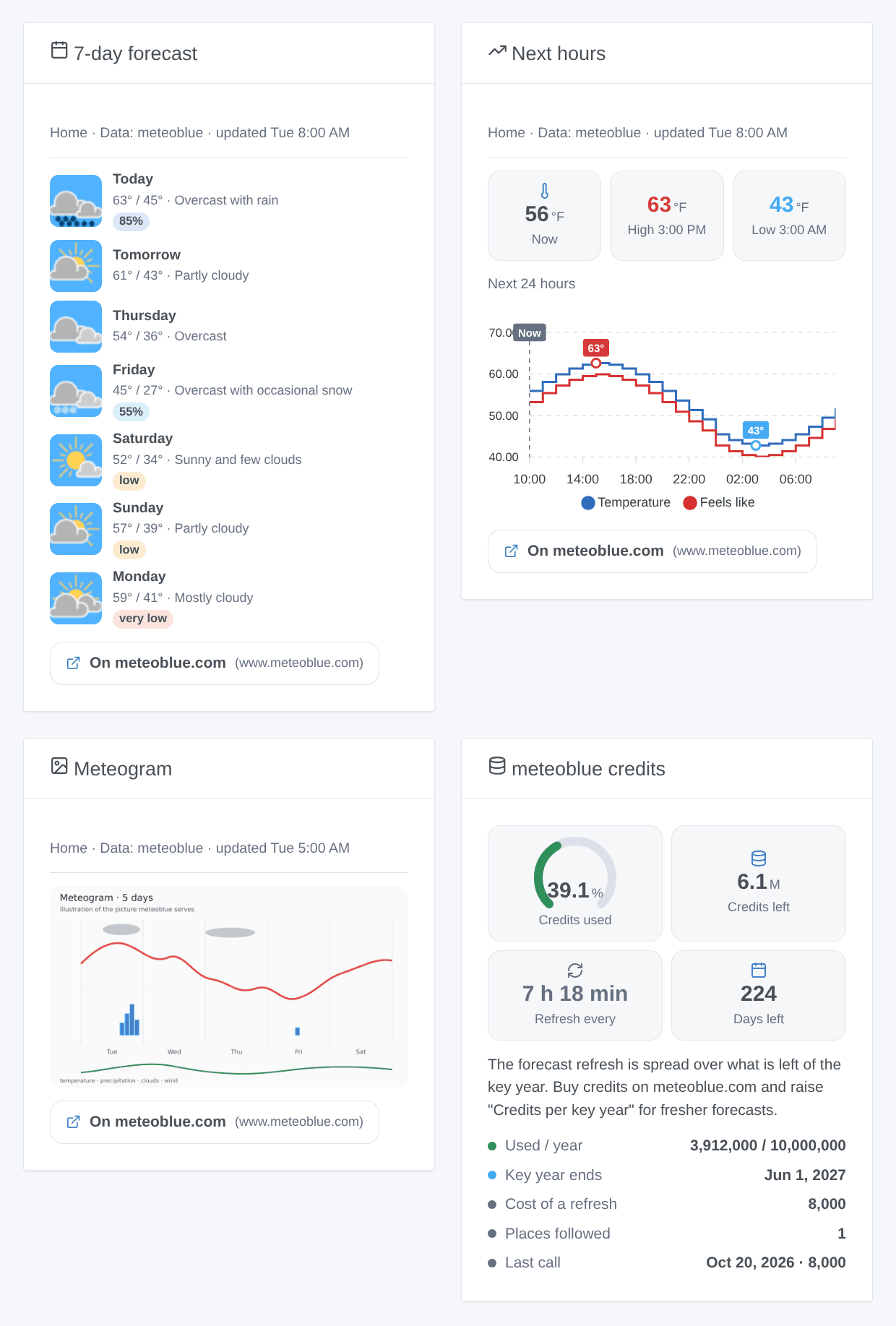
- 7-day forecast: 3, 5 or 7 days with the meteoblue pictograms, high and low, sky, chance of precipitation; tap a day for the amount and hours of precipitation, the wind, the UV index, the predictability and the sun times. A day of low predictability without rain gets a badge.
- Next hours: a curve of the next 12, 24 or 48 hours: temperature and feels like, precipitation, or wind.
- Meteogram: the 5-day meteogram of meteoblue (temperature, clouds, precipitation, wind), when switched on in the configuration.
- meteoblue credits: the credits used and left this key year, the refresh interval they allow, the days left and the last call.
The forecast widgets have a House setting (empty for the first located house), name their source and link to the meteoblue page of the same place.
Scene triggers
- Rain expected soon: the forecast now shows precipitation within the next 3 hours (at least 0.2 mm in an hour, and a chance of 40 % or more when meteoblue gives one), after a check that showed none. Filters: house, kind (rain, snow, rain and snow). Variables: house, kind, start time, minutes until it starts, amount over 3 hours, chance, sky.
- Frost expected: the forecast now shows 0 °C or below within the next 12 hours. Variables: house, start time, hours until it starts, lowest temperature and its time.
- meteoblue credits running out: 75, 90 or 100 % of the credits of the key year are used, each level once a key year. Variables: level, credits used, per year, left, next key year.
The watcher looks at the cached forecast every 10 minutes (it costs no credit). The first check after a start sets the baseline: a rain already expected does not fire. The forecast is as fresh as the credits allow (about 7 hours old at most with the free key, for one house).
Scene actions
- Get the forecast of a day: today to 6 days ahead: high, low, sky, amount and chance of precipitation, predictability, max wind, summary.
- Get the current weather: temperature, feels like, humidity, wind, sky and summary of the present hour.
- Is rain expected?: within 3 to 24 hours: yes or no, from when, rain or snow, total amount, max chance, summary.
Scene examples
- When rain is expected soon (house "Home", kind "Rain") → send "Bring the washing in:
{{triggerEvent.data.kind}}from{{triggerEvent.data.start_time}}" to your phone. - When frost is expected → close the garden water valve and send
{{triggerEvent.data.min_temperature}}°C at{{triggerEvent.data.coldest_time}}. - Every evening at 20:00 → Is rain expected? (12 hours) → if no precipitation is expected, start the garden watering.
Attribution and non-commercial use
The free key is for non-commercial use (meteoblue conditions), which asks for a direct link to meteoblue for the same place: every forecast widget names meteoblue and carries that link, and the meteogram keeps the meteoblue logo. The weather pictograms are those of meteoblue, offered for free use with a link to their pictogram page; they are fetched from meteoblue by the integration, never by your browser. Weather data © meteoblue AG.
Troubleshooting
- "meteoblue refused the API key (invalid)": the key is wrong; copy it again from Account overview → Weather API.
- "(missing)": no key saved in the configuration.
- "the access of this key has expired": the free year is over; renew it or buy credits on meteoblue.com.
- "requires signed requests": the key is protected by a shared secret, not supported; use a key without signature.
- "refused the request for credits or rate": meteoblue's own count is spent, or a daily limit is set on the key in your account; the cached forecast is served meanwhile.
- "Credits of the key year spent": the integration's cap is reached; raise "Credits per key year" after buying credits, or wait for the next key year. The meteoblue account page is the reference (it also counts other uses of the key).
- The forecast seems old: the free credits allow a refresh about every 7 hours for one house; the "meteoblue credits" widget shows the interval.
- No weather for a house: it has no location in Gladys.
- Logs: Settings → Supervision → Meteoblue. The key never appears in them.
Configuration settings
These are the settings Meteoblue asks for in its configuration screen in Gladys.
| Setting | Type | Required | Description |
|---|---|---|---|
| Your meteoblue API key | section | No | Create a free meteoblue account, open "Account overview" and click "Weather API": the free trial starts at once, for one year, with 10 million credits, for NON-COMMERCIAL use only. Data leaves your network: each request goes to meteoblue with the coordinates of the house. |
| API key | secret | Yes | The key shown under "Weather API" in your meteoblue account. Keys that require signed requests are not supported. |
| Credits and refresh | section | No | meteoblue counts credits, not calls: a forecast refresh (hourly + 7 days) costs 8,000 credits, so the free 10 million allow about 3 refreshes a day for one house. The integration spreads the credits left over the rest of the key year and computes the interval itself; every located house shares them. Forecasts are kept in /data: a restart costs nothing. |
| Credits per key year | number | No | 10,000,000 for the free trial. Raise it after buying credits; the integration never spends more in a key year. |
| Start of the key year | string | No | The day your Weather API access started (YYYY-MM-DD), shown in your meteoblue account. Empty: the first day the integration used the key. |
| Refresh at most every (min) | number | No | Between 30 and 1,440. The credits usually allow less often: this floor only matters with bought credits. |
| Meteogram | section | No | The 5-day meteogram picture of meteoblue, in the weather card and in its widget. Each picture costs 16,000 credits (two forecast refreshes): it is fetched only when someone looks at it, then kept for the duration below. |
| Show the meteogram | boolean | No | |
| Keep a meteogram for (hours) | number | No | Between 3 and 168. 24 h = 5.8 million credits a year: more than half of the free ones. |
How to install Meteoblue in Gladys
- In Gladys, open Integrations: Meteoblue appears in the catalog, next to the native integrations, with a community badge.
- Click Install. Gladys pulls the Docker image (
ghcr.io/william-de71/gladys-meteoblue:0.1.0), starts it in a sandbox isolated from the core, and generates the integration's interface (devices, discovery and configuration). - Open the Configuration screen of the integration, fill in the settings, and save.
- You can also install it directly from its repository URL: https://github.com/William-De71/gladys-meteoblue.
Meteoblue requires Gladys >=5.2.0. The catalog inside Gladys refreshes every hour, so a new version becomes available at most one hour after its release.
Not running Gladys yet? It is free and open source: follow the installation guide to get started.
About external integrations
Meteoblue is an external integration: a community integration packaged as a Docker container and published on GitHub, that Gladys installs in one click and runs in a sandbox isolated from its core. It is published and maintained by William-De71, not by the Gladys core team.
- Browse all integrations, native and community
- Build and publish your own external integration
- Source code on GitHub — source of this documentation