Mercedes-Benz smart home integration, free and open source
Your Mercedes-Benz in Gladys: battery, fuel, range, lock, charge, climate and scenes.
Published by William-De71
- Devices
- Version 0.1.0
- Requires Gladys >=5.1.0
- ★ 0
Overview
This integration brings the Mercedes-Benz cars of your Mercedes me account into Gladys, through the servers of the Mercedes me app, like the mbapi2020 Home Assistant integration:
- one device per car: battery or fuel, range, odometer, lock, anti-theft alarm, doors, trunk, windows, sunroof, charge, pre-climatisation, tire pressures, service, warnings and distance from home;
- commands when the car accepts them: lock, unlock, pre-climatisation, charge limit, flash the lights, horn, close the windows;
- scene triggers and actions, and a dashboard widget per car.
Mercedes pushes each change of the car: the values follow within a minute or two. Everything goes through the Mercedes cloud (cloud transport): the car is never reached on your network. This is a community integration, not affiliated with Mercedes-Benz; the Mercedes me servers have no public documentation and may change.
Prerequisites
- Gladys Assistant 5.1.0 or later.
- A car connected to Mercedes me (Mercedes me connect in North America), and the e-mail and password of the account, signed in once in the official app.
- No two-factor authentication on this account: Gladys must sign in again on its own about every 18 hours. Best: create a second Mercedes me account and have the main user invite it to the car (up to six users per car), then use it only in Gladys.
- The security PIN of the app, only to unlock the car from Gladys.
Configuration
| Field | What to enter |
|---|---|
| E-mail / Password | The Mercedes me account |
| Region | Europe (also India, Thailand), North America, Asia-Pacific (also Latin America) |
| Security PIN | Optional: needed only to unlock |
| Pause between readings | 1 minute by default; longer = fewer connections to Mercedes |
| Home radius | 200 m by default, for the distance from home and the arrived/left scenes |
| Language of the texts | Automatic: the language of your dashboard |
| App version / SDK | Advanced, leave empty unless Mercedes refuses the app (error 418) |
Click Save, then Test the connection: it lists your cars and the number of commands each accepts. The houses of Gladys need a position on the map for the distance from home.
Usage
Devices
Open Discover, then add your cars. A feature appears once the car has reported its value: if one is missing (fuel, sunroof…), scan again later. Lock, pre-climatisation and charge limit can be changed from the dashboard when the car accepts these commands. A command takes a few seconds to a minute: the car wakes up, runs it, then Mercedes sends the new state.
Dashboard widget
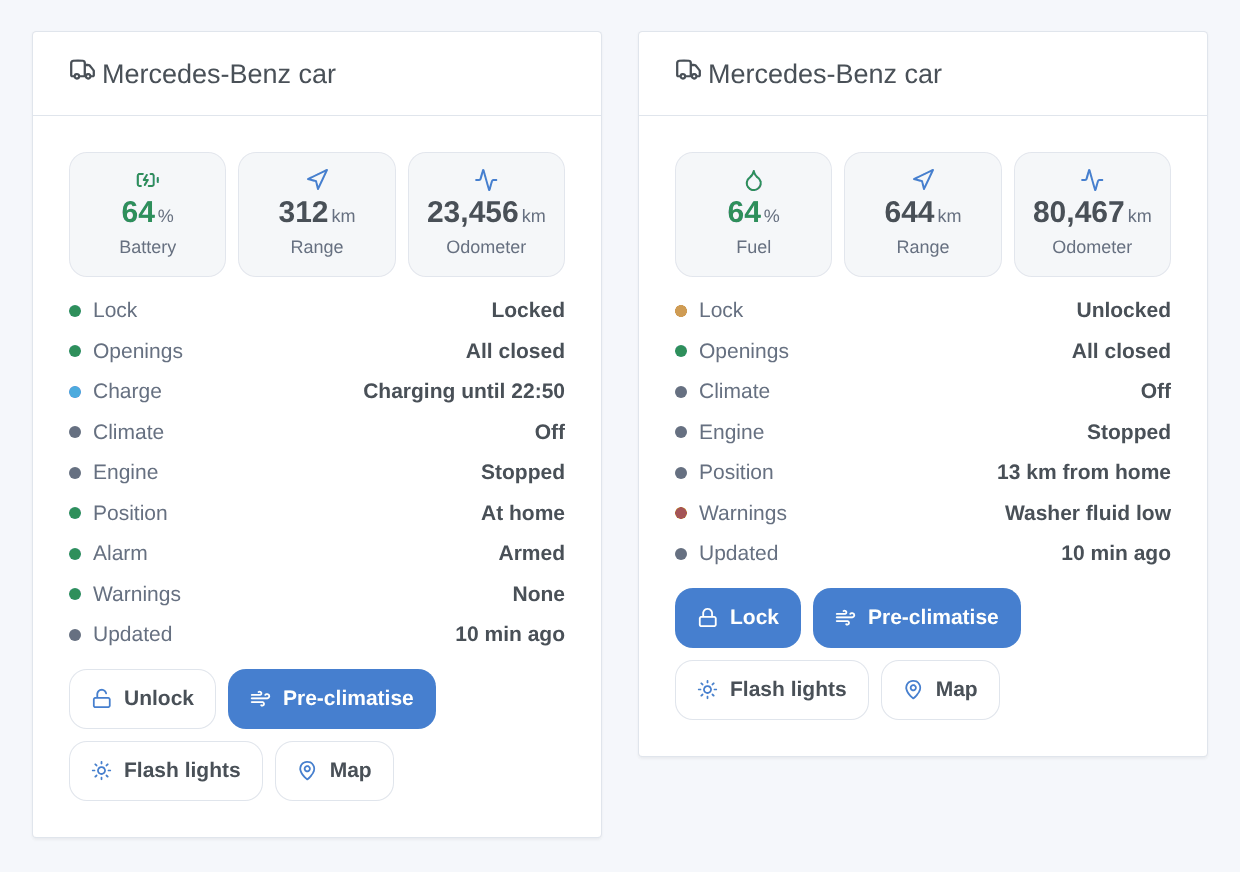
The Mercedes-Benz car widget shows the battery or the fuel, the range, the odometer, a status list (lock, openings, charge, climate, engine, position, alarm, warnings) and buttons: lock or unlock (unlock asks first, and needs the PIN), pre-climatise, flash the lights, and the position on a map. Choose the car in its settings, or leave it empty for the first car.
Scenes
Triggers: locked or unlocked, locked but left open, anti-theft alarm, engine started or stopped, charging status changed, cable plugged or unplugged, arrived home or left, new warning, account problem. Actions: send a command (and wait for the car's answer), read the status of a car (with a sentence ready for a message).
Examples:
- When the car is locked but left open → send me a message with the summary.
- When charging becomes "Charged" → notify and switch the charging socket off.
- Every working day at 7:30 in winter → send the command "Start the pre-climatisation".
Transport
The badge of a car says cloud. It turns unreachable when Mercedes refuses the account, and shows an orange dot while Mercedes blocks the live connection: the values then come every 10 minutes.
Troubleshooting
- Wrong e-mail or password: check them in the official app first. The account must not ask for a code (two-factor authentication).
- Account blocked (429): Mercedes limits how long an account stays connected each day; the block often ends at midnight GMT. Use a second account dedicated to Gladys, and a longer pause between readings.
- App version refused (418): Mercedes requires a newer app. Update the integration; meanwhile, enter the current app and SDK versions in the Advanced settings (see the mbapi2020 project).
- A value or a command is missing: not every car reports everything, and some commands depend on the services of your car. Click Diagnostic, then copy the lines of the Logs tab into an issue on GitHub: they contain what the car reports, without VIN, plate nor position.
- Unlock refused: enter the security PIN set in the Mercedes me app.
Configuration settings
These are the settings Mercedes-Benz asks for in its configuration screen in Gladys.
| Setting | Type | Required | Description |
|---|---|---|---|
| Mercedes me account | section | No | The account of the Mercedes me app (the North American app is Mercedes me connect). Sign in once in the app first. A second account, invited to the car by the main user, avoids blocking yours. Two-factor authentication is not supported: Gladys must sign in again on its own every day. |
string | Yes | ||
| Password | secret | Yes | |
| Region | select | Yes | Europe also covers India and Thailand; Asia-Pacific covers Latin America. China is not supported. |
| Security PIN | secret | No | The PIN set in the Mercedes me app. Only needed to unlock the car from Gladys. |
| Options | section | No | Mercedes blocks an account whose live connection stays open too long each day. The integration opens it, reads the changes, closes it after 30 s of silence and opens it again after the pause below (it stays open while the engine runs). |
| Pause between readings | select | No | |
| Home radius (m) | number | No | A car closer than this to a house of Gladys (with its position set) is home: distance feature and arrived/left scenes. |
| Language of the texts | select | No | Language of the device names, the charging status, the warnings and the scene summaries. Automatic: the language of your dashboard. |
| Advanced | section | No | Leave empty. If Mercedes refuses the app version (error 418) before an update of the integration, enter the current version of the Mercedes me app and of its SDK here (see the forum or the mbapi2020 project). |
| App version | string | No | |
| SDK version | string | No |
How to install Mercedes-Benz in Gladys
- In Gladys, open Integrations: Mercedes-Benz appears in the catalog, next to the native integrations, with a community badge.
- Click Install. Gladys pulls the Docker image (
ghcr.io/william-de71/gladys-mercedes-benz:0.1.0), starts it in a sandbox isolated from the core, and generates the integration's interface (devices, discovery and configuration). - Open the Configuration screen of the integration, fill in the settings, and save.
- You can also install it directly from its repository URL: https://github.com/William-De71/gladys-mercedes-benz.
Mercedes-Benz requires Gladys >=5.1.0. The catalog inside Gladys refreshes every hour, so a new version becomes available at most one hour after its release.
Not running Gladys yet? It is free and open source: follow the installation guide to get started.
About external integrations
Mercedes-Benz is an external integration: a community integration packaged as a Docker container and published on GitHub, that Gladys installs in one click and runs in a sandbox isolated from its core. It is published and maintained by William-De71, not by the Gladys core team.
- Browse all integrations, native and community
- Build and publish your own external integration
- Source code on GitHub — source of this documentation