Marées France smart home integration, free and open source
Tides of French harbors (SHOM): high and low tides, coefficients, water height, scenes.
Published by William-De71
- Devices
- Version 0.1.0
- Requires Gladys >=5.1.0
- ★ 0
Overview
This integration brings the tides of French harbors into Gladys, from the predictions of the SHOM (the French Navy hydrographic office, the one behind maree.shom.fr): times and heights of high and low tides, coefficients and the water height at any moment. It covers 387 harbors: mainland France, overseas territories and a few foreign harbors.
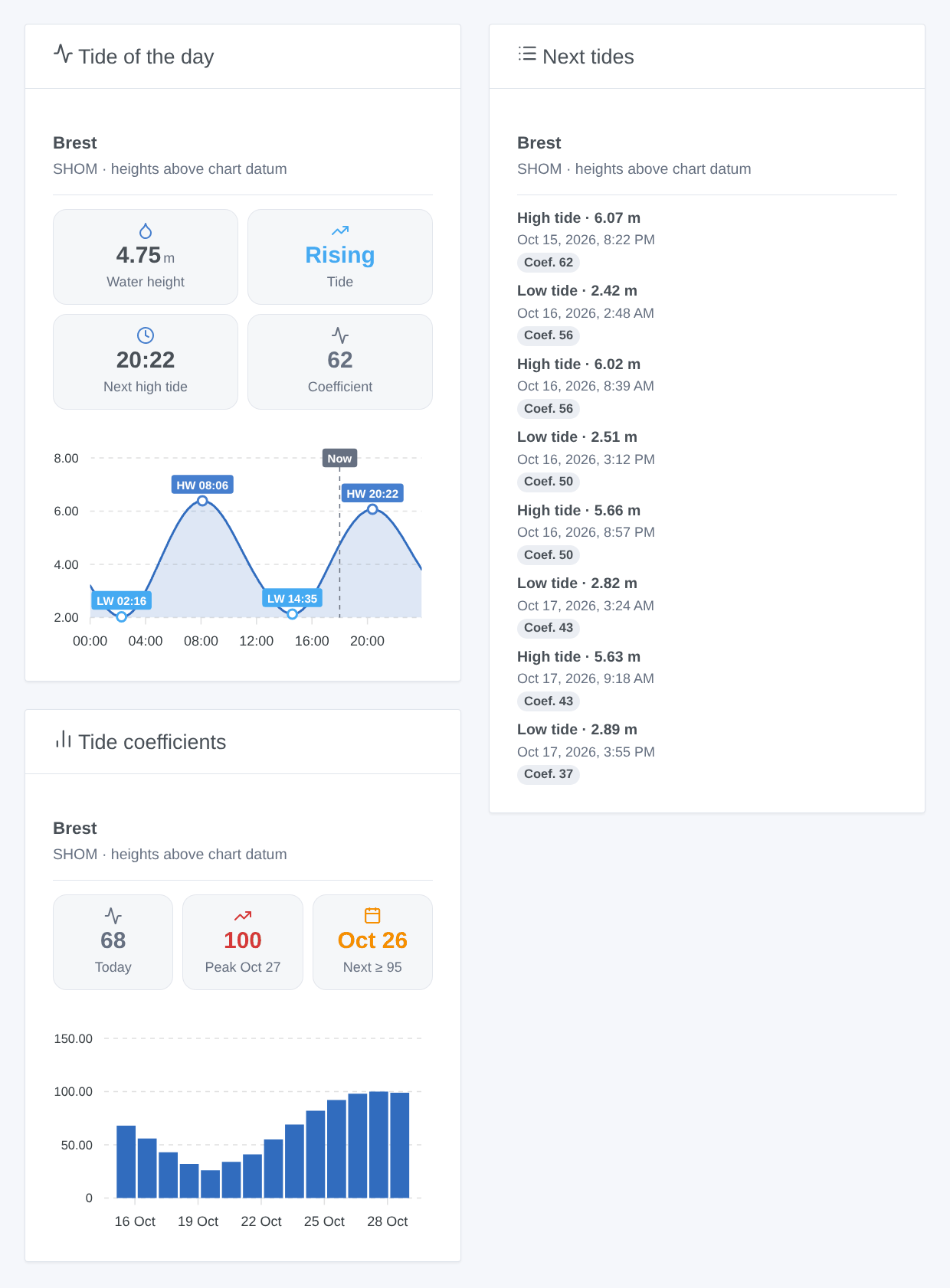
Each harbor becomes a device, scenes fire before each tide or on spring tides, and three widgets show the curve of the day, the next tides and the coefficients.
The predictions are the property of the SHOM and do not replace official nautical documents. This community integration is not affiliated with the SHOM.
Requirements
- Gladys Assistant 5.1.0 or newer.
- Internet access from Gladys. No account, no key.
Configuration
| Field | Role |
|---|---|
| Harbor | The main harbor, in the SHOM list. Type its first letters to jump to it. |
| Other harbors | Up to four more, by name, separated by commas: Saint-Malo, Roscoff. |
| Language of the texts | Language of the device names, text states and scene summaries. Automatic by default. |
The Find a harbor button checks a name (accents and case ignored) and shows the matching harbors. Download now downloads the tides again (done on its own once a day, at night). The connection status lists the harbors followed and the names not found.
Usage
Devices
Open the Discover tab and add the "Tide <harbor>" devices. Each one has: the water height (m, in 5-minute steps), the tide (rising or falling), the next tide in words ("High tide at 20:22 (6.07 m, coef. 62)"), the minutes to the next high and low tide and their heights, the coefficient of the next high tide and the highest coefficient of tomorrow (for harbors with coefficients). Heights are above the chart datum, as on maree.shom.fr; times follow the timezone of Gladys.
Dashboard widgets
- Tide of the day: water height, trend, next tide, coefficient and the curve of the day with its high and low tides.
- Next tides: the next eight, dated, with their coefficient.
- Tide coefficients: two weeks as bars, the peak and the next spring tide (coefficient ≥ 95).
Each widget has a Harbor setting (a harbor device already added); empty, it shows the first harbor of the configuration.
Scenes
- Tide: high or low tide: at the time of the tide or 15 minutes to 6 hours before. Filters: harbor, tide type.
- Tide: spring tide: a high tide whose coefficient reaches a threshold (70 to 115), at its time or up to the day before. The time of the following low tide is given.
- Action Tide: get the next tide: time, height, coefficient, current height and a summary ready for a message.
Examples: one hour before high tide, send its time and height on Telegram; the day before a spring tide of coefficient 95 or more, send a reminder for fishing on foot; at low tide, close a shutter.
An event missed by more than 10 minutes (Gladys stopped) is not replayed, and each event is sent once only, even after a restart.
Transport
The data comes from the SHOM services over the internet ("cloud" badge). Only the harbor code is in the requests: nothing about you leaves your network. Three requests per harbor and per day are enough; everything else is computed in the container.
Troubleshooting
- "Harbor not found": use the Find a harbor button, then copy the exact name into "Other harbors".
- "The SHOM refused the requests": its firewall sometimes blocks an address for a while. The integration tries again on its own a few hours later and keeps the data of the previous days (8 days of tides).
- No coefficient: the SHOM publishes none for some overseas harbors.
- Bug report: click Diagnostic, then copy the "Diagnostic:" lines of the Logs tab, with the versions of Gladys and of the integration (Gladys does not pass
DEBUGto the container).
Configuration settings
These are the settings Marées France asks for in its configuration screen in Gladys.
| Setting | Type | Required | Description |
|---|---|---|---|
| Harbors | section | No | The tide predictions of the SHOM, the French hydrographic office, as on maree.shom.fr: 380 harbors in mainland France, overseas and abroad. Choose up to five harbors; each one becomes a device on the Discovery screen. |
| Harbor | select | No | Pick it in the list (type its first letters to jump to it). |
| Other harbors | string | No | Up to four more, by name, separated by commas. Accents and case do not matter; the “Find a harbor” button below checks a name. |
| Language of the texts | select | No | Device names, text states and scene summaries. Automatic: the language of your dashboard, once a tide widget has been displayed (French before that). |
How to install Marées France in Gladys
- In Gladys, open Integrations: Marées France appears in the catalog, next to the native integrations, with a community badge.
- Click Install. Gladys pulls the Docker image (
ghcr.io/william-de71/gladys-marees-france:0.1.0), starts it in a sandbox isolated from the core, and generates the integration's interface (devices, discovery and configuration). - Open the Configuration screen of the integration, fill in the settings, and save.
- You can also install it directly from its repository URL: https://github.com/William-De71/gladys-marees-france.
Marées France requires Gladys >=5.1.0. The catalog inside Gladys refreshes every hour, so a new version becomes available at most one hour after its release.
Not running Gladys yet? It is free and open source: follow the installation guide to get started.
About external integrations
Marées France is an external integration: a community integration packaged as a Docker container and published on GitHub, that Gladys installs in one click and runs in a sandbox isolated from its core. It is published and maintained by William-De71, not by the Gladys core team.
- Browse all integrations, native and community
- Build and publish your own external integration
- Source code on GitHub — source of this documentation