Magic Home smart home integration, free and open source
Magic Home Wi-Fi LED bulbs, strips and sockets, controlled on the local network.
Published by William-De71
- Devices
- Version 0.2.0
- Requires Gladys >=5.3.0
- ★ 0
Overview
This integration brings your Magic Home Wi-Fi devices into Gladys: colour and white bulbs, LED strip controllers, CCT and dimmable lights, addressable strips, string lights, sockets and switches — the devices set up with the Magic Home Pro, Zengge or Surplife apps. You turn them on and off, set their colour, white and brightness from the dashboard, start their built-in effects from your scenes, and your scenes know when a device stops answering.
Everything stays on your local network: no account, no cloud, nothing leaves your home. Gladys finds the devices by itself with the search of the Magic Home app (UDP port 48899), then the integration talks to each one directly (TCP port 5577).
Requirements
- Gladys Assistant 5.3.0 or later.
- Devices set up with the Magic Home Pro app (or Zengge, Surplife…) and connected to the same network as Gladys. A guest network or a router that isolates Wi-Fi clients blocks them.
- On the install screen, accept the network discovery (UDP port 48899): it is what lets Gladys find the devices.
Configuration
Search
Nothing to fill in for most homes: press Search and test the devices. The message lists every device found with its address, its model and whether it answers.
A device the search does not find (another subnet, a network that filters broadcasts): type its address in IP addresses, separated by commas, then save.
Give each device a fixed IP address in your router: the integration finds a device whose address changed again (by its MAC address), but sooner with a fixed one.
Refresh and language
- State refresh: each device is asked for its state every 10 seconds, 30 seconds (default) or 1 minute. Most devices also report their changes at once (remote control, Magic Home app).
- Automatic search: the network is searched again every hour (default), every 15 minutes, or never; a device that stops answering triggers a search anyway.
- Language of the device texts: the feature names in the Discover tab and the error messages of the scenes are written in this language, because Gladys does not send yours with them.
Usage
Devices
Open the Discover tab of the integration: every device found is listed with the features its model and its wiring offer. Add the ones you want, and rename them as you like.
- Colour and white bulbs, RGB&CCT controllers: On/Off, Brightness, Colour, Colour temperature.
- RGB, RGBW and RGB/W controllers and bulbs, addressable strips, string lights: On/Off, Brightness, Colour (a white colour lights the white LEDs of an RGB+W device).
- CCT bulbs and controllers: On/Off, Brightness, Colour temperature.
- Single-colour controllers, dimmable bulbs: On/Off, Brightness.
- Sockets and switches: On/Off.
A colour and a white are alternatives: choosing a colour lights the colour LEDs, choosing a temperature lights the white LEDs, like the Magic Home app does. Each device shows a local badge, or unreachable when it does not answer.
Widgets
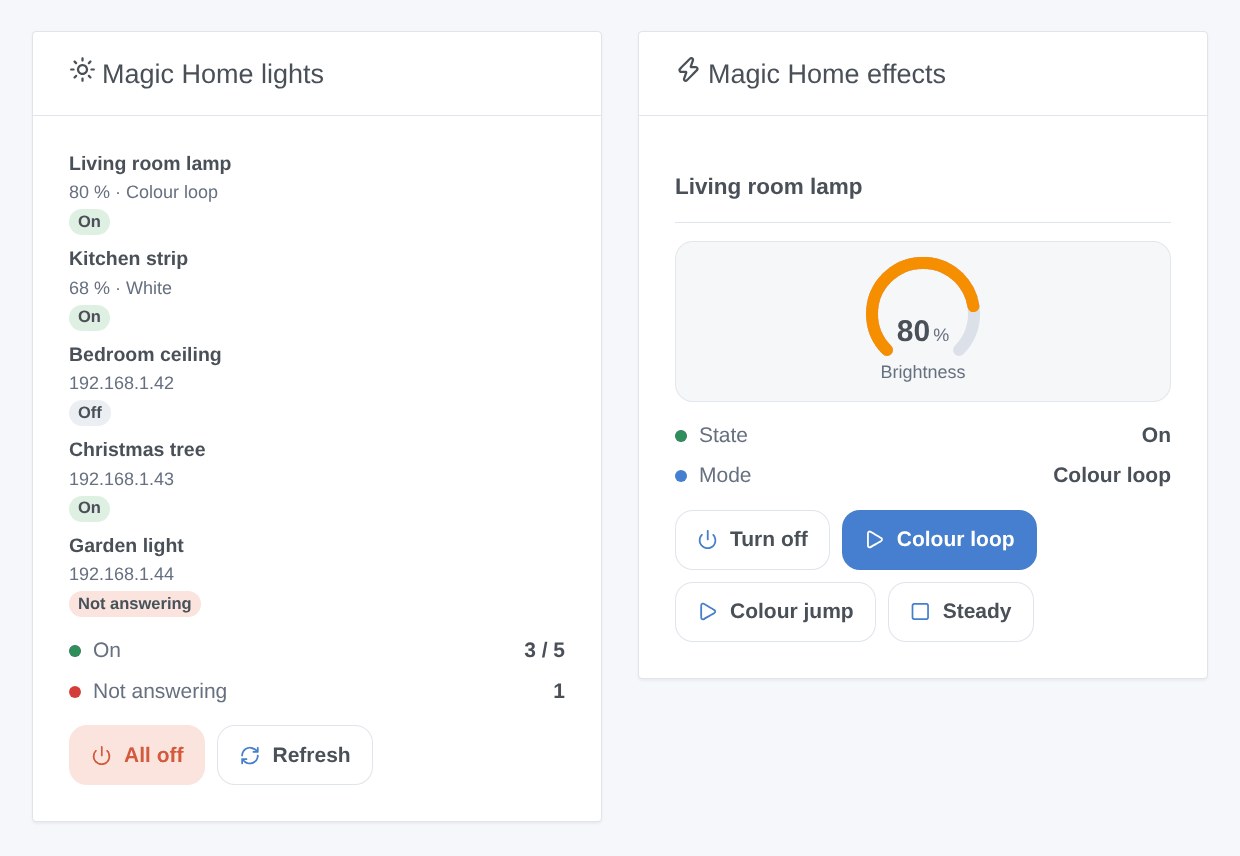
- Magic Home lights: how many devices are on, how many do not answer, every device with its state, its brightness and what it plays, an All off button (with confirmation) and Refresh. Setting: all devices or only those on.
- Magic Home effects: one light chosen in the settings, its state, mode and brightness, an on/off button and three effect buttons you choose in the settings (with their speed). While an effect plays, the third button becomes Steady.
Scene triggers
- A Magic Home device stops answering: unplugged, switched off at the wall or out of Wi-Fi for more than 30 seconds.
- A Magic Home device answers again: after it stopped answering.
Both can be limited to one device and give device_name and ip to the scene.
Scene actions
- Start a Magic Home effect: one of the 23 built-in effects (colour loop, jumps, pulses, strobes…), its speed, and its brightness on recent firmwares.
- Play Magic Home colours: up to 16 colours of your choice (
#FF0000, #0000FF), in a fade, a jump or a strobe. - Flash a Magic Home light: blinks a colour for 1 to 60 seconds, then the light comes back as it was (colour, white, effect, or off).
- Stop a Magic Home effect: back to the last steady colour or white.
Scene examples
- When someone rings at the door → Flash a Magic Home light red for 5 seconds on the living room lamp.
- When the garden light stops answering → send yourself a message: it was switched off at the wall.
- Every evening at sunset → kitchen strip at 40 %, then Play Magic Home colours
#FF6A00, #FF0040in a slow fade on the living room strip.
Troubleshooting
- No device found: check that the device answers in the Magic Home app over Wi-Fi (not through the cloud, away from home), that it is on the same network as Gladys, and that the router does not isolate Wi-Fi clients. Otherwise type its IP address in the configuration.
- “Gladys refused the network discovery”: reinstall the integration and accept its network access on the install screen.
- A device is “Not answering”: it is unplugged, switched off at the wall, or out of Wi-Fi. If its address changed, the next search finds it again; press Search and test the devices to search at once.
- An effect does not start: sockets, single-white devices and addressable strips have no built-in effects in this integration; a few effects only exist on recent firmwares.
- A feature is missing or wrong: the features follow the model and the wiring the device reports (its
MAGICHOME_MODELparameter). Open an issue on GitHub with this parameter, the Gladys and integration versions, and the logs (Logs tab of the integration).
Configuration settings
These are the settings Magic Home asks for in its configuration screen in Gladys.
| Setting | Type | Required | Description |
|---|---|---|---|
| Before you start | section | No | Set up your devices with the Magic Home Pro app (or Zengge, Surplife…) and connect them to the same network as Gladys. Gladys then finds them by itself: open the Discover tab. Nothing goes through the cloud. Give each device a fixed IP address in your router: it is found again after an address change, but faster with a fixed one. |
| IP addresses (optional) | string | No | Only for devices the search does not find (another subnet, a network that blocks broadcasts). Separate them with commas. |
| State refresh | select | No | How often each device is asked for its state. Most devices also report their changes at once. |
| Automatic search | select | No | Searches the network again on a schedule, to follow a device whose address changed. A device that stops answering triggers a search anyway. |
| Language of the device texts | select | No | Feature names in the Discover tab and error messages of the scenes. Gladys does not send your language with them. |
| A device is not found? | section | No | Check that it answers in the Magic Home app over Wi-Fi, that it is on the same network as Gladys (not a guest network) and that the router lets UDP port 48899 and TCP port 5577 through. Otherwise type its IP address above. |
How to install Magic Home in Gladys
- In Gladys, open Integrations: Magic Home appears in the catalog, next to the native integrations, with a community badge.
- Click Install. Gladys pulls the Docker image (
ghcr.io/william-de71/gladys-magic-home:0.2.0), starts it in a sandbox isolated from the core, and generates the integration's interface (devices, discovery and configuration). - Open the Configuration screen of the integration, fill in the settings, and save.
- You can also install it directly from its repository URL: https://github.com/William-De71/gladys-magic-home.
Magic Home requires Gladys >=5.3.0. The catalog inside Gladys refreshes every hour, so a new version becomes available at most one hour after its release.
Not running Gladys yet? It is free and open source: follow the installation guide to get started.
About external integrations
Magic Home is an external integration: a community integration packaged as a Docker container and published on GitHub, that Gladys installs in one click and runs in a sandbox isolated from its core. It is published and maintained by William-De71, not by the Gladys core team.
- Browse all integrations, native and community
- Build and publish your own external integration
- Source code on GitHub — source of this documentation