Lunar gardening calendar smart home integration, free and open source
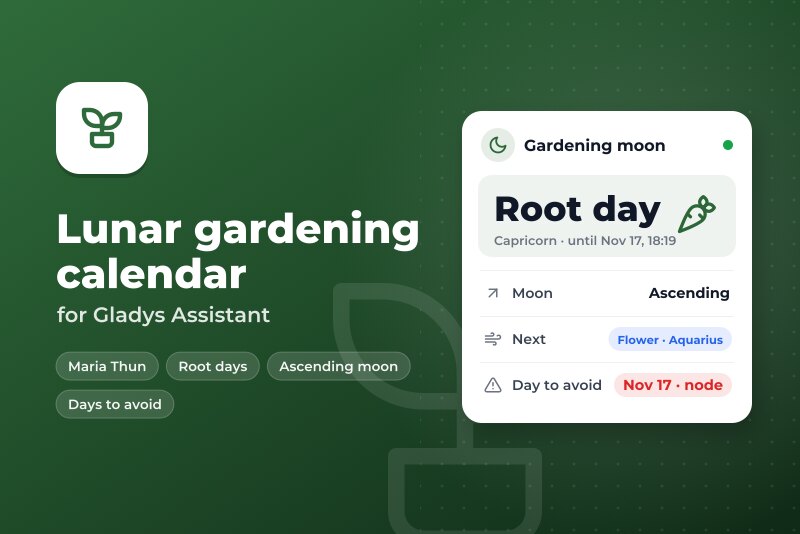
Fruit, root, flower, leaf days, ascending moon, days to avoid: calendar, scenes, widgets.
Published by William-De71
- Devices
- Version 0.1.0
- Requires Gladys >=5.3.0
- ★ 0
Overview
The lunar gardening calendar (the method of Maria Thun's biodynamic sowing calendars) in Gladys, computed in the integration itself: no account, no key, no connection.
- Fruit, root, flower and leaf days: the type of the day follows the constellation the moon stands in (fire, earth, air and water constellations), to the minute.
- Ascending and descending moon: about 13.6 days each, independent of the phase. Ascending: sow, graft, harvest fruit and leaves. Descending: plant out, transplant, prune, work the soil.
- Days to avoid: the days of a perigee, an apogee, a lunar node or an eclipse.
You get a calendar in My calendars, two dashboard widgets, three scene triggers and a scene action.
Requirements
- Gladys Assistant 5.3.0 or later.
- The right timezone in Gladys (Settings → System): days and hours are computed in it.
Configuration
- Install the integration from Integrations (Lunar gardening calendar).
- Under My calendars, click Enable for me: the "Lunar gardening calendar" appears in your calendars. To use it in scenes, open it in Calendars and share it with the household.
- Choose what the calendar shows and the hour of the daily summary:
| Field | Default | What it does |
|---|---|---|
| Ascending and descending moon in the calendar | yes | One event per period, about 13 days each. |
| Days to avoid in the calendar | yes | One all-day event on the days of a perigee, an apogee, a lunar node or an eclipse. |
| Hour of the daily summary | 7 | The "Daily summary" trigger starts every day at this hour (0 to 23). |
| Language of the texts | Automatic | Scene texts and status. The calendar always follows the language of each user. |
Usage
Calendar
- "Root day · Capricorn" from 09:34 on Sunday to 18:19 on Tuesday: one event per day type, with the vegetables of that type in its description.
- "Ascending moon" and "Descending moon": one event per period.
- "Day to avoid: Ascending node 12:47": an all-day event, like the printed calendars, which mark the whole day.
The calendar covers the past week and the coming year. It moves forward every night.
Widgets
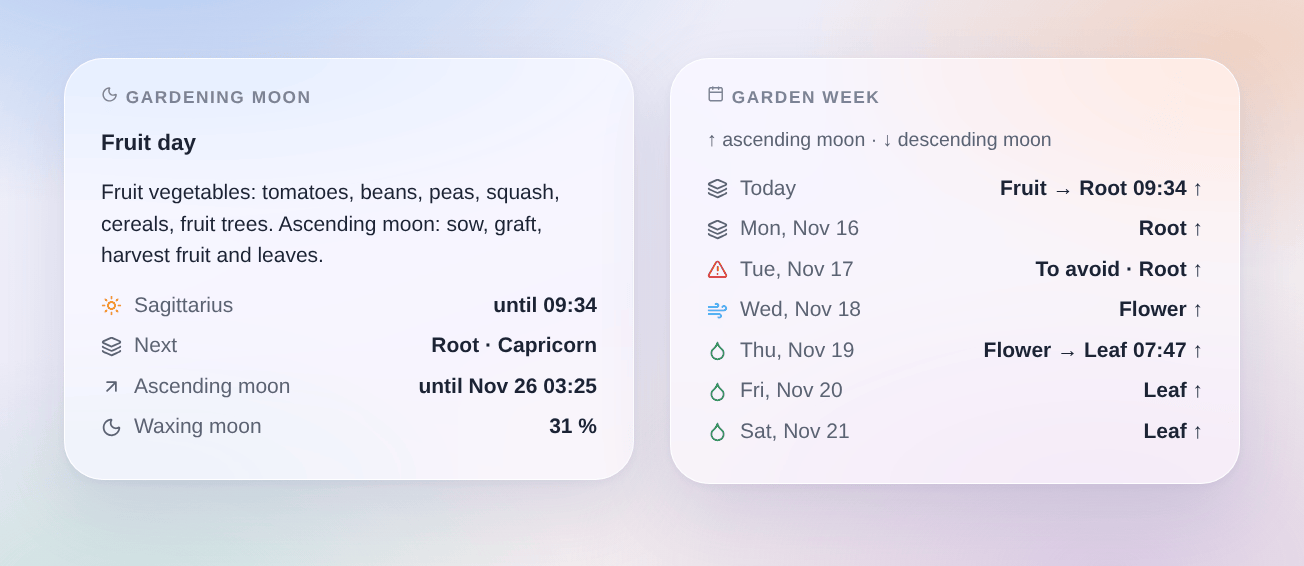
- Gardening moon: the day type in force and until when, the next one, the trajectory and until when, the phase, the day to avoid, and what to do.
- Garden week: one line a day (3 to 10 days, setting "Days"): the day types and the hour they change, ↑ ascending or ↓ descending moon, and the days to avoid in red.
Scenes
Triggers:
- New day type: when the moon enters the constellation of a new day type. Filter: the day types. Variables:
day_type(fruit, root, flower, leaf),day_type_label,constellation,ends_at,summary,advice. - New moon trajectory: when the moon turns ascending or descending. Filter: the trajectory. Variables:
trajectory(ascending, descending),trajectory_label,ends_at,summary,advice. - Daily summary: every day at the hour of the configuration. Filters: the main day type of the day, the trajectory, day to avoid or not. Variables: the same values as the action below.
Action Get the gardening day (today or tomorrow): date, day_type, day_type_label, day_types ("Fruit until 09:34, then Root"), constellation, trajectory, trajectory_label, avoid (yes, no), avoid_reasons, phase (waxing, waning), phase_label, illumination (%), summary, advice.
Examples:
- Every evening at 20:00 (scheduled scene) → "Get the gardening day" (tomorrow) → send its "Summary sentence" and "Gardening advice" outputs in a message.
- "Daily summary", filters day type = root and day to avoid = no → send "{{triggerEvent.data.summary}} {{triggerEvent.data.advice}}".
- "New moon trajectory", filter descending → send "{{triggerEvent.data.advice}}" (plant out, transplant, prune…).
Transport
Local only: everything is computed in the container, nothing leaves your network. The catalog shows the "local" badge.
How it is computed
- The position of the moon comes from astronomy-engine (MIT), accurate to a few arcseconds.
- The constellations are the real ones of the sky (IAU boundaries), of unequal sizes, not 12 signs of 30°. Fire (Aries, Leo, Sagittarius): fruit. Earth (Taurus, Virgo, Capricorn): root. Air (Gemini, Libra, Aquarius): flower. Water (Cancer, Scorpio, Pisces): leaf.
- The moon also crosses Ophiuchus every month, and sometimes Auriga, Orion, Cetus or Sextans. Like the printed calendars, these crossings keep the constellation before them until midnight, then take the one after them.
- The ascending or descending moon of a day is the one at noon. The days to avoid are the local days of a perigee, an apogee, a lunar node or an eclipse (penumbral lunar eclipses included).
- Checked day by day against the 2026 and 2027 calendars published by icalendrier.fr: 730 days out of 730, and the same minutes where it prints them.
Troubleshooting
- No calendar: click Enable for me under My calendars on the integration page. Calendars that are not shared do not appear in scenes: share them with the household.
- Hours shifted by one or two hours: check the timezone of Gladys (Settings → System), then restart the integration.
- A day differs from your paper calendar: calendars do not all use the same boundaries (some use 12 signs of 30°, others shift Ophiuchus differently) nor the same days to avoid. Open an issue with the calendar, the day and what it prints.
- The daily summary does not start: it starts once a day, at the configured hour or at the first minute after it. It is not started again after a restart the same day.
- Logs: the Logs tab of the integration. In developer mode,
DEBUG=gladys-integration-sdkadds the SDK logs.
Configuration settings
These are the settings Lunar gardening calendar asks for in its configuration screen in Gladys.
| Setting | Type | Required | Description |
|---|---|---|---|
| Lunar gardening calendar | section | No | How it works: 1. Enable the integration for you in “My calendars” below: you get a “Lunar gardening calendar” with the fruit, root, flower and leaf days, the ascending and descending moon and the days to avoid, a year ahead. Share it with the household to use it in the scenes. 2. Add the “Gardening moon” and “Garden week” widgets to a dashboard. 3. In a scene, use the triggers (new day type, new trajectory, daily summary) or the “Get the gardening day” action. Everything is computed in the integration from the position of the moon (Maria Thun method, constellations of the sky): no account, no connection. |
| Ascending and descending moon in the calendar | boolean | No | One event per period, about 13 days each. |
| Days to avoid in the calendar | boolean | No | One all-day event on the days of a perigee, an apogee, a lunar node or an eclipse. |
| Hour of the daily summary | number | No | The “Daily summary” trigger starts every day at this hour (0 to 23, in the timezone of Gladys). |
| Language of the texts | select | No | Scene texts and status. Automatic: the language of your dashboard once a widget has been shown, guessed from the timezone of Gladys before that. The calendar always follows the language of each user. |
How to install Lunar gardening calendar in Gladys
- In Gladys, open Integrations: Lunar gardening calendar appears in the catalog, next to the native integrations, with a community badge.
- Click Install. Gladys pulls the Docker image (
ghcr.io/william-de71/gladys-lunar-gardening-calendar:0.1.0), starts it in a sandbox isolated from the core, and generates the integration's interface (devices, discovery and configuration). - Open the Configuration screen of the integration, fill in the settings, and save.
- You can also install it directly from its repository URL: https://github.com/William-De71/gladys-lunar-gardening-calendar.
Lunar gardening calendar requires Gladys >=5.3.0. The catalog inside Gladys refreshes every hour, so a new version becomes available at most one hour after its release.
Not running Gladys yet? It is free and open source: follow the installation guide to get started.
About external integrations
Lunar gardening calendar is an external integration: a community integration packaged as a Docker container and published on GitHub, that Gladys installs in one click and runs in a sandbox isolated from its core. It is published and maintained by William-De71, not by the Gladys core team.
- Browse all integrations, native and community
- Build and publish your own external integration
- Source code on GitHub — source of this documentation