LG Soundbar smart home integration, free and open source
LG Wi-Fi soundbars on the local network: power, volume, input, sound mode and scenes.
Published by William-De71
- Devices
- Version 0.1.1
- Requires Gladys >=5.1.0
- ★ 0
Overview
This integration brings your LG Wi-Fi soundbars into Gladys: the models set up with the LG Sound Bar (or Wi-Fi Speaker) app. It talks to them on your local network, over the protocol of that app (TCP port 9741): no account, no cloud, nothing leaves your network.
For each soundbar you get power, volume, mute, input, sound mode, night mode, speaker levels and, while music is streamed to it, the track. A change made with the remote, the TV or the LG app shows up in Gladys within a second, and your scenes can react to it.
The integration is not affiliated with LG and has not been tested with a real soundbar yet: please report what your model does.
Prerequisites
- Gladys Assistant 5.1.0 or later.
- The soundbar set up in the LG Sound Bar / Wi-Fi Speaker app, connected to the same network as Gladys. Some recent models controlled only by LG ThinQ do not open port 9741 and cannot work.
- Ideally, a fixed IP address for the soundbar (a DHCP reservation in your router).
Configuration
| Field | Default | What it does |
|---|---|---|
| IP addresses | empty | For soundbars the search does not find (another subnet, a network that blocks multicast). Separate them with commas. |
| Search the network | on | Looks for the soundbars (mDNS, LG and Chromecast announcements) at each search of the Discover tab, and when a soundbar stops answering. |
| Never wake the soundbar | off | A soundbar in standby switches on when it is asked something. Turn this on if yours switches on when Gladys restarts: the state is then only learnt from its changes and from your commands. |
| Language of the names | English | Names of the features, inputs, sound modes and texts of the scenes. |
Press Search and test the soundbars: it lists every soundbar found with its address, its model and whether it is connected.
Usage
Devices
Open the Discover tab of the integration and add your soundbar. Its features depend on the model:
| Feature | Notes |
|---|---|
| Power | Reported by recent models. On the others it is assumed: the last order, on when the soundbar is used, off when it is unreachable. Some models ignore "off" sent over the network. |
| Volume | From 0 to the maximum of the soundbar (often 40). |
| Mute | On = muted. |
| Input | The inputs the soundbar lists. E-ARC shows as "Optical / HDMI ARC" when only that one is listed, as in the LG app. |
| Sound mode | The sound modes the soundbar lists. |
| Night mode, auto volume, dynamic range control, auto power on | When the model has them. |
| Subwoofer, rear, center, up-firing levels | In dB, within the range of the soundbar. |
| Playback, track, artist | Only for music streamed to the soundbar (Chromecast, AirPlay, Spotify Connect…). |
| Audio signal | Recent models: "DOLBY AUDIO", "PCM", "NO SIGNAL". |
Dashboard widget
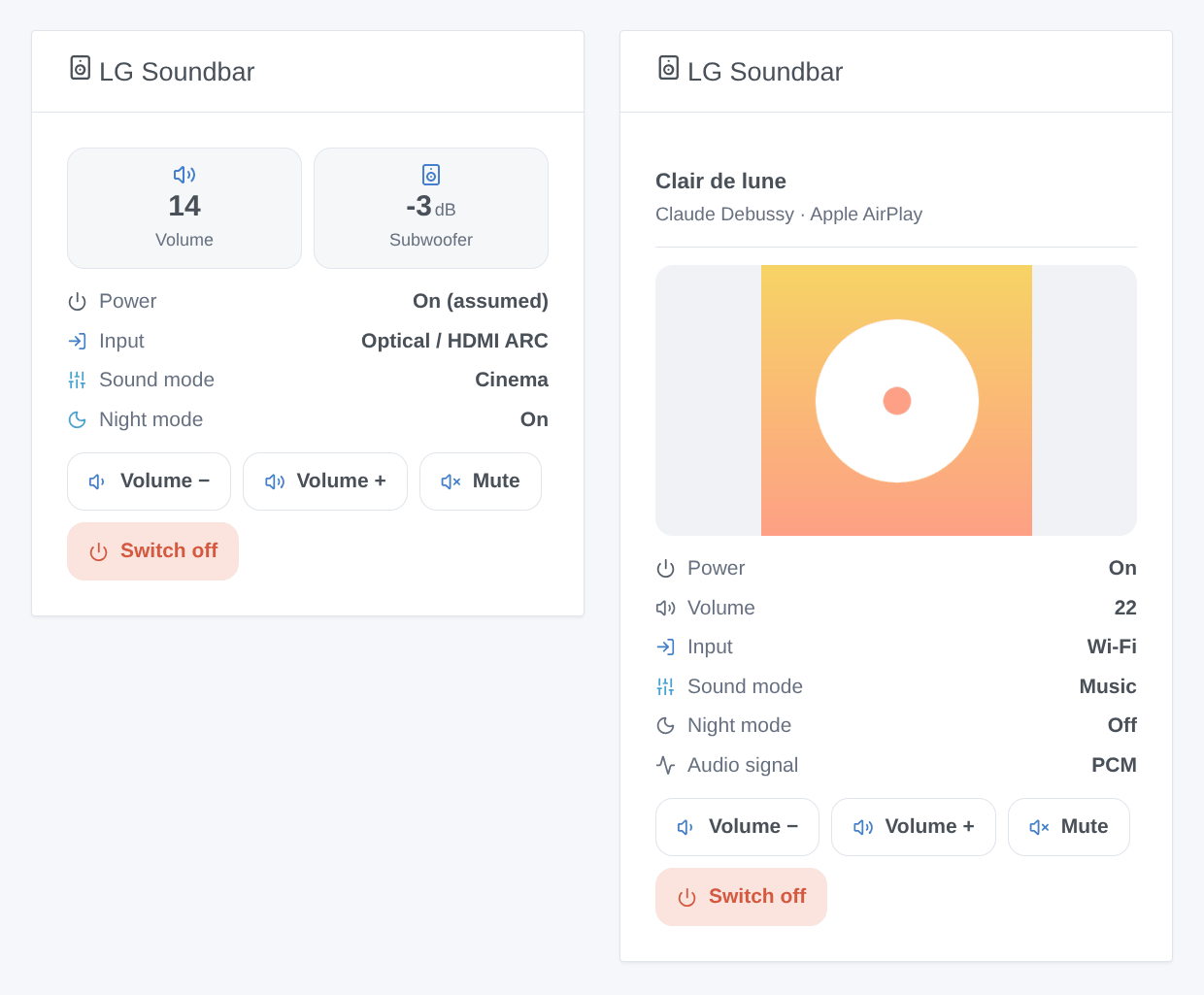
The LG Soundbar widget shows the volume, the subwoofer level, the power, the input, the sound mode, the night mode, the audio signal and, while streaming, the track with its cover. Its buttons lower or raise the volume, mute, and switch the soundbar on or off. Choose the soundbar in its settings (the first one by default). The image above is a generated illustration, not a screenshot.
Scenes
Triggers (only for changes made outside Gladys: remote, TV, LG app):
- LG Soundbar: input changed — filter on the new inputs; variables: input, previous input.
- LG Soundbar: sound mode changed — filter on the new sound modes.
- LG Soundbar: new track — title, artist and how it is streamed.
- LG Soundbar: unreachable — no connection for 2 minutes (unplugged, power cut, new address).
- LG Soundbar: reachable again.
For power, volume or mute, use the usual "device state changed" trigger.
Actions:
- LG Soundbar: apply a sound preset — input, sound mode, night mode and volume in one go; empty fields stay as they are.
- LG Soundbar: change the volume — a number of steps from the current volume (−5 lowers by 5).
Examples: when the input becomes Bluetooth, switch the TV off; at 10 pm, apply "Cinema, night mode on, volume 12"; when the phone rings, lower the volume by 8.
Troubleshooting
- No soundbar found: check that it is on and in the LG app, on the same network as Gladys. Type its IP address in the configuration. Press Search and test the soundbars: "no soundbar answered on port 9741" means it cannot be reached, or the model does not have this protocol.
- The soundbar switches on when Gladys restarts: turn Never wake the soundbar on.
- "Off" does nothing: some models (SP11RA, DSN10YG in Home Assistant reports) ignore it over the network; the integration tells you when the soundbar reports it stayed on.
- Power always "on (assumed)": your model does not report its power; it is guessed.
- Commands stop working while the LG app or Home Assistant is connected: close the other client.
- A sound mode or an input has a number instead of a name: your model reports one the integration does not know yet; it works anyway. Open an issue with its number and the name the LG app shows.
- For an issue, give the versions of Gladys and of the integration, the model and firmware of the soundbar, and the logs with
DEBUG=gladys-integration-sdk.
Configuration settings
These are the settings LG Soundbar asks for in its configuration screen in Gladys.
| Setting | Type | Required | Description |
|---|---|---|---|
| Before you start | section | No | For the LG Wi-Fi soundbars set up with the LG Sound Bar (or Wi-Fi Speaker) app, which answer on port 9741 of the local network: no account, no pairing, nothing goes through the cloud. Connect the soundbar to the same network as Gladys in the LG app, then open the Discover tab. Some recent models controlled only by LG ThinQ do not open this port. |
| IP addresses (optional) | string | No | Only for soundbars the search does not find (another subnet, a network that blocks multicast). Separate them with commas. A fixed address (DHCP reservation in your router) is best. |
| Search the network | boolean | No | Gladys looks for the soundbars (mDNS, LG and Chromecast announcements) at each search of the Discover tab, and again when a soundbar stops answering (it may have a new address). |
| Never wake the soundbar | boolean | No | A soundbar in standby switches on when it is asked something. By default the integration reads its state when it starts and after the soundbar was unreachable. Turn this on if your soundbar switches on when Gladys restarts: the state is then only learnt from its changes and your commands. |
| Language of the names | select | No | Language of the feature names, of the inputs and sound modes, and of the texts of the scenes (Gladys does not tell the integration the language of the user). |
How to install LG Soundbar in Gladys
- In Gladys, open Integrations: LG Soundbar appears in the catalog, next to the native integrations, with a community badge.
- Click Install. Gladys pulls the Docker image (
ghcr.io/william-de71/gladys-lg-soundbar:0.1.1), starts it in a sandbox isolated from the core, and generates the integration's interface (devices, discovery and configuration). - Open the Configuration screen of the integration, fill in the settings, and save.
- You can also install it directly from its repository URL: https://github.com/William-De71/gladys-lg-soundbar.
LG Soundbar requires Gladys >=5.1.0. The catalog inside Gladys refreshes every hour, so a new version becomes available at most one hour after its release.
Not running Gladys yet? It is free and open source: follow the installation guide to get started.
About external integrations
LG Soundbar is an external integration: a community integration packaged as a Docker container and published on GitHub, that Gladys installs in one click and runs in a sandbox isolated from its core. It is published and maintained by William-De71, not by the Gladys core team.
- Browse all integrations, native and community
- Build and publish your own external integration
- Source code on GitHub — source of this documentation