Last.fm smart home integration, free and open source

What you listen to on Last.fm: scrobbles, music scenes and widgets.
Published by William-De71
- Devices
- Version 1.2.0
- Requires Gladys >=5.3.0
- ★ 0
This integration brings your Last.fm listening into Gladys: what you are listening to right now, your scrobbles, scenes that react to the music, and three dashboard widgets.
Last.fm records ("scrobbles") every track played on Spotify, Deezer, Apple Music, YouTube Music, Tidal, Plex, Sonos and many more players. Whatever the player: if your listening reaches your Last.fm profile, Gladys sees it.
Community integration, not affiliated with Last.fm.
Setup
1. Create an API key (free)
- Sign in to Last.fm, then open Create an API account.
- Fill in an application name (e.g. "Gladys") and a description. The callback URL can stay empty.
- Last.fm shows an API key (32 characters) and a shared secret. Find them again at any time in My API accounts.
2. Fill in the integration
| Field | Purpose |
|---|---|
| API key | required |
| Shared secret | only to link an account (love tracks from Gladys) |
| Profiles to follow | Last.fm usernames separated by commas (10 at most): yours, a relative's… |
| Refresh interval | 30 seconds by default (15 to 300): this is how fast the scenes react |
| Language of the texts | device names and scene summaries; Automatic follows your dashboard once a Last.fm widget was shown |
Save. The Test the connection button checks the key and reads every profile.
A profile that hides its recent listening (Last.fm privacy settings) cannot be followed: Last.fm refuses to share it.
3. Add the devices
On the Discovery tab, each followed profile shows up as a "Last.fm – name" device. Add it and put it in a room. Widgets and scenes work without a device too, but picking a profile in their settings goes through the device list.
4. Link your account (optional)
Only to love or unlove tracks from Gladys (widget button, scene actions):
- fill in the shared secret and save;
- click Connect: a Last.fm page opens;
- click Yes, allow access. Gladys notices within a few seconds: the configuration screen reads "account name linked".
Nothing else is needed: no redirect URL to declare. The page stays valid 15 minutes; past that, click Connect again.
To unlink: the Unlink the account button, and optionally revoke the access in your Last.fm settings (Applications).
The device of a profile
| Feature | Value |
|---|---|
| Listening | 1 while a track is playing, 0 otherwise |
| Current or last track | "Artist – Track"; keeps the last track once listening stopped |
| Scrobbles today | since midnight, in the Gladys time zone |
| Total scrobbles | since the account was created |
| Title, Artist, Album, Cover | the track playing now (Gladys 5.3 music features), empty when nothing plays |
Title, artist, album and cover are shown in the "Devices in the room" box. There is no duration nor position (Last.fm does not give them), and the dashboard music box does not offer the profile: it is not a player you can command. A device added before these features gets them with the Update button of the Discovery tab.
History is kept: the dashboard "Chart" box shows your week of listening, and the usual scenes on a device value work ("more than 100 scrobbles today"…).
Scene triggers
In the scene editor, under Last.fm:
| Trigger | Fires when… | Filters |
|---|---|---|
| Last.fm: new track | a profile starts playing a track | profile, artist |
| Last.fm: listening started | a profile starts listening after a pause | profile |
| Last.fm: listening stopped | nothing has been playing for two checks in a row | profile |
| Last.fm: track loved | a profile loves a track (on Last.fm or in a connected player) | profile, artist |
Passed on to the scene actions: username, artist, track, album, loved, Last.fm link, and a ready-to-send summary; for "listening stopped", the session length (minutes) and the number of tracks played.
Examples:
- Listening started → dim the living room and power the amplifier on;
- Listening stopped → power the amplifier off;
- New track, artist "Daft Punk" → disco lights.
Good to know:
- The Artist filter compares the name exactly as Last.fm spells it, case included ("Daft Punk", not "daft punk").
- Last.fm pushes nothing: the integration reads the profiles every 30 seconds by default, so a scene reacts within a few seconds to half a minute.
- When the integration starts, a session already in progress does not fire "Listening started"; only the next track counts.
- The same track played twice in a row counts once (Last.fm gives no way to tell the two plays apart).
Scene actions
| Action | Result |
|---|---|
| Last.fm: what is playing | listening (yes/no), artist, track, album, loved, link, time played, summary |
| Last.fm: listening statistics | scrobbles today and in total, top artist / album / track over a period, summary |
| Last.fm: love a track | adds a track to the loved tracks of the linked account |
| Last.fm: unlove a track | removes it |
To love or unlove: leave artist and track empty to target the track playing now (or the last one played) on the linked account, or fill them in (scene variables accepted). Both actions need a linked account.
Dashboard widgets
| Widget | Content |
|---|---|
| Last.fm now playing | cover, track, artist and album, scrobbles today and in total, status, Love button (linked account), link |
| Last.fm recent tracks | the latest tracks with their covers; the track playing now and the loved ones are badged |
| Last.fm top charts | top artists, albums (as a cover grid) or tracks over 7 days, 1, 3, 6 or 12 months, or all time |
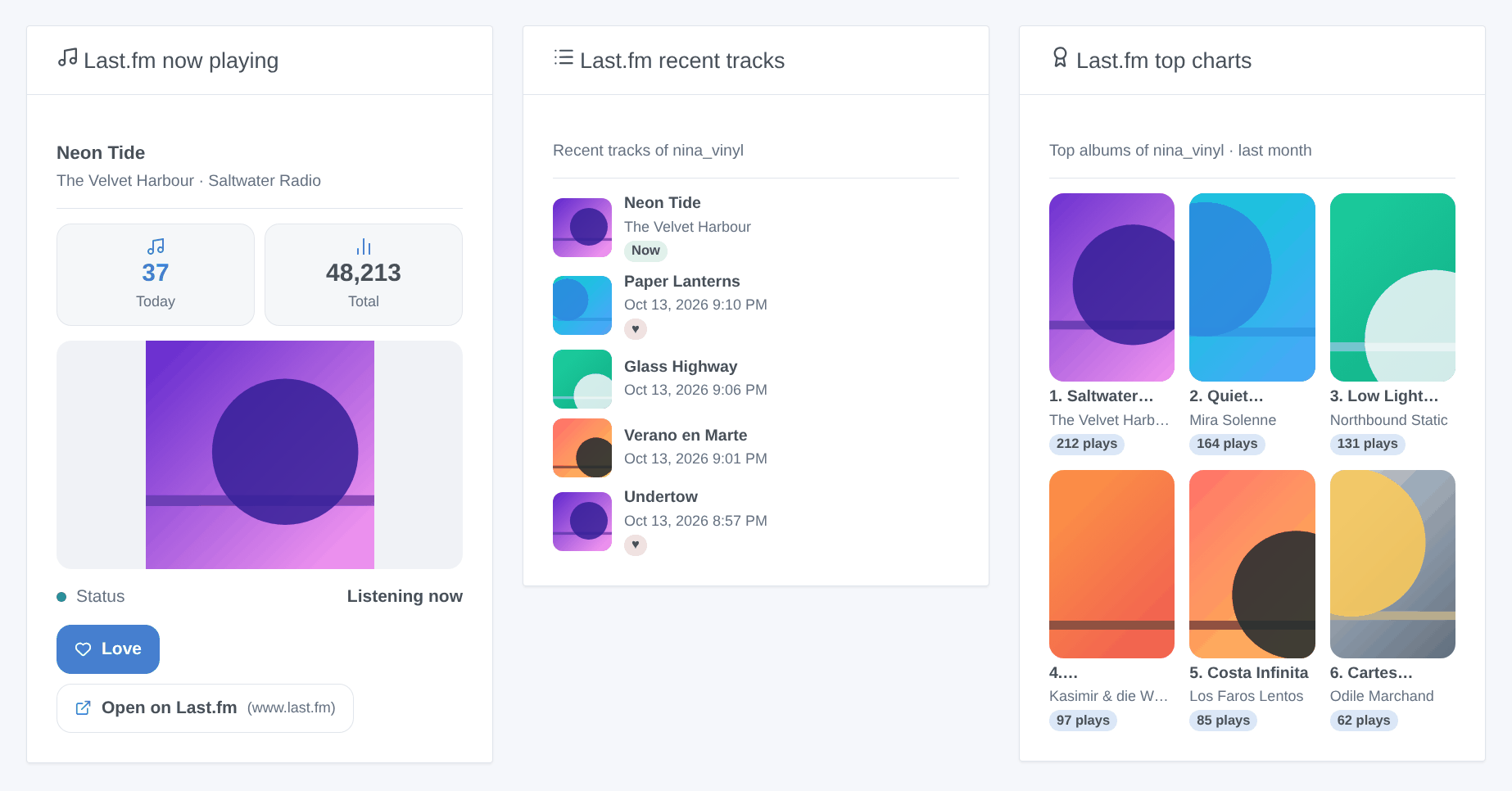
Each widget is set to a profile (empty = the first followed profile). The "now playing" widget refreshes as soon as a new track starts.
Last.fm has not served artist pictures since 2019: the top artists show without images.
Troubleshooting
| Symptom | Likely cause |
|---|---|
| "Last.fm refuses the API key" | key miscopied, or a wrong shared secret when linking |
| A profile is missing from Discovery | the username does not exist (see the integration logs) |
| "hides their recent listening" | the profile enabled the matching privacy option on Last.fm |
| Nothing happens while listening | the player does not scrobble: check that the track shows on your Last.fm profile |
| The Connect button fails | shared secret missing: fill it in and save before clicking |
Configuration settings
These are the settings Last.fm asks for in its configuration screen in Gladys.
| Setting | Type | Required | Description |
|---|---|---|---|
| Last.fm API key | section | No | Last.fm records what you listen to on Spotify, Deezer, Apple Music, YouTube Music, Plex and many more. Reading your listening needs a free API key: create an API account on Last.fm (any application name; the callback URL can stay empty), then copy its API key and shared secret below. |
| API key | secret | Yes | 32 characters. |
| Shared secret | secret | No | Only needed to link an account (to love tracks). |
| Profiles to follow | string | Yes | Last.fm usernames, separated by commas (10 at most). Each one becomes a device on the Discovery screen. |
| Refresh interval (s) | number | No | How often the profiles are read, between 15 and 300 seconds. Last.fm has no push: this is the delay of the scenes. |
| Language of the texts | select | No | Device names, scene summaries and outputs. Automatic: the language of your dashboard, once a Last.fm widget has been displayed. |
| Link your account (optional) | section | No | Only needed to love or unlove tracks from Gladys (widget button, scene actions). Fill in the shared secret and save first, then click Connect and approve the access on the Last.fm page that opens. Gladys detects the approval within a few seconds. |
| Last.fm account | account_link | No |
How to install Last.fm in Gladys
- In Gladys, open Integrations: Last.fm appears in the catalog, next to the native integrations, with a community badge.
- Click Install. Gladys pulls the Docker image (
ghcr.io/william-de71/gladys-lastfm:1.2.0), starts it in a sandbox isolated from the core, and generates the integration's interface (devices, discovery and configuration). - Open the Configuration screen of the integration, fill in the settings, and save.
- You can also install it directly from its repository URL: https://github.com/William-De71/gladys-lastfm.
Last.fm requires Gladys >=5.3.0. The catalog inside Gladys refreshes every hour, so a new version becomes available at most one hour after its release.
Not running Gladys yet? It is free and open source: follow the installation guide to get started.
About external integrations
Last.fm is an external integration: a community integration packaged as a Docker container and published on GitHub, that Gladys installs in one click and runs in a sandbox isolated from its core. It is published and maintained by William-De71, not by the Gladys core team.
- Browse all integrations, native and community
- Build and publish your own external integration
- Source code on GitHub — source of this documentation