KNX smart home integration, free and open source
Control your KNX installation through a KNX IP interface: lights, covers, sensors, scenes.
Published by William-De71
- Devices
- Version 0.2.1
- Requires Gladys >=5.3.0
- ★ 0
Overview
This integration connects Gladys to a KNX installation through a KNX IP interface or router on your local network. Lights, switches, shutters and curtains, sensors and room thermostats of the KNX bus become Gladys devices: you control them from the dashboard and the scenes, and their states follow the bus in real time.
KNX devices cannot be discovered: the meaning of each group address lives in your ETS project. You declare each device once in the integration configuration, with its group addresses, then add it from the Discover tab like any discovered device.
Everything stays on your local network (local badge): the integration talks to the interface over KNXnet/IP, no data goes to the internet.
Requirements
- Gladys Assistant 5.3.0 or later.
- A KNX IP interface (tunnelling) or a KNX IP router on the same network as Gladys, with a free tunnel.
- Your ETS project, or at least the list of group addresses of the devices you want in Gladys (with their datapoint types, DPT).
- For a KNX IP Secure interface: the individual address, user ID and password of a tunnel (ETS, properties of the interface).
Configuration
Connection
- Connection: UDP tunnelling suits most interfaces. Choose TCP tunnelling for KNX IP Secure and recent interfaces. Routing (multicast) needs a KNX IP router and usually does not reach the container of the integration: prefer tunnelling.
- KNX IP interface address: its IP address or host name. Leave it empty to use the first interface found on the network; the Search for KNX IP interfaces button lists the interfaces that answer.
- Port: 3671, unless your interface uses another one.
- Individual address of Gladys: optional with tunnelling (the interface gives the address of its tunnel), required with routing (a free address of the line, reserved in ETS).
- Save, then press Test the connection.
KNX IP Secure
Choose TCP tunnelling, tick Use KNX IP Secure, then fill in the individual address of the tunnel (for example 1.1.254), the tunnel user ID and the tunnel user password from ETS. The device authentication code is optional: with it, the integration checks that it talks to your interface. KNX Data Secure (encrypted group communication) is not supported.
Declare your devices
At the bottom of the configuration page, one button per kind of device opens a form. Group addresses are written like in ETS: 1/2/3 (three levels), 1/515 (two levels) or 2563 (free) are the same address. The status address is the status object of the actuator (read flag set in ETS): without it, Gladys keeps the last command as the state.
| Button | Group addresses | Gladys features |
|---|---|---|
| Declare a light | switch (DPT 1.001) and status, brightness (5.001) and status, RGB color (232.600) and status, color temperature (7.600) and status | on/off, brightness, color, color temperature |
| Declare a switch | switch (1.001) and status | on/off (socket, valve, pump…) |
| Declare a cover | up/down (1.008), stop (1.007 or 1.010), position (5.001) and status | open / close / stop, position |
| Declare a sensor | value: temperature, humidity, illuminance, CO2, air pressure, wind speed, power, energy meter, voltage, current, percentage, counter | the measure, with its unit |
| Declare a binary sensor | state (1.x): motion, presence, window or door contact, smoke, water leak, rain, other | the state |
| Declare a thermostat | setpoint (9.001) and status, measured temperature | setpoint, temperature |
The main group address (the switch address, the up/down address, the value address, the setpoint address) identifies the device: declaring again the same kind with the same main address updates it. List the devices shows the declarations, Remove a declared device takes a name or a main address. The declarations are saved in the Gladys configuration, so in the Gladys backups.
Then open the Discover tab and add the devices. A cover is open at 100 % in Gladys and closed at 0 % (KNX says the opposite; tick Invert the position if yours already does it). A temperature, a power or a voltage sent as a 4-byte float (DPT 14) is understood too.
States and scenes
- Read the states at startup and Read the states again every (minutes): the integration asks the status addresses for their value when it connects, then at this interval (0: never). KNX devices send their changes themselves; this only catches up with telegrams sent while Gladys was stopped.
- Group addresses for scenes: the telegrams on these addresses start the scenes “A KNX telegram is received”. Separate them with commas, use * for a whole main or middle group (1/0/, 2/), and add :DPT to decode the value (1/0/7:9.001).
- Language of the feature names: the language of the names of the features, given when a device is added.
Usage
Devices
The added devices behave like any Gladys device: dashboard, rooms, history, scenes, voice and chat. A device without a status address shows the last command sent from Gladys, and the commands sent from the bus (a wall push button on the same group address).
Widget
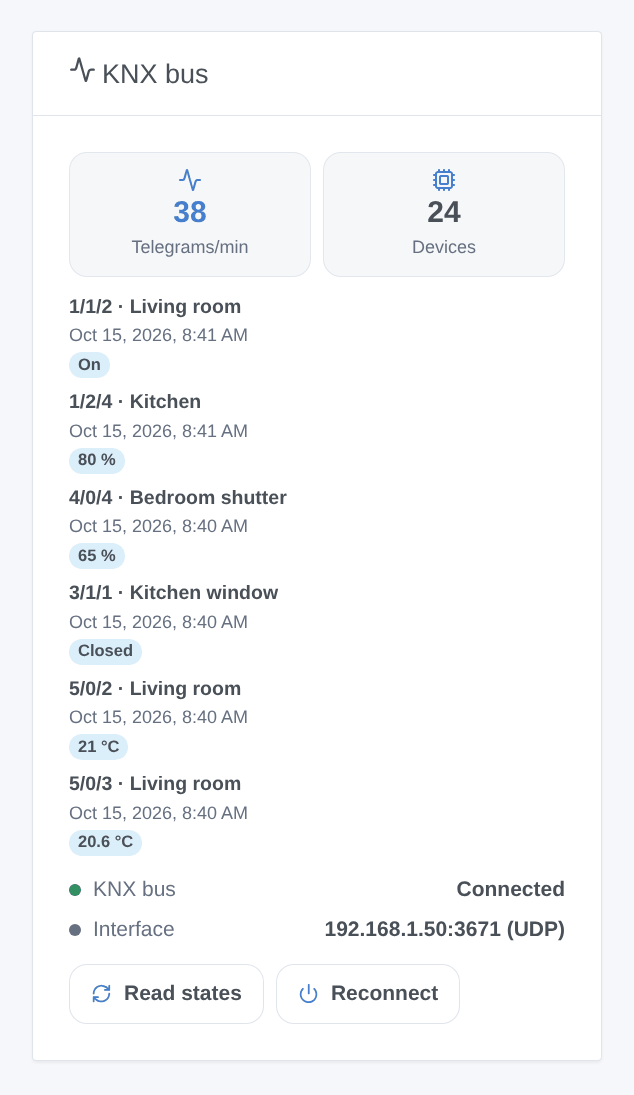
The KNX bus widget shows the connection, the telegrams of the last minute, the number of declared devices and the last telegrams with the name of the device and its value. Read states asks every status address for its value, Reconnect opens a new connection to the interface. Its settings: the number of telegrams shown and a filter of group addresses (1/, 2/1/).
Scene triggers
- A KNX telegram is received: on an address of the “Group addresses for scenes” field. Filters: group address (three-level form), telegram type (write, response, read request), value (true, false, 21.5…). Variables: group address, sender, telegram type, value, numeric value, raw data.
- The KNX connection is lost, The KNX connection is restored (after a loss): the interface and the reason, or the downtime in seconds.
Scene actions
- Send a value on the KNX bus: a group address, a datapoint type (1.001, 5.001, 9.001, 232.600…) and a value (on, off, 21.5, #ff8000, a text or a scene variable). Any group address, even one that is not a device in Gladys.
- Read a value on the KNX bus: asks a group address for its value; the next actions get the value, the numeric value and the raw data.
- Recall a KNX scene: sends a scene number from 1 to 64 (DPT 17.001) to a scene group address.
Scene examples
- When the push button “All off” of the entrance (group address 0/0/1 in “Group addresses for scenes”) sends off → turn off the Gladys lights that are not KNX and send a notification.
- When the alarm is armed → recall the KNX scene 3 “Away” on 0/1/0 and close the covers.
- When the KNX connection is lost → send a message to the household, with the reason.
Troubleshooting
- “No KNX IP interface found”: the search goes through the Gladys core on the local network; some interfaces do not answer it. Enter the IP address of the interface in the configuration.
- The connection fails or drops: an interface has a few tunnels only (often 4 or 5), shared with ETS and other software. Close the ETS bus monitor, or give Gladys a tunnel of its own in ETS. With KNX IP Secure, check the user ID and the password of the tunnel.
- A state never comes back: check that the status object of the actuator has its read flag set in ETS, and that the status address is the right one (the bus monitor of the widget shows what arrives).
- A wrong value (temperature far off, percentage at 255): the datapoint type of the address is not the expected one; check it in ETS.
- A cover goes the wrong way: tick or untick Invert the position and declare it again (same up/down address: the device is updated).
- Logs: the Logs tab of the integration. For more details, add the environment variable
DEBUG=gladys-integration-sdkto the container. Report problems on GitHub with the Gladys version, the integration version, the interface model and the logs.
KNX and the KNX logo are trademarks of KNX Association cvba. This integration is not affiliated with, endorsed or certified by KNX Association.
Configuration settings
These are the settings KNX asks for in its configuration screen in Gladys.
| Setting | Type | Required | Description |
|---|---|---|---|
| Connect Gladys to your KNX installation | section | No | Gladys talks to the KNX bus through a KNX IP interface or router on your network. Leave its address empty to use the first one found on the network. KNX devices cannot be discovered: declare each one below with the “Declare a …” buttons and the group addresses of your ETS project, then add them from the Discover tab. |
| Connection | select | No | Routing uses multicast, which usually does not reach the container of the integration: prefer tunnelling. |
| KNX IP interface address | string | No | IP address or host name. Empty: the first interface found on the network (the “Search for KNX IP interfaces” button lists them). |
| Port | number | No | |
| Individual address of Gladys | string | No | Optional with tunnelling (the interface gives the address of its tunnel). Required with routing: a free address of the line, reserved in ETS. |
| KNX IP Secure | section | No | For a KNX IP Secure interface, choose TCP tunnelling and fill in the tunnel user of your ETS project (properties of the interface, tunnel tab). KNX Data Secure (encrypted group communication) is not supported. |
| Use KNX IP Secure | boolean | No | |
| Individual address of the tunnel | string | No | |
| Tunnel user ID | number | No | |
| Tunnel user password | secret | No | |
| Device authentication code (optional) | secret | No | From the ETS project: lets the integration check that it talks to your interface. |
| States and scenes | section | No | KNX devices send their changes themselves. The integration also reads the status addresses at startup and at the chosen interval, to catch up with telegrams sent while Gladys was stopped. |
| Read the states at startup | boolean | No | |
| Read the states again every (minutes) | number | No | 0: never. |
| Group addresses for scenes | string | No | Telegrams on these addresses start the “A KNX telegram is received” scenes. Separate them with commas; * covers a main or middle group; add :DPT to decode the value (1/0/7:9.001). |
| Language of the feature names | select | No | Used when a device is added from the Discover tab. |
How to install KNX in Gladys
- In Gladys, open Integrations: KNX appears in the catalog, next to the native integrations, with a community badge.
- Click Install. Gladys pulls the Docker image (
ghcr.io/william-de71/gladys-knx:0.2.1), starts it in a sandbox isolated from the core, and generates the integration's interface (devices, discovery and configuration). - Open the Configuration screen of the integration, fill in the settings, and save.
- You can also install it directly from its repository URL: https://github.com/William-De71/gladys-knx.
KNX requires Gladys >=5.3.0. The catalog inside Gladys refreshes every hour, so a new version becomes available at most one hour after its release.
Not running Gladys yet? It is free and open source: follow the installation guide to get started.
About external integrations
KNX is an external integration: a community integration packaged as a Docker container and published on GitHub, that Gladys installs in one click and runs in a sandbox isolated from its core. It is published and maintained by William-De71, not by the Gladys core team.
- Browse all integrations, native and community
- Build and publish your own external integration
- Source code on GitHub — source of this documentation