Kleenex Pollen Radar smart home integration, free and open source
Kleenex pollen radar: trees, grass and weeds pollen per city, five-day forecast.
Published by William-De71
- Devices
- Version 0.1.0
- Requires Gladys >=5.1.0
- ★ 0
Overview
This integration brings into Gladys the pollen counted by the Kleenex pollen radar (Scottex in Italy), for one to three cities: the number of pollen grains per m³ of air for trees, grass and weeds, their level (low, moderate, high, very high), the main species (birch, ragweed, grasses…) and the forecast for the next four days. Each city becomes a device to show on a dashboard and to use in scenes.
Countries covered: France, United Kingdom and Ireland, Netherlands, Italy and the United States. No account and no key are needed. In the United States, the radar gives no detail per species.
This connector is unofficial and affiliated with neither Kleenex nor Kimberly-Clark. It reads the same data as the website, without a documented API: if the site changes, it may stop working until an update.
It is a cloud integration: it asks the Kleenex website of the chosen country every three hours, one request per city, and keeps the last forecast, so a restart costs no request.
Prerequisites
- Gladys Assistant 5.1.0 or later.
- The name or postal code of the cities to follow, as the pollen radar website understands them.
Configuration
| Field | What to type |
|---|---|
| Country | The pollen radar asked for every city. France by default. |
| City | “Leeds”, “London”, “Utrecht”, “Mâcon”, “71000”… For Ireland, add the country: “Dublin, Ireland”. Required. |
| City 2, City 3 | Other cities (a second home, the workplace, the school). Optional. |
| Language of the texts | Device names, main pollen and scene summaries. Automatic: your dashboard. |
Save: the status at the top of the page shows the cities read, their pollen level today and the time of the next reading. An unknown city is reported there: try another spelling or the postal code. Read now reads again at once (at most every 10 minutes).
Usage
Devices
In the Discover tab, create the “Pollen …” device of each city. It holds:
- the pollen level today and tomorrow, from 1 (low) to 4 (very high): the highest of the three types;
- the number of grains per m³ of trees, grass and weeds today (the site writes “PPM”);
- the level of each type today, from 1 to 4;
- the main pollen as text, for example “Ragweed 13”.
A level is a figure from 1 to 4, not an air quality index: Gladys has no pollen unit, so these features show none. The device is identified by the location the radar answers: a new spelling that finds the same place keeps the same device. The status of the configuration shows the name the radar found: check it.
Dashboard widgets
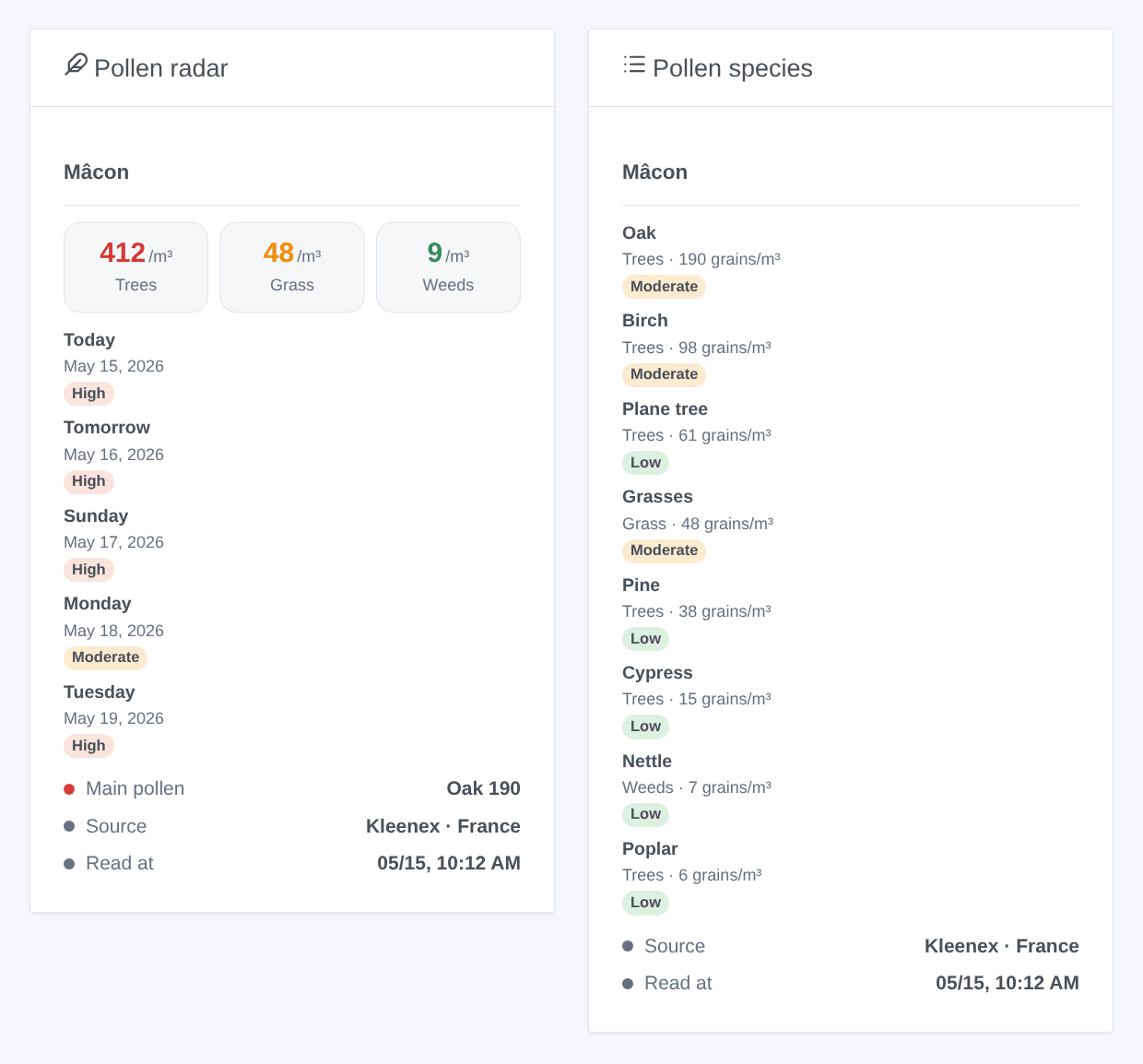
- Pollen radar: the three types of today, one card per day over five days (level, counts, main species), the main pollen, the source and the reading time.
- Pollen species: the species counted today, highest first, with their level.
Choose the city in the settings of the widget (empty: the first one).
Scenes
The Kleenex: pollen alert trigger fires when the trees, grass or weeds of today or tomorrow reach “Moderate” or more, or rise again; never twice for the same day, type and level. Filter by city, pollen type, day and level (“High” and “Very high” for most allergic people). It gives a ready-made sentence, {{triggerEvent.data.summary}}, and its values (type, level, count, species).
The Kleenex: read the pollen action returns the level, the counts and the main pollen of a city for today or tomorrow, to put in a message or to test in a condition.
Examples:
- When grass is high tomorrow → send the summary in the evening.
- When trees are very high today → close the bedroom windows.
- Every morning → read the pollen and announce it with the alarm.
Transport
Cloud only: the data come from the Kleenex (or Scottex) website of the chosen country. Only the names of the typed cities leave your network.
Troubleshooting
- “unknown to the pollen radar”: the site does not know this spelling; try the postal code, or a large city nearby.
- “refused the request (HTTP 403)”: the site blocked the request; the integration tries again in 15 minutes, then later and later.
- “the site may have changed”: the page no longer looks like the one the integration can read. Report it: an update will be needed.
- The level stays at 1: outside the pollen season this is normal; the counts stay at or near 0.
- To report a problem: press Diagnostic, then copy the lines starting with “Pollen diagnostic” from the Logs tab into a GitHub issue or a reply on the forum, with the versions of Gladys and of the integration.
Configuration settings
These are the settings Kleenex Pollen Radar asks for in its configuration screen in Gladys.
| Setting | Type | Required | Description |
|---|---|---|---|
| Kleenex pollen radar | section | No | The data come from the pollen radar of the Kleenex websites (Scottex in Italy): the pollen counted in the air for trees, grass and weeds, with the main species, today and for the next four days. No account and no key are needed. This connector is unofficial and not affiliated with Kleenex or Kimberly-Clark: it reads the same data as the website, every three hours, and may stop working if the site changes. |
| Country | select | Yes | The pollen radar of this country is asked for every city below. |
| Cities | section | No | Type up to three cities, by name or postal code: “Mâcon”, “71000”, “Leeds”, “Utrecht”. For Ireland, add the country: “Dublin, Ireland”. Each city becomes a device in the Discover tab; the status above shows the name the radar found. |
| City | string | Yes | Name or postal code, as the pollen radar site understands it. |
| City 2 | string | No | Another city to follow (a second home, the workplace, the school). Optional. |
| City 3 | string | No | Another city to follow (a second home, the workplace, the school). Optional. |
| Options | section | No | |
| Language of the texts | select | No | Language of the device names and of the scene texts. Automatic: the language of your dashboard. |
How to install Kleenex Pollen Radar in Gladys
- In Gladys, open Integrations: Kleenex Pollen Radar appears in the catalog, next to the native integrations, with a community badge.
- Click Install. Gladys pulls the Docker image (
ghcr.io/william-de71/gladys-kleenex-pollen:0.1.0), starts it in a sandbox isolated from the core, and generates the integration's interface (devices, discovery and configuration). - Open the Configuration screen of the integration, fill in the settings, and save.
- You can also install it directly from its repository URL: https://github.com/William-De71/gladys-kleenex-pollen.
Kleenex Pollen Radar requires Gladys >=5.1.0. The catalog inside Gladys refreshes every hour, so a new version becomes available at most one hour after its release.
Not running Gladys yet? It is free and open source: follow the installation guide to get started.
About external integrations
Kleenex Pollen Radar is an external integration: a community integration packaged as a Docker container and published on GitHub, that Gladys installs in one click and runs in a sandbox isolated from its core. It is published and maintained by William-De71, not by the Gladys core team.
- Browse all integrations, native and community
- Build and publish your own external integration
- Source code on GitHub — source of this documentation