Isypower smart home integration, free and open source
Solar panels, batteries and grid exchange of your Isypower Cloud installation (Materfrance).
Published by William-De71
- Devices
- Version 0.1.0
- Requires Gladys >=5.2.0
- ★ 0
Overview
This integration brings your Isypower Cloud installation (Materfrance, formerly Izypower) into Gladys: solar production, house consumption, energy bought from and sold to the grid, and your home batteries. It reads the same cloud as the Isypower Cloud mobile application, with your account.
- One device per power station: production, consumption, grid exchange, battery level and powers, and lifetime energy indexes that feed the energy tracking of Gladys (consumption, cost, production).
- One device per battery: level, stored energy, charging and discharging powers, temperature, backup outlet, and its control mode and manual mode as dropdowns.
- Dashboard widgets, scene triggers and scene actions (below).
This is a community integration, not developed nor endorsed by Materfrance.
Prerequisites
- Gladys Assistant 5.2.0 or later.
- An Isypower Cloud account (the e-mail and password of the application) with at least one station.
- Internet access from Gladys: the data come from the cloud of Materfrance, never from the local network.
Configuration
In Integrations → Isypower → Configuration:
| Field | Description |
|---|---|
| The e-mail of your Isypower Cloud account. | |
| Password | Its password, stored as a secret: never shown again, never written to the logs. |
| Read every | 3 (default), 5, 10 or 15 minutes. The boxes report every 3 minutes: faster brings nothing. |
| Language of the texts | Names of the devices, battery modes, scene summaries. Automatic: the language of your dashboard. |
Save: the status shows the stations found. A wrong password stops the readings until you save again, so that your account is never locked by retries. Two buttons: Read now and Diagnostic (writes what was read to the Logs tab, without the password, the token nor the serial numbers).
Usage
Devices
Open the Discover tab and create the devices you want:
- Isypower <station>: solar production (W) and its index (kWh), house consumption (W), grid exchange (W, positive when buying, negative when selling), energy bought from the grid (kWh, used by Gladys for the consumption and its cost), energy sold to the grid (kWh) and, with a battery, the battery level (%), charging and discharging powers (W) and indexes (kWh).
- Isypower <battery>: charge level (%), stored energy (kWh), charging and discharging powers (W), temperature (°C), backup outlet power (W). A master or standalone battery also has two dropdowns: control mode (intelligent, manual, calendar; intelligent needs the Isypower smart meter) and manual mode (standby, charge, discharge). A slave battery follows its master.
Dashboard widgets
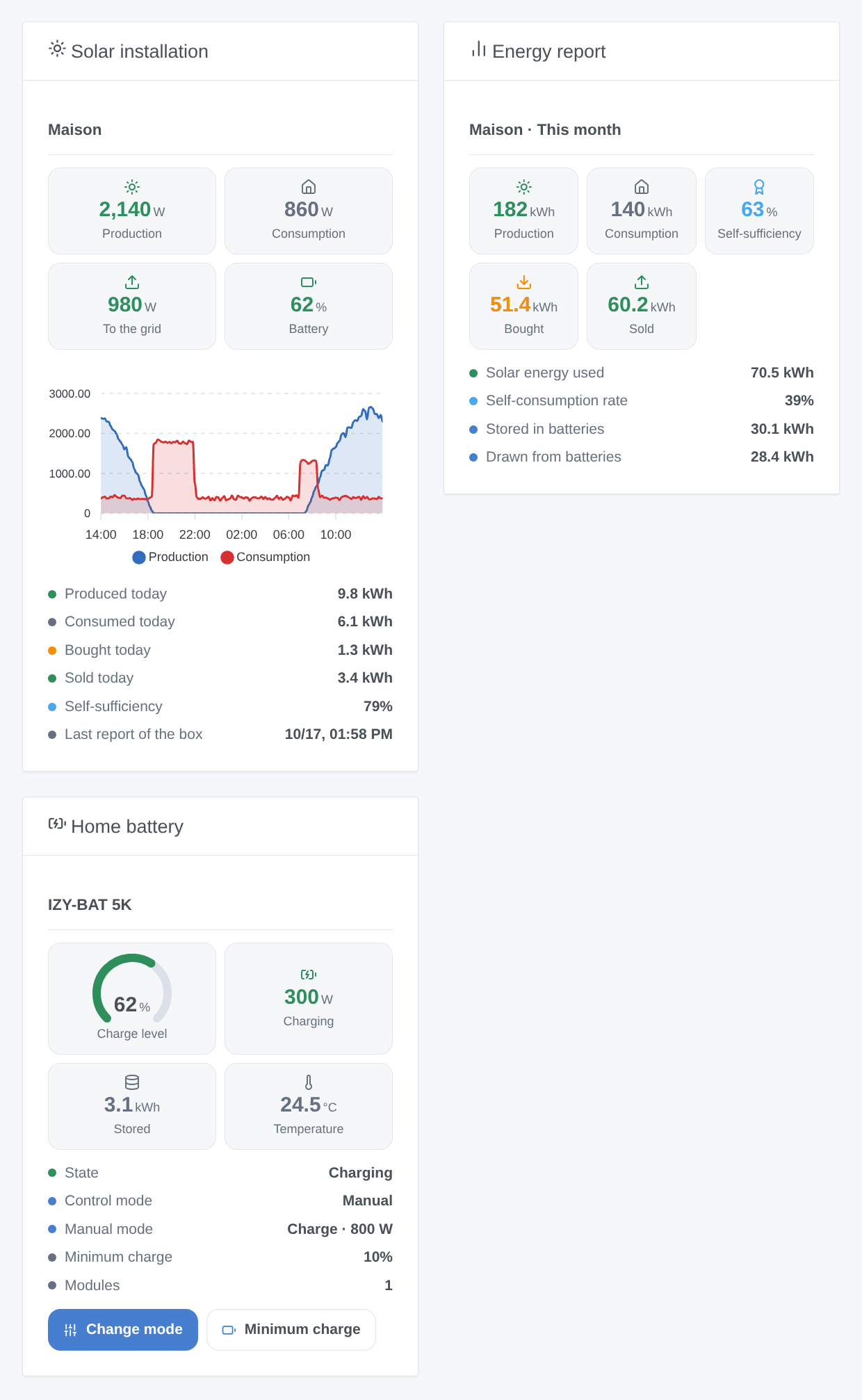
- Solar installation: production, consumption, grid and battery now, the production and consumption curves of the last 24 hours (drawn from the readings of the integration), today's energy and the last report of the box.
- Energy report: produced, consumed, bought and sold energy and self-sufficiency, today, this month, this year or since the installation.
- Home battery: level, power, stored energy, temperature and modes, with a Change mode button (control mode, manual mode, power) and a Minimum charge button.
Scenes
Triggers:
- Battery starts charging, discharging or stops, filtered by battery and new state.
- Equipment offline or back online (micro-inverter, battery, meter, charging station).
- Firmware update available (checked every six hours).
- Station silent or reporting again: the box has sent nothing to the cloud for 20 minutes.
Actions:
- Set the mode of a battery: control mode, and in manual control standby, charge or discharge at a given power.
- Set the minimum charge of a battery (5 to 100 %).
- Read the energy report of a period: kWh produced, consumed, bought, sold, stored and drawn, self-sufficiency, and a ready-made summary for a message.
Examples:
- Every evening at 9 pm, read the energy report of today and send its summary on Telegram.
- When the electricity is expensive (peak hours), set the battery mode to manual discharge at 800 W; back to calendar at the end of the peak.
- When a micro-inverter goes offline, or the station is silent, send a notification.
Transport
Cloud only: the integration logs in to Isypower Cloud (application.izypowercloud.fr) over the internet, exactly like the application, and the data leave your network through this cloud. Gladys shows the cloud badge on the integration.
Troubleshooting
- "Isypower Cloud refused the login": check the e-mail and the password in the application, then save again. The integration does not retry by itself.
- No device in Discover: press Read now, then check the status. A station that the application does not show is not read either.
- A value stays empty: the cloud did not send it (a station without battery has no battery feature). Press Diagnostic and attach the lines starting with "Isypower diagnostic" to an issue.
- The station is silent: the box reports every three minutes; check its Wi-Fi and its power supply.
- Issues: https://github.com/William-De71/gladys-isypower/issues, with the versions of Gladys and of the integration and the diagnostic lines. In developer mode,
DEBUG=gladys-integration-sdkadds the SDK logs.
Configuration settings
These are the settings Isypower asks for in its configuration screen in Gladys.
| Setting | Type | Required | Description |
|---|---|---|---|
| Isypower Cloud account | section | No | Enter the e-mail and the password you use in the Isypower Cloud application (formerly Izypower). The integration reads your stations, micro-inverters and batteries from the cloud of Materfrance every few minutes: the data leave your network through this cloud, as in the application. A wrong password stops the readings until you save again, so that the account is never locked. |
string | Yes | ||
| Password | secret | Yes | |
| Options | section | No | The boxes report to the cloud every three minutes: reading more often brings nothing. |
| Read every | select | No | About five requests per station and reading, plus two per battery. |
| Language of the texts | select | No | Names of the devices, modes of the batteries, scene summaries. Automatic: the language of your dashboard, once an Isypower widget has been displayed (French before). |
How to install Isypower in Gladys
- In Gladys, open Integrations: Isypower appears in the catalog, next to the native integrations, with a community badge.
- Click Install. Gladys pulls the Docker image (
ghcr.io/william-de71/gladys-isypower:0.1.0), starts it in a sandbox isolated from the core, and generates the integration's interface (devices, discovery and configuration). - Open the Configuration screen of the integration, fill in the settings, and save.
- You can also install it directly from its repository URL: https://github.com/William-De71/gladys-isypower.
Isypower requires Gladys >=5.2.0. The catalog inside Gladys refreshes every hour, so a new version becomes available at most one hour after its release.
Not running Gladys yet? It is free and open source: follow the installation guide to get started.
About external integrations
Isypower is an external integration: a community integration packaged as a Docker container and published on GitHub, that Gladys installs in one click and runs in a sandbox isolated from its core. It is published and maintained by William-De71, not by the Gladys core team.
- Browse all integrations, native and community
- Build and publish your own external integration
- Source code on GitHub — source of this documentation