IoTaWatt smart home integration, free and open source
IoTaWatt energy monitor on the local network: power, energy and voltage per circuit.
Published by William-De71
- Devices
- Version 0.1.0
- Requires Gladys >=5.3.0
- ★ 0
Overview
This integration brings your IoTaWatt energy monitors into Gladys. An IoTaWatt is an open-hardware Wi-Fi energy monitor: current clamps (CT) on the circuits of your electrical panel, and a voltage transformer (VT) on a socket. The integration reads it over your local network, through its documented local API (/status and /query), and never writes to it: nothing leaves your home. It is not affiliated with IoTaWatt, Inc.
- One device for the IoTaWatt itself (Wi-Fi signal, clock battery, firmware), and one device per input or output: power, energy consumed, energy exported, voltage, current.
- Energy indexes counted every minute from the IoTaWatt's own log: a restart of Gladys or of the integration loses nothing.
- Two dashboard widgets: one IoTaWatt with its busiest channels; one channel with a chart from the IoTaWatt's log.
- Scene triggers: not answering, answering again, restarted.
- Scene action: the energy of a channel over a period (today, yesterday, last month…).
Transport: local. The integration talks to the IoTaWatt over HTTP on your network; no data goes to the internet.
Prerequisites
- Gladys Assistant 5.3.0 or later.
- An IoTaWatt set up with its configuration app (inputs named, outputs if you want them), on the same network as Gladys.
- Its address (IP or name), or let the integration find it: the IoTaWatt announces itself with mDNS under its device name, and the integration only tries the names that contain "iota" (the default name is "IotaWatt"). A renamed device must be typed in by hand.
- No password, unless you set one in the IoTaWatt (Setup → Passwords) without allowing local access without a password.
The integration reads the power of every channel every 10, 30 or 60 seconds (one request), and once a minute the energy of the minutes not counted yet (one more request). An IoTaWatt is a small ESP8266 module: requests go one at a time, never in parallel.
Configuration
| Field | Meaning |
|---|---|
| Addresses | IP addresses or names of your IoTaWatt devices, separated by commas (192.168.1.20, iotawatt.local); empty: automatic search |
| User | user (read only, enough) or admin; only used with a password |
| Password | Only if the IoTaWatt asks for one (a secret: never shown again, never written to the logs nor to /data) |
| Power reading | Every 10 seconds, 30 seconds (default) or minute; the energy is counted every minute whatever this setting |
| Language of the texts | Feature names, scene texts and errors; automatic follows the language of the last widget shown (en/fr/de/es) |
Buttons:
- Search and test looks for the IoTaWatt devices (addresses typed and network search), reads them and offers their channels on the Discover screen.
- Diagnostic writes what the integration knows to its logs, without the password.
The password is used for HTTP Digest: it never travels on the network, only an answer computed from it. When "local access" is allowed in the IoTaWatt, a request from the same network needs no password; the requests of the integration leave through the Gladys host, so they usually come from the same network.
Usage
Devices
After the configuration, open Discover: the IoTaWatt and each of its channels are offered, named after the IoTaWatt ("Heat Pump (IoTaWatt)"). Add only the channels you want, put each in its room and rename it if you like: the widgets and the scenes use the name you give it.
| Device | Feature | Category / type | Unit |
|---|---|---|---|
| IoTaWatt | Wi-Fi signal | signal / integer | — (dBm) |
| IoTaWatt | Clock battery low | battery-low / binary | — |
| IoTaWatt | Firmware | text / text | — |
| Power input or output | Power | energy-sensor / power | W |
| Power input or output | Energy consumed | energy-sensor / index | kWh |
| Power input or output | Energy exported | energy-production-sensor / index | kWh |
| Voltage input/output | Voltage | energy-sensor / voltage | V |
| Current output | Current | energy-sensor / current | A |
All features are read only. The power is signed: a channel that exports (a mains clamp while solar panels produce) goes negative. Energy exported only appears once a channel was seen negative (over the last 7 days at the first reading, or later): press Update on the Discover screen to add it to an existing device.
The energy indexes start at 0 when the integration first sees a channel; Gladys only uses their increases (consumption, cost). Every minute, the integration asks the IoTaWatt for the energy of each minute not counted yet and adds the positive minutes to "Energy consumed", the negative ones to "Energy exported". After a stop of Gladys or of the integration, it catches up from the IoTaWatt's log, up to 7 days back.
An input keeps its device when you rename it in the IoTaWatt (it is known by its channel number). An output is only known by its name: renamed, it is offered as a new device. Outputs in VA, VAR, PF or Hz have no matching feature in Gladys and are not offered.
Dashboard widgets
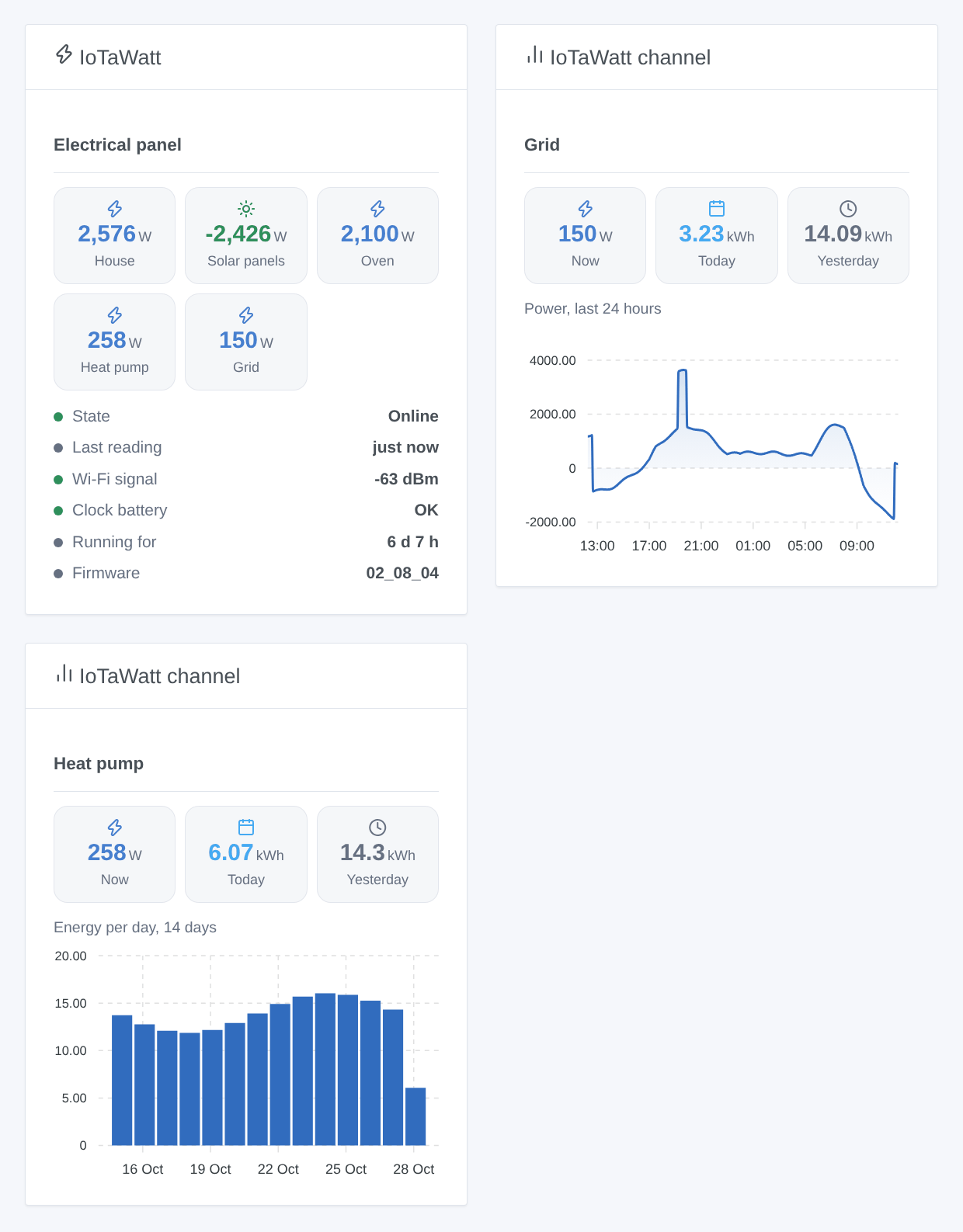
- IoTaWatt: one IoTaWatt (choose it in the settings of the widget; the first one by default): the power of its five busiest channels (a negative power, exported, in green), then its state, the last reading, the Wi-Fi signal, the clock battery, how long it has been running and the firmware.
- IoTaWatt channel: one channel (the first one by default): its power now, the energy of today and of yesterday, and a chart from the IoTaWatt's log: power over 24 hours, energy per day over 14 days, or energy per month over 12 months (setting Chart). For a voltage or current channel, the value now and 24 hours of chart. The history is asked to the IoTaWatt and kept 5 minutes.
Scenes
Triggers (once per change, never at the first reading, never because of a scene action), filtered by IoTaWatt (the device of the IoTaWatt itself, not a channel):
- IoTaWatt: not answering: no answer to 3 readings in a row, for at least a minute (power cut, Wi-Fi lost, crash); variables: name, address, MAC address, readings missed, message.
- IoTaWatt: answering again: it answers again; variable: minutes without answer.
- IoTaWatt: restarted: its uptime went back (power cut, firmware update, crash); variable: hours running before.
A comparison such as "power above 3,000 W" is not a trigger of the integration: use a device condition of Gladys on the Power feature, with your own threshold.
Action:
- IoTaWatt: energy of a channel: the energy (kWh) and the average power (W) of a power channel over a period (today, yesterday, this week from Sunday, last week, this month, last month, this year, last 24 hours, last 7 days, last 30 days), with the start and end of the period and a sentence (
summary). The IoTaWatt computes it from its own log, in its own local time.
Examples:
- Every morning at 8:00 → IoTaWatt: energy of a channel (Heat Pump, yesterday) → send its
summary. - When the Power of the oven goes above 3,000 W (device condition) → turn off the water heater.
- When IoTaWatt: not answering → send "{{triggerEvent.data.meter_name}} does not answer: power cut?".
Troubleshooting
- "No IoTaWatt found": type its address in Addresses, then press Search and test. The automatic search only tries the mDNS names that contain "iota".
- "asks for a password, or refuses the one given": the IoTaWatt has passwords; enter the user (
useris enough) and its password, or allow local access in the IoTaWatt. - "answers, but it is not an IoTaWatt": the address belongs to another device; it is left alone for 30 minutes.
- A channel is named "Input 3": the list of the series did not match the inputs; it is read again every 10 minutes.
- No "Energy exported": the channel was never seen negative; once it is, press Update on the Discover screen.
- The values are outdated: the IoTaWatt does not answer; its address may have changed: with an automatic search, it is looked for again every 30 minutes (a meter is known by its MAC address).
- For an issue, give the versions of Gladys, of the integration and of the IoTaWatt firmware, the message of Search and test and the "IoTaWatt diagnostic" lines written by Diagnostic in the logs of the integration (
DEBUG=gladys-integration-sdkadds the SDK logs). Never paste your password. - Limitations: never tested with a real IoTaWatt yet (written from the official documentation and the firmware 02_08_04); VA, VAR, PF and Hz outputs are not offered; the indexes start at 0, not at the IoTaWatt's history.
Configuration settings
These are the settings IoTaWatt asks for in its configuration screen in Gladys.
| Setting | Type | Required | Description |
|---|---|---|---|
| IoTaWatt on your network | section | No | The integration reads your IoTaWatt over the local network, through its local API, and never writes to it: nothing leaves your home. Leave the addresses empty to find it automatically (its name must contain “iota”, as by default), or type its IP address or name. Not affiliated with IoTaWatt, Inc. |
| Addresses | string | No | IP addresses or names of your IoTaWatt devices, separated by commas. Empty: automatic search. |
| Password (optional) | section | No | Only if you set passwords in the IoTaWatt configuration app (Setup → Passwords) and did not allow local access without one. The “user” account is enough: it can only read. |
| User | select | No | |
| Password | secret | No | |
| Options | section | No | |
| Power reading | select | No | How often the power is read. The energy is counted every minute from the IoTaWatt log, whatever this setting. |
| Language of the texts | select | No | Feature names, scene texts and errors. Automatic: the language of the last widget shown. |
How to install IoTaWatt in Gladys
- In Gladys, open Integrations: IoTaWatt appears in the catalog, next to the native integrations, with a community badge.
- Click Install. Gladys pulls the Docker image (
ghcr.io/william-de71/gladys-iotawatt:0.1.0), starts it in a sandbox isolated from the core, and generates the integration's interface (devices, discovery and configuration). - Open the Configuration screen of the integration, fill in the settings, and save.
- You can also install it directly from its repository URL: https://github.com/William-De71/gladys-iotawatt.
IoTaWatt requires Gladys >=5.3.0. The catalog inside Gladys refreshes every hour, so a new version becomes available at most one hour after its release.
Not running Gladys yet? It is free and open source: follow the installation guide to get started.
About external integrations
IoTaWatt is an external integration: a community integration packaged as a Docker container and published on GitHub, that Gladys installs in one click and runs in a sandbox isolated from its core. It is published and maintained by William-De71, not by the Gladys core team.
- Browse all integrations, native and community
- Build and publish your own external integration
- Source code on GitHub — source of this documentation