iNoé Espace Famille – Agenda smart home integration, free and open source
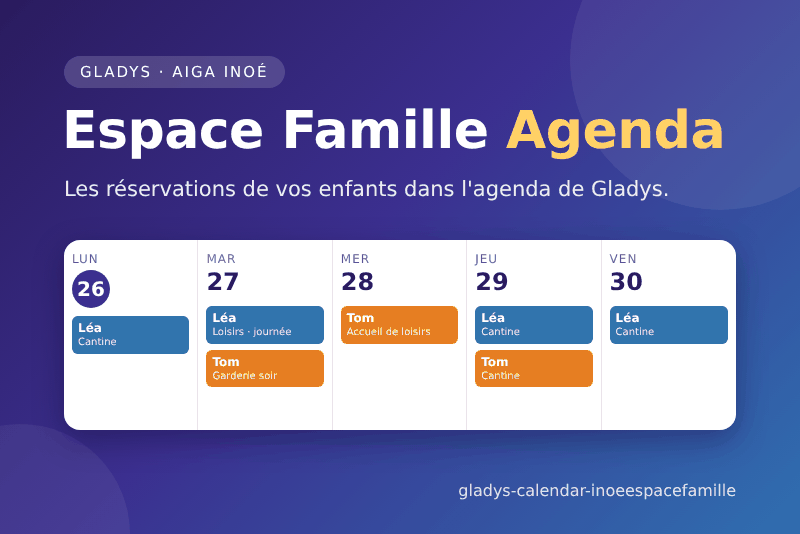
Your children's bookings on iNoé Espace Famille (AIGA), in the Gladys calendar.
Published by prohand
- Devices
- Version 1.0.0
- Requires Gladys >=5.3.0
- ★ 0
This integration puts your children's bookings on your iNoé Espace Famille (the family portal AIGA provides to many French towns and structures: canteen, after-school club, leisure centre, nursery) into the Gladys calendar.
- One calendar per child ("Léa – iNoé").
- One full-day event per booked day, with every slot of the day: "Léa – Accueil de loisirs : Matin, Repas, Après-midi".
- An absence or a place on a waiting list is not a booked day.
- A booking cancelled on the portal leaves the calendar at the next sync.
- Past days stay in the calendar.
The portal gives the slots (morning, lunch, evening…), not their hours: the events last the whole day.
The integration only reads: it never books, cancels or pays anything. It is a cloud integration: it talks to the AIGA servers over the Internet.
Gladys 5.3 or newer is required.
This integration complements the iNoé Espace Famille integration (invoices, one device per child, scene triggers), still needed for everything but the calendar. Both can be installed side by side.
Installation (administrator)
In Gladys, open Integrations and install iNoé Espace Famille – Agenda. The Configuration screen has three settings, shared by every user:
| Field | Key | What to enter |
|---|---|---|
| Sync interval | refresh_minutes | How often the portal is read, in minutes (60 by default, 15 to 1440). |
| Days published ahead | days_ahead | How many days of each child's planning go into the calendar, today included (31 by default, 7 to 92). |
| Time zone | timezone | What decides "today": Europe/Paris by default, Indian/Reunion, America/Martinique… |
The Sync now button (sync_now) reads the portal of every user at once and gives, for each
one, the structure and the number of days booked per child.
Enabling your calendars (every user)
Each Gladys user who wants the calendars does it for themselves, in the My calendars block of the integration page:
| Field | What to enter |
|---|---|
| Portal address | The address of the portal's sign-in page, pasted as is: https://espacefamille.aiga.fr/index.html?dossier=1626256#connexion… or https://espacefamille.aiga.fr/11578177. The number alone works too. |
| The email you sign in to the portal with. | |
| Password | The password of the portal. It is only sent to the AIGA sign-in server, and never written to the logs. |
Then click Enable. The calendars appear after the first read (a few seconds).
Where is the portal address? In the account creation email of your structure, or in the address bar of your browser on the portal: the number after
dossier=(or afterespacefamille.aiga.fr/).
Two toggles of each calendar belong to you:
- Sync: off, the calendar is emptied and no longer updated. Back on, it is filled again at the next sync.
- Share: a calendar starts private. Shared, the household sees it, and it reaches the
scenes (the Gladys calendar trigger,
calendar.event-is-coming, and the calendar actions) and the assistant.
Disabling the integration under My calendars removes your iNoé calendars from Gladys.
A child no longer on the portal account loses its calendar. A read of the portal that returns no child deletes nothing.
Scene ideas
- The Gladys calendar trigger (
calendar.event-is-coming) on the shared calendar "Léa – iNoé", the evening before: send the event name on Telegram ("Léa – Périscolaire : Cantine"). - Ask the assistant: "What does Léa have tomorrow?"
Troubleshooting
The Configuration screen shows, for each user whose sync failed, their first name and the cause:
| Message | What to do |
|---|---|
| "to fill in under "My calendars"" | The user completes their account under My calendars. |
| "this portal address is unknown to iNoé" | Copy the address again from the email of the structure. |
| "the portal refused the email or the password" | Sign in on the portal itself; if the password changed, update it under My calendars. |
| "the iNoé portal is in maintenance" | Nothing to do: it is retried at the next sync. |
| "Gladys refused the calendar update" | Look at the integration logs. |
When a child's planning cannot be read, its events already in the calendar stay; Sync now shows "planning unreadable" for that child.
The portal has no public API: the integration uses the same exchanges as the website. If AIGA changes its site, an update of the integration may be needed.
Privacy
- Only the users who enabled the integration are read, each with their own account.
- The password is only sent to
ism.aiga.fr(the AIGA sign-in server). - Nothing is sent anywhere but to the AIGA servers and your Gladys. The integration writes nothing to disk.
Configuration settings
These are the settings iNoé Espace Famille – Agenda asks for in its configuration screen in Gladys.
| Setting | Type | Required | Description |
|---|---|---|---|
| How it works | section | No | Each Gladys user enables the integration for themselves under "My calendars", with their own iNoé Espace Famille address, email and password. Every child of the family gets a calendar, with one event per booked day. The integration only reads: it never books, cancels or pays anything. The settings below apply to every user. |
| Sync interval (min) | number | No | How often the portal is read, in minutes (15 to 1440). |
| Days published ahead | number | No | How many days of each child's planning are put in the calendar, today included (7 to 92). Past days stay in the calendar. |
| Time zone | string | No | The time zone of the families, which decides what "today" is. An IANA name such as Europe/Paris or Indian/Reunion. |
How to install iNoé Espace Famille – Agenda in Gladys
- In Gladys, open Integrations: iNoé Espace Famille – Agenda appears in the catalog, next to the native integrations, with a community badge.
- Click Install. Gladys pulls the Docker image (
ghcr.io/prohand/gladys-calendar-inoeespacefamille:1.0.0), starts it in a sandbox isolated from the core, and generates the integration's interface (devices, discovery and configuration). - Open the Configuration screen of the integration, fill in the settings, and save.
- You can also install it directly from its repository URL: https://github.com/prohand/gladys-calendar-inoeespacefamille.
iNoé Espace Famille – Agenda requires Gladys >=5.3.0. The catalog inside Gladys refreshes every hour, so a new version becomes available at most one hour after its release.
Not running Gladys yet? It is free and open source: follow the installation guide to get started.
About external integrations
iNoé Espace Famille – Agenda is an external integration: a community integration packaged as a Docker container and published on GitHub, that Gladys installs in one click and runs in a sandbox isolated from its core. It is published and maintained by prohand, not by the Gladys core team.
- Browse all integrations, native and community
- Build and publish your own external integration
- Source code on GitHub — source of this documentation