Infoclimat smart home integration, free and open source
Infoclimat weather stations (StatIC): temperature, wind, rain, near your houses.
Published by William-De71
- Devices
- Version 0.1.0
- Requires Gladys >=5.2.0
- ★ 0
Overview
This integration brings the weather stations of Infoclimat into Gladys. Infoclimat is a French non-profit association: its members share the readings of their own stations (the StatIC network, about 900 stations reporting every day, mostly in France, a few in Belgium, Switzerland, Spain, Italy), next to official stations. You follow up to three stations: the nearest StatIC station of a house of Gladys, or a station chosen by its identifier.
Each station becomes a device with the measures it really gives: temperature, humidity, sea-level pressure, dew point, mean wind, gusts, wind direction, rain over the last hour, rain of the day, and, for some stations, snow depth and visibility. Scenes can react when rain starts or stops at a station, when a station goes silent, or when Infoclimat refuses your key. Three dashboard widgets show the latest reading, the last 24 hours of a measure and the stations side by side.
Transport: cloud. Every 10 minutes the integration asks Infoclimat for the readings of your stations, in one request, with your key. The location of your house never leaves Gladys: the nearest station is found in the public list of the stations, inside the integration.
Not tested with a real Infoclimat key yet: the requests follow the open data API of Infoclimat and its real answers without a key; please report what you see.
Prerequisites
- Gladys Assistant 5.2.0 or later (house picker, widgets and scenes of integrations).
- A free Infoclimat open data key: request it on the open data page of Infoclimat.
- To follow the nearest station of a house: the location of the house set in Gladys (Settings → Houses).
The data are free for a personal, non-commercial use. Many StatIC stations are published under the CC BY-NC license (non-commercial): the widgets credit Infoclimat and the license of each station; keep that credit if you share them.
Configuration
| Field | Default | Meaning |
|---|---|---|
| Open data key | — | Required, a secret, never shown again nor written to the logs |
| Station 1, 2, 3: House | — | The nearest StatIC station of this house that reported in the last 24 hours |
| Station 1, 2, 3: Or a station identifier | — | 000P2, STATIC0095, or an official station; wins over the house |
| Reading interval | 10 min | 10, 15, 30 or 60 minutes; all the stations in one request |
| Language of the texts | automatic | Device names and scene texts; automatic follows the last widget, else the timezone |
The identifier of a station is at the end of the address of its page on infoclimat.fr: https://www.infoclimat.fr/observations-meteo/temps-reel/besancon/000P2.html → 000P2. Use the map of the stations to find one. Official stations (Météo-France synoptic stations) are not in the public list but can be typed by their identifier.
The nearest station of a house is kept while it reports. When it stays silent for 24 hours, the next nearest one is chosen, and a new device is offered.
Configuration buttons: Read now finds the stations and reads them at once (never twice within 2 minutes); Diagnostic writes the state of the integration to its logs, without the key.
Usage
Devices
After the first reading, open Discover and add the stations you want. Each device only has the features of the measures its station gives:
| Feature | Category / type | Unit |
|---|---|---|
| Temperature | temperature-sensor / decimal | °C |
| Humidity | humidity-sensor / decimal | % |
| Pressure (sea level) | pressure-sensor / decimal | hPa |
| Dew point | temperature-sensor / probe | °C |
| Mean wind speed, wind gust | speed-sensor / decimal | km/h |
| Wind direction | angle-sensor / integer | ° |
| Rain over the last hour | precipitation-sensor / decimal | mm/h |
| Rain today (since 00:00 UTC) | precipitation-sensor / decimal | mm/day |
| Snow depth, visibility | distance-sensor / decimal | cm, m |
A feature once given stays: an empty reading never removes it. When a station reports a new measure, Update on the Discover tab adds it. The dew point is a probe temperature, so it never counts in the temperature of a room. The rain of the day is the one of Infoclimat when the station gives it, otherwise the sum of the full hours since 00:00 UTC. The solar radiation (W/m²) has no unit in Gladys: it is shown in the widgets and given to the scenes.
Dashboard widgets
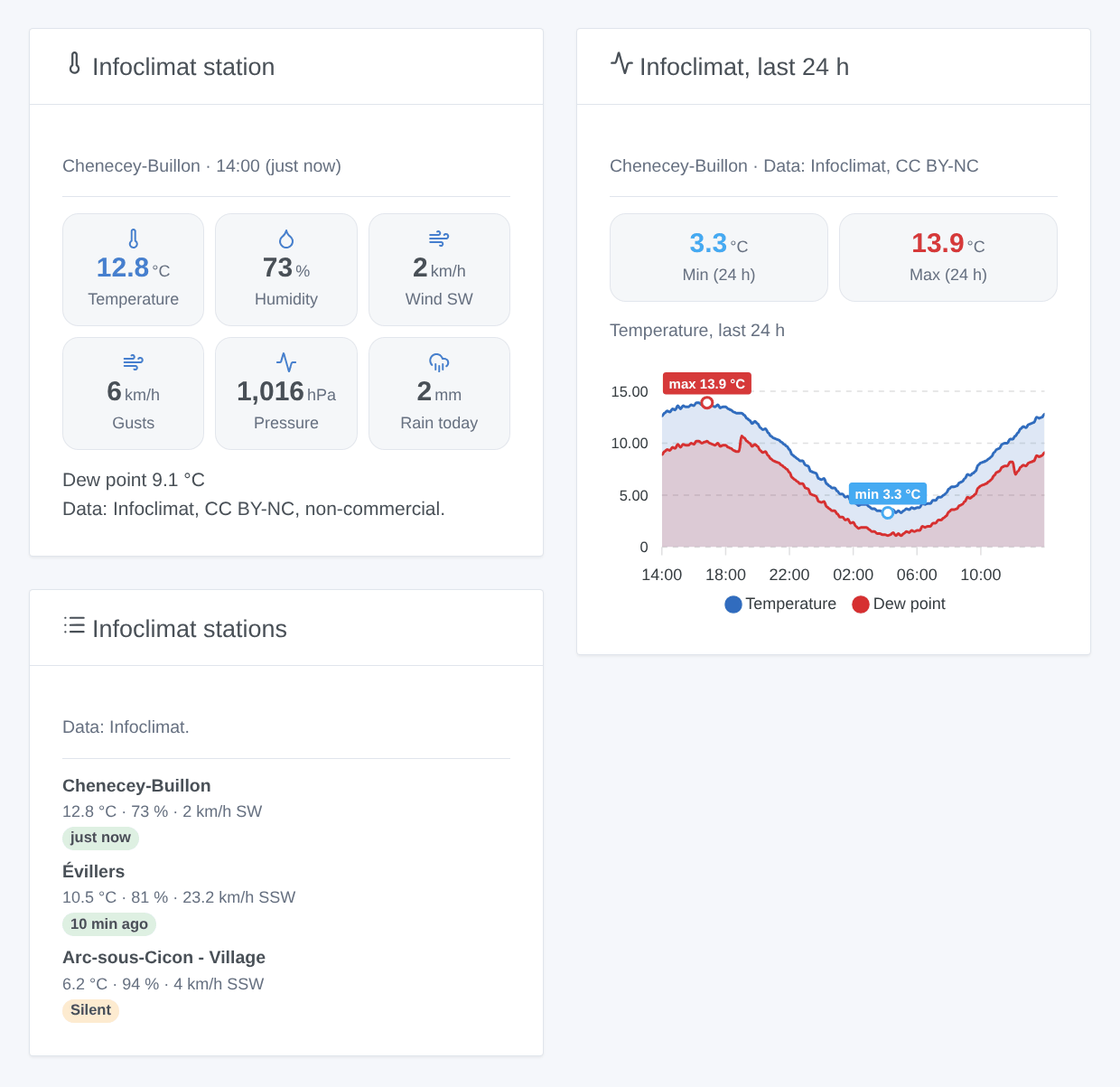
- Infoclimat station: the latest reading of a station, up to six tiles (temperature, humidity, wind and its direction, gusts, pressure, rain of the day), the other measures in the text, and the credit of Infoclimat.
- Infoclimat, last 24 h: one measure over the last 24 hours (temperature with the dew point, humidity, pressure, wind with the gusts, or rain), its lowest and highest values marked.
- Infoclimat stations: the followed stations side by side; a silent station is flagged.
There is no refresh button: Infoclimat is run by volunteers, and the integration never asks more often than its timer.
Scenes
Triggers (one event per change, never at the first reading of a station):
- Rain started: the rain of the last hour at a station goes above 0.
- Rain stopped: it falls back to 0, so up to one hour after the last drop.
- Station silent: a station gave no reading for 90 minutes. Station back: it reports again.
- Key refused: Infoclimat refuses the key, once until it works again.
Each station trigger can be filtered on a station and gives the station, its name, the temperature, the rain of the hour and of the day, the time of the reading and its age in minutes. The rain triggers need a station that measures the rain.
Action Read a station: the latest reading (temperature, humidity, pressure, dew point, wind, gusts, direction, rain, radiation, time, age) and a sentence ready for a message. It never sends a request: it answers from the last reading.
Examples:
- When rain starts at "Infoclimat Chenecey-Buillon" → close the roof window and send "It rains at the station: {{triggerEvent.data.rain_1h}} mm in the last hour".
- Every morning at 7:00 → read a station → send the summary by message.
- When the key is refused → notify the administrator (the key may be bound to an IP address that changed).
The values themselves (temperature, gusts…) are device features: "gusts above 60 km/h" or "temperature under 0 °C" are device triggers of Gladys.
Troubleshooting
- "Infoclimat refuses the key": check the key on the open data page of Infoclimat. A key may be bound to the public IP address it was used from: with a dynamic IP address it can stop working after a change of address. Ask Infoclimat for a new key, paste it, and the integration tries again at once; otherwise it tries every 6 hours.
- No device on the Discover tab: a station is offered after its first reading, within 10 minutes; press Read now. Check the identifier, or that the house has a location.
- "no reading in the last 24 hours": the station is silent or the identifier is wrong; choose another one.
- A value is missing: the station does not measure it, or did not send it lately; the feature keeps its last value.
- Infoclimat cannot be reached: the integration waits longer after each failure (up to an hour), and an hour after a "too many requests".
- Forecasts of Infoclimat are not part of this version (another key, another API).
- To report a problem, open an issue on GitHub with the versions of Gladys and of the integration, and the result of Diagnostic (in the logs of the integration). Never paste your key.
Configuration settings
These are the settings Infoclimat asks for in its configuration screen in Gladys.
| Setting | Type | Required | Description |
|---|---|---|---|
| Infoclimat open data key | section | No | Infoclimat is a French non-profit association that shares the readings of the weather stations of its members (the StatIC network) and of official stations. Its open data API needs a free personal key: request it on its open data page, then paste it below. The key may be bound to the public IP address it is used from. |
| Open data key | secret | Yes | |
| Station 1 | section | No | Up to three stations, each the nearest one of a house of Gladys or a station chosen by its identifier. The identifier is in the address of the page of a station on infoclimat.fr (…/besancon/000P2.html). |
| House | select | No | The nearest StatIC station of its location in Gladys that reported in the last 24 hours. |
| Or a station identifier | string | No | Or the identifier of a station (000P2, STATIC0095, an official station…). Wins over the house. |
| Station 2 | section | No | Optional. |
| House | select | No | The nearest StatIC station of its location in Gladys that reported in the last 24 hours. |
| Or a station identifier | string | No | Or the identifier of a station (000P2, STATIC0095, an official station…). Wins over the house. |
| Station 3 | section | No | Optional. |
| House | select | No | The nearest StatIC station of its location in Gladys that reported in the last 24 hours. |
| Or a station identifier | string | No | Or the identifier of a station (000P2, STATIC0095, an official station…). Wins over the house. |
| Options | section | No | Infoclimat is run by volunteers: all the stations are read in one request, every 10 minutes at most. |
| Reading interval | select | No | Minutes between two readings of Infoclimat. |
| Language of the texts | select | No | Device names and the texts given to scenes. Automatic: the language of the last widget shown. |
How to install Infoclimat in Gladys
- In Gladys, open Integrations: Infoclimat appears in the catalog, next to the native integrations, with a community badge.
- Click Install. Gladys pulls the Docker image (
ghcr.io/william-de71/gladys-infoclimat:0.1.0), starts it in a sandbox isolated from the core, and generates the integration's interface (devices, discovery and configuration). - Open the Configuration screen of the integration, fill in the settings, and save.
- You can also install it directly from its repository URL: https://github.com/William-De71/gladys-infoclimat.
Infoclimat requires Gladys >=5.2.0. The catalog inside Gladys refreshes every hour, so a new version becomes available at most one hour after its release.
Not running Gladys yet? It is free and open source: follow the installation guide to get started.
About external integrations
Infoclimat is an external integration: a community integration packaged as a Docker container and published on GitHub, that Gladys installs in one click and runs in a sandbox isolated from its core. It is published and maintained by William-De71, not by the Gladys core team.
- Browse all integrations, native and community
- Build and publish your own external integration
- Source code on GitHub — source of this documentation