Indice UV smart home integration, free and open source
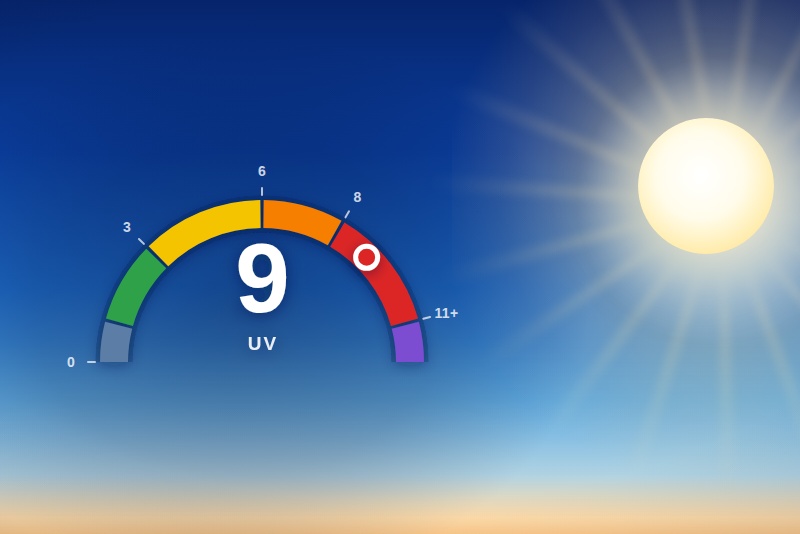
UV index for the locations you choose, from the Copernicus CAMS forecast.
Published by prohand
- Devices
- Version 2.5.1
- Requires Gladys >=5.2.0
- ★ 0
This integration follows the UV index of the locations you choose. You add your Gladys houses in one click, or a location by its French postal code, and a device shows up in the Discover tab, ready to be added to Gladys.
No account to create, no API key to paste: both sources are public open data.
Adding your Gladys houses, in one click
You have already told Gladys where you live: that is the map in Settings > Houses. The "Add my Gladys houses" button reads those houses and creates a location for each one that is not watched yet — no postal code to type.
Three things to know:
- The access is a permission. Where you live is personal data: Gladys only shares it if you accepted the request on the integration's install screen. If the button answers that the access is refused, remove and re-install the integration, accepting the request it shows.
- A house you never placed on the map has no coordinates. It is named in the answer; locate it in Settings > Houses and run the action again.
- This is not a sync. The houses are read at the moment you click. What comes out is an ordinary location, renamed and removed like the others, and a house moved in Gladys afterwards does not move its location.
To add only one of your houses — a holiday home you do not want watched stays out — pick it in the button's House field (Gladys 5.2 or later); left empty, every house is added.
Clicking again is safe: a house that is already watched is reported, not added a second time.
Adding a location
In the integration's Configuration tab, click "Add a location" and fill the form in:
- Location name — optional. Left empty, the name of the commune found is used ("Nantes").
- Postal code — five digits, e.g.
44300. This is the normal way in. - Commune — optional, and only needed when a postal code covers several
communes.
01000is Bourg-en-Bresse, Péronnas and Saint-Denis-lès-Bourg: run the action without this field first, the answer displayed under the button lists the candidates, then run it again with the one you mean. - Latitude / Longitude — optional. Filled in together, they are used as they are and the postal code above becomes a mere label.
The message under the button confirms what was added, with the commune it resolved to and its point. The device is not created automatically: go and pick it up in the integration's Discover tab.
A location outside France
The postal code is French by construction — it is the French state's registry
that resolves it. The UV data itself is worldwide: for a place abroad, leave the
postal code empty and fill in the latitude and longitude in WGS-84
decimal degrees. A decimal comma is accepted (48,8566).
Listing and removing your locations
- "Show my locations" lists everything configured, numbered. Each entry opens with a "•" followed by its number.
- "Remove a location" asks for that number — the one the listing prints — and then for a confirmation. Run the action once without ticking the box to check which location would go.
Two things to know about removal:
- The Gladys device is not deleted. An integration is not allowed to delete a device; it can only stop offering it. The location leaves the Discover tab and the device stops updating — delete it yourself from the integration's Devices tab if you no longer want it. The removal message names it for you.
- The following numbers move up one rank. Removing location 2 of 4 makes the old location 3 into location 2. Run "Show my locations" again before removing another one.
What each device measures
| Feature | What it is |
|---|---|
| UV index | The index right now, as a whole number |
| UV index max today | Today's peak — the number to plan an afternoon around |
| UV index (clear sky) | What it would be with no clouds; the gap with the real index is the cloud cover |
| UV exposure level | 0–5, the WHO categories: the feature to test in a scene |
| UV exposure level (text) | Its wording: "Low", "High"… |
| Sun protection advice | The WHO recommendation for that level |
| Data updated at | The hour of the forecast the values come from, in the local time of the point |
The scale
The Global Solar UV Index is defined by the WHO, WMO, UNEP and ICNIRP. It is open-ended, reported as a whole number, and read by category:
| UV index | Level published | Wording | Protection |
|---|---|---|---|
| 0 | 0 | None | None: no radiation |
| 1–2 | 1 | Low | No protection needed |
| 3–5 | 2 | Moderate | Shade around midday, hat, sunglasses, sunscreen |
| 6–7 | 3 | High | Avoid the sun between 12:00 and 16:00 |
| 8–10 | 4 | Very high | Avoid being outside between 12:00 and 16:00, cover up |
| 11+ | 5 | Extreme | Unprotected skin burns within minutes |
Level 0 is this integration's addition: the WHO's lowest band, "low", covers 0 to 2, but "there is no UV at all right now" deserves its own value in a home — it is what a scene fires on at dusk.
A missing value is never a zero
When the model has no value for a location, nothing is published for that feature and the device keeps its last known value. Publishing a 0 would look like sunset in the middle of the afternoon, and would fire the scenes that watch for it.
How old is the data?
Data updated at is the hour of the CAMS forecast the values on the device come from, written in the local time of the point — a location in Sydney and one in Nantes never show the same one, which is why it sits on each station rather than on a device of its own.
It is not the moment the integration last asked. The forecast has an hourly resolution, so reading it three times in an hour returns the same timestamp three times, and that is the point: it tells you how old the numbers are, not how often they were fetched. When a refresh fails, nothing is published at all — the timestamp stops moving and the age becomes visible on the dashboard.
A brief outage of the source does not cost a whole refresh: the integration tries again straight away, twice, a few seconds apart. If the source stays unreachable, the widgets and the "Read the UV index" scene action show the last known value — 3 hours old at most — with its own timestamp, which tells honestly how old it is; the devices never receive an old value passed off as a new one.
"Test the UV provider" ends each line with the same timestamp, so a source that answers with yesterday's hour shows up as what it is.
On the dashboard
Two widgets are offered in the dashboard editor (Dashboard → Edit → New widget, Gladys 5.1 or later), in the Integration widgets section:
- UV index of a location — the index now, today's maximum and the clear-sky index, today's hourly forecast curve with the peak marked and a "now" line, the exposure level and the advice that goes with it. In the widget settings, pick the UV device of the location to show: only the devices already added to Gladys are listed.
- UV index of all locations — one row per location (10 at most), with the current index and its level, in colour. No settings.
The widgets are shown in the language of whoever looks at them, and follow every refresh of the integration. If you remove a widget's location, the widget says so: pick another device in its settings.
In scenes
The integration adds two cards to the scene editor (Gladys 5.1 or later), under the Integrations category: an Integration trigger and an Integration action.
Trigger "UV exposure level changed"
Fires when the exposure level of a location moves to another band (from 0 "None" to 5 "Extreme"). Three filters, all optional — left empty, a filter accepts anything:
- Location — the UV device of the location to watch;
- New level — one level or several, for example 3 and 4;
- Direction — rising or falling.
The actions of the scene can reuse these values: the location name, the new
level and its label, the previous level, the direction (rising or falling),
the protection advice, the UV index and the time of the data. Example message:
"UV {{triggerEvent.data.level_label}} in {{triggerEvent.data.location_name}}:
{{triggerEvent.data.advice}}".
Good to know:
- The first reading after the integration starts is a baseline and fires nothing: a restart is not a change in the sky.
- To react to a threshold ("as soon as the level is at least 3"), use the Device state change trigger on the device's "UV exposure level" feature instead.
- The texts (label, advice) are written in the language of the device names chosen in the general settings.
Action "Read the UV index"
Reads a location's UV index when the scene runs it and hands its values to the next actions: location name, index now, today's maximum, clear-sky index, level and label, level and label of the peak, time of the peak, protection advice and time of the data. A value the source does not have is absent, never replaced by 0.
Example: an "every day at 8:00" trigger, then "Read the UV index" on your home,
then a message "UV peak {{0.1.uv_index_max_today}}
({{0.1.level_max_today_label}}) around {{0.1.peak_time}}". The numbers (0.1)
are the ones of the action in your scene: the editor offers them.
General settings
- Language of the device names — everything else this integration says already follows your Gladys language, but a device name and its feature names are stored as they are the moment you create the device. A device already added keeps the names it was created with: change the language, then delete the device and add it again from the Discover tab to rename it. The texts handed to your scenes (level label, advice) follow this setting too. The choices are French (the default), English, German and Spanish.
- Refresh interval — 30 minutes by default, between 10 minutes and 6 hours. The CAMS forecast is hourly, so there is nothing to gain from going much below half an hour. Every location is read in a single request, and a value is only asked for once an hour, however many refreshes and widgets there are.
Checking that it works
The "Test the UV provider" button queries the source live for every location and shows the index it got, in the same numbered format as the location listing. If one location fails, its line says why and the others still answer. A location the source has no value for reads "no data", never a level. Unlike the widgets, this button never shows an old value: a source that is down reads as down.
The Supervision tab also shows the integration's status: while no location is configured, it says one has to be added.
Where the data comes from
- The UV index: the European Copernicus CAMS service, which computes the biologically effective UV dose from the total column ozone, the aerosols and the cloud cover. Its forecast is republished as open data by Open-Meteo (CC BY 4.0), with no account and no key. Worldwide coverage, hourly resolution, ~45 km grid.
- The postal codes: the French state's API Découpage administratif, published on data.gouv.fr from the INSEE administrative database. It gives the communes a postal code covers and their centroid.
Météo-France publishes a French UV forecast too, but its portal requires an account and an application token every user would have to create before the integration showed anything at all. Copernicus is just as official and asks for nothing.
Configuration settings
These are the settings Indice UV asks for in its configuration screen in Gladys.
| Setting | Type | Required | Description |
|---|---|---|---|
| How it works | section | No | Add a location with the button below: type its French postal code, it is resolved to a commune, and a UV device appears in the Discover tab, ready to be added to Gladys. The UV index comes from the CAMS forecast (Copernicus), republished as open data by Open-Meteo, and postal codes are read through the French state's "Découpage administratif" API: no account and no API key are needed. Outside France, add a location by its latitude and longitude — the UV data itself is worldwide. Once a device is added, the dashboard offers two UV widgets and the scene editor a UV trigger and a UV action. |
| General settings | section | No | These settings apply to every configured location. |
| Language of the device names | select | No | The language the device and feature names are written in: "Indice UV", "UV index", "UV-Index" or "Índice UV". Everything else this integration displays already follows your Gladys language, but the name of a device and of its features is stored as it is published, so it has to be chosen here — as do the texts the UV scene cards hand to your scenes. A device already added to Gladys keeps the names it was created with: delete it and add it again from the Discover tab to rename it. |
| Refresh interval (s) | number | No | How often each location is refreshed, in seconds. The forecast has an hourly resolution, so there is nothing to gain from going much below half an hour. |
| Your locations | section | No | Use the buttons below to add, list and remove your locations. "Add my Gladys houses" adds them all in one click, from the houses you already placed on the map in Gladys. They are not fields of this form: a list you build as you go cannot be one, so everything about them happens under a button, and the answer displayed there is what shows you the list. |
How to install Indice UV in Gladys
- In Gladys, open Integrations: Indice UV appears in the catalog, next to the native integrations, with a community badge.
- Click Install. Gladys pulls the Docker image (
ghcr.io/prohand/gladys-uvindex:2.5.1), starts it in a sandbox isolated from the core, and generates the integration's interface (devices, discovery and configuration). - Open the Configuration screen of the integration, fill in the settings, and save.
- You can also install it directly from its repository URL: https://github.com/prohand/gladys-uvindex.
Indice UV requires Gladys >=5.2.0. The catalog inside Gladys refreshes every hour, so a new version becomes available at most one hour after its release.
Not running Gladys yet? It is free and open source: follow the installation guide to get started.
About external integrations
Indice UV is an external integration: a community integration packaged as a Docker container and published on GitHub, that Gladys installs in one click and runs in a sandbox isolated from its core. It is published and maintained by prohand, not by the Gladys core team.
- Browse all integrations, native and community
- Build and publish your own external integration
- Source code on GitHub — source of this documentation