Horaires Commerces smart home integration, free and open source
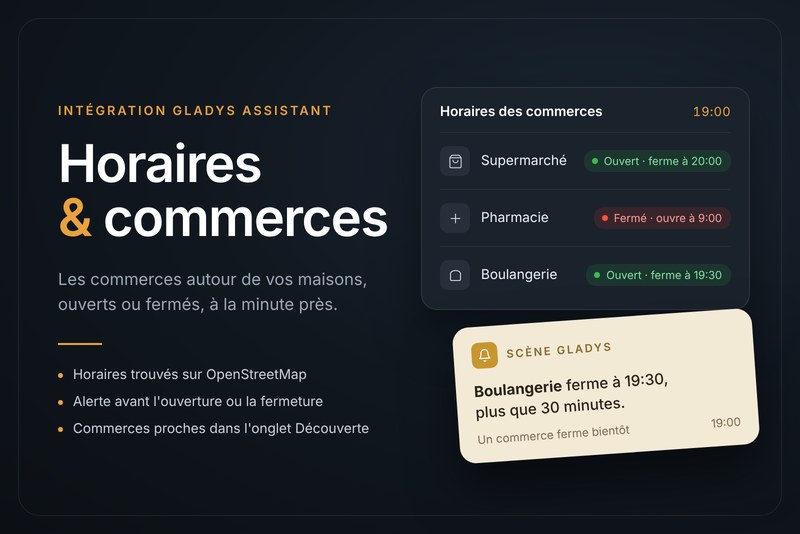
Opening hours of your shops, found on OpenStreetMap, on the Gladys dashboard.
Published by prohand
- Devices
- Version 1.0.1
- Requires Gladys >=5.3.0
- ★ 0
This integration brings into Gladys the opening hours of the shops you go to: which shops are open, when they open or close, with scenes when a shop opens or closes soon.
Everything is computed in Gladys. The only call out is to OpenStreetMap, through the overpass.ch service and with your free key, to find the hours of shops around your houses (see overpass.ch key below). Without a key, type the hours of your shops yourself.
Set up
Open Integrations, find the integration, install it, then fill in the Configuration screen.
| Field | What to put |
|---|---|
| overpass.ch key | Your free key, to look up the hours on OpenStreetMap (see below). |
| Shops and opening hours | Your shops and their hours (see below). |
| Houses to search around | The Gladys houses to search around. None checked: every house with a location. |
| Search radius ... (km) | How far from a house the shops are looked for. Default: 10. |
| Kinds of shops ... | The kinds of shops offered in the Discovery tab. None checked: none. |
| Notice before ... (min) | When the "opens soon" / "closes soon" triggers fire. Default: 30 minutes. |
Then click Test the configuration: the answer says, shop by shop, whether it is open.
Finally, open the Discovery tab of the integration and create the devices.
Shops and opening hours
One shop per entry: a name, then = and its hours if you want to type them. Separate the shops with |:
Leclerc = Mo-Sa 08:30-20:00; PH off | Pharmacy = Mo-Fr 09:00-19:00 | Bakery = Tu-Su 07:00-13:00,15:30-19:30
The hours use the OpenStreetMap syntax — often already shown on the shop's map page:
| You write | It means |
|---|---|
Mo-Sa 08:30-20:00 | Monday to Saturday, 8:30 to 20:00 |
Mo-Fr 08:30-12:00,14:00-19:00 | With a lunch break |
Mo-Sa 08:30-20:00; Su 09:00-12:30 | Rules separated by ; |
Mo-Sa 08:30-20:00; We 08:30-21:00 | A later rule replaces the earlier one that day |
...; PH off | Closed on French public holidays |
...; PH 09:00-12:30 | Shorter hours on public holidays |
24/7 | Always open |
Days: Mo Tu We Th Fr Sa Su. PH = French public holidays (Easter Monday,
Ascension and Whit Monday included). Hours are read on the French clock. Up to 10
shops.
The name identifies the shop: renaming it creates a new device in Gladys.
Hours found automatically
Write only the name: Leclerc (or Leclerc = auto). The integration then looks on
OpenStreetMap for the shop of that name nearest to your Gladys houses (all the
houses with a location, set in Settings → Houses), and takes its hours. To look
for other words than the name, write them after auto:, for example
Bakery = auto: Boulangerie Dupont. Accents and case do not matter. This needs a free overpass.ch key (see
overpass.ch key below).
- With several houses, the nearest shop of all houses wins: give a precise name
(
auto: Carrefour Market Vierzon) to pick one near a given house. - Test the configuration names the shop found, its town, its distance and its hours: check it is the right one.
- The hours are looked up again once a day, and kept: a restart without network keeps them.
- If OpenStreetMap has no hours for your shop, or hours the integration cannot read, type them by hand (and why not add them on openstreetmap.org).
Shops around your houses (Discovery tab)
The integration looks on OpenStreetMap, around each Gladys house with a location (set in Settings → Houses), for the nearest shops of the kinds checked in the configuration — supermarkets, bakeries, pharmacies, post offices, recycling centres… — that publish their opening hours. The 3 nearest of each kind, per house.
Open the Discovery tab of the integration: each shop is listed with its house
and its distance, for example E.Leclerc (Home, 1.3 km). Create the ones you go to,
in a room of the right house, and rename them as you like: they work like the shops
you type, and their hours are kept up to date once a day.
overpass.ch key
The hours are looked up on OpenStreetMap through the overpass.ch service, with your own free key: without a key, nothing is looked up (the shops typed with their hours work all the same). The free plan (no credit card, for personal use) gives 10,000 requests a month; the integration makes one a day.
- Open overpass.ch/signup (Get a free key button on the home page).
- Fill in E-mail, Password (at least 10 characters) and Website (for
example
https://github.com/prohand/gladys-horaires-commerces), tick the terms, then click Create account (or Continue with Google). - Open the e-mail you receive and click the confirmation link.
- Log in and open the keys page:
overpass.ch/dashboard/keys. Create a key.
Leave "Allowed referers" empty and do not tick "Reject requests without a
referer": the integration sends no referer, the server would refuse its requests
(error 403
forbidden_referer). - Copy the key. Its whole URL,
https://api.overpass.ch/v1/…/interpreter, works too. - In Gladys: Integrations → Horaires Commerces → Configuration, paste it in overpass.ch key and save.
- Click Test the configuration. The integration logs say
OpenStreetMap answered by api.overpass.chwhen the key works.
The key is personal: do not publish it (forum, code repository, screenshot). A key
refused or a monthly quota used up is told by Test the configuration and in the
logs (OpenStreetMap lookup failed: overpass.ch refused the key (403)); the hours
found before stay, and the lookup tries again within the hour.
Devices
| Device | Feature | Notes |
|---|---|---|
| Each shop | Open (1 = open, 0 = closed) | Usable in any scene condition |
| Each shop | Minutes until it opens or closes | Updated every minute |
Scenes
Triggers
- A shop opens soon (
store_opening_soon) and A shop closes soon (store_closing_soon): fired once, the configured number of minutes before. Filter: the shop (empty = any). Variables: shop name, time, minutes left. Example: "The {{store_name}} closes at {{time}}, {{minutes_left}} minutes left."
"The shop is open" is a state: use the device conditions of Gladys.
Actions
- Is a shop open? (
is_store_open): choose a shop. Outputs: open (yes/no), the time of the next change (HH:MM) and the minutes until then.
Dashboard
- Shop hours: every shop at a glance (open or closed, until when), or — with the setting Shop — one shop in detail, with a countdown and today's hours.
Troubleshooting
- The Discovery tab is empty: click Test the configuration: it looks again on OpenStreetMap and says why (house without a location, no kind checked, OpenStreetMap unreachable, no shop of these kinds within the radius).
- "overpass.ch key missing": paste your key in the configuration (see overpass.ch key above).
- "OpenStreetMap could not be reached": the message says why (key refused, quota used up, server unreachable). Check the key on overpass.ch/dashboard/keys; new try within the hour.
- "No shop of this name ... on OpenStreetMap": try fewer words, a wider Search radius, or type the hours by hand.
- "No house of Gladys has a location": set the house location in Settings → Houses.
- "The opening hours are not understood": the message names the wrong part. Use
the English day names (
Mo, notLu) andHH:MMtimes (08:30, not8h30). - A shop is "not understood": each entry must be
Name = hours, entries separated by|.
Data
To find the hours (shops written without hours, and the Discovery tab), the words
looked for, the kinds of shops and the location of your houses (an area of the
search radius around each) are sent to the OpenStreetMap Overpass API
of overpass.ch (api.overpass.ch, in Germany), with your key, once a day. The hours found are kept in /data/hours.json. To
send nothing: set no key, and type the hours of every shop.
Configuration settings
These are the settings Horaires Commerces asks for in its configuration screen in Gladys.
| Setting | Type | Required | Description |
|---|---|---|---|
| Getting started | section | No | Everything is computed in Gladys: the opening hours of the shops you go to, typed by you or found on OpenStreetMap around your houses, open or closed at a glance, with scenes when a shop opens or closes soon. To find the hours on OpenStreetMap, paste your free overpass.ch key below. |
| OpenStreetMap server | section | No | The hours are looked up on OpenStreetMap through overpass.ch, with your own free key: create a free account on overpass.ch (no credit card) and paste its key below (steps in the Documentation). Without a key, nothing is looked up: type the hours of your shops. overpass.ch receives the words looked for, the kinds of shops and an area around each house. |
| overpass.ch key | secret | No | |
| Your shops | section | No | One shop per entry: a name alone, the hours are then looked up on OpenStreetMap, at the shop of that name nearest to your Gladys houses (Name = auto: other words to look for another name), or a name, an equals sign and its hours in the OpenStreetMap syntax (days Mo Tu We Th Fr Sa Su, PH for public holidays, off when closed). Shops separated by a vertical bar |. |
| Shops and opening hours | string | No | |
| Around your houses | section | No | The integration looks on OpenStreetMap, around each Gladys house with a location, for the nearest shops of the kinds checked below that publish their hours. Open the Discovery tab: the shops are listed with their house and distance, e.g. E.Leclerc (Home, 1.3 km); create the ones you go to. |
| Houses to search around (none checked: all) | multi_select | No | |
| Search radius around the houses (km) | number | No | How far from a house the shops are looked for on OpenStreetMap: the shops written without hours, and the shops offered in the Discovery tab. |
| Kinds of shops to offer in the Discovery tab (none checked: none) | multi_select | No | The 3 nearest of each kind, per house. |
| Notice before opening or closing (min) | number | No | When the "opens soon" and "closes soon" scene triggers fire. |
How to install Horaires Commerces in Gladys
- In Gladys, open Integrations: Horaires Commerces appears in the catalog, next to the native integrations, with a community badge.
- Click Install. Gladys pulls the Docker image (
ghcr.io/prohand/gladys-horaires-commerces:1.0.1), starts it in a sandbox isolated from the core, and generates the integration's interface (devices, discovery and configuration). - Open the Configuration screen of the integration, fill in the settings, and save.
- You can also install it directly from its repository URL: https://github.com/prohand/gladys-horaires-commerces.
Horaires Commerces requires Gladys >=5.3.0. The catalog inside Gladys refreshes every hour, so a new version becomes available at most one hour after its release.
Not running Gladys yet? It is free and open source: follow the installation guide to get started.
About external integrations
Horaires Commerces is an external integration: a community integration packaged as a Docker container and published on GitHub, that Gladys installs in one click and runs in a sandbox isolated from its core. It is published and maintained by prohand, not by the Gladys core team.
- Browse all integrations, native and community
- Build and publish your own external integration
- Source code on GitHub — source of this documentation