hOn smart home integration, free and open source
Haier, Candy and Hoover appliances of the hOn app: washers, dryers, AC, fridges, ovens.
Published by William-De71
- Devices
- Version 0.3.1
- Requires Gladys >=5.3.0
- ★ 0
Overview
This integration brings the Haier, Candy and Hoover appliances of your hOn app into Gladys: washing machines, washer dryers, tumble dryers, dishwashers, air conditioners, fridges, freezers, wine cellars and ovens. You follow their state, phase and remaining time on the dashboard, you start a program or pause a cycle from Gladys, and your scenes react when a cycle ends, an error appears or the salt runs out.
It talks to the hOn cloud with the account of the app, through the same unofficial interface as the app (Haier publishes no API): your appliances and their states go through Haier’s servers, over the Internet. Haier may change this interface without notice.
Requirements
- Gladys Assistant 5.3.0 or later.
- An hOn account (e-mail address and password) where your appliances are already added and connected, in the hOn app. Log in to the app once if you have just created the account or changed the password (terms to accept).
- Accounts with two-step verification by e-mail are not supported.
Configuration
Account
Enter the e-mail address and the password of your hOn account, then save. The password is stored by Gladys and only sent to the hOn cloud; the session (never the password) is kept by the integration so that a restart does not log in again: the hOn cloud blocks accounts that log in too often.
Press Test the connection: the message lists your appliances and their state. If hOn refuses the account, the integration waits 15 minutes (then longer) before trying again; fix the e-mail address or the password to try at once.
Refresh interval and language
- Refresh interval: the state of the appliances is read every 30 seconds, 1 minute (default), 2 or 5 minutes.
- Language of the device texts: the feature names and the text states (machine state, phase) are written in this language, because Gladys does not send yours with them.
Remote control
Like in the hOn app, a washing machine, a dryer or a dishwasher only accepts a start, a pause or a stop when remote control is enabled on its panel: load it, close the door, then press its remote control or Wi-Fi button. The Remote control feature of the device shows whether it is enabled. Ovens are read only: no remote start from Gladys.
Usage
Devices
Open the Discover tab of the integration: every appliance of the account is listed, with the features it reports. Add the ones you want.
- Washing machines, washer dryers, dryers, dishwashers: State (running, paused, finished, delayed start…), Phase (washing, rinse, spin, drying…), Program (choose one to start it), Remaining time, Pause, Door, Remote control, Energy consumption and Water consumption (models that report them), Error, and for dishwashers Salt to refill and Rinse aid to refill.
- Air conditioners: On/Off, Mode, Setpoint, Fan speed, Swing, indoor and outdoor temperatures.
- Fridges, freezers, wine cellars: temperature and setpoint of each zone, doors, super cool, super freeze, holiday and auto modes and a Mode list (started like in the hOn app), room temperature and humidity.
- Ovens and the other types: state, temperatures, remaining time, error.
Each appliance shows a cloud badge, or unreachable when it is not connected to the hOn cloud. Program names are the ones of the hOn cloud, in English.
Widgets
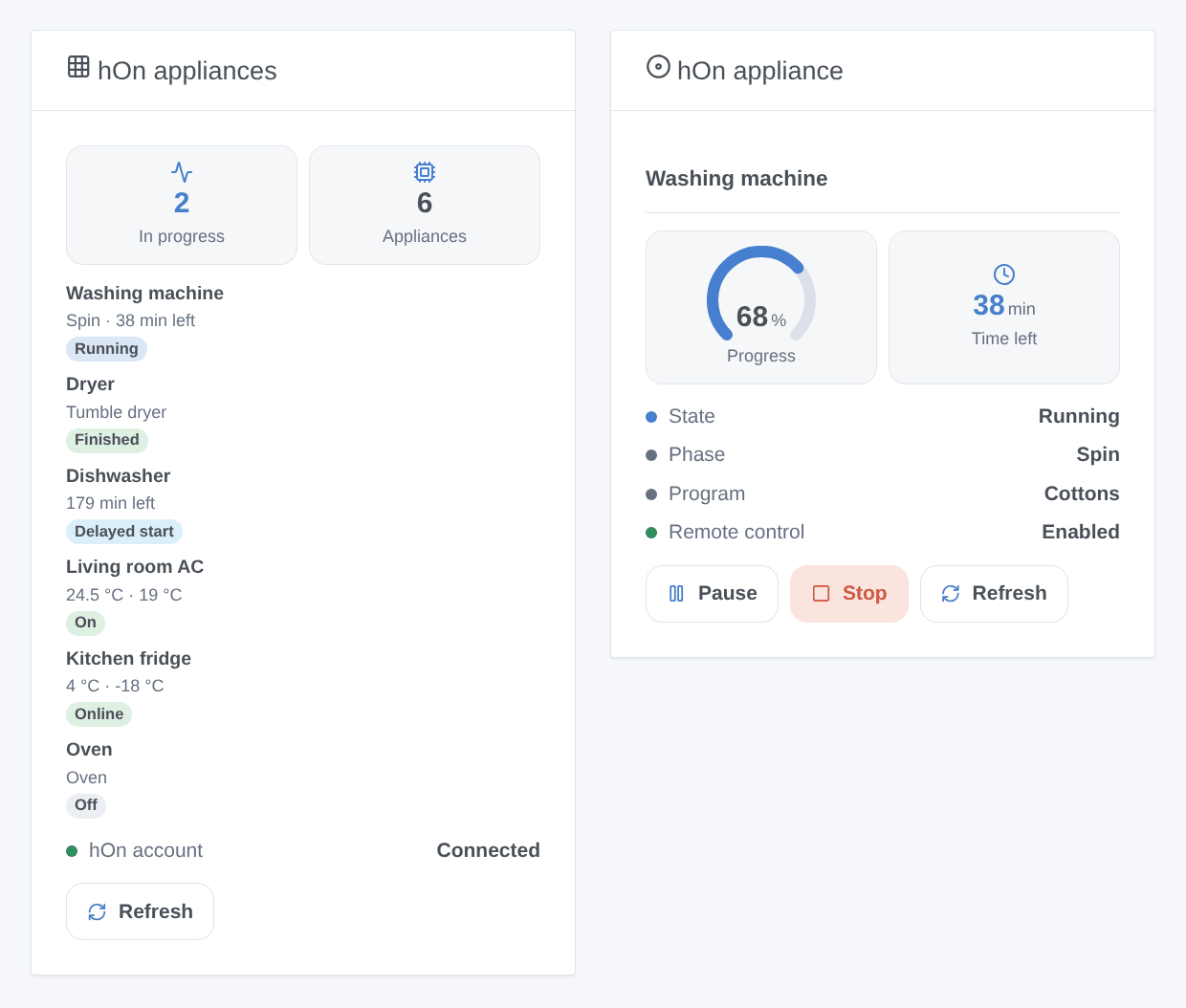
- hOn appliances: every appliance with its state, phase and time left (or its temperatures), and a Refresh button. Setting: all appliances or only those running.
- hOn appliance: one appliance (setting): state, phase, program, remote control, progress of the cycle, time left, temperatures (the setpoints of a fridge that reports none), and the Pause, Resume, Stop (with confirmation) or Turn on / Turn off buttons.
Scene triggers
- An hOn cycle starts and An hOn cycle is finished (filters: appliance, type): variables appliance name, type, program, minutes left or duration.
- An hOn appliance reports an error: variable error code.
- An hOn appliance needs a refill: salt, rinse aid, detergent or softener.
- An hOn appliance goes offline / is back online.
- The hOn account is refused: Gladys no longer receives the states.
A cycle started or stopped by a scene action does not fire these triggers (no loop).
Scene actions
- Start an hOn program: appliance, program name (from the List the programs button of the configuration, e.g.
cottons), optional delayed start in minutes. Outputs: program, estimated duration. - Pause, resume or stop an hOn cycle.
- Read the state of an hOn appliance: outputs machine state, phase, program, minutes left, connected, error code, for a condition or a message.
Scene examples
- When the washing machine’s cycle is finished → send “The laundry is ready ({{triggerEvent.data.duration_minutes}} min)” to the family.
- When the dishwasher needs a refill of salt → add “salt” to the shopping list notification.
- Every weekday at 1 pm, if the electricity is cheap → Start an hOn program
eco_40_60on the washing machine loaded in the morning (remote control enabled).
Troubleshooting
- “hOn refused the e-mail address or the password”: check them in the hOn app. The same message appears when the account logged in too often: wait, the integration retries by itself. Accounts with two-step verification by e-mail cannot log in.
- No appliance: add them in the hOn app first, then press Test the connection.
- “Remote control is off”: enable it on the panel of the appliance, it switches off again at the end of the cycle on most models.
- A command is accepted but nothing happens: the appliance applies it within a few seconds; it is read again 5 and 20 seconds later. Check the door and the remote control.
- A feature is missing: features follow what the model reports to the hOn cloud; open an issue with the type and model.
- Logs: the Logs tab of the integration. For a report, click Diagnostic in the configuration and copy the lines starting with
hOn diagnostic(e-mail, MAC address, serial number and nickname are left out). Issues: https://github.com/William-De71/gladys-hon/issues
Configuration settings
These are the settings hOn asks for in its configuration screen in Gladys.
| Setting | Type | Required | Description |
|---|---|---|---|
| Connect Gladys to your hOn account | section | No | Use the account of the hOn mobile app, where your Haier, Candy or Hoover appliances are already added. Gladys talks to the hOn cloud (an unofficial API, the one of the app): your appliances and their states go through Haier’s servers. Then add the appliances from the Discover tab. |
| hOn e-mail address | string | Yes | |
| hOn password | secret | Yes | Stored by Gladys and only sent to the hOn cloud. Accounts with two-step verification by e-mail are not supported. |
| Refresh interval | select | No | How often the state of the appliances is read from the hOn cloud. |
| Language of the device texts | select | No | Feature names and text states (machine state, phase). Gladys does not send your language with them. |
| Starting a program from Gladys | section | No | Like in the hOn app, a washing machine, dryer or dishwasher only accepts a start, a pause or a stop when remote control is enabled on its panel (load it, close the door, then press the remote control or Wi-Fi button). The “Remote control” feature of the device shows it. |
How to install hOn in Gladys
- In Gladys, open Integrations: hOn appears in the catalog, next to the native integrations, with a community badge.
- Click Install. Gladys pulls the Docker image (
ghcr.io/william-de71/gladys-hon:0.3.1), starts it in a sandbox isolated from the core, and generates the integration's interface (devices, discovery and configuration). - Open the Configuration screen of the integration, fill in the settings, and save.
- You can also install it directly from its repository URL: https://github.com/William-De71/gladys-hon.
hOn requires Gladys >=5.3.0. The catalog inside Gladys refreshes every hour, so a new version becomes available at most one hour after its release.
Not running Gladys yet? It is free and open source: follow the installation guide to get started.
About external integrations
hOn is an external integration: a community integration packaged as a Docker container and published on GitHub, that Gladys installs in one click and runs in a sandbox isolated from its core. It is published and maintained by William-De71, not by the Gladys core team.
- Browse all integrations, native and community
- Build and publish your own external integration
- Source code on GitHub — source of this documentation