Holidays Calendar smart home integration, free and open source
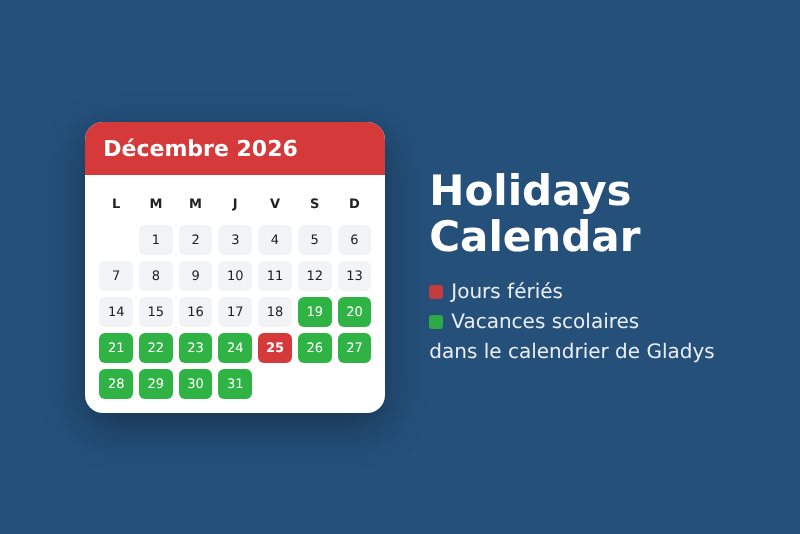
Public holidays of 200 countries and French school holidays in the Gladys calendar.
Published by prohand
- Devices
- Version 1.0.1
- Requires Gladys >=5.2.0
- ★ 0
Public holidays and school holidays show up right in the Gladys calendar, next to your other calendars. Your scenes then use them through the calendar blocks of Gladys: the alarm clock, the heating and the shutters no longer behave the same on a holiday or during the school holidays.
- Public holidays of about 200 countries and their subdivisions (Alsace-Moselle, German states, Swiss cantons, Canadian provinces, US states…), computed offline on your Gladys: no account, no network.
- French school holidays of your zone (optional), from the open data of the Education ministry, in a second calendar.
- Your bridges and company days off added to the holidays calendar, and the holidays you do not want left out.
Tested with its automated test suite, not yet on many real Gladys instances: feedback is welcome on the Gladys forum or in the GitHub issues.
What you need
- Gladys Assistant 5.2.0 or later (calendar integrations arrived with that version).
- Nothing else: no account, no API key, no hardware. Only the French school holidays need Internet access, once a day.
Configuration
Install the integration (Integrations → Install from GitHub, address
https://github.com/prohand/gladys-calendar-holidays), open its Configuration tab, fill in the fields
below and save. These settings apply to the whole household.
Country and subdivision
- Country: the holidays to follow. French-speaking countries come first, then the others in alphabetical order (in English).
- Subdivision: optional, for a region with holidays of its own. Examples:
67,68or57for Alsace-Moselle (Good Friday and 26 December),BYfor Bavaria,QCfor Quebec,VDfor the canton of Vaud. Some subdivisions have regions:BY-KATHfor the Catholic municipalities of Bavaria (15 August). The Check the configuration button lists the codes of the country. - Days put in the calendar: public holidays only by default. You can add bank holidays, local school days off, optional days and observances (Mother's Day, Whit Sunday…).
Extra days off and holidays left out
- Extra days off: bridges or company days off, added to the holidays calendar, separated by commas:
2026-05-15for one date,12-24for every year, with an optional name after=:2026-05-15=Bridge, 12-24=Christmas Eve. Without a name, the event is called "Day off". - Holidays left out: holidays not put in the calendar, separated by commas. A name in any language
(
Whit Mondayfor the French solidarity day, whatever its date), a date (2027-05-17) or a day of every year (12-26).
French school holidays
For France and its overseas territories. Choose your zone: A, B, C, Corsica, Guadeloupe, French Guiana, Martinique, Mayotte, Réunion or Saint Pierre and Miquelon. The pupils' holidays are read once a day from data.education.gouv.fr, then kept: an Internet outage changes nothing for the days already known. Leave None to keep the integration fully offline.
Enable the calendars ("My calendars")
In Gladys, a calendar belongs to a user. Each person who wants the calendars opens the page of the integration and clicks Enable for me in the My calendars block. They then get:
- Public holidays (France) (in red): one full-day event per holiday, from January of this year to December of next year;
- School holidays (Zone C) (in green), when a zone is chosen: one event per period, from the first day off to the eve of the return to school.
The names of the calendars and of the holidays follow the language of each user (English, French, German or Spanish). Under each calendar, two switches:
- Synchronize this calendar: off, the calendar is emptied and the integration no longer fills it;
- Share with the household: see below.
Disable and delete my calendars removes that person's calendars; enabling again creates them again.
Use the calendars in scenes
Gladys only shows shared calendars to scenes: turn on Share with the household on the calendar you need (one person of the household is enough). Then, in the scene editor:
- trigger Calendar event is coming: for example at the start of any event of the "Public holidays" calendar, or the day before at 8 pm;
- action Condition on calendar events: "continue only if an event is running in School holidays", so the children's alarm does not ring during the holidays;
- action Get calendar events: to announce the next holiday in a message.
Example: a "Wake up" scene at 7 am on weekdays, with the condition "no event running in Public holidays", does not ring on Christmas Day.
What is sent, and when
- At start, when Gladys comes back after a restart and whenever the configuration is saved, everything is sent again.
- When someone enables the integration or turns a calendar back on, their calendars are sent again.
- Every 15 minutes, the integration checks what changed (school calendar read again, new year) and sends only that. On 1 January, the year after next is added; past years stay in the calendar as history.
- An event you create by hand in these calendars is never deleted by the integration.
Troubleshooting
- I do not see the calendars: enable the integration for yourself in My calendars, then reload the Calendar view.
- The scene does not react: the calendar must be shared with the household.
- A holiday of my region is missing: fill in the Subdivision. Check the configuration lists the codes and reports an unknown code.
- No school holidays: check the zone and the Internet access of Gladys. Check the configuration tells until when the holidays are known and what to fix.
- The status of the integration turns to an error when Gladys refuses a push; the integration tries again on its own a quarter of an hour later.
Limits
- One country per installation, the same for the whole household.
- Holidays decided late by a government arrive with a date-holidays update; the Extra days off field covers the meantime. Lunar holidays can differ by a day from the official announcement.
- School holidays: pupils only; New Caledonia, French Polynesia and Wallis and Futuna are not offered. Beyond what the ministry has published, nothing is guessed.
- Each user has their own copy of the calendars: if two people share them, scenes see each holiday twice.
Credits
- date-holidays (code ISC, data CC BY 3.0): the holidays of every country.
- Calendrier scolaire of the French Education ministry (Licence Ouverte 2.0).
- gladys-holidays (Apache-2.0): the holiday computation and the reading of the school calendar come from that integration.
Configuration settings
These are the settings Holidays Calendar asks for in its configuration screen in Gladys.
| Setting | Type | Required | Description |
|---|---|---|---|
| How it works | section | No | Public holidays are computed offline for the chosen country, without any account. Each user then enables the integration in the "My calendars" block of this page and gets the calendars in the Calendar view. To use them in scenes, share them there. |
| Country | select | Yes | |
| Subdivision (optional) | string | No | Code of a region with its own holidays: 67, 68 or 57 for Alsace-Moselle, BY for Bavaria, QC for Quebec, VD for Vaud. "Check the configuration" lists the codes of the country. |
| Days put in the calendar | multi_select | No | Public holidays are the days off by law. The others depend on the country: bank holidays, local school days off, optional days, observances (Mother's Day…). |
| Extra days off | string | No | Bridges or company days off, added to the holidays calendar, separated by commas: 2026-05-15 for one date, 12-24 for every year, with an optional name after =. |
| Holidays left out | string | No | Holidays not put in the calendar, separated by commas: a name (any language, e.g. Whit Monday for the French solidarity day), a date 2027-05-17, or 12-26 for every year. |
| French school holidays | section | No | Optional, for France and its overseas territories: the holidays of your zone are read once a day from the open data of the Education ministry (data.education.gouv.fr) and put in a second calendar. |
| School holiday zone | select | No |
How to install Holidays Calendar in Gladys
- In Gladys, open Integrations: Holidays Calendar appears in the catalog, next to the native integrations, with a community badge.
- Click Install. Gladys pulls the Docker image (
ghcr.io/prohand/gladys-calendar-holidays:1.0.1), starts it in a sandbox isolated from the core, and generates the integration's interface (devices, discovery and configuration). - Open the Configuration screen of the integration, fill in the settings, and save.
- You can also install it directly from its repository URL: https://github.com/prohand/gladys-calendar-holidays.
Holidays Calendar requires Gladys >=5.2.0. The catalog inside Gladys refreshes every hour, so a new version becomes available at most one hour after its release.
Not running Gladys yet? It is free and open source: follow the installation guide to get started.
About external integrations
Holidays Calendar is an external integration: a community integration packaged as a Docker container and published on GitHub, that Gladys installs in one click and runs in a sandbox isolated from its core. It is published and maintained by prohand, not by the Gladys core team.
- Browse all integrations, native and community
- Build and publish your own external integration
- Source code on GitHub — source of this documentation