Google Mail smart home integration, free and open source
Gmail in Gladys: notifications by email, vacation responder, new mail scenes, widgets.
Published by William-De71
- Messaging
- Version 0.1.0
- Requires Gladys >=5.2.0
- ★ 0
Overview
This integration links a Gmail account to Gladys through the official Gmail API and OAuth 2.0: no app password, and every permission is chosen and can be revoked.
- Notifications by email: each user enters in "My account" the address that receives their Gladys notifications; they are sent from the connected Gmail account (with the camera image when the notification has one).
- Vacation responder: turn it on or off from a scene (subject, message, optional dates, contacts only) or from a widget.
- "New mail received" trigger, filtered by sender address, Gmail label and category (Primary, Promotions…), with the sender, subject, snippet and labels as variables.
- Scene actions: send a mail (recipients, cc, bcc, plain text or simple HTML), read the unread mails, mark as read, add a label, archive.
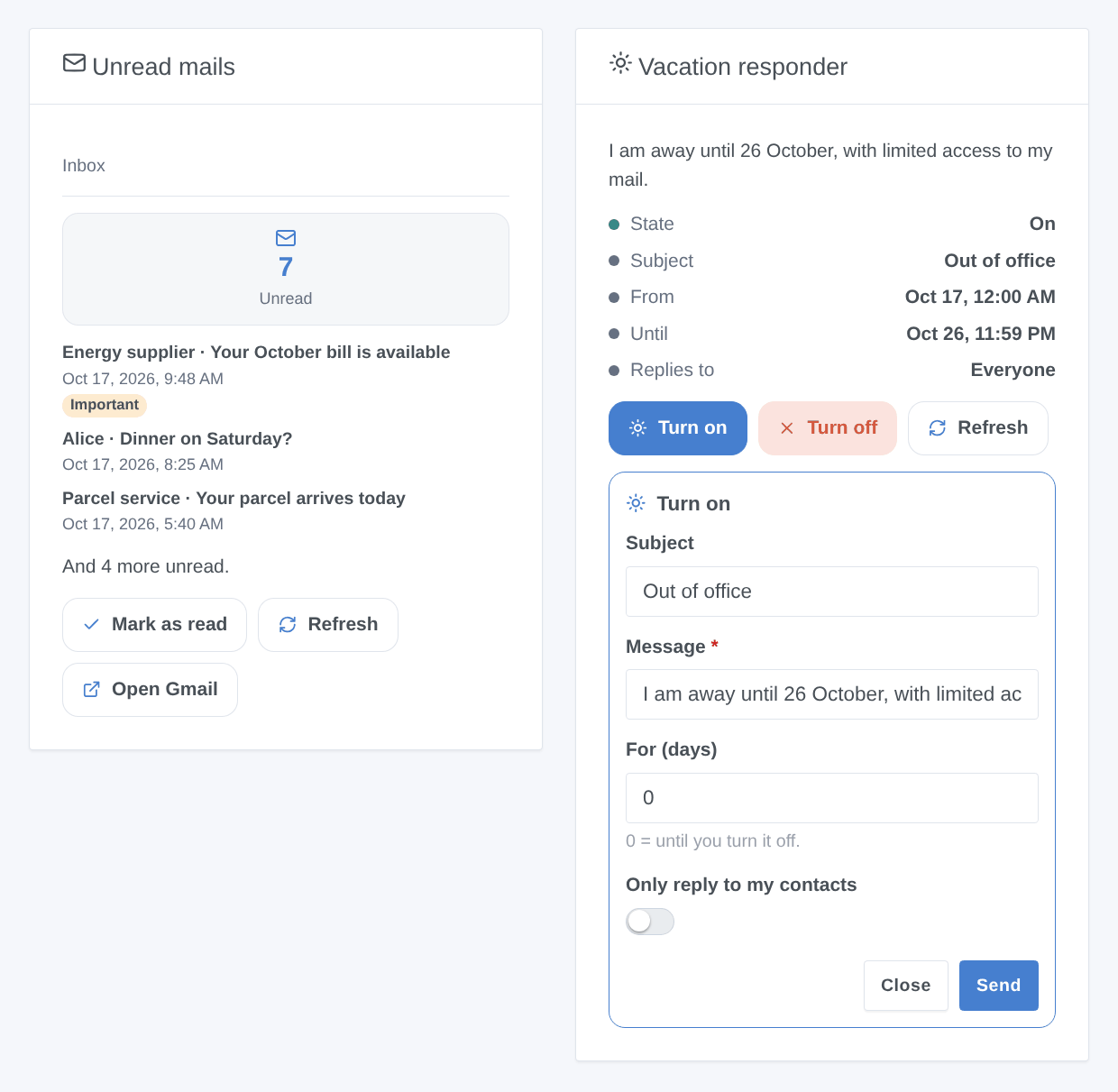
- Widgets: the unread mails of the inbox or of a label, and the state of the vacation responder with its buttons.
- Cloud: the data travels between the Google servers and your Gladys, with your own Google client; nothing goes through a third-party server.
How it differs from the SMTP and IMAP integrations of the store: "SMTP" sends notifications through any mail server (with an app password for Gmail), without trigger, widget or vacation responder; "IMAP Mail" reads up to three mailboxes with an app password. Google Mail only targets Gmail, but without any app password, with permissions limited to what is needed (the body of the mails is never read), the vacation responder, Gmail labels and categories, and sending, reading and organizing in a single integration.
Requirements
- Gladys 5.2.0 or later (widget forms).
- A Gmail account (personal, or Google Workspace when the administrator allows third-party apps).
- A free Google Cloud project in which you create your own OAuth client: Google does not allow sharing a key, and the integration ships none. About ten minutes, once.
Configuration
1. Google Cloud project and API
- Open the Google Cloud console and create a project (for example "Gladys").
- In APIs & Services → Library, search for Gmail API and click Enable (direct link).
2. Consent screen (Google Auth Platform)
- Open Google Auth Platform (link) and click Get started: app name ("Gladys"), support email, audience External, contact address, accept the terms, then Create.
- In Audience, click Publish app to switch it In production. This is essential: an app left In testing gets permissions that expire after 7 days, and only test users can sign in.
- Do not ask Google for a verification: the app stays "unverified", which suits personal use (100 users at most). Google shows a warning when you connect (step 4). The Gmail reading permissions are called restricted: for a public app Google would require a security assessment; for your own unverified app it only shows a stronger warning.
3. OAuth client
-
In Google Auth Platform → Clients, click Create client.
-
Application type: Web application, name: "Gladys".
-
Under Authorized redirect URIs, add exactly:
https://my.gladysassistant.com/redirect/oauthThis is the HTTPS page of Gladys that sends your browser back to your instance, whatever its address (Google refuses
http://addresses and IP addresses). If you reach Gladys over HTTPS and enable the advanced "instance address" option of the configuration screen, declare the address it shows instead. -
Click Create, then copy the Client ID and the Client secret (it starts with
GOCSPX-).
4. In Gladys
- Open the Google Mail integration, paste the Client ID and the Client secret, choose What Gladys may do, then save.
- Click Connect with Google and pick your account.
- Google warns that it hasn’t verified this app: it is yours. Click Advanced, then Go to Gladys (unsafe).
- Tick every Gmail permission offered, then Continue. You are back in Gladys, connected.
- Each user who wants their notifications by email enters their address in the My account block of the integration page.
| Field | Default | Role |
|---|---|---|
| Client ID | — | The Client ID of your OAuth client (ends with .apps.googleusercontent.com). |
| Client secret | — | Its secret (GOCSPX-…), never shown nor written to the logs. |
| What Gladys may do | Reading | The access level (table below). Connect again after a change. |
| Connect with Google | — | The connection button. |
| Look for new mails every (minutes) | 2 | From 1 to 60. Each check costs 3 Gmail quota units, plus 20 per new mail. |
| Subject of the notifications | Gladys | The subject of the mails sent as notifications. |
| My account → Email address | — | For each user: the address that receives their notifications (empty: nothing is sent). |
Access levels and permissions
The integration only asks for the permissions of the chosen level, the narrowest Gmail offers:
| Level | Google permissions | What works |
|---|---|---|
| Send and vacation responder only | gmail.send, gmail.settings.basic | Notifications, "send a mail" action, vacation responder (scenes and widget) |
| + read senders, subjects and labels | the same + gmail.metadata (restricted) | + "new mail" trigger, unread mails (action and widget), without snippet |
| + read and organize | gmail.send, gmail.settings.basic, gmail.modify (restricted) | + mail snippets, mark as read, add a label, archive |
gmail.metadata only gives access to the headers and labels, never to the body of the mails. gmail.modify allows reading mails and changing their labels; the integration only uses it for the snippet and the labels, and never deletes anything. The tokens and the reading cursor are kept in /data (the volume of the integration), never in the logs.
Usage
Notifications by email
The integration is a "send-only" communication channel: when Gladys sends a message to a user ("Send a message" scene action, alerts…), it goes by email to the address entered in My account, with the configured subject. An image attached to the notification (camera snapshot) is added as an attachment. Gladys does not read the replies: answering the mail does not control the house.
Widgets
- Unread mails: the unread count of the inbox (or of the label chosen in the widget settings, by its name), the five newest (sender, subject, date, snippet, link to Gmail), the Mark as read (level "read and organize"), Refresh and Open Gmail buttons.
- Vacation responder: state (on, scheduled, ended, off), subject, dates, recipients, with Turn on (form: subject, message, duration in days, contacts only) and Turn off.
Scene trigger
Gmail: new mail received fires for each mail that reaches the inbox or a label (a Gmail filter may skip the inbox), checked every 2 minutes by default. Drafts, sent mails, spam, trash and the mails sent by Gladys itself never fire it.
- Filters: sender address (exact, lower case), Gmail label (the exact name of the first label of the mail, or
INBOXfor a mail without label), category (Primary, Social, Promotions, Updates, Forums). - Variables: sender name and address, full sender, recipients, subject, snippet (level "read and organize"), label, every label, category, important, date received, mail and conversation IDs, unread count of the inbox.
Scene actions
- Send a mail: recipients (comma separated), Cc, Bcc, subject, message, plain text or simple HTML. Outputs: mail and conversation IDs.
- Turn the vacation responder on: subject, message, optional start and end (
YYYY-MM-DD,DD/MM/YYYY, with an optional timeHH:MM, or+3for in 3 days; time zone of Gladys; an end without time stops at 23:59), contacts only. Outputs: start and end (ISO 8601). - Turn the vacation responder off: the subject and message are kept.
- Read the unread mails: of the inbox or of a label. Outputs: count, sender, subject and ID of the newest.
- Mark as read, label, archive: on the ID of a mail (the trigger variable), mark as read, add an existing label, remove from the inbox.
These actions never fire the "new mail" trigger, not even a mail sent to your own address.
Scene examples
- When a mail arrives from
[email protected]→ send a notification "New bill: {{subject}}" and add the label "Bills". - When the house mode switches to "Vacation" → turn the vacation responder on until
+14; back home → turn it off. - When the alarm goes off → send a mail to the whole family, with a message in simple HTML.
Troubleshooting
- "Error 400: redirect_uri_mismatch": the redirect URI of the OAuth client is not the one of Gladys. Check
https://my.gladysassistant.com/redirect/oauth, without trailing slash, under Authorized redirect URIs of a Web application client. - "Error 403: access_denied": the app is still In testing and your account is not a test user. Publish it (Audience → Publish app).
- "Google hasn’t verified this app": expected, it is your own app; Advanced → Go to Gladys (unsafe).
- "Google did not grant every permission": a box was not ticked on the consent screen, or the access level changed since the connection. Connect again and tick everything.
- "Google revoked the access" every week: the app stayed In testing (7 days). Publish it, then connect again.
- "The Gmail API is not enabled": enable Gmail API in the project of the OAuth client, wait a few minutes, then Test the connection.
- Google Workspace account: the administrator may block unverified apps or restricted permissions; ask them to allow your OAuth client.
- A new mail takes a few minutes to start its scene: that is the check interval (2 minutes by default).
- For a bug report: click Diagnostic (an anonymized summary in the logs, without token, address nor mail content), then attach the logs of the integration, the Gladys version and the integration version.
Limitations
- Never tested with a real Google account: the code follows the Gmail API documentation and tests against a fake Google; your feedback is welcome.
- No push notification from Gmail (it goes through Google Cloud Pub/Sub, out of reach of a home server): a new mail is seen at the latest after the check interval. If the integration is stopped for more than about a week, Gmail may refuse the old cursor: the mails received in between fire nothing.
- At most 20 new mails read per check: beyond (a big import), the oldest fire nothing.
- The "label" filter compares the first label of the mail; for a mail with several, use the "every label" variable in a condition.
- The body of the mails is never read; no attachment when sending from a scene (only the image of a notification is attached); no drafts nor deletion.
- Gladys receives no message by email (send-only channel): a mail cannot control the house, except through your own scenes on the trigger.
- One Google account per integration.
Configuration settings
These are the settings Google Mail asks for in its configuration screen in Gladys.
| Setting | Type | Required | Description |
|---|---|---|---|
| 1. Your Google Cloud OAuth client | section | No | Google gives no shared key: create a free project in the Google Cloud console, enable the Gmail API, configure the consent screen (External) and publish it "In production" (otherwise the access expires after 7 days), then create an OAuth client of type "Web application" whose authorized redirect URI is exactly https://my.gladysassistant.com/redirect/oauth. The documentation details every step. |
| Client ID | string | Yes | Ends with .apps.googleusercontent.com. |
| Client secret | secret | Yes | Shown by Google when the client is created (it starts with GOCSPX-). |
| What Gladys may do | select | No | Decides the permissions asked at "Connect": connect again after a change. Reading the mailbox (scene trigger, unread mails) needs a "restricted" Gmail permission: Google shows a stronger warning for your own unverified app. |
| 2. Connect your Google account | section | No | Save first, then click the button. Google warns that it "hasn’t verified this app": it is your own app, click Advanced, then Go to (unsafe), and tick every Gmail permission. Connect again whenever Gladys reports a revoked access. |
| Connect with Google | oauth2 | No | Gladys never reads the body of your mails and never deletes anything. |
| 3. Options | section | No | Each user enters the address that receives their Gladys notifications in the "My account" block below. With a reading access, the integration reads the mailbox history on a timer (Gmail pushes nothing to a home server). |
| Look for new mails every (minutes) | number | No | Each check costs 3 Gmail quota units, plus 20 per new mail: far below the limits of a personal project. |
| Subject of the notifications | string | No | The subject of the mails Gladys sends as notifications. |
How to install Google Mail in Gladys
- In Gladys, open Integrations: Google Mail appears in the catalog, next to the native integrations, with a community badge.
- Click Install. Gladys pulls the Docker image (
ghcr.io/william-de71/gladys-google-mail:0.1.0), starts it in a sandbox isolated from the core, and generates the integration's interface (devices, discovery and configuration). - Open the Configuration screen of the integration, fill in the settings, and save.
- You can also install it directly from its repository URL: https://github.com/William-De71/gladys-google-mail.
Google Mail requires Gladys >=5.2.0. The catalog inside Gladys refreshes every hour, so a new version becomes available at most one hour after its release.
Not running Gladys yet? It is free and open source: follow the installation guide to get started.
About external integrations
Google Mail is an external integration: a community integration packaged as a Docker container and published on GitHub, that Gladys installs in one click and runs in a sandbox isolated from its core. It is published and maintained by William-De71, not by the Gladys core team.
- Browse all integrations, native and community
- Build and publish your own external integration
- Source code on GitHub — source of this documentation