Free Mobile SMS smart home integration, free and open source
Send SMS notifications to your own phone number through the Free Mobile SMS API.
Published by William-De71
- Messaging
- Version 1.3.0
- Requires Gladys >=5.1.0
- ★ 0
This integration sends SMS notifications to your own phone number, using the free Free Mobile SMS API. It is a send-only channel: Gladys can send you an SMS (a scene notification, an alert…), but there is no inbound channel — you cannot reply to the SMS to control Gladys.
Requirements
- A Free Mobile subscription (the Free mobile plan, not the Freebox).
- The "SMS notifications" option enabled on your account.
- Gladys Assistant 5.1.0 or later. On Gladys 4.86 to 5.0, an installed version 1.2.0 keeps sending SMS but receives no further update (its "Update available" badge cannot be applied): update Gladys first.
Enable the option and get your credentials
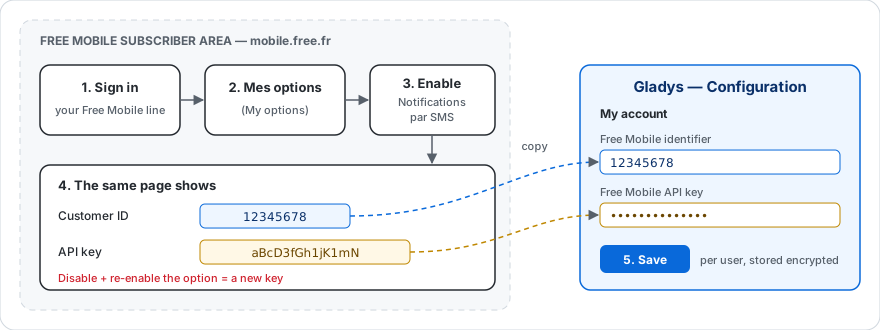
- Sign in to your Free Mobile subscriber area at https://mobile.free.fr.
- Open the "Mes options" (My options) menu.
- Find the "Notifications par SMS" (SMS notifications) line and enable it.
- On that same page, Free Mobile shows two values you will need:
- your Customer ID (an 8-digit login);
- an API key (generated for you; you can regenerate it if needed).
Keep both values at hand: these are what you will enter in Gladys.
Important: if you disable and re-enable the "SMS notifications" option, a new API key is generated. Remember to update it in your Gladys configuration.
Configure the integration in Gladys
- In Gladys, open the Configuration screen of the Free Mobile SMS integration.
- In the "My account" block, fill in:
- Free Mobile identifier → your 8-digit login;
- Free Mobile API key → the key from the previous step (it is stored encrypted and never shown again).
- Save. That's it.
Each Gladys user enters their own credentials in their "My account" block. SMS messages always go to the phone number of the matching Free Mobile account.
Usage
Once configured, the integration receives the outgoing messages Gladys sends you (for example the "Send Message" action of a scene, or an alert) and forwards them by SMS to your phone. No further action is required.
By default, a scene message goes to every messaging service you configured. To send it by SMS only, pick Free Mobile SMS in the "Send through" list of the action.
Scenes: when an SMS is not sent
The "SMS not sent" trigger starts a scene when Free Mobile refuses or does not receive an SMS: wrong API key, option disabled, too many SMS, Free Mobile out of service… Use it to be warned through another channel (Telegram, a notification, a light that turns red).
- It fires on the first failure of a Free Mobile line, then again only after an SMS of that line went through. A scene that warns you through this same channel therefore cannot loop.
- The Reasons filter limits the scene to some causes; leave it empty to react to all of them.
- The scene actions can use these variables:
| Variable | Content |
|---|---|
{{triggerEvent.data.reason}} | cause code: access_denied, rate_limited, server_error, timeout, unreachable, invalid_message or unexpected |
{{triggerEvent.data.status}} | HTTP status returned by Free Mobile (403, 402…), empty without an answer |
{{triggerEvent.data.error}} | error message in English, as in the logs |
{{triggerEvent.data.account}} | masked identifier of the line, for example 12****78 |
timeout means Free Mobile did not answer in time: the SMS may still arrive.
Example: trigger "SMS not sent" with the reason "Access denied", then a "Send Message" action sent through Telegram: Free Mobile refused an SMS ({{triggerEvent.data.error}}): check the API key.
Limitations
- Sends only to your own number: the Free Mobile API does not allow sending to an arbitrary number.
- No inbound: you cannot reply to the SMS to talk to Gladys.
- Text-only SMS: any attachments (images) are not forwarded.
- Long messages: Free Mobile accepts up to 999 characters per SMS. A longer message is sent as several SMS, numbered "(1/2)", "(2/2)"…
- Rate limit: Free Mobile refuses messages sent too close together. The integration sends a user's messages one after the other and, when Free Mobile asks to slow down, retries twice (after 2 then 5 seconds) before giving up.
Troubleshooting
- No SMS received: check that the "SMS notifications" option is enabled and that the identifier and API key are correct.
- Access denied error: the identifier or key is likely wrong, or the option has been disabled. Regenerate the key from your subscriber area and update it in Gladys.
- "Too many SMS sent" error: several messages left within a few seconds and Free Mobile kept refusing them after the retries. Space out the "Send Message" actions of your scenes (a short wait between two of them is enough).
How to install Free Mobile SMS in Gladys
- In Gladys, open Integrations: Free Mobile SMS appears in the catalog, next to the native integrations, with a community badge.
- Click Install. Gladys pulls the Docker image (
ghcr.io/william-de71/gladys-free-mobile:1.3.0), starts it in a sandbox isolated from the core, and generates the integration's interface (devices, discovery and configuration). - Open the Configuration screen of the integration, fill in the settings, and save.
- You can also install it directly from its repository URL: https://github.com/William-De71/gladys-free-mobile.
Free Mobile SMS requires Gladys >=5.1.0. The catalog inside Gladys refreshes every hour, so a new version becomes available at most one hour after its release.
Not running Gladys yet? It is free and open source: follow the installation guide to get started.
About external integrations
Free Mobile SMS is an external integration: a community integration packaged as a Docker container and published on GitHub, that Gladys installs in one click and runs in a sandbox isolated from its core. It is published and maintained by William-De71, not by the Gladys core team.
- Browse all integrations, native and community
- Build and publish your own external integration
- Source code on GitHub — source of this documentation