Fête du jour smart home integration, free and open source
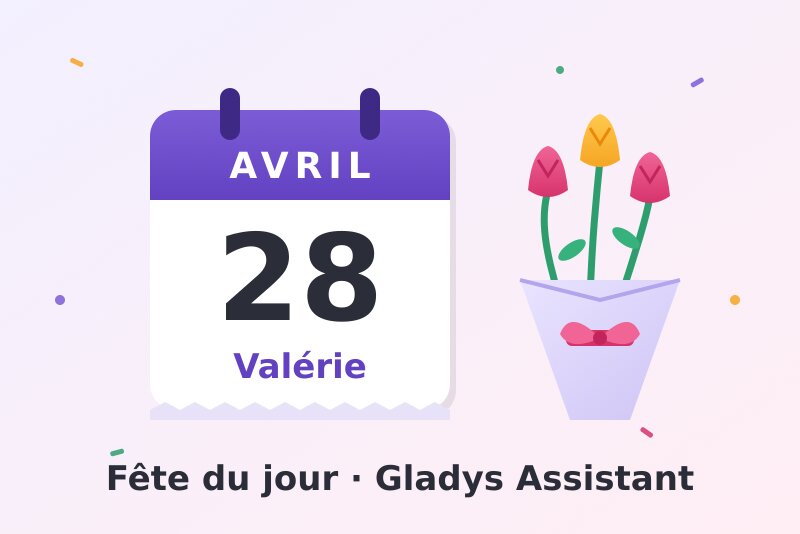
Name days of the French calendar: a Gladys calendar, a scene trigger, a widget.
Published by William-De71
- Devices
- Version 0.1.0
- Requires Gladys >=5.2.0
- ★ 0
Overview
This integration brings into Gladys the name day of each day of the traditional French calendar: "Name day: Valérie" on April 28, "Fête nationale · Name day: Camille" on July 14.
- A Gladys calendar "Name days" for every user who enables it: one all-day event a day, from 7 days back to a year ahead.
- A scene trigger "Name day", every day at the chosen hour, or only on the name day of the first names you choose (yours, your family's).
- A scene action "Get the name day" (today or tomorrow), with a ready-made sentence to send.
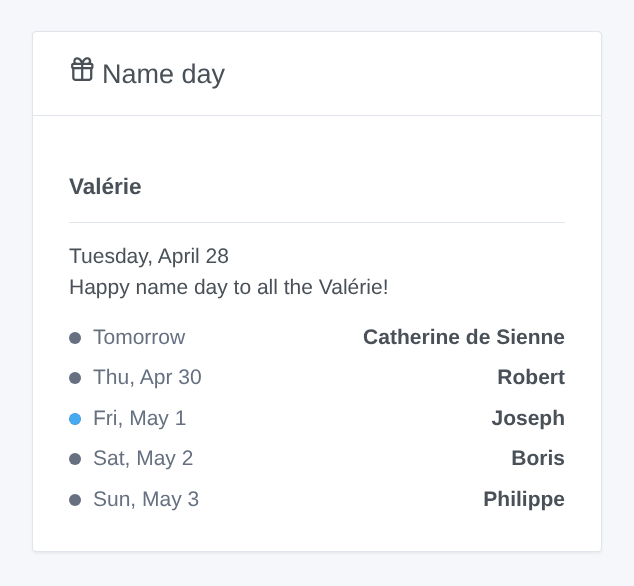
- A widget "Name day": the name day of today and of the next days.
The image above is a generated illustration, not a screenshot.
Requirements
- Gladys Assistant 5.2.0 or later (calendar integrations).
- The timezone of Gladys set correctly (Settings > System): the days change at its midnight.
- Nothing else with the built-in list. For fetedujour.fr: a free key and a fixed public IP address (see below).
Configuration
| Field | Description |
|---|---|
| Hour of the scene event | The hour (0 to 23) the "Name day" trigger starts every day. 8 by default. |
| Language of the texts | Scene summaries and status. Automatic: the language of your dashboard once the widget has been shown, guessed from the timezone before that. The calendar follows each user's language. |
| fetedujour.fr key | Optional. Empty: the built-in list. |
Then, in the My calendars block of the integration page, click Enable for me: your "Name days" calendar appears in the Gladys calendar. It starts private: to use it in scenes or show it to the household, turn on Share with the household. Each user enables their own.
Where the names come from
- Built-in list (default): the traditional French calendar, one saint a day (351 first names), with the feasts and public holidays (Toussaint, Noël, Fête nationale…). When a feast has a first name attached, it comes with it: Martin on November 11, Camille on July 14, Marie on August 15. No connection is needed. February 29 (Auguste) only exists in leap years.
- fetedujour.fr (optional): generate a free key on fetedujour.fr/api with the public IP address of your internet box, then paste it in the configuration. The key only works from that IP address: if your internet provider gives you an address that changes, the key will stop working. The integration asks each day of the year only once (one request every 30 seconds, about three hours the first time, today first) and keeps the answers; the feasts of the built-in list stay as they are. Until a day is read, and whenever fetedujour.fr refuses the key or does not answer, the built-in list takes over.
The status at the top of the configuration page shows the source in use and the progress ("fetedujour.fr: 120 of 366 days read").
Usage
Calendar
The "Name days" calendar shows in the calendar view of Gladys, with the others. The Gladys trigger "Calendar event is coming" works on it too, once the calendar is shared with the household.
Widget
Name day: the first name of the day in large (or the feast), the date and a "Happy name day to all the Valérie!", then the next days (0 to 7, "Next days" setting). Feasts are in blue.
Scenes
Trigger Name day, sent once a day at the hour of the configuration (never twice a day; if Gladys was stopped at that hour, it comes when Gladys is back, the same day). First names filter: left empty, the scene starts every day; otherwise only on the name day of the chosen first names.
Variables: first name of the day, feast or holiday (empty most days), day (YYYY-MM-DD) and a ready-made sentence ("Today is the name day of Valérie.").
Action Get the name day: today or tomorrow; outputs the first name, the feast, the day and the sentence ("Tomorrow is the name day of Catherine de Sienne.").
Examples:
- Every day at 8:00 (Name day trigger) → send "{{triggerEvent.data.summary}}" to the family messaging.
- Name day, first names Valérie and Martin → send a message not to forget to wish them a happy name day.
- Every evening at 20:00 → get tomorrow's name day → announce it on the living room speaker.
Transport
Local with the built-in list: nothing leaves your Gladys. With a key, the integration also calls fetedujour.fr (cloud), and only that site.
Troubleshooting
- "fetedujour.fr refused the key": the key is tied to a fixed public IP address. Check that the address of your internet box is the one given when the key was created, otherwise generate a new one. The built-in list is used meanwhile; the integration tries again every 6 hours, and right after a change of key.
- The calendar does not show: enable the integration for you in "My calendars". For scenes, share it with the household.
- The name day is one day off: check the timezone of Gladys (Settings > System).
- Something else: open an issue on GitHub (https://github.com/William-De71/gladys-fete-du-jour/issues) with the versions of Gladys and of the integration, the source in use, the status shown in the configuration and the logs of the integration (Settings > Supervision). Never paste your key.
Configuration settings
These are the settings Fête du jour asks for in its configuration screen in Gladys.
| Setting | Type | Required | Description |
|---|---|---|---|
| Name days | section | No | How it works: 1. Enable the integration for you in “My calendars” below: you get a “Name days” calendar, one all-day event a day, for a year ahead. Share it with the household to use it in the scenes. 2. Add the “Name day” widget to a dashboard. 3. In a scene, the “Name day” trigger starts every day at the hour below, or only on the name day of the first names you choose. The names come from the traditional French calendar built into the integration: nothing to set, no connection needed. |
| Hour of the scene event | number | No | The “Name day” trigger starts every day at this hour (0 to 23, in the timezone of Gladys). |
| Language of the texts | select | No | Scene summaries and status. Automatic: the language of your dashboard once the widget has been shown, guessed from the timezone of Gladys before that. The calendar always follows the language of each user. |
| fetedujour.fr (optional) | section | No | Instead of the built-in list, the names can come from fetedujour.fr. Its key is free, but tied to ONE fixed public IP address: generate it on the page below with the public address of your internet box. With an address that changes, the key stops working and the built-in list takes over. Each day of the year is asked once (one request every 30 seconds, about three hours the first time), then kept. |
| fetedujour.fr key (optional) | secret | No | Empty: the built-in list. |
How to install Fête du jour in Gladys
- In Gladys, open Integrations: Fête du jour appears in the catalog, next to the native integrations, with a community badge.
- Click Install. Gladys pulls the Docker image (
ghcr.io/william-de71/gladys-fete-du-jour:0.1.0), starts it in a sandbox isolated from the core, and generates the integration's interface (devices, discovery and configuration). - Open the Configuration screen of the integration, fill in the settings, and save.
- You can also install it directly from its repository URL: https://github.com/William-De71/gladys-fete-du-jour.
Fête du jour requires Gladys >=5.2.0. The catalog inside Gladys refreshes every hour, so a new version becomes available at most one hour after its release.
Not running Gladys yet? It is free and open source: follow the installation guide to get started.
About external integrations
Fête du jour is an external integration: a community integration packaged as a Docker container and published on GitHub, that Gladys installs in one click and runs in a sandbox isolated from its core. It is published and maintained by William-De71, not by the Gladys core team.
- Browse all integrations, native and community
- Build and publish your own external integration
- Source code on GitHub — source of this documentation