ESPSomfy RTS smart home integration, free and open source
Somfy RTS shades, awnings and gates through an ESPSomfy RTS controller, on the local network.
Published by William-De71
- Devices
- Version 0.1.0
- Requires Gladys >=5.1.0
- ★ 0
Overview
This integration brings your Somfy RTS motors into Gladys through an ESPSomfy RTS controller: roller shutters, blinds and their slats, awnings, curtains, garage doors and gates, in rooms and scenes, with their position, their “My” favourite position and their sun and wind sensor.
ESPSomfy RTS is an open-source firmware for an ESP32 with a 433 MHz radio (CC1101). It sends the radio frames of a Somfy RTS remote, so it drives the motors without any Somfy box, and it hears your remotes, so it knows where each shade went. It estimates the positions from the travel times you set in its web page.
How it works: everything stays on your local network. Gladys finds the controller by itself (SSDP), reads its shades and groups, then keeps a connection open with it: every move, whether made from Gladys, from a remote or from the web page of the controller, shows up at once, nothing is polled. No account, no cloud. This integration is unofficial and not affiliated with Somfy nor with the authors of ESPSomfy RTS.
Requirements
- Gladys Assistant 5.1.0 or later.
- An ESPSomfy RTS controller with firmware 2.4 or later, connected to the same network as Gladys (Wi-Fi or Ethernet).
- Your shades and groups created and paired in the web page of the controller: the integration does not pair motors, it uses what the controller knows.
- On the install screen, accept the network discovery (SSDP), which lets Gladys find the controller. The SSDP broadcast option of the controller must stay on (it is by default); otherwise, type its address in the configuration.
Configuration
Controllers
Nothing is required: save the configuration, then press Search the controllers. The message lists every controller found with its address, its firmware and its number of shades and groups.
- Controller IP addresses: only for a controller the search does not find (another subnet, a network that filters multicast, SSDP turned off), separated by commas. Give your controller a fixed address in your router: a controller whose address changed is found again by its server id, but sooner with a fixed one.
- Search the network again: every hour (default), every 15 minutes, or never. Useful for a new controller, a shade added in the web page, or an address changed by the router. A controller that stops answering is called again anyway.
Language
Language of the texts: names of the features and error messages of the scenes, because Gladys does not send your language with them.
Usage
Devices
Open the Discover tab of the integration and add your shades and groups. Each one becomes a Gladys device, named as in the controller:
- Roller shutter, shutter, blind, awning, garage door, three-button gate: a shutter with Open / close (open, stop, close) and Position (0 % = closed, 100 % = open).
- Drapery: a curtain with the same two features.
- Blind with a tilt motor: also Slats (0 % = closed, 100 % = open). A tilt-only blind has its slats as its position.
- One-button garage door or gate: Open / close only; the button is pressed only when it changes something.
- Dry contact: a Relay switch.
- Motor with a sun sensor, awning: also Sun sensor active, which lets the sun sensor move the motor, or not (the Somfy “sun flag”).
- Group: Open / close for all its shades at once (and Sun sensor active when it has one). A group has no position.
Stop stops a moving shade; on a still shade it does nothing (in Somfy, the same button sends a still shade to its “My” position: use the scene action or the widget for that). The positions follow the conventions of the Home Assistant integration of the firmware author, including the flip position option and the awnings (open = out).
Transport
The catalogue shows the local badge: nothing leaves your network. Each device shows local while its controller answers, unreachable when it does not.
Widgets
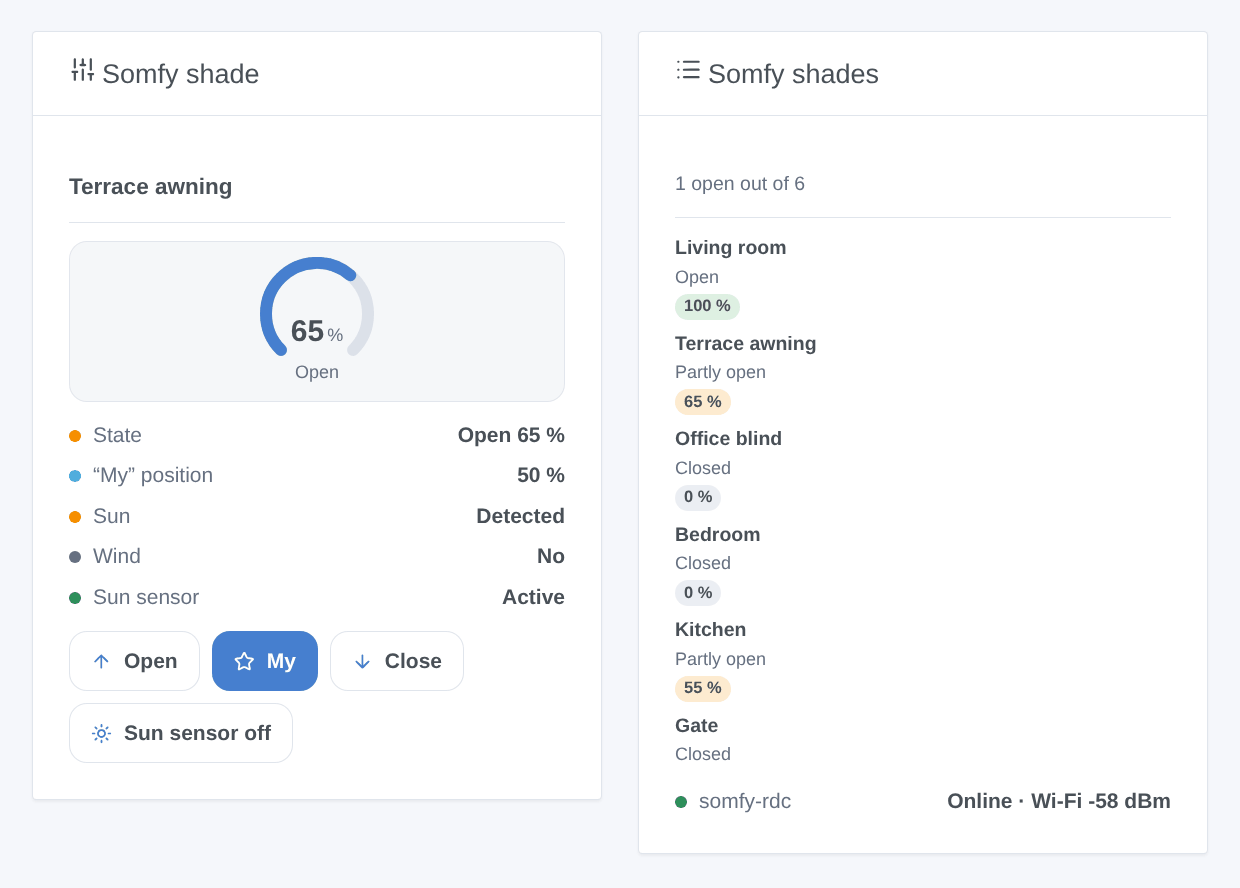
- Somfy shade: one shade or group chosen in the settings: how open it is (live gauge), its state, its “My” position, the slats, sun and wind, and the buttons Open, My, Close and the sun sensor. My is the favourite position stored in the motor, which Gladys has no button for.
- Somfy shades: every shade added to Gladys, open or closed at a glance (eight at most), and the state of the controllers with a firmware update when one is available.
Scene triggers
- A Somfy remote is pressed: a remote, a wall switch or a Situo paired with a shade is pressed and the controller hears it. Filter by shade and by button (▲ up, ▼ down, My, My + up…). Variables: shade name, button, address of the remote. The commands sent by Gladys or by the controller never trigger it.
- Sun or wind changes: the Somfy sun and wind sensor of a motor reports sun or wind coming or going. Filter by shade, sensor and state.
- An ESPSomfy RTS controller is lost: it has not answered for a minute (unplugged, Wi-Fi lost). Variables: controller name, IP address.
- An ESPSomfy RTS controller is back: it answers again after a “lost” event.
Scene actions
- Send a Somfy command to a shade or a group: My (favourite position; stops a moving shade), open, close, one step towards open or closed, sun sensor active or ignored.
- Correct the position of a shade: tells the controller where the shade really is, without moving it (after a remote it does not hear, or a power cut), with the slats if any.
Scene examples
- When the “My” button of the living-room remote is pressed → dim the lights and turn on the TV.
- When wind is detected on the terrace awning → send a notification (the motor retracts it by itself).
- At sunset → Send a Somfy command “My” to the ground-floor group: every shade goes to its favourite position.
Troubleshooting
- No controller found: check that the controller answers at
http://<its address>from a computer on the same network, that its SSDP broadcast option is on, and that you accepted the network discovery when installing (otherwise reinstall the integration). Or type its address in Controller IP addresses. - A shade is missing: create it in the web page of the controller, then run a search in the Discover tab.
- The position is wrong: ESPSomfy RTS estimates it from the travel times set in its web page and from the frames it hears. A remote it does not hear moves the shade without telling it: use the Correct the position of a shade action, or link that remote in the web page of the controller.
- The commands go the wrong way: fix it in the web page of the controller (flip commands, flip position), then add the device again if the Discover tab offers an update.
- Unreachable: the controller reboots after a firmware update or a lost Wi-Fi; Gladys reconnects within a minute. The HTTP API (port 8081) and the socket (port 8080) must be reachable from Gladys.
- Logs: Logs tab of the integration page. For more detail, add the environment variable
DEBUG=gladys-integration-sdk.
Configuration settings
These are the settings ESPSomfy RTS asks for in its configuration screen in Gladys.
| Setting | Type | Required | Description |
|---|---|---|---|
| Your ESPSomfy RTS controller | section | No | ESPSomfy RTS is an open-source firmware for an ESP32 with a 433 MHz radio: it drives Somfy RTS motors (roller shutters, blinds, awnings, curtains, garage doors, gates) like their remotes do, and hears those remotes. Set up your shades and groups in its web page first. Gladys then finds the controller on the local network by itself, and every shade and group appears in the Discover tab. Nothing leaves your network. Not affiliated with Somfy. |
| Controller IP addresses | string | No | Optional, separated by commas. Only for a controller the automatic search does not find (another subnet, a network that filters multicast, SSDP turned off). |
| Search the network again | select | No | To find a new controller, a shade added in its web page, an address changed by the router. A lost controller is called again anyway. |
| Language of the texts | select | No | Names of the features and error messages of the scenes: Gladys does not tell the integration your language for those. |
How to install ESPSomfy RTS in Gladys
- In Gladys, open Integrations: ESPSomfy RTS appears in the catalog, next to the native integrations, with a community badge.
- Click Install. Gladys pulls the Docker image (
ghcr.io/william-de71/gladys-espsomfy-rts:0.1.0), starts it in a sandbox isolated from the core, and generates the integration's interface (devices, discovery and configuration). - Open the Configuration screen of the integration, fill in the settings, and save.
- You can also install it directly from its repository URL: https://github.com/William-De71/gladys-espsomfy-rts.
ESPSomfy RTS requires Gladys >=5.1.0. The catalog inside Gladys refreshes every hour, so a new version becomes available at most one hour after its release.
Not running Gladys yet? It is free and open source: follow the installation guide to get started.
About external integrations
ESPSomfy RTS is an external integration: a community integration packaged as a Docker container and published on GitHub, that Gladys installs in one click and runs in a sandbox isolated from its core. It is published and maintained by William-De71, not by the Gladys core team.
- Browse all integrations, native and community
- Build and publish your own external integration
- Source code on GitHub — source of this documentation