Écocompteur Legrand smart home integration, free and open source
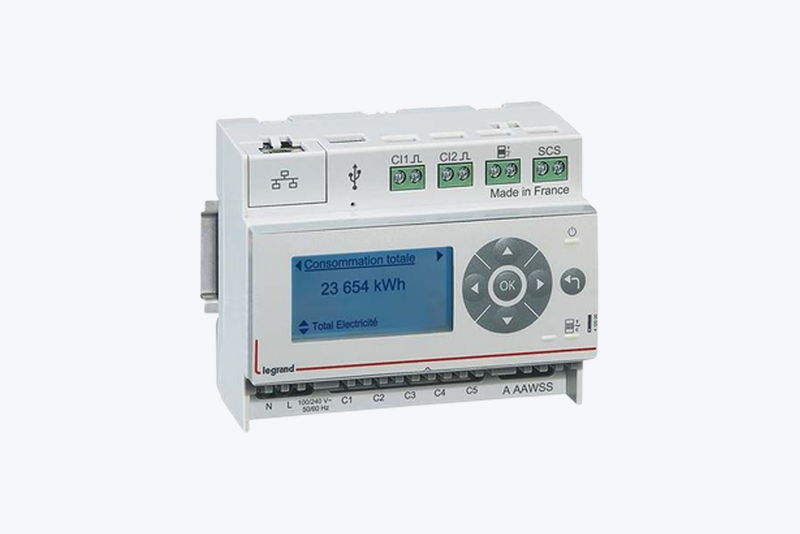
Reads the Legrand eco-meter (ref. 412000) on your local network.
Published by goldorakiller
- Devices
- Version 1.3.0
- Requires Gladys >=5.1.0
- ★ 1
This integration reads the Legrand eco-meter (ref. 412000) directly on your local network, with no account and no third-party service. The device exposes two HTTP endpoints (/inst.json and /data.json) that the integration polls at a configurable interval.
What shows up in Gladys
- Instantaneous power of the 5 measurement channels, in watts. Feature names come from the labels you set in the eco-meter's own interface: if input 1 is named "Heating" there, it is named "Heating" in Gladys.
- Meter indexes read from the teleinformation stream: off-peak/peak, the 6 Tempo colour indexes, or the base index depending on your tariff option (detected automatically). Reported in kWh.
- Tariff option and current tariff period as readable text ("HC/HP", "Tempo", "Heure Pleine Bleu"...) rather than a raw numeric code.
- Energy consumed per channel, in kWh ("Heating (énergie)"...), see below.
- Pulse inputs (gas, water): only the ones enabled on the device are created, with their volume in m³.
Energy per channel
The eco-meter only reports the instantaneous power of its channels, never a cumulative meter. The integration therefore builds an energy index for each channel by integrating the power between two readings. Like the teleinformation indexes, these indexes automatically get their "30-minute consumption" and "30-minute cost": you can track the cost of your heat pump or your EV charger on its own.
Good to know:
- The index starts at 0 when the integration is installed: it is a relative total, not the real lifetime history of the circuit. Gladys only looks at differences, so consumption and cost are not affected.
- It is an approximation: an appliance that switches on and off between two readings is counted more or less accurately. The shorter the refresh interval, the more accurate the result.
- If the eco-meter stays unreachable for more than 5 minutes, that period is not counted: the integration would rather under-count than invent consumption.
- The total is saved and survives a restart of the integration.
"Live power" widget
The integration provides a dashboard widget (Gladys 5.1 or later). Add it from the dashboard editor, in the integration's section. It shows:
- the power of the 5 channels, updated live;
- their total;
- the current tariff period, coloured by period (blue, white or red with Tempo, green for off-peak, orange for peak).
Consumption and cost tracking (Tempo option)
Every index feature (off-peak, peak, or any of the 6 Tempo combinations) is a real Gladys "Index" feature: the Gladys core automatically adds a matching "30-minute consumption" and "30-minute cost" feature for it, no extra configuration needed on the integration side — you only need a price table in Settings → Energy for the cost to compute.
With the Tempo option, that means 6 separate indexes, each with its own consumption/cost tracking:
| Index | Period |
|---|---|
| Index Heures Creuses Bleu | Off-peak, blue day |
| Index Heures Pleines Bleu | Peak, blue day |
| Index Heures Creuses Blanc | Off-peak, white day |
| Index Heures Pleines Blanc | Peak, white day |
| Index Heures Creuses Rouge | Off-peak, red day |
| Index Heures Pleines Rouge | Peak, red day |
Gladys knows the official Tempo day calendar itself: it does not need the eco-meter to tell it which colour applies on a given day, only the prices for each colour/period combination.
Configuration
- Give the eco-meter a fixed DHCP lease on your router. Its address is used as the device identifier: changing it would create a new device in Gladys.
- Enter that address in the configuration field (for example
192.168.1.140). - Adjust the refresh interval if needed (60 seconds by default, from 1 second to 60 seconds).
- Use the Test the connection button to check that the device answers before running a discovery.
Notes
- The eco-meter returns its indexes with leading zeros, which is not valid JSON; the integration normalizes the payload before parsing it.
- Channel labels are taken from the eco-meter when the device is created in Gladys. Once the device exists, its names belong to Gladys (like the device name or its room): renaming an input on the eco-meter afterwards does not update them. Rename the feature directly in Gladys, or delete and re-create the device from the Discovery tab (which loses its history).
- An unwired channel reports 0 W permanently. You can delete the matching feature in Gladys if it gets in the way.
Configuration settings
These are the settings Écocompteur Legrand asks for in its configuration screen in Gladys.
| Setting | Type | Required | Description |
|---|---|---|---|
| Getting started | section | No | The eco-meter exposes its data locally, with no account and no API key. Give it a fixed DHCP lease: its address identifies the device in Gladys. |
| Eco-meter address | string | Yes | IP address or hostname on your local network, e.g. 192.168.1.140 |
| Refresh interval | select | No | How often the eco-meter is polled. Gladys only allows these fixed values (device poll_frequency is an enum, in milliseconds). |
| Publish meter indexes | boolean | No | Adds the off-peak/peak (or base) indexes read from the meter's teleinformation. |
How to install Écocompteur Legrand in Gladys
- In Gladys, open Integrations: Écocompteur Legrand appears in the catalog, next to the native integrations, with a community badge.
- Click Install. Gladys pulls the Docker image (
ghcr.io/goldorakiller/gladys-integration-ecocompteur:1.3.0), starts it in a sandbox isolated from the core, and generates the integration's interface (devices, discovery and configuration). - Open the Configuration screen of the integration, fill in the settings, and save.
- You can also install it directly from its repository URL: https://github.com/goldorakiller/gladys-integration-ecocompteur.
Écocompteur Legrand requires Gladys >=5.1.0. The catalog inside Gladys refreshes every hour, so a new version becomes available at most one hour after its release.
Not running Gladys yet? It is free and open source: follow the installation guide to get started.
About external integrations
Écocompteur Legrand is an external integration: a community integration packaged as a Docker container and published on GitHub, that Gladys installs in one click and runs in a sandbox isolated from its core. It is published and maintained by goldorakiller, not by the Gladys core team.
- Browse all integrations, native and community
- Build and publish your own external integration
- Source code on GitHub — source of this documentation