CityBikes smart home integration, free and open source
Bike sharing stations worldwide (Vélib’, Vélo’v…): bikes, e-bikes, free docks.
Published by William-De71
- Devices
- Version 0.1.0
- Requires Gladys >=5.3.0
- ★ 0
Overview
This integration brings the bike sharing stations of your city into Gladys: the available bikes, the e-bikes, the mechanical bikes and the free docks of the stations you follow, for more than 800 networks in the world — Vélib' in Paris, Vélo'v in Lyon, V3 in Bordeaux, V'Lille, Bicing in Barcelona, the nextbike networks, Santander Cycles in London… Each station becomes a device you can show on a dashboard and use in scenes: be told when a bike is back at the station under your window, or find the nearest free dock before leaving work.
The data come from the CityBikes API (https://citybik.es), a free project that gathers the data of the operators: no account, no key. The whole network is read in one request every 2 minutes by default, whatever the number of stations followed. The terms of the API ask to credit it: the widgets show "Data: CityBikes (citybik.es)".
It is a cloud integration: it contacts api.citybik.es. The location of your house is only used inside the integration, to find the nearest network and stations: it is never sent to CityBikes.
Prerequisites
- Gladys Assistant 5.3.0 or later.
- To use the stations near the house: a location for the house (Settings → Houses), and the location permission accepted when installing the integration. Without it, type the network and the stations.
Configuration
| Field | What to enter |
|---|---|
| Network | The CityBikes id of the network ("velib", "velov", "v3-bordeaux"), its name or its city. Empty: the network nearest to the house. |
| House | The house the nearest network and stations are counted from. Empty: the first house with a location. |
| Followed stations | Up to 20, separated by commas: their ids ("22002") or exact names. The Find a station button gives the ids. |
| Stations near the house | None, or the 1, 2, 3 (default) or 5 nearest stations, followed without typing them. |
| Reading of the stations | Every 1, 2 (default), 5 or 10 minutes. One request per reading; the API allows 300 per hour. |
| Language of the texts | Feature names, scene summaries and outputs. Automatic: the language of your dashboard once a CityBikes widget has been displayed. |
The buttons under the form:
- Test the connection: reads the list of the networks again, then your network and your stations, and shows what was found.
- Find a network: type a city, a network or an operator ("Paris", "Lyon", "nextbike"); empty, it lists the networks nearest to the house. Copy the id into the Network field.
- Find a station: type words of the name or of the address ("Bastille"); it gives the id of each station with its bikes now. Copy the ids into Followed stations.
- Diagnostic: writes the network, the stations, the last reading, the last error and the quota left to the Logs tab, for a report.
Usage
Devices
After saving, open the Discover tab of the integration and create the stations you want. Each one is named "Station (Network)" and holds, when the operator gives them:
- Available bikes: every kind of bike;
- Available e-bikes and Available mechanical bikes (Vélib', Vélo'v, V3, Bicing…);
- Free docks: to return a bike (missing for some free-floating networks).
The values follow the readings of the integration; Gladys keeps their history.
Dashboard widgets
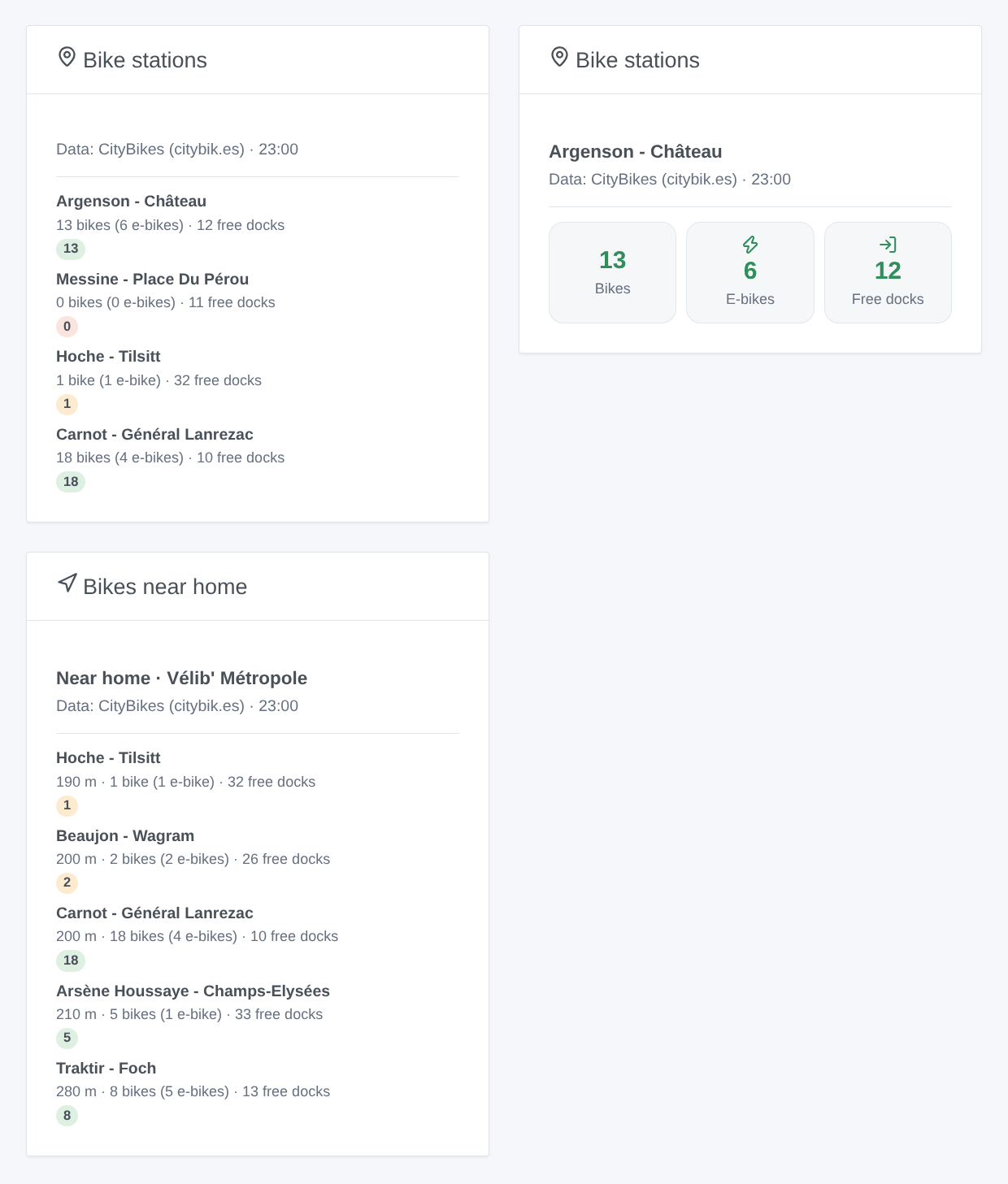
- Bike stations: the stations you added (or the ones chosen in its settings); one station as three tiles, several as a list with a colored badge of the bikes left.
- Bikes near home: the 1 to 8 stations nearest to the house, with their distance, optionally only those with a bike, an e-bike or a free dock.
Scenes
Triggers, for a station or any followed station: bikes available again, station empty, e-bikes available again, no e-bike left, free docks again, station full. Their variables give the station, the network, the bikes, e-bikes, mechanical bikes and free docks (-1 when the operator does not count them).
Actions: read a station (its counts and a sentence ready for a message) and find the nearest station with a bike, an e-bike or a free dock, from the house or from a followed station (name, distance in metres, counts, sentence).
Examples:
- When "Station empty" fires for the station under your window, on a weekday between 7:00 and 8:30 → send "No bike left downstairs, try Hoche - Tilsitt" to your phone.
- When "E-bikes available again" fires → say it on the speaker of the hall.
- At 18:00 → "find the nearest station" with a free dock from the station of your office → send its summary.
Transport
Cloud only: the catalog shows the cloud badge, there is no local connection. The integration asks api.citybik.es for the list of the networks once a week and for your network at each reading. The coordinates of the house never leave Gladys and the integration.
Troubleshooting
- "CityBikes knows no network …": use Find a network and copy the id exactly ("velib", not "Vélib").
- A station is "Not found": its name is ambiguous or written differently; use Find a station and type its id.
- "Hourly quota of the CityBikes API reached": the API allows 300 requests per hour and per address, shared with anything else on your connection; choose a longer reading interval. The readings start again on their own.
- No device in Discover: no network or no station was found; look at the status of the integration and press Test the connection.
- The counts look old: some operators refresh their data only every few minutes; the widgets show the time of the last reading.
- For a report, press Diagnostic and attach the "CityBikes diagnostic" lines of the Logs tab, with the versions of Gladys and of the integration.
Configuration settings
These are the settings CityBikes asks for in its configuration screen in Gladys.
| Setting | Type | Required | Description |
|---|---|---|---|
| CityBikes | section | No | The stations come from the CityBikes API, which gathers the data of more than 800 bike sharing networks in the world (Vélib’, Vélo’v, V3, V’Lille, Bicing, nextbike…). No account and no key. Choose your network and your stations below, then press "Test the connection". Data: CityBikes (citybik.es). |
| Network | string | No | The CityBikes id of the network ("velib", "velov", "v3-bordeaux"), its name or its city: the "Find a network" button gives the ids. Empty for the network nearest to the house. |
| House | select | No | The house the nearest network and stations are counted from. Empty for the first house with a location. Its coordinates never leave Gladys and the integration: the distances are computed locally. |
| Followed stations | string | No | Up to 20, separated by commas: their ids ("22002", given by "Find a station") or their exact names. A device is offered for each one. |
| Stations near the house | select | No | Also follow the stations nearest to the house, without typing them. |
| Options | section | No | |
| Reading of the stations | select | No | How often the network is read: one request each time, whatever the number of stations. The CityBikes API allows 300 requests per hour and per address. |
| Language of the texts | select | No | Feature names, scene summaries and outputs. Automatic: the language of your dashboard, once a CityBikes widget has been displayed. Names of networks and stations stay as the operators write them. |
How to install CityBikes in Gladys
- In Gladys, open Integrations: CityBikes appears in the catalog, next to the native integrations, with a community badge.
- Click Install. Gladys pulls the Docker image (
ghcr.io/william-de71/gladys-citybikes:0.1.0), starts it in a sandbox isolated from the core, and generates the integration's interface (devices, discovery and configuration). - Open the Configuration screen of the integration, fill in the settings, and save.
- You can also install it directly from its repository URL: https://github.com/William-De71/gladys-citybikes.
CityBikes requires Gladys >=5.3.0. The catalog inside Gladys refreshes every hour, so a new version becomes available at most one hour after its release.
Not running Gladys yet? It is free and open source: follow the installation guide to get started.
About external integrations
CityBikes is an external integration: a community integration packaged as a Docker container and published on GitHub, that Gladys installs in one click and runs in a sandbox isolated from its core. It is published and maintained by William-De71, not by the Gladys core team.
- Browse all integrations, native and community
- Build and publish your own external integration
- Source code on GitHub — source of this documentation